glassy-liquid
| Install | |
|---|---|
npm install glassy-liquid |
|
| Latest Version: | 0.1.0 |
| Vue: | 3 |
| License: | MIT |
| Last Updated: | Oct 24, 2026 |
| Links: | GitHub · npm |
glassy-liquid


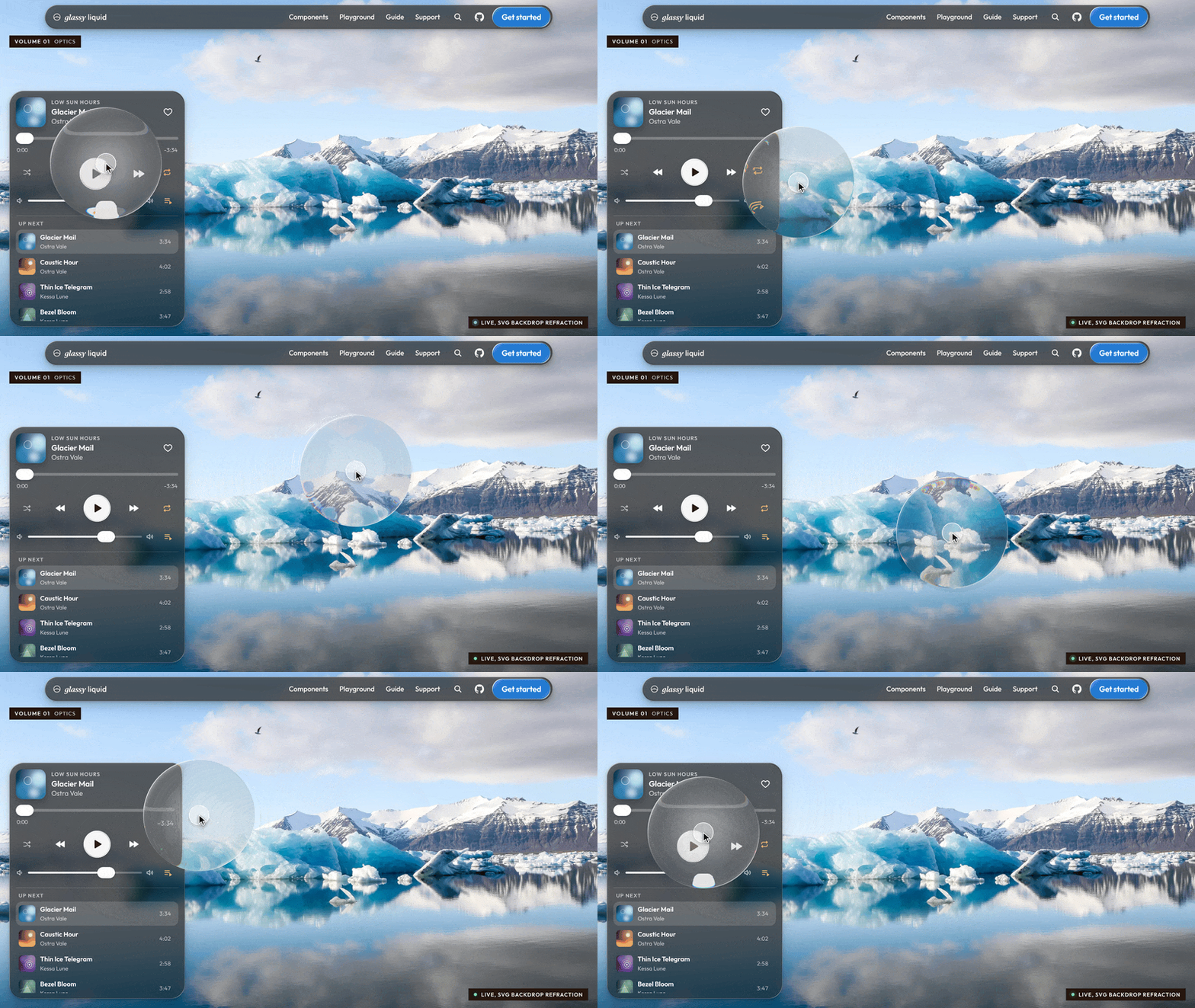
Apple-style Liquid Glass for the web: real refraction, the core iOS 26 Liquid Glass controls, and typed bindings for Web Components, React, Vue, and Svelte.
Docs, live demos, and the playground: https://9und30.github.io/glassy-liquid/
Why glassy-liquid
- The core iOS 26 Liquid Glass controls. Buttons, switches, sliders, a tab bar, a segmented control, menus, toolbars, search, sheets, and scroll-edge blur, plus a generic surface and a scene. Nineteen components, one look.
- Safari, iOS, and Firefox included. Chromium refracts the live page. Inside
<glass-scene>, WebKit and Firefox refract photos, video, and DOM through WebGL or a scoped content filter. Every other engine gets a calibrated frost with the same rim light, tint, shadow, and motion. - Accessible by default.
prefers-reduced-motiondrops the elasticity,prefers-reduced-transparencymakes the material opaque, and forced colors switch to system colors. Prominent labels stay at a 4.5:1 contrast. - About 35.7 kB gzip.
dist/glassy-liquid.min.jsis 35.7 kB gzip and registers every element. Zero runtime dependencies. No WebGPU. - Web Components, React, Vue, and Svelte. One binding table in
src/bindings/specs.tsdrives all three frameworks. A parity test keeps them 1:1.
Not affiliated with Apple. Liquid Glass names the design language this library recreates.
Contents
- Quick start
- Usage
- SSR and hydration
- API reference
- Theming
- Browser support
- Accessibility
- Performance
- Coming from liquid-glass-react
- FAQ
- Contributing
- License
Quick start
# snippet: install
npm install glassy-liquid
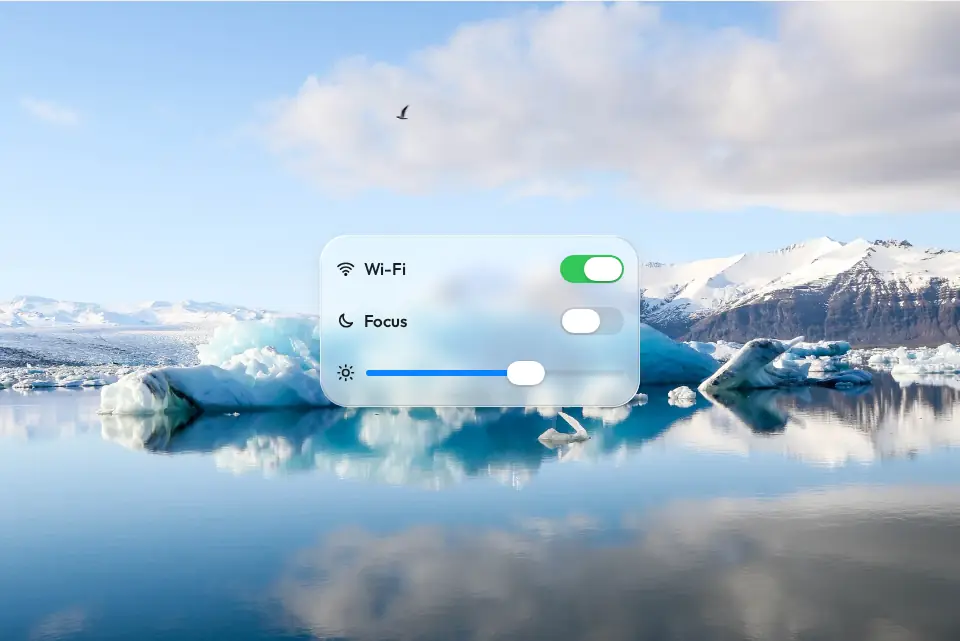
With a bundler such as Vite, register the elements once, then write HTML. Without a build step, use the CDN module shown below instead: a bare import "glassy-liquid/elements" only resolves through a bundler or an import map. Wrap a photograph in <glass-scene> so Safari, iOS, and Firefox refract it too. src accepts any image URL. The photograph below is public, so the example works when pasted. If the image fails, the scene hides the broken icon and keeps linear-gradient(160deg, #9bb7c9, #e7eef2).
<!-- snippet: quick-start -->
<script type="module">
  import "glassy-liquid/elements";
</script>

<glass-scene src="https://upload.wikimedia.org/wikipedia/commons/thumb/5/58/Iceberg_reflection_in_J%C3%B6kuls%C3%A1rl%C3%B3n_%28Unsplash%29.jpg/960px-Iceberg_reflection_in_J%C3%B6kuls%C3%A1rl%C3%B3n_%28Unsplash%29.jpg" style="height: 100vh; background: linear-gradient(160deg, #9bb7c9, #e7eef2)">
  <glass-button variant="prominent">Continue</glass-button>
</glass-scene>
React 18 or 19. In the Next.js App Router this component uses state, so its file starts with "use client":
"use client";
// snippet: react-settings
import { useState } from "react";
import { GlassScene, GlassButton, GlassSwitch, GlassSlider } from "glassy-liquid/react";

export function Settings() {
  const [wifi, setWifi] = useState(true);
  const [level, setLevel] = useState(50);
  return (
    <GlassScene src="https://upload.wikimedia.org/wikipedia/commons/thumb/5/58/Iceberg_reflection_in_J%C3%B6kuls%C3%A1rl%C3%B3n_%28Unsplash%29.jpg/960px-Iceberg_reflection_in_J%C3%B6kuls%C3%A1rl%C3%B3n_%28Unsplash%29.jpg" style={{ height: "100vh", background: "linear-gradient(160deg, #9bb7c9, #e7eef2)" }}>
      <GlassSwitch checked={wifi} onCheckedChange={setWifi} aria-label="Wi-Fi" />
      <GlassSlider value={level} onValueChange={setLevel} />
      <GlassButton variant="prominent">Done</GlassButton>
      <p className="readout">{wifi ? "on" : "off"} {Math.round(level)}</p>
    </GlassScene>
  );
}
Without a build step, load the single module from a CDN. The path matches the glassy-liquid/cdn export (dist/glassy-liquid.min.js):
<!-- snippet: cdn -->
<script type="module" src="https://cdn.jsdelivr.net/npm/glassy-liquid@0.1/dist/glassy-liquid.min.js"></script>

<glass-surface radius="28" style="padding: 20px">
  Hello, glass.
</glass-surface>
Usage
Web Components
import "glassy-liquid/elements" defines every tag. Attributes are kebab-case (light-angle for lightAngle). Listen for the DOM events in the API reference (change, input, select, toggle, search, detent) plus native click.
React
Import from glassy-liquid/react. Callback props are onCheckedChange, onValueChange, onValueCommit, onSelect, onOpenChange, onSearch, and onDetentChange. Uncontrolled initial values are defaultChecked and defaultValue. The ref is the custom element.
useGlass turns any element into glass:
// snippet: use-glass
import { useRef } from "react";
import { useGlass } from "glassy-liquid/react";

export function Card() {
  const ref = useRef<HTMLDivElement>(null);
  useGlass(ref, { radius: 28 });
  return <div ref={ref} className="card">Card</div>;
}
Vue
Vue 3. Same components and prop names as React. Each framework is an optional peer dependency.
<!-- snippet: vue-settings -->
<script setup lang="ts">
import { ref } from "vue";
import { GlassScene, GlassSwitch, GlassSlider, GlassButton } from "glassy-liquid/vue";

const wifi = ref(true);
const level = ref(50);
function save(value: number) {
  level.value = value;
}
function done() {
  wifi.value = false;
}
</script>

<template>
  <GlassScene src="https://upload.wikimedia.org/wikipedia/commons/thumb/5/58/Iceberg_reflection_in_J%C3%B6kuls%C3%A1rl%C3%B3n_%28Unsplash%29.jpg/960px-Iceberg_reflection_in_J%C3%B6kuls%C3%A1rl%C3%B3n_%28Unsplash%29.jpg" style="background: linear-gradient(160deg, #9bb7c9, #e7eef2)">
    <GlassSwitch v-model:checked="wifi" aria-label="Wi-Fi" />
    <GlassSlider v-model:value="level" @value-commit="save" />
    <GlassButton variant="prominent" @click="done">Done</GlassButton>
    <p class="readout">{{ wifi ? "on" : "off" }} {{ Math.round(level) }}</p>
  </GlassScene>
</template>
- Callback props work as props or listeners:
:onValueChange="fn"and@value-change="fn". - Two-way binding:
v-model:checked,v-model:value, andv-model:openon the components listed in Two-way bindings. useGlass(elRef, options)matches the React hook.- The custom element is
elon the component ref.
When you write raw <glass-*> tags in a Vue template (the wrapper components do not need this), tell the compiler they are custom elements:
// snippet: vue-custom-element
export const vuePluginOptions = {
  template: { compilerOptions: { isCustomElement: (tag: string) => tag.startsWith("glass-") } },
};
Pass vuePluginOptions to @vitejs/plugin-vue.
Svelte
Svelte 5 and Svelte 4. The components ship as .svelte source (svelte export condition) and your bundler compiles them. They use export let and <slot> on purpose: that syntax compiles in both versions, and Svelte 5 accepts it without deprecation warnings.
<!-- snippet: svelte-settings -->
<script>
  import { GlassScene, GlassSwitch, GlassSlider } from "glassy-liquid/svelte";
  let wifi = true;
  let level = 50;
  function save(value) {
    level = value;
  }
</script>

<GlassScene src="https://upload.wikimedia.org/wikipedia/commons/thumb/5/58/Iceberg_reflection_in_J%C3%B6kuls%C3%A1rl%C3%B3n_%28Unsplash%29.jpg/960px-Iceberg_reflection_in_J%C3%B6kuls%C3%A1rl%C3%B3n_%28Unsplash%29.jpg" style="background: linear-gradient(160deg, #9bb7c9, #e7eef2)">
  <GlassSwitch bind:checked={wifi} aria-label="Wi-Fi" />
  <GlassSlider bind:value={level} onValueCommit={save} />
  <p class="readout">{wifi ? "on" : "off"} {Math.round(level)}</p>
</GlassScene>
In a Svelte 5 runes file, use $state instead of let for those bindings. Named slots match HTML: <GlassButton slot="trigger"> inside <GlassMenu>, and <svg slot="icon"> inside <GlassButton> or <GlassMenuItem>. bind:element is the custom element.
Without the components, apply React prop names with the glassProps action:
<!-- snippet: svelte-actions -->
<script>
  import "glassy-liquid/elements";
  import { glassProps, useGlass } from "glassy-liquid/svelte/actions";
  let wifi = true;
</script>

<glass-switch use:glassProps={{ checked: wifi, onCheckedChange: (v) => (wifi = v) }} aria-label="Wi-Fi"></glass-switch>
<div class="card" use:useGlass={{ radius: 28 }}>Glass card</div>
Importing glassy-liquid/svelte also types every <glass-*> tag for svelte-check. With SSR and raw elements, add defer-hydration on each tag. glassProps removes it after hydration. The components do that for you.
Scenes
Chromium refracts whatever is behind the element. WebKit drops backdrop-filter when the list contains a url() SVG filter reference (bug 245510). Firefox does not refract the live page backdrop either. A scene tells the glass what lies behind it:
<!-- snippet: scenes -->
<glass-scene src="https://upload.wikimedia.org/wikipedia/commons/thumb/5/58/Iceberg_reflection_in_J%C3%B6kuls%C3%A1rl%C3%B3n_%28Unsplash%29.jpg/960px-Iceberg_reflection_in_J%C3%B6kuls%C3%A1rl%C3%B3n_%28Unsplash%29.jpg">
  <glass-button variant="prominent">Continue</glass-button>
</glass-scene>

<glass-scene>
  <article glass-backdrop>
    <h2>Live DOM</h2>
  </article>
  <glass-surface radius="capsule"></glass-surface>
</glass-scene>
An image, video, or canvas backdrop is drawn with one shared WebGL context. Any other backdrop is a scoped content filter (keep those scenes small; the work is on the CPU in WebKit). Chromium ignores the scene and keeps the backdrop path unless the scene has force.
Your own elements
// snippet: glass-api
import { glass } from "glassy-liquid";

const card = document.querySelector(".card");
const surface = glass(card, { radius: 28, material: "clear" });
surface.set({ tint: "#0a84ff" });
surface.engine is "backdrop", "scene-gl", "scene-dom", or "css". Call surface.destroy() when the element goes away.
// snippet: custom-element
import { GlassElement } from "glassy-liquid";

class NowPlaying extends GlassElement {
  static glassDefaults = { radius: 30, material: "clear" };
  static interactive = true;
  static extraAttributes = ["title"];
  static styles = ":host { display: flex; gap: 14px; padding: 12px 18px; color: #fff; }";

  render() {
    return `<b></b><slot></slot>`;
  }

  setup() {
    const title = this.shadow.querySelector("b");
    if (title) title.textContent = this.getAttribute("title") ?? "";
  }
}

customElements.define("now-playing", NowPlaying);
document.body.insertAdjacentHTML("beforeend", '<now-playing title="Caustic Hour"></now-playing>');
In TypeScript, type the defaults so the literal values stay narrow: static glassDefaults: GlassOptions = { radius: 30, material: "clear" }; with import type { GlassOptions } from "glassy-liquid".
Lower-level pieces, all exported from glassy-liquid:
GlassSurface/glass(): the layer stack and renderer selectionThumbLens: the solid thumb that lifts into a magnifying lensattachPress(): swell, illumination, and gel releaseSpring,springs,rubberBand: analytic springsplace(),lerpRect(): popover placement and morph geometryaddTask(),wake(): the shared frame ticker, which sleeps when idle
SSR and hydration
The React, Vue, and Svelte bindings server-render each element with a defer-hydration attribute (the same idea as Lit). While it is present the element stays inert: it does not add role, tabindex, or styles before the framework hydrates. The binding removes the attribute after hydration. That avoids hydration mismatches, including when the elements are registered before hydration. Covered by renderToString + hydrateRoot (React 18 and 19 render without server warnings), Vue createSSRApp, and Svelte 4/5 SSR.
Every entry point is safe to import on the server, including glassy-liquid and glassy-liquid/elements. Custom elements register only in the browser, where customElements exists. glass(), useGlass(), and attachPress() touch the DOM, so call them in an effect or in onMount.
The image created for <glass-scene src> lives in the scene shadow root. Style it with glass-scene::part(backdrop). It is not a light-DOM child, so hydration does not see an extra node.
API reference
Generated from src/bindings/specs.ts. npm test fails if this section drifts from the specs, from the slots in the component source, or from the Svelte slot map.
Glass attributes
These props are accepted on every framework component. They change the material on <glass-surface>, <glass-button>, <glass-group>, <glass-tab-bar>, and <glass-search>. <glass-sheet> applies material, blur, and tint to its slab, including through ::part(glass). glass() and useGlass() take the same fields, plus zoom (default 1), backdrop (default true), and fill.
| Prop | Kind | Type | Default | Description |
|---|---|---|---|---|
material |
attribute | regular or clear |
regular |
Frosted and adaptive, or transparent for media. |
appearance |
attribute | auto, light, or dark |
auto |
auto reads --glass-appearance, then the page color-scheme. |
radius |
attribute | number, capsule, or circle |
per component | Corner radius in CSS pixels. |
refraction |
attribute | number | scales with size | Maximum rim displacement in CSS pixels. |
bezel |
attribute | number | 18 |
Width of the refracting rim in CSS pixels. |
blur |
attribute | number | material | Frost before refraction, in CSS pixels. |
dispersion |
attribute | number (0 to 1) | 0.25 in WebGL, else 0 |
Chromatic split at the rim. |
tint |
attribute | CSS color | none | Color of tinted glass. |
specular |
attribute | number (0 to 2) | 1 |
Rim light strength. |
lightAngle |
attribute | degrees | -135 |
Light direction. -90 is the top. |
shadow |
attribute | boolean or CSS box-shadow |
true |
true uses the material shadow. A string is used as the shadow. |
profile |
attribute | squircle, convex, lip, or flat |
squircle |
Cross-section of the rim. |
engine |
attribute | auto, backdrop, scene-gl, scene-dom, or css |
auto |
Force a renderer. Mainly for tests. |
interactive |
attribute | boolean | per component | Press response: swell, light, and gel stretch. |
Framework components also forward class, style, and other DOM attributes, and take children for the default slot. React refs and Vue el point at the custom element. Svelte uses bind:element.
Components
GlassScene
Custom element: <glass-scene>. Real refraction for Safari, iOS, iPadOS, and Firefox. Chromium keeps the faster page-backdrop path unless force is set.
| Prop | Kind | Type | Default | Description |
|---|---|---|---|---|
src |
attribute | string | none | Image URL. The scene creates a cover image in its shadow root. |
backdrop |
attribute | string | direct child | When omitted, the direct child [glass-backdrop] or [data-glass-backdrop]. A set value is a CSS selector, queried on the scene and then on document. |
force |
attribute | boolean | false |
Use scene rendering even in Chromium. |
mode |
attribute | gl or dom |
auto | Force WebGL (gl) or the DOM content filter (dom). |
Slots: default.
Parts: ::part(backdrop).
- The automatic
srcimage is not a light-DOM child. Style it withglass-scene::part(backdrop). - With no
srcand nobackdropselector, that direct child is the backdrop. An image, video, or canvas uses WebGL. Any other element uses the DOM content filter. - Glass anywhere inside the scene, including inside shadow roots, picks the scene up on its own.
GlassSurface
Custom element: <glass-surface>. Generic slab for cards, widgets, and bars. The default radius is 24.
No component-specific props.
Slots: default.
Parts: ::part(glass).
- Accepts every glass attribute. Content goes in the default slot.
GlassButton
Custom element: <glass-button>. iOS 26 glass button. prominent fills with the accent, plain draws no glass of its own.
| Prop | Kind | Type | Default | Description |
|---|---|---|---|---|
variant |
attribute | glass, prominent, or plain |
glass |
Visual style. |
size |
attribute | small, medium, or large |
medium |
32, 44, or 52 CSS pixels tall. |
shape |
attribute | capsule, circle, or rounded |
capsule |
rounded uses a 12px radius unless radius is set. |
disabled |
attribute | boolean | false |
Disables interaction and sets aria-disabled. |
type |
attribute | button, submit, or reset |
button |
Form action when the button has no href. |
href |
attribute | string | none | Renders as a link (role="link") and navigates on click. |
target |
attribute | string | none | Link target. Anything other than _self opens with noopener. |
Slots: default, icon, trailing.
Parts: ::part(label), ::part(glass).
- Native event:
click. Enter and Space activate the button. - Slots:
icon, then the default slot (the label), thentrailing. - Form-associated. Inside a form,
type="submit"callsrequestSubmit()andtype="reset"resets. - Accepts every glass attribute. Default radius is
capsule.interactiveis on.
GlassSwitch
Custom element: <glass-switch>. Toggle whose thumb lifts into a lens. Form-associated, role switch.
| Prop | Kind | Type | Default | Description |
|---|---|---|---|---|
disabled |
attribute | boolean | false |
Disables the control. |
name |
attribute | string | none | Form field name. |
value |
attribute | string | on |
Value submitted when the switch is on. |
checked |
property | boolean | false |
Controlled on state. Set the property, or the checked attribute for the initial value. |
defaultChecked |
uncontrolled checked |
boolean | false |
Uncontrolled initial checked attribute. Later updates are ignored. |
onCheckedChange |
event change |
(checked: boolean) => void |
none | Fires when the user toggles the switch. |
onChange |
event change |
(event: Event) => void |
none | The same DOM change event, passed through unchanged. |
Slots: none.
Parts: ::part(track), ::part(fill), ::part(thumb), ::part(glass).
- Also fires
inputon a user toggle. - Keyboard: Space and Enter toggle. A wrapping
<label>activates it. - Vue:
v-model:checked. Svelte:bind:checked.
GlassSlider
Custom element: <glass-slider>. Slider with a thumb that magnifies into a lens while dragged. Form-associated, role slider.
| Prop | Kind | Type | Default | Description |
|---|---|---|---|---|
min |
attribute | number | 0 |
Range start. |
max |
attribute | number | 100 |
Range end. |
step |
attribute | number | 0 (continuous) |
Snap increment. 0 keeps the value continuous. |
ticks |
attribute | boolean | false |
Draw tick marks at each step. |
disabled |
attribute | boolean | false |
Disables the control. |
name |
attribute | string | none | Form field name. |
value |
property | number | min |
Controlled value. When omitted, the value is min. |
defaultValue |
uncontrolled value |
number | min |
Uncontrolled initial value. When the attribute is omitted, the value is min. |
onValueChange |
event input |
(value: number) => void |
none | Fires while the value is changing. |
onValueCommit |
event change |
(value: number) => void |
none | Fires when the user commits (pointer up or keyboard). |
Slots: none.
Parts: ::part(track), ::part(fill), ::part(ticks), ::part(thumb), ::part(glass).
- Keyboard: Arrow keys nudge, Home and End jump to the ends.
- Vue:
v-model:value. Svelte:bind:value.
GlassTabBar
Custom element: <glass-tab-bar>. Floating tab bar. The selection is a pill that lifts into a draggable magnifying lens.
| Prop | Kind | Type | Default | Description |
|---|---|---|---|---|
value |
attribute | string | first enabled item | Selected item value. When omitted, the first enabled item is selected. |
onValueChange |
event change |
(value: string) => void |
none | Fires when the selection changes. Detail is { value, index }. |
Slots: default.
Parts: ::part(indicator), ::part(lens), ::part(glass).
- Children are
<glass-tab>elements in the default slot. - Role
tablist. Arrow keys, Home, and End move the selection. - Accepts every glass attribute. Default radius is
capsule. - Vue:
v-model:value. Svelte:bind:value.
GlassSegmented
Custom element: <glass-segmented>. Segmented control with the same selection lens, on a quiet frosted track.
| Prop | Kind | Type | Default | Description |
|---|---|---|---|---|
value |
attribute | string | first enabled item | Selected item value. When omitted, the first enabled item is selected. |
onValueChange |
event change |
(value: string) => void |
none | Fires when the selection changes. Detail is { value, index }. |
Slots: default.
Parts: ::part(track), ::part(indicator), ::part(lens), ::part(glass).
- Children are
<glass-segment>elements in the default slot. - The track itself is not a glass surface. Only the lens is.
- Vue:
v-model:value. Svelte:bind:value.
GlassTab
Custom element: <glass-tab>. One item in a <glass-tab-bar>. Role tab.
| Prop | Kind | Type | Default | Description |
|---|---|---|---|---|
value |
attribute | string | index | Item value. Defaults to the child index when omitted. |
disabled |
attribute | boolean | false |
Skips the item for pointer and keyboard selection. |
Slots: default.
Parts: ::part(content).
- The default slot is the label, often an icon plus text.
GlassSegment
Custom element: <glass-segment>. One item in a <glass-segmented>. Role tab.
| Prop | Kind | Type | Default | Description |
|---|---|---|---|---|
value |
attribute | string | index | Item value. Defaults to the child index when omitted. |
disabled |
attribute | boolean | false |
Skips the item for pointer and keyboard selection. |
Slots: default.
Parts: ::part(content).
- The default slot is the label.
GlassMenu
Custom element: <glass-menu>. Pull-down menu that morphs out of its trigger. Press, drag, and release selects in one gesture.
| Prop | Kind | Type | Default | Description |
|---|---|---|---|---|
open |
attribute | boolean | false |
Open state. The attribute presence opens the menu. |
placement |
attribute | bottom-start, bottom-end, bottom, top-start, top-end, or top |
bottom-start |
Where the panel sits relative to the trigger. |
onSelect |
event select |
(value: string) => void |
none | Fires when an item is chosen. Detail is { value, item }. Cancelable. |
onOpenChange |
event toggle |
(open: boolean) => void |
none | Fires when the menu opens or closes. Detail is { open }. |
Slots: default, trigger.
Parts: ::part(panel), ::part(content), ::part(glass).
- Put the trigger in the
triggerslot. Items, labels, and separators go in the default slot. - The panel is glass. Set the element's
glassproperty (GlassOptions) to tune that surface. It is not a binding prop. - Vue:
v-model:open. Svelte:bind:open.
GlassMenuItem
Custom element: <glass-menu-item>. A row in a menu. Role menuitem, or menuitemcheckbox when checked or checkable is set.
| Prop | Kind | Type | Default | Description |
|---|---|---|---|---|
value |
attribute | string | text content | Value reported by select. Falls back to the trimmed text. |
disabled |
attribute | boolean | false |
Dims the row and skips it. |
destructive |
attribute | boolean | false |
Uses the destructive color. |
checked |
attribute | boolean | false |
Shows a check mark. |
checkable |
attribute | boolean | false |
Reserves space for a check even when unchecked. |
group |
attribute | string | none | Items that share a group behave as a single-select set. |
Slots: default, icon, shortcut.
Parts: ::part(label).
- Slots: the default slot is the label, plus optional
iconandshortcut. Put icons inicon: they trail the row at 20px, as on iOS. An SVG or image in any slot is capped at 20px.
GlassMenuSeparator
Custom element: <glass-menu-separator>. A hairline between menu rows. Role separator.
No component-specific props.
Slots: none.
Parts: none.
- No props and no slots.
GlassMenuLabel
Custom element: <glass-menu-label>. A section header inside a menu. Role presentation.
No component-specific props.
Slots: none.
Parts: none.
- The label is light-DOM text. The element has no shadow slot.
GlassToolbar
Custom element: <glass-toolbar>. A row of buttons and groups with arrow-key focus. Role toolbar. The bar itself is not glass.
No component-specific props.
Slots: default.
Parts: none.
- Arrow keys move focus between enabled buttons, links, and switches. Home and End jump to the ends.
aria-orientation="vertical"uses ArrowUp and ArrowDown.
GlassGroup
Custom element: <glass-group>. One shared capsule around several controls, as in an iOS 26 toolbar.
No component-specific props.
Slots: default.
Parts: ::part(glass).
- Accepts every glass attribute. Default radius is
capsule. Rolegroup.
GlassSpacer
Custom element: <glass-spacer>. Flexible or fixed space inside a toolbar. aria-hidden.
| Prop | Kind | Type | Default | Description |
|---|---|---|---|---|
size |
attribute | number | flex | Fixed width in CSS pixels. Omit it and the spacer grows. |
Slots: none.
Parts: none.
- No slots.
GlassSearch
Custom element: <glass-search>. Search field on a glass capsule, with a clear button. Form-associated.
| Prop | Kind | Type | Default | Description |
|---|---|---|---|---|
placeholder |
attribute | string | Search |
Placeholder and the default accessible name. |
name |
attribute | string | none | Form field name. |
disabled |
attribute | boolean | false |
Disables the input. |
value |
property | string | "" |
Controlled field value. |
onValueChange |
event input |
(value: string) => void |
none | Fires on each edit, including clear. |
onSearch |
event search |
(value: string) => void |
none | Fires when the user presses Enter. Detail is { value }. |
Slots: default.
Parts: ::part(icon), ::part(input), ::part(clear), ::part(glass).
- Also fires a native
changeevent from the inner input. - Escape clears the field when it has text.
- The default slot is trailing content after the clear button.
- Accepts every glass attribute. Default radius is
capsule. - Vue:
v-model:value. Svelte:bind:value.
GlassSheet
Custom element: <glass-sheet>. Bottom sheet with detents, a grabber, drag to resize, and swipe to dismiss. Role dialog.
| Prop | Kind | Type | Default | Description |
|---|---|---|---|---|
open |
attribute | boolean | false |
Open state. |
detents |
attribute | string | medium large |
Space or comma separated small, medium, large, percentages, or pixel lengths. |
modal |
attribute | boolean | false |
Dim the page, block pointer input outside the sheet, and keep keyboard focus inside it. The dialog gets aria-modal. |
noDismiss |
attribute | boolean | false |
Keep the sheet open on scrim click, Escape, and a swipe past the last detent. |
onOpenChange |
event toggle |
(open: boolean) => void |
none | Fires when the sheet opens or closes. Detail is { open }. |
onDetentChange |
event detent |
(index: number) => void |
none | Fires when the resting detent changes. Detail is { index, height }. |
Slots: default.
Parts: ::part(scrim), ::part(sheet), ::part(grabber), ::part(body), ::part(glass).
- The default slot is the sheet body.
smallis 25vh,mediumis 50vh,largefills the viewport inset.- Vue:
v-model:open. Svelte:bind:open.
GlassProgressiveBlur
Custom element: <glass-progressive-blur>. iOS 26 scroll-edge blur. Content fades into a stronger blur toward one edge. aria-hidden.
| Prop | Kind | Type | Default | Description |
|---|---|---|---|---|
edge |
attribute | top, bottom, left, or right |
top |
Edge the blur grows toward. |
size |
attribute | number | 96 |
Thickness of the effect in CSS pixels. |
blur |
attribute | number | 16 |
Maximum blur in CSS pixels. |
layers |
attribute | number (2 to 8) | 6 |
How many stacked blur bands to paint. |
tint |
attribute | CSS color | none | Optional gradient tint over the blur. |
Slots: none.
Parts: none.
- Position it yourself (
position: fixedorabsoluteover the scrolling content). prefers-reduced-transparency: reduceremoves the blur.
Two-way bindings
Vue v-model:* and Svelte bind:* follow the same events as the React change callbacks:
GlassSwitch:v-model:checked/bind:checkedGlassSlider:v-model:value/bind:valueGlassTabBar:v-model:value/bind:valueGlassSegmented:v-model:value/bind:valueGlassMenu:v-model:open/bind:openGlassSearch:v-model:value/bind:valueGlassSheet:v-model:open/bind:open
Theming
/* snippet: theme */
:root {
  --glass-accent: #0a84ff;
  --glass-appearance: dark;
  --glass-font: "Inter", system-ui;
}
With appearance="auto" (the default), glass follows --glass-appearance, then the page color scheme, the way native form controls do. A page that never declares color-scheme: dark or color-scheme: light dark (in CSS or <meta name="color-scheme">) keeps light glass in OS dark mode, so text you color yourself stays readable. Pages that support both schemes follow the OS. Theme switches on <html> or <body> (class, attribute, or style) and the meta tag are picked up automatically. After changing --glass-appearance or color-scheme on another element, call updateAppearance().
Glass sets --gl-fg and --gl-text-shadow on the host and both inherit. For content you color yourself inside glass, use color: var(--gl-fg). Every glass element sets data-appearance="light" or data-appearance="dark".
| Property | Role |
|---|---|
--glass-accent |
Prominent buttons, sliders, selected tabs. Default #007aff (light) / #0a84ff (dark). |
--glass-appearance |
light or dark. Wins over the page color scheme. |
--glass-font |
Face used inside glass. |
--glass-foreground |
Text color override. Falls back to --gl-fg. |
--glass-text-shadow |
Text shadow override. Falls back to --gl-text-shadow. |
--glass-focus |
Focus ring color. |
Component knobs, each with a built-in default:
--glass-button-height, --glass-button-padding, --glass-button-font-size, --glass-on-accent, --glass-accent-text, --glass-switch-on, --glass-switch-off, --glass-slider-track, --glass-slider-off, --glass-thumb, --glass-tab-bar-height, --glass-tab-selection, --glass-tab-selected, --glass-segmented-height, --glass-segmented-track, --glass-segmented-backdrop, --glass-segmented-selected, --glass-segmented-thumb, --glass-selector-padding, --glass-item-direction, --glass-item-gap, --glass-menu-highlight, --glass-destructive, --glass-search-height, --glass-scrim, --glass-sheet-inset, --glass-sheet-max-width, --glass-sheet-padding, --glass-group-padding, --glass-toolbar-gap.
Style internals with ::part(), listed per component in the API reference. The shared glass stack is ::part(glass). The scene backdrop image is glass-scene::part(backdrop).
Accent colors move to a readable lightness per appearance where the browser supports relative color syntax. Older browsers keep the accent as given. Prominent buttons darken the accent just enough for a 4.5:1 white label. Clear glass puts a soft halo behind its light text.
Browser support
| Browser | Page backdrop | Inside a scene |
|---|---|---|
| Chrome, Edge, Opera, Samsung Internet, Electron | Refraction | Refraction (backdrop path, unless force) |
| Safari 16.4+ on macOS, and every browser on iOS / iPadOS | Frosted fallback | WebGL for media, content filter for DOM |
| Firefox 103+ | Frosted fallback | WebGL for media, content filter for DOM |
| Renderer | Where | How |
|---|---|---|
backdrop |
Chromium | backdrop-filter: blur() url(#svg) saturate() on the live page. The displacement map is a cached nine-slice. |
scene-gl |
WebKit and Firefox, image / video / canvas scene | One shared WebGL context: rounded-rect distance field, rim normals, refraction, magnification, dispersion, frost, and tone. |
scene-dom |
WebKit and Firefox, DOM scene | The scene filters its content layer once, with a subregion per surface. |
css |
Anywhere else | Calibrated backdrop-filter frost with the same rim light, tint, shadow, and motion. |
Accessibility
Real roles and states: button or link, switch, slider, tablist / tab, menu / menuitem / menuitemcheckbox, toolbar, dialog. Keyboard support matches those roles (Enter and Space, arrows, Home and End, Escape to dismiss). Focus rings are visible. Switch, slider, search, and submit buttons are form-associated.
prefers-reduced-motion: reduce removes elastic stretch and snaps sheets, menus, and thumbs. prefers-reduced-transparency: reduce makes the glass material opaque and drops scroll-edge blur. forced-colors: active uses Canvas / CanvasText and hides the decorative rim.
Performance
Measured with npm run bench on 2026-10-15 (bench/results.json). Same scene in both libraries, 16 glass surfaces over a photo with live text, headless Chrome 154 with GPU, device pixel ratio 2, median of 3 runs. On this machine glassy-liquid's frame time sat on a 16.7 ms interval (60 fps) in every case. Bundle sizes for both libraries are gzip level 9 in SI kilobytes (1 kB = 1000 bytes), the way size-limit measures.
| glassy-liquid | @glass-sdk/liquid-glass 0.0.2 | |
|---|---|---|
| Bundle, gzip | 35.7 kB for everything | 99.8 kB DOM entry, 189.2 kB React entry (React excluded) |
| Set up 16 surfaces | 99 ms | 355 ms (WebGPU map generation) |
| Content scrolling under glass | 60 fps (p95 16.8 ms) | 15 fps (p95 83 ms) |
| 16 surfaces resizing every frame | 60 fps (p95 16.7 ms) | 10 fps (p95 133 ms) |
| 16 surfaces moving every frame | 60 fps (p95 16.8 ms) | 17 fps (p95 67 ms) |
Nine-slice maps never re-encode on resize. Shadows and rims are cached images. One shared ticker runs only while something animates. Offscreen scenes do no work. WebGL scenes share one context and one texture per image URL. Chromatic dispersion is off by default on the backdrop path because splitting color channels costs several GPU passes per surface. Set dispersion on the surfaces where you want it. The CDN bundle (dist/glassy-liquid.min.js) is 35.7 kB gzip.
Coming from liquid-glass-react
liquid-glass-react is a single React wrapper that refracts its backdrop with an SVG displacement filter. glassy-liquid is a control library: the same material, plus the iOS 26 controls, Web Component / Vue / Svelte bindings, and a scene path for Safari and Firefox.
| liquid-glass-react | glassy-liquid |
|---|---|
<LiquidGlass> |
<GlassSurface> or glass() / useGlass() |
displacementScale (default 70) |
refraction, in CSS pixels. Start around 16 to 32 and tune. |
blurAmount (default 0.0625, a fraction) |
blur, in CSS pixels, or leave it to the material. |
saturation (default 140) |
material="regular" is already saturated. There is no separate saturation prop. |
aberrationIntensity (default 2) |
dispersion from 0 to 1. Default is 0.25 in WebGL and 0 on the backdrop path. |
elasticity |
No direct equivalent. interactive is a press response (swell and gel release), not mouse-follow liquid warp. |
cornerRadius |
radius (number, capsule, or circle). |
overLight |
appearance="light". |
mode (standard, polar, prominent, shader) |
engine selects a renderer. variant="prominent" on <GlassButton> is the filled accent button. |
onClick |
onClick on <GlassButton>, or a click listener on the surface. |
padding, className, style |
style and className on the component. Padding is normal CSS. |
| React only | Web Components, React, Vue, and Svelte. |
// snippet: migrate
import { GlassSurface } from "glassy-liquid/react";

export function ClickMe() {
  return (
    <GlassSurface radius={100} refraction={64} blur={8} dispersion={0.2} interactive>
      <span>Click Me</span>
    </GlassSurface>
  );
}
On Safari and Firefox, put that surface inside <GlassScene src="..."> (or a DOM backdrop) so the refraction is real. Chromium refracts the page without a scene.
FAQ
Does it need WebGPU?
No. Chromium uses SVG backdrop filters. Scenes use WebGL. The fallback is CSS backdrop-filter.
Why is Safari frosted until I add a scene?
WebKit does not apply SVG filters inside backdrop-filter, so no library can bend arbitrary page content there. <glass-scene> names the backdrop and refracts that.
Can I use it in a React Server Component?
The React entry starts with "use client", so the components render from a Client Component, and Next.js also renders those on the server. Server rendering plus hydration is supported, and every entry point is safe to import on the server. See SSR and hydration.
Do I have to install React, Vue, and Svelte? No. They are optional peer dependencies. Install the one you use.
How big is the CDN build?
dist/glassy-liquid.min.js is 35.7 kB gzip and registers every element. Framework bindings are separate entry points, so a React app does not download the Vue build.
Can a coding agent read these docs?
Yes. The package ships dist/docs/llms.txt (overview, setup, and the export map) and dist/docs/llms-full.txt (plus this API reference and every component in every framework), generated from the same sources as the docs site. The docs site serves the same files at https://9und30.github.io/glassy-liquid/llms.txt and https://9und30.github.io/glassy-liquid/llms-full.txt. To point an agent at the installed version, add a line like this to your project's AGENTS.md: "Before writing glassy-liquid code, read node_modules/glassy-liquid/dist/docs/llms-full.txt."
Will prefers-reduced-motion turn the effect off?
It removes elasticity and snap animations. The glass material stays. prefers-reduced-transparency is what makes the material opaque.
Contributing
Bug reports and feature requests are very welcome. Open them from the issue chooser. Pull requests are not accepted for now, and pull requests from outside the project are closed automatically. CONTRIBUTING.md explains why, what a good bug report contains, and how to set up a fork. CODE_OF_CONDUCT.md and SECURITY.md cover behavior and vulnerability reports. Coding agents working in a checkout start at AGENTS.md.
# snippet: scripts
npm install
npm run dev
npm run test
npm run test:e2e
npm run bench:competitor
npm run bench
npm run build
Comparison bundles under bench/competitor/*.bundle.js are not committed. npm run bench builds them from the pinned @glass-sdk/liquid-glass release when they are missing. Rebuild with npm run bench:competitor. See bench/README.md.
License
MIT. Copyright (c) 2026 thirtynine.
Related Packages
Liquid Glass for the whole web in one package: core engine plus /react, /vue, /s...
Drop-in Materials3D scene for Vue, Svelte, or plain HTML: the custom element
Framework-agnostic iOS 26 Liquid Glass effect Web Components for Vue, Nuxt, Reac...
Componentes UI atómicos como Web Components. Sin dependencias; funcionan en Reac...
Version History
| Version | Released | Vue | License |
|---|---|---|---|
| 0.1.0 | ^3.3.0 | MIT |
Pre-releases (1)
| Version | Released | License |
|---|---|---|
| 0.0.0-stage |