@ozcanyldzhn/liquid-glass-js
| Install | |
|---|---|
npm install @ozcanyldzhn/liquid-glass-js |
|
| Latest Version: | 1.0.2 |
| Vue: | 3 |
| License: | MIT |
| Last Updated: | Aug 31, 2026 |
| Links: | GitHub · npm |
🔮 Liquid Glass JS (@ozcanyldzhn/liquid-glass-js)
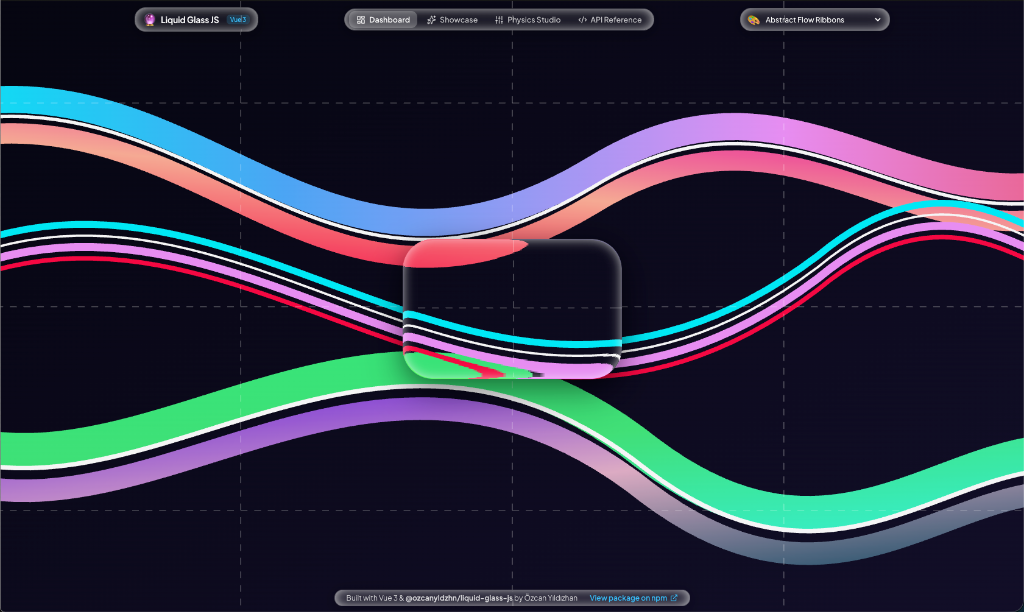
Framework-agnostic, ultra-realistic iOS 26 Liquid Glass optical displacement effect for modern web applications.




⚡ Live Demo • Vue 3 & Nuxt • React & Next.js • Vanilla HTML/JS • Physics Studio • API Reference
✨ Features
- 💎 Real-time Fluid Optical Physics: Authentic SVG displacement mapping and WebGL refraction engine that accurately bends background pixels through glass edges.
- 📐 Smart Adaptive Sizing (Hug & Fixed): Auto-wraps content dynamically or allows fixed pixel dimensions (
width/height). - 🖐️ Bounded Pointer & Touch Drag Physics: Built-in multi-touch and pointer drag physics strictly clamped to window and viewport bounds.
- 🛡️ Zero DOM Conflict (Shadow DOM): Every instance encapsulates its styles and generates isolated SVG filter IDs — place unlimited glass elements on the same page with zero crosstalk.
- ⚡ 100% Framework Agnostic: Native Web Components standard with dedicated TypeScript wrappers for Vue 3, Nuxt 3, React, Next.js, Svelte, Astro, and Vanilla HTML5.
- 🎨 Deep Physics Customization: Tweak IOR (Index of Refraction), thickness, bezel width, backdrop blur, tint colors, specular lighting, and squircle curvature profiles in real-time.
📦 Installation
Install @ozcanyldzhn/liquid-glass-js using your favorite package manager:
# npm
npm install @ozcanyldzhn/liquid-glass-js

# pnpm
pnpm add @ozcanyldzhn/liquid-glass-js

# yarn
yarn add @ozcanyldzhn/liquid-glass-js

# bun
bun add @ozcanyldzhn/liquid-glass-js
🚀 Quick Start Guide
🟢 Vue 3 / Nuxt 3
Import the package and its stylesheet once in your application (main.ts or component). In Nuxt 3, wrap in <ClientOnly> for SSR safety.
<script setup>
import { ref } from 'vue';
import '@ozcanyldzhn/liquid-glass-js';
import '@ozcanyldzhn/liquid-glass-js/css';

const glassRef = ref(null);
</script>

<template>
  <ClientOnly>
    <!-- Draggable Glass Container -->
    <liquid-glass
      ref="glassRef"
      width="420"
      height="240"
      radius="36"
      thickness="90"
      bezel="50"
      ior="3.0"
      tint-opacity="4"
      draggable="true"
    >
      <div class="glass-content">
        <h2>Liquid Glass in Vue 3</h2>
        <p>Real-time optical refraction with custom displacement mapping.</p>
      </div>
    </liquid-glass>
  </ClientOnly>
</template>

<style scoped>
.glass-content {
  padding: 24px;
  color: #ffffff;
  display: flex;
  flex-direction: column;
  justify-content: center;
  height: 100%;
}
</style>
⚛️ React / Next.js (App & Pages Router)
Use the dedicated React wrapper with TypeScript definitions and full ref forwarding.
'use client';

import React, { useRef } from 'react';
import { LiquidGlassReact } from '@ozcanyldzhn/liquid-glass-js/react';
import '@ozcanyldzhn/liquid-glass-js/css';

export default function GlassCard() {
  const glassRef = useRef<HTMLElement | null>(null);

  return (
    <LiquidGlassReact
      ref={glassRef}
      width={420}
      height={240}
      radius={36}
      thickness={90}
      bezel={50}
      ior={3.0}
      tintOpacity={4}
      draggable={true}
    >
      <div style={{ padding: '24px', color: '#fff' }}>
        <h2>Liquid Glass in React</h2>
        <p>Interactive iOS 26 optics in React 18 & 19.</p>
      </div>
    </LiquidGlassReact>
  );
}
🌐 Vanilla HTML5 / JavaScript
No build tools required! Include the stylesheet and module script directly.
<!DOCTYPE html>
<html lang="en">
<head>
  <meta charset="UTF-8" />
  <title>Liquid Glass Demo</title>
  <link rel="stylesheet" href="https://unpkg.com/@ozcanyldzhn/liquid-glass-js/dist/liquid-glass.css">
  <script type="module" src="https://unpkg.com/@ozcanyldzhn/liquid-glass-js/dist/liquid-glass.js"></script>
</head>
<body style="min-height: 100vh; background: url('wallpaper.jpg') center/cover no-repeat;">

  <!-- Auto-Sizing Glass Button -->
  <liquid-glass radius="20" ior="2.6" draggable="true">
    <div style="padding: 10px 22px; font-weight: 600; color: #fff;">
      ✨ Auto-Sizing Button
    </div>
  </liquid-glass>

  <!-- Interactive Glass Card -->
  <liquid-glass width="400" height="230" radius="32" ior="3.0" thickness="90" bezel="50" draggable="true">
    <div style="padding: 24px; color: #fff;">
      <h3>🔮 Pure Glassmorphism</h3>
      <p>Bends background light vectors dynamically across the viewport.</p>
    </div>
  </liquid-glass>

</body>
</html>
🎛️ Multiple Independent Elements on One Page
You can place unlimited Liquid Glass components on the same webpage simultaneously.
Each <liquid-glass> element automatically:
- Generates a unique isolated SVG displacement filter (
liquid-glass-filter-1,liquid-glass-filter-2, ...). - Encapsulates rendering within its own Shadow DOM.
- Handles independent pointer drag physics and dimensions without interfering with neighboring glass elements.
<!-- Mini Glass Audio Pill -->
<liquid-glass radius="18" ior="2.4" thickness="55" tint-color="#06b6d4" tint-opacity="10" draggable="true">
  <div style="padding: 8px 16px; color: white;">🎵 Now Playing</div>
</liquid-glass>

<!-- High-Refraction Dashboard Card -->
<liquid-glass width="440" height="260" radius="36" ior="3.0" thickness="110" bezel="60" draggable="true">
  <div style="padding: 24px; color: white;">
    <h3>Deep Refraction Pane</h3>
  </div>
</liquid-glass>
📋 Props & Attributes Reference
| Prop / Attribute | Type | Default | Description |
|---|---|---|---|
width |
number | string |
auto |
Element width in pixels. Omit for dynamic content-hugging auto sizing. |
height |
number | string |
auto |
Element height in pixels. Omit for dynamic content-hugging auto sizing. |
radius |
number | string |
24 |
Border radius in pixels (auto-constrained to maximum squircle pill). |
ior |
number | string |
3.0 |
Index of refraction / optical distortion strength (1.0–3.0). |
thickness |
number | string |
80 |
Glass displacement thickness depth (10–200). |
bezel |
number | string |
60 |
Refraction bezel edge width (5–100). |
surface-fn |
string |
'convex_squircle' |
Curvature profile: convex_squircle, convex_circle, concave, lip. |
blur |
number | string |
0 |
Backdrop blur intensity in pixels. |
tint-color |
string |
'#ffffff' |
Hex color string for custom tinted glass (e.g. '#8b5cf6'). |
tint-opacity |
number | string |
0 |
Tint layer opacity percentage (0–100). |
specular-opacity |
number | string |
0 |
Specular light reflection intensity (0.0–1.0). |
outer-shadow-blur |
number | string |
24 |
Outer drop shadow elevation blur in pixels. |
draggable |
boolean |
false |
Enables smooth pointer & touch drag-and-drop physics with boundary constraints. |
engine |
string |
'svg' |
Optical rendering engine: 'svg' (Displacement Mapping) or 'webgl' (Raytracing). |
🧪 Interactive Physics Studio & Local Development
Experience live optical parameter tweaking, card templates, and multi-framework code export in the interactive Physics Studio:
# 1. Clone repository
git clone https://github.com/ozcanyldzhn/liquid-glass.js.git
cd liquid-glass.js

# 2. Install dependencies
npm install

# 3. Start local development server
npm run dev
Visit http://localhost:5173/studio to:
- 🎛️ Dashboard: Test screen-bounded transparent draggable glass.
- 🌟 Showcase: Interactive audio wave synthesizer and weather widgets.
- 🧪 Physics Studio: Real-time 3-column optical workbench with instant Vue 3, React, and HTML5 code export.
- 📖 API Reference: High-contrast reference documentation.
🛠️ Build & Contribution
# Build NPM Library Package (dist/liquid-glass.js, .cjs, .css, .d.ts)
npm run build:lib

# Build Full Web Application for Production Deployment (Vercel)
npm run build

# Preview Production Build Locally
npm run preview
📄 License
MIT License © Özcan Yıldızhan
Related Packages
Liquid Glass for the whole web in one package: core engine plus /react, /vue, /s...
Apple-style Liquid Glass for the web: real refraction, specular light and fluid...
Framework-agnostic custom elements for the Kanso Protocol design system — use co...
Vue 3 components for Apple-flavored interface surfaces: Liquid Glass, squircles,...
Version History
| Version | Released | Vue | License |
|---|---|---|---|
| 1.0.2 | ^3.0.0 | MIT | |
| 1.0.1 | ^3.0.0 | MIT | |
| 1.0.0 | ^3.0.0 | MIT |