@surdeddd/liquidglass
LiquidGlassJS
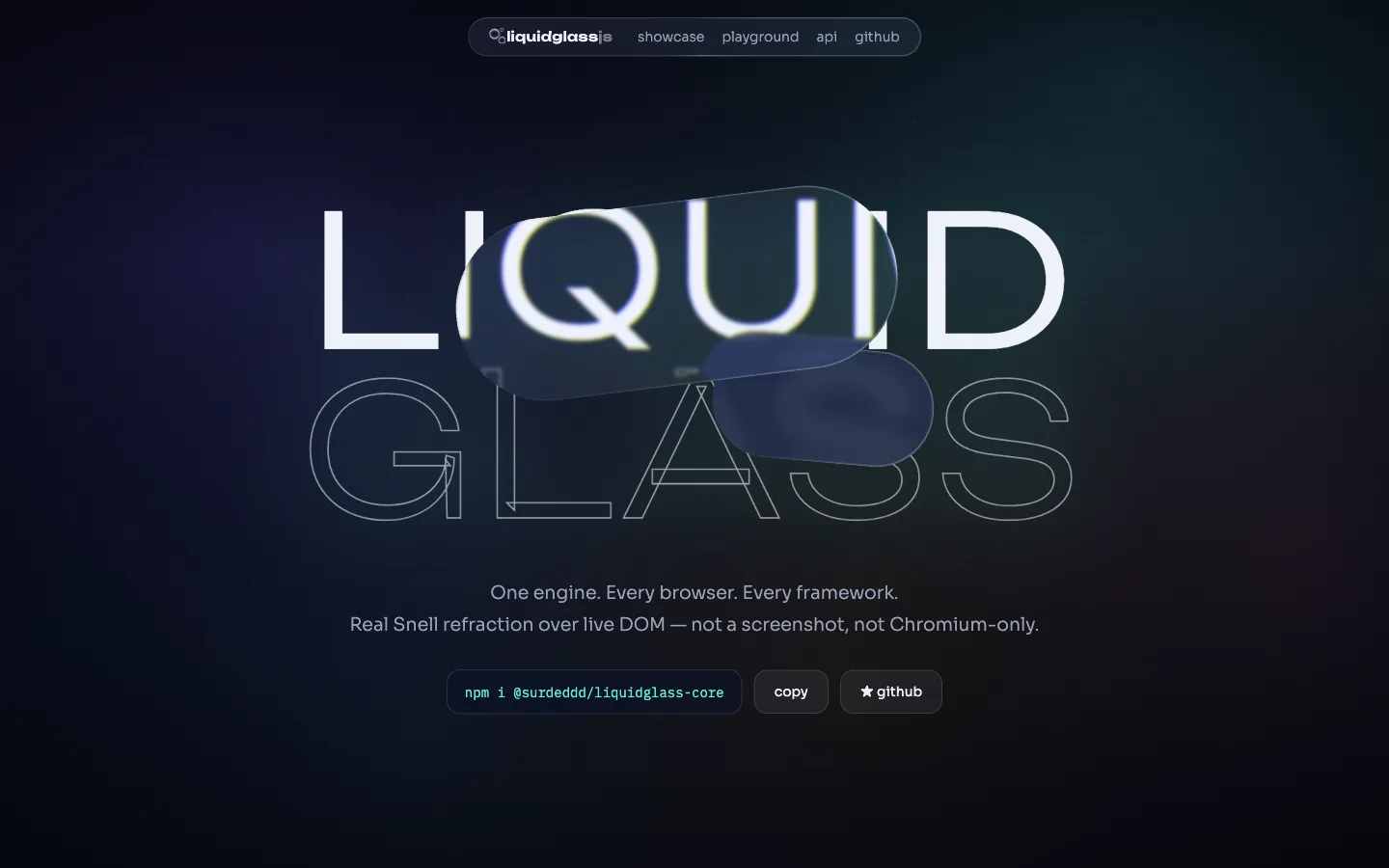
Liquid Glass for the whole web — one engine, every browser, every framework.




Real refraction over live DOM — not a screenshot, not Chromium-only. Living spring physics, iOS-26-style metaball merging, adaptive contrast, and accessibility baked in.
Live demo & playground → · API reference · npm
Why another liquid glass library?
Every existing implementation picked one rendering lane and died in it. LiquidGlassJS probes what the browser can do and routes each surface to the best available backend — under a single API:
@surdeddd/liquidglass
├─ physics        springs: press squash, release wobble, hover magnetism
├─ material       ior, frost, bevel, dispersion, specular, tint + presets
├─ a11y           backdrop tone sampling, reduced motion / transparency
├─ dom-sync       resize / intersection / scroll tracking
└─ backends
   ├─ css-svg         backdrop-filter + displacement maps   Chromium · live DOM
   ├─ svg-content     counter-positioned live copy          Safari + Firefox · live DOM
   ├─ webgl-scene     full GPU optics over owned scenes     explicit
   ├─ webgl-overlay   one shared canvas + page snapshot     metaball merging
   └─ css-fallback    graceful blur + tint                  everywhere
How it compares
| LiquidGlassJS | liquid-glass-react | liquidGL | samasante | liquid-dom | |
|---|---|---|---|---|---|
| Live-DOM refraction in Chromium | ✅ | ✅ | ❌ snapshot | ✅ | 🚧 behind flag |
| Live-DOM refraction in Safari/Firefox | ✅ | ❌ flat blur | ❌ snapshot | ✅ manual mode | ❌ |
| Automatic capability tiering | ✅ | ❌ | ❌ | ❌ | ❌ |
| Physics system (press/wobble/hover) | ✅ | partial | ❌ | partial | ❌ |
| Metaball merging over your page | ✅ | ❌ | ❌ | ❌ | ❌ |
| Adaptive contrast (auto tint + tone hook) | ✅ | ❌ manual flag | ❌ | ❌ | ❌ |
| prefers-reduced-motion / transparency | ✅ | ❌ | ❌ | ❌ | ❌ |
| Frameworks | vanilla · element · react 18+19 · vue 3 · svelte | react 19 only | vanilla | react | react 19 |
| Core dependencies | 0 | — | 0 | — | — |
Competitor capabilities as of July 2026 — methodology and sources in
docs/research/competitive-landscape.md.
The engine ships zero runtime dependencies; the optional snapshot tier bundles a vendored copy of
html-to-image into a lazily imported chunk, credited in THIRD-PARTY-NOTICES.md.
Requirements
| Supported | |
|---|---|
| React | >=18 <20 |
| Vue | ^3.4 |
| Svelte | 4 or 5 |
| Node (toolchain only) | >=20.19 |
| Chromium | 76+ for the blur fallback; the css-svg tier also needs backdrop-filter: url(), the GL tiers need WebGL2 |
| Safari | any version where CSS.supports('filter', 'url(#lg)') is true — the content tier is feature-detected, not version-gated |
| Firefox | the same feature test; backdrop-filter: url() is not implemented there, so Firefox never resolves to css-svg |
Anything that fails those tests lands on css-fallback, which is blur and tint — never a broken
surface. Per-engine
detail and the fidelity matrix live in
docs/browser-support.md.
What it looks like

| Spring physics | Metaball merging + tab bar |
|---|---|
 |
 |
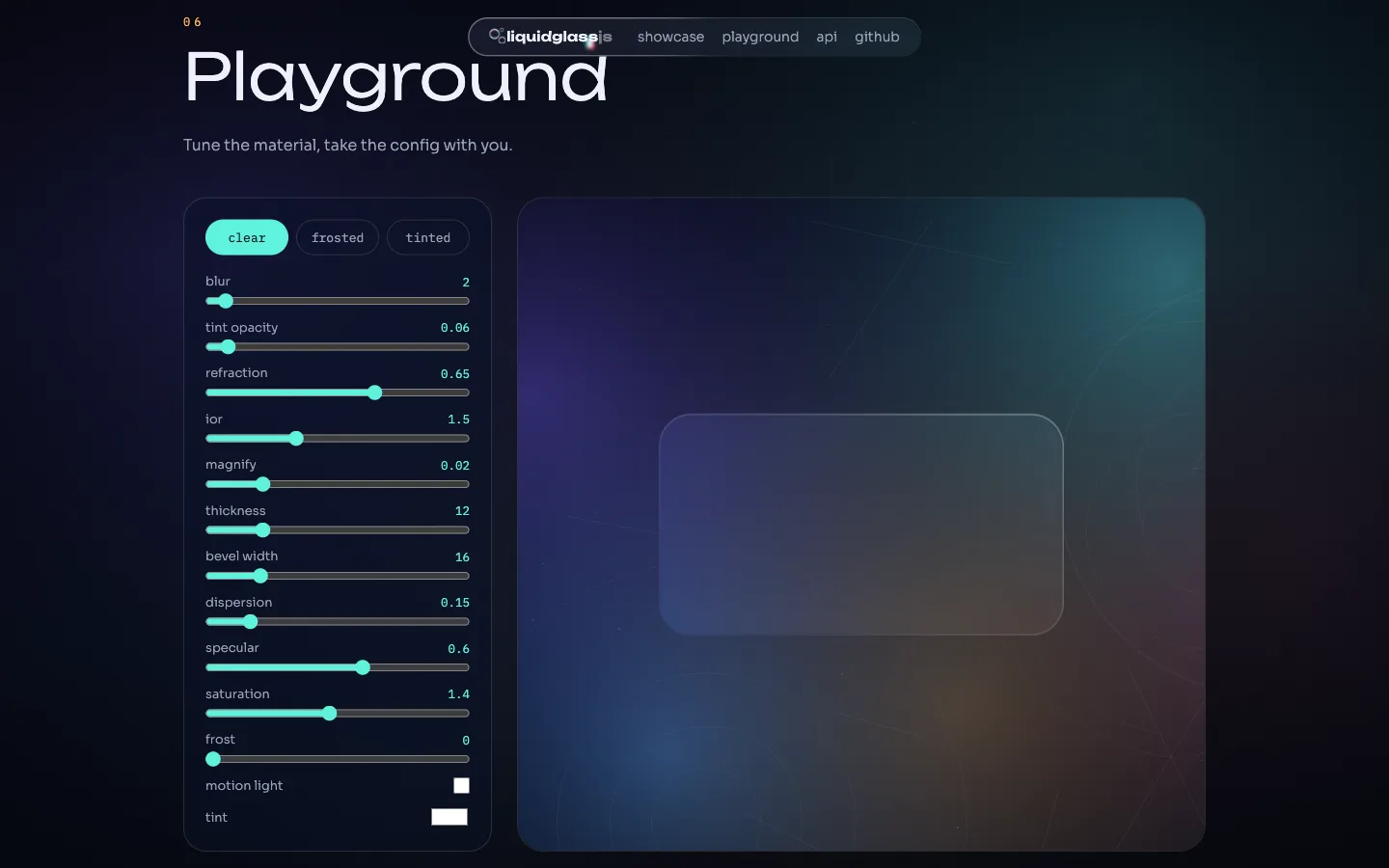
| iOS showcase | Config-exporting playground |
|---|---|
 |
 |
One package
| Entry | What you get |
|---|---|
@surdeddd/liquidglass |
Framework-agnostic engine — attach(), zero dependencies |
@surdeddd/liquidglass/element |
<liquid-glass> web component, works in any framework |
@surdeddd/liquidglass/react |
React 18 & 19 component + hooks |
@surdeddd/liquidglass/vue |
Vue 3 component + v-liquid-glass directive |
@surdeddd/liquidglass/svelte |
Svelte action |
React, Vue and Svelte are optional peers — install only the framework you already use.
Quick start
npm i @surdeddd/liquidglass
No build step — one script tag from a CDN:
The CDN build carries the web component and registers <liquid-glass> on load, so a script tag is
the whole setup. Drop the version to track latest at your own risk.
<liquid-glass preset="frosted">Hello</liquid-glass>
<div data-liquid-glass-auto='{"preset":"clear"}'>glass</div>

<script src="https://unpkg.com/@surdeddd/liquidglass@0.10.0/dist/liquidglass.global.js"></script>
<script>
  LiquidGlass.autoAttach()
</script>
import { attach } from '@surdeddd/liquidglass'

const panel = document.querySelector<HTMLElement>('.panel')
if (panel) {
  const glass = attach(panel, {
    preset: 'frosted',
    ior: 1.5,
    dispersion: 0.3,
    motionLight: true,
    physics: { wobble: 0.8 }
  })

  glass.on('tonechange', tone => console.log('backdrop is', tone))
  glass.set({ preset: 'clear' })
  glass.destroy()
}
<script type="module">
  import { define } from '@surdeddd/liquidglass/element'
  define()
</script>

<liquid-glass preset="frosted" merge="dock">Hello</liquid-glass>
import { LiquidGlass } from '@surdeddd/liquidglass/react'

<LiquidGlass as="nav" preset="clear" dispersion={0.3}>…</LiquidGlass>
<script setup>
import { LiquidGlass, vLiquidGlass } from '@surdeddd/liquidglass/vue'
</script>

<template>
  <LiquidGlass preset="frosted" :options="{ dispersion: 0.3 }">…</LiquidGlass>
  <div v-liquid-glass="{ preset: 'clear' }">…</div>
</template>
<script>
  import { liquidGlass, glass } from '@surdeddd/liquidglass/svelte'
</script>

<div use:liquidGlass={{ preset: 'frosted' }}>…</div>

<!-- svelte 5 attachment -->
<div {@attach glass({ preset: 'frosted' })}>…</div>
The Vue directive is registered locally by importing vLiquidGlass into <script setup>; register
it globally with app.directive('liquid-glass', vLiquidGlass) if you prefer.
Each entry has a guide of its own, covering how options map to that framework's idioms, the escape hatch back to the engine handle, server rendering and cleanup: React · Vue · Svelte · web component.
On Safari and Firefox the engine refracts a designated element rather than the whole page. It picks
the nearest ancestor that paints a background on its own; pass backdrop when you want a specific
one — it is also the cheaper choice, because that element gets cloned into the refraction layer.
attach(panel, { backdrop: '.hero-art' })
Options
Every option is optional and can be changed at runtime through set(). Numeric values are clamped
to the range shown; anything non-finite falls back to the default. Where a preset moves a value the
default column reads clear / frosted / tinted — clear is what you get when you pass no preset.
| Option | Type | Default | Range | Notes |
|---|---|---|---|---|
preset |
'clear' | 'frosted' | 'tinted' |
'clear' |
— | Starting point for every material value below |
blur |
number | 1.2 / 1.5 / 8 | 0–100 | Backdrop blur in px — the same strength on every tier, WebGL included |
saturation |
number | 1 / 5.5 / 1 | 0–8 | Backdrop saturation multiplier; frosted needs the headroom to keep colour through its frost |
brightness |
number | 1.121 / 0.936 / 1 | 0–3 | Backdrop brightness multiplier |
tint |
string | #ffffff, #7c5cff under tinted |
hex or rgb() |
Set it explicitly to opt out of adaptive tinting |
tintOpacity |
number | 0.0765 / 0.86 / 0.96 | 0–1 | Tint alpha |
refraction |
number | 0.5 | 0–1 | Strength of the rim bend; 0.5 is the strength measured on Apple's renderer |
ior |
number | 1.5 | 1–2.5 | Index of refraction; 1 bends nothing |
magnify |
number | 0 | 0–0.1 | Whole-body magnification — Apple's glass has none |
thickness |
number | 'auto' |
'auto' |
0–100 | Dome height for lighting: true; it no longer changes the bend |
bevelWidth |
number | 'auto' |
'auto' |
0–200 | Rim band width; auto is 20 px, narrowing to 0.7 of the half side on controls under 60 px |
bevelDepth |
number | 0.6 | 0–1 | How close to the rim the bend is held; higher is tighter |
dispersion |
number | 0 | 0–1 | Chromatic split at the rim — Chromium and WebGL tiers only |
specular |
number | 0.8 / 0.8 / 0.1 | 0–1 | Strength of the one-pixel rim light along the light axis; 0 removes it |
shadow |
number | 0 / 0.35 / 0.35 | 0–1 | Cast shadow under the glass — a soft ambient sized from the element plus a contact line; 0 removes it. Painted on every tier |
frost |
number | 0 / 0.09 / 0 | 0–1 | Share of light scattered diffusely inside the glass |
radius |
number | 'auto' |
'auto' |
≥ 0 | auto reads the element's border-radius |
shape |
'rounded' | 'squircle' |
'rounded' |
— | Squircle also clips the host |
backend |
BackendId | 'auto' |
'auto' |
— | Honoured only if the tier is supported |
backdrop |
Element | string | null |
null |
— | Refraction source for svg-content |
sceneImage |
string | null | null |
— | Texture for webgl-scene |
physics |
boolean | { press, hover, wobble } |
true — press and hover on, wobble 0.6 |
wobble 0–1 |
Disabled entirely under reduced motion; hover turns itself off on coarse pointers unless you pass it explicitly |
merge |
string | null | null |
— | Metaball group name; needs webgl-overlay, and a group holds at most 8 lenses |
mergeStrength |
number | 30 | px, unclamped | Distance at which group members melt together; <liquid-glass-group spacing> sets it to 40 |
adaptive |
boolean | true |
— | Backdrop tone sampling; frosted follows the page's declared color-scheme and turns to smoke over dark surroundings |
motionLight |
boolean | false |
— | Drive the bezel highlight from device orientation |
quality |
{ mapSide: number, caPasses: 1 | 3, maxDpr: number } |
device tier | — | Per-surface override of the quality profile; layers on top of configure() |
A merge group is capped at 8 lenses, which is the size of the shader's shape array. The ninth and
later members of a group are dropped from the overlay pass entirely — they keep their blur, tint and
shadow but get neither refraction nor merging, and nothing is logged. Split a longer dock into a
second merge group.
Runtime and events
const glass = attach(el, { preset: 'frosted' })

glass.on('backendchange', id => console.log('now rendering with', id))
glass.on('tonechange', tone => root.classList.toggle('on-light', tone === 'light'))
glass.on('press', point => console.log('pressed at', point.x, point.y))
glass.on('release', () => {})
glass.on('degrade', id => console.log('fps watchdog dropped to', id))

glass.options.preset
Every payload is typed per event: backendchange and degrade give a BackendId, tonechange
gives 'light' | 'dark' | null, press gives the point relative to the element's own top-left
corner rather than the viewport, release gives null. handle.options reports the resolved
configuration, and every subscription returns its own unsubscribe function.
The web component mirrors the same events onto the DOM as composed liquid-glass:* CustomEvents,
so a page without a handle can listen too:
document.addEventListener('liquid-glass:tonechange', event => console.log(event.detail))
One glass per element. attach() on an element that already has one returns the same handle and
applies the new options — it is attach-or-update, not a second surface. destroy() and detach()
remove it for everyone, so two independent owners on the same node share a lifetime; give them
separate elements if they need separate lifetimes. Calling destroy() twice is safe, and a stale
handle cannot tear down a surface that was attached after it.
Beyond the handle:
| API | What it does |
|---|---|
autoAttach(root?) |
Attaches every [data-liquid-glass-auto] element and keeps watching for new ones. Returns a stop function; inert without a DOM |
configure({ mapSide, caPasses, maxDpr, snapshotThrottleMs, overlayZIndex }) |
Overrides the quality profile the device tier picked |
resetQuality() |
Clears every override, including the caPasses: 1 the fps watchdog writes |
deviceTier() / getQuality() |
Reads what the engine decided for this device |
probeCapabilities() |
The capability snapshot behind backend selection |
mountScrollEdge(el, { position = 'top', size = 96, strength = 12 }) |
Progressive blur edge for floating bars; returns a handle whose destroy() you have to call |
morphGlass(from, to, { stiffness = 320, damping = 26 }) |
Hands one control's geometry to another on a spring; returns a promise that resolves when the spring settles |
getInstance(el) / detach(el) |
Reach or tear down a surface you did not keep a handle to |
VERSION |
The version string this build was stamped with |
The resolved state is also on the element, which makes it inspectable in devtools:
data-liquid-glass (preset), data-liquid-glass-backend, data-liquid-glass-tone,
data-liquid-glass-pressed, data-liquid-glass-degraded. A morphing element also carries
data-liquid-glass-morphing for the length of the spring.
What attach() takes over
The engine paints through inline styles on your element, so some properties stop being yours for the
lifetime of the glass. Whatever you had set inline is captured at mount and put back by destroy(),
but while the surface is attached the engine's value wins. backdrop-filter below stands for both
the prefixed and the unprefixed form, and border-radius is only overwritten when radius is a
number or a squircle needs one — at radius: 'auto' the engine reads yours instead.
| Tier | Inline properties it owns |
|---|---|
css-svg |
backdrop-filter, background, border-radius, box-shadow, clip-path |
svg-content |
the same, plus isolation and position |
webgl-overlay |
backdrop-filter, background, border-radius, box-shadow, position, z-index |
webgl-scene |
background, border-radius, isolation, position — this is the one tier that paints no cast shadow |
css-fallback |
background, backdrop-filter, border-radius, box-shadow, clip-path |
Two consequences are worth planning for. Your own background and box-shadow are replaced — the
glass is the surface now, and shadow: 0 is how you ask for no cast shadow. And a host whose
computed position is static becomes relative, which re-parents its absolutely positioned
children; the specular bezel and the press glow do that on every tier, since both mount a layer
inside the host. The division that works: style layout on the host — size, margin, padding, and the
border-radius that radius: 'auto' reads — and leave paint to the engine.
Highlights
- Real lens optics — a convex squircle dome refracted by Snell's law (
ior, default 1.5): optically flat interior with a subtle whole-body magnification (magnify) and all the bending concentrated in a rim band that tracks your corner radius, exactly like iOS 26. - Edge chromatic aberration —
dispersionsplits R/G/B along the rim on the Chromium and WebGL paths (fidelity matrix). - Living specular bezel — a two-tone rim highlight that follows the pointer (or device tilt with
motionLight: true) instead of a painted-on gradient. - Tiered rendering — capability probe picks the best backend per browser; fidelity improves as browsers ship new APIs, your code never changes.
- Metaballs — wrap lenses in
<liquid-glass-group spacing="48">(or share amergegroup) and they melt into each other through an SDF smooth-min shader, the GlassEffectContainer way. Up to 8 lenses per group. - Scroll edge —
mountScrollEdge(document.body, { position: 'top' })progressively dissolves content under your floating bars, like iOS scroll edge effects. - Morphing —
morphGlass(from, to)hands one control's geometry to another on a spring, the glassEffectID transition. - Living physics — a mass–spring–damper system drives gel squash, wobbly release and magnetic hover on any backend; sleeps when idle.
- Adaptive contrast — glass samples backdrop luminance and follows it the way Apple's material does: dark smoke over dark content, white frost over light. It exposes
data-liquid-glass-toneand a ready--lg-on-glasscolor for your text. - Accessible by default — reduced motion and reduced transparency are respected live; every injected layer is aria-hidden. Reduced transparency is only observable from a page in Chromium 118+, so the opaque fallback is a bonus rather than a contrast plan.
- Fast enough to be honest about — ten lenses scrolling continuously start in the mid-30s with dispersion at full quality and settle around 100 once the fps watchdog drops the extra passes; render-on-demand everywhere, and nothing keeps a frame loop alive when the page is still. Numbers from the included bench, not a guess.
Troubleshooting
Safari or Firefox shows flat blur. Those engines refract a cloned source rather than the live
backdrop. The engine falls back to the nearest ancestor that paints a background — if every ancestor
is transparent, nothing can be cloned. Pass backdrop explicitly.
merge does nothing. Metaball merging exists only on webgl-overlay. Under backend: 'auto'
the engine now switches to it when a merge group is set and WebGL2 is available; if WebGL2 is
missing, the group is dropped and the engine logs it once. <liquid-glass-group> sets the backend
for its children.
Strict CSP blocks the worker. Lens maps are generated in a worker spawned from a Blob URL, so
allow worker-src blob:. Without it the library silently generates maps on the main thread — same
output, more main-thread work.
Next.js / Nuxt / SvelteKit. Every entry imports cleanly on the server and attach() is a
client-side call; run it from an effect. autoAttach() is safe to call anywhere — it returns an
inert stop function when there is no DOM.
React Server Components. @surdeddd/liquidglass/react ships without a "use client" banner, so
importing it from a server component fails. Put 'use client' at the top of your own file — the one
that imports LiquidGlass, useLiquidGlass or useLiquidGlassHandle — or reach it through
dynamic(() => import('./glass'), { ssr: false }). pnpm ssr only proves the entries import in bare
Node; it does not exercise the RSC boundary.
Only some of my lenses merge. A merge group holds 8. The ninth and later members are dropped
from the overlay pass — blur, tint and shadow survive, refraction and merging do not, and nothing is
logged. Split the rest into a second group.
Images vanish inside a metaball group. The webgl-overlay tier rasterizes the page to a
texture, so cross-origin images without CORS headers and webfonts that cannot be inlined do not make
it into the snapshot.
Reduced transparency or Windows High Contrast. The surface switches to an opaque material (refraction and dispersion off, tint raised). This is deliberate, and it follows the OS setting live.
Text over glass is unreadable. adaptive samples the backdrop and matches the default material
to it — smoke over dark, frost over light — but it cannot resolve a luminance over a raster image
backdrop. Use color: var(--lg-on-glass), the tonechange event or the data-liquid-glass-tone
attribute to style text yourself, or set tint explicitly.
More symptoms, and more depth on these, in docs/troubleshooting.md — stacking order under a merge group, the two CSP directives, hydration, and how to get off a watchdog demotion.
Stability
Pre-1.0. A minor bump can carry a breaking change, and the release notes say so when one does.
The public API is what @surdeddd/liquidglass and its /element, /react, /vue and /svelte
entries export. Within that:
| Stable in a minor | attach, detach, getInstance, autoAttach, the LiquidGlassHandle shape, the five event names and their payloads, the option names in the table above, the data-liquid-glass* attributes, the <liquid-glass> attribute surface |
| May change in a minor | Rendered output — optics, defaults, the values a preset resolves to. Which backend auto picks on a given engine. The clamp ranges. Anything a new browser API makes better |
| Not public at all | Everything exported for the demo and the tests — GlRenderer, sdfSuperellipse, setLuminanceGrid, MAX_SHAPES, the backends/* objects. These can change in a patch |
The five workspace packages (-core, -element, -react, -vue, -svelte) are private build
inputs versioned in lockstep with the published package; only @surdeddd/liquidglass is installable.
Release history is packages/liquidglass/CHANGELOG.md.
Development
pnpm install
pnpm build && pnpm typecheck && pnpm lint && pnpm test && pnpm coverage && pnpm ssr && pnpm size
pnpm e2e
That is the same list CI runs, in the same order. pnpm build comes first because the framework
adapters resolve the engine through its built output, so their tests run against packages/core/dist
rather than src.
The fps benchmark needs the demo served on 4173, which is the address pnpm bench opens — vite
alone serves 5173 and the bench would find nothing there:
pnpm --filter demo exec vite --port 4173 --strictPort   # one shell
pnpm bench                                              # another; exits non-zero below 55 fps
BENCH_URL overrides the address: BENCH_URL=http://localhost:5173/bench.html pnpm bench if the
demo is already up on the vite default. pnpm bench is headless; the numbers below come from
node scripts/fps-bench.mjs --headed.
The bench reports two numbers, because one would be misleading. Ten lenses scrolling on headed Chromium on an M-series machine open in the mid-30s — every lens running three displacement passes for chromatic dispersion — and settle around 100 fps once the fps watchdog decides the page cannot afford them and drops to one. The same page with no glass on it runs at ~118 fps, so the lenses are the cost, and dispersion is most of it.
Headless lands far lower on both counts: it renders through SwiftShader, which is a software rasterizer figure rather than a rendering regression.
The landing + playground lives in apps/docs, the test harness in apps/demo, research notes in
docs/research.
Documentation
docs/ is the index — what each document is for and the order to read them in.
| React · Vue · Svelte · Web component | One guide per entry: options as idioms, the handle escape hatch, SSR, cleanup, a composed example |
| Recipes | Whole components: nav bar, tactile card, melting tab bar, morph, lens over your own art |
| Accessibility | What the engine handles, what stays yours, and how to check either |
| Troubleshooting | Symptom first: flat lenses, merge groups, stacking order, CSP, hydration, a stuck watchdog |
| Performance | What each surface costs, which knob moves it, how the fps watchdog behaves |
| Browser support | Engine-by-engine behaviour, the per-backend fidelity matrix, version floors |
| Architecture | Module map, dependency direction, how tiers are selected |
| API reference | Generated from the published entry points |
License
MIT
Related Packages
Apple-style Liquid Glass for the web: real refraction, specular light and fluid...
Framework-agnostic iOS 26 Liquid Glass effect Web Components for Vue, Nuxt, Reac...
Apple-style liquid glass in one line. Real WebGL2 refraction of the page behind...
Vue 3 components for Apple-flavored interface surfaces: Liquid Glass, squircles,...
A component for Vue 3. Anything inside the tag sits on real refracting glass.
Version History
| Version | Released | Vue | License |
|---|---|---|---|
| 0.12.0 | ^3.4.0 | MIT | |
| 0.11.0 | ^3.4.0 | MIT | |
| 0.10.0 | ^3.4.0 | MIT | |
| 0.9.0 | ^3.4.0 | MIT | |
| 0.8.0 | ^3.4.0 | MIT | |
| 0.7.0 | ^3.4.0 | MIT | |
| 0.6.1 | ^3.4.0 | MIT | |
| 0.6.0 | ^3.4.0 | MIT | |
| 0.5.0 | ^3.4.0 | MIT | |
| 0.4.0 | ^3.4.0 | MIT | |
| 0.3.0 | ^3.4.0 | MIT |