vuetify-tailwind-utility-bridge
vuetify-tailwind-utility-bridge
Tailwind CSS plugin that brings Vuetify-style utility classes to your project.
Enables Figma design token alignment, Tailwind auto-completion, and incremental migration from Vuetify to Tailwind.
A Tailwind CSS plugin that provides Vuetify-like utility classes — for autocomplete support and progressive migration from Vuetify to Tailwind.
✨ Purpose
This package is designed with two main use cases:
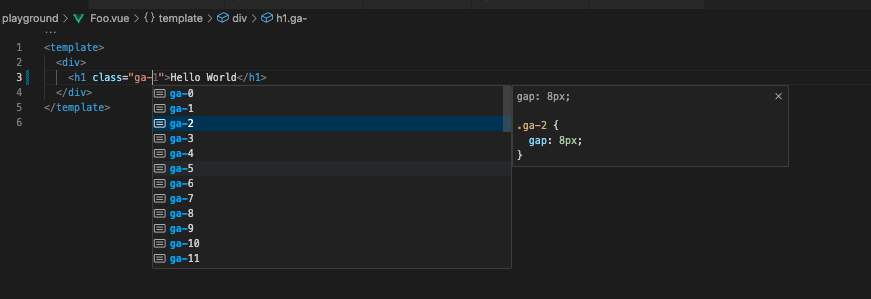
1. Autocomplete support for Vuetify utility classes in VSCode
- Enables Tailwind CSS IntelliSense (autocomplete) for Vuetify utility classes like
.ma-1,.text-primary,.elevation-4, etc. - This does not require Tailwind CSS to be installed in your project.
- This was the original motivation behind creating this plugin — enabling autocomplete even in a Vuetify-only project.
🛠 Recommended VSCode settings
Add the following to your .vscode/settings.json:
{
  "tailwindCSS.includeLanguages": {
    "vue": "html",
    "plaintext": "html"
  },
  "editor.quickSuggestions": {
    "strings": true
  }
}
✨ Features
- 🔧 Provides Vuetify-style utility classes (
.d-flex,.ma-2,.rounded-lg, etc.) - 🎨 Maps Vuetify design tokens to Tailwind utility conventions
- 🧩 Enables Tailwind IntelliSense / autocomplete in VSCode
- 📦 Lightweight and framework-agnostic plugin
- 🪜 Perfect for incremental migration from Vuetify to Tailwind
- Theme injection (only Colors)
Unsupported Features
- RTL mode
- Expand css variables (e.g.
var(–v-hover-opacity);) - partial typography utilities(see src/generated/vuetifyUtilities.ts)
📦 Installation
npm install vuetify-tailwind-utility-bridge
🛠 Usage
- Add Tailwind CSS IntelliSense in your VSCode
- Add this plugin on your tailwindcss.config.js
- You don't need to install tailwindcss if you want to use this module for autocompletion.
const vuetifyUtilityBridgePlugin = require('vuetify-tailwind-utility-bridge');

/** @type {import('tailwindcss').Config} */
module.exports = {
  corePlugins: [],
  content: ['**/*.vue', '**/*.js', '**/*.ts'],
  plugins: [vuetifyUtilityBridgePlugin.vuetifyPlugin()],
  // or your Vuetify theme (yourTheme: Vuetify ThemeDefinition)
  // plugins: [vuetifyUtilityBridgePlugin.vuetifyPlugin({ theme: yourTheme })],
};
🚀 Use Case
- Bring Tailwind-class auto-completion to Vuetify-based components
- Use it as a design token bridge between Vuetify and Figma
- Gradually refactor Vuetify components into Tailwind
📄 License
MIT
Related Packages
tailwindcss-scoped-preflight
To avoid style conflicts (CSS collisions/interference side effects) when using T...
3,950,475
202
Version History
| Version | Released | License |
|---|---|---|
| 0.1.5 | MIT | |
| 0.1.4 | MIT | |
| 0.1.3 | MIT | |
| 0.1.2 | MIT | |
| 0.1.1 | MIT | |
| 0.1.0 | MIT |