tailwindcss-scoped-preflight
| Install | |
|---|---|
npm install tailwindcss-scoped-preflight |
|
| Latest Version: | 4.0.6 |
| License: | MIT |
| Last Updated: | Apr 29, 2026 |
| Links: | GitHub · npm |
Tailwind CSS + UI libraries = no conflicts 🚀




What
Tailwind CSS plugin
Why
To avoid style conflicts (CSS collisions/interference side effects) when using Tailwind CSS with other UI libraries like Antd, Vuetify etc.
How
This plugin limits the scope of Tailwind's opinionated preflight styles to a customizable CSS selector. So you can control exactly where in the DOM to apply these base styles — usually your own components, not third-party ones.
Version 4 is here 🎉
Looking for the v3 documentation? v3 README
Version 4 is built for TailwindCSS v4 and uses the new CSS-first @plugin API — no JavaScript config needed.
Key changes from v3:
- Configure via
@pluginin your CSS file, nottailwind.config.js - No JS imports required
- Simpler option syntax using CSS property values
❤️ If you'd like to say thanks, buy me a coffee

Support/contact tiny website
Discord server for any discussions/questions/ideas/proposals — feel free to join.
Strategies overview
Two isolation strategies are available, covering 99% of cases:
| Strategy | Description |
|---|---|
isolation-strategy: inside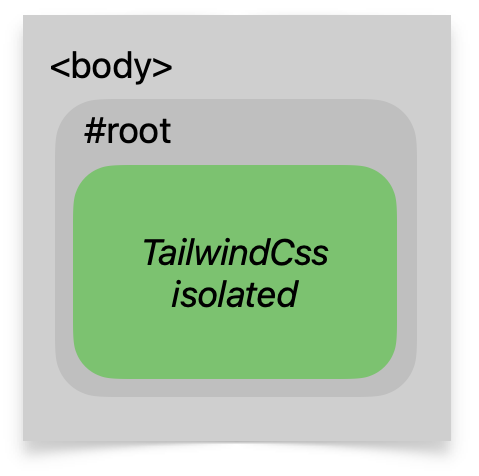 |
Everything is protected from preflight styles, except the specified Tailwind root(s). Use it when all your Tailwind-powered content lives inside some root container. |
isolation-strategy: outside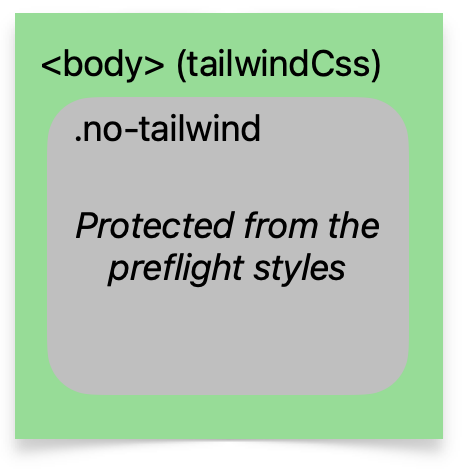 |
Protects specific root(s) from preflight styles — Tailwind is everywhere outside. Use it when Tailwind is everywhere, but you want to exclude some part of the DOM from preflight. |
Quick Start
1. Install
npm i -D tailwindcss-scoped-preflight
2. Replace your Tailwind import
Most projects start with a single import:
@import "tailwindcss";
This includes Tailwind's global preflight (CSS reset) — which is exactly what this plugin replaces with a scoped version. To avoid having both global and scoped preflight in your CSS, replace the single import with granular ones that skip preflight:
@import "tailwindcss/theme";
@import "tailwindcss/utilities";
Why not
@import "tailwindcss"? It bundles preflight that applies to*,html,bodyglobally. With this plugin you want preflight scoped to your selector — having both defeats the purpose.
3. Add @plugin to your CSS file
3.1 Lock Tailwind preflight inside a container
Use isolation-strategy: inside when all your Tailwind-powered content is under a single root element (like .twp). Preflight styles will only apply within that container.
/* input.css */
@import "tailwindcss/theme";
@import "tailwindcss/utilities";

@plugin "tailwindcss-scoped-preflight" {
  isolation-strategy: inside;
  selector: .twp;
}
With an exclusion zone (to protect third-party markup nested under .twp):
@plugin "tailwindcss-scoped-preflight" {
  isolation-strategy: inside;
  selector: .twp;
  except: .no-twp;
}
| Option | Value | Description |
|---|---|---|
isolation-strategy |
inside |
Required. Activates the inside-container isolation mode. |
selector |
CSS selector (or comma-list) | Required. The container(s) where Tailwind content lives. e.g. .twp or .twp, [twp] |
except (optional) |
CSS selector | Excludes nested elements from preflight. Useful for third-party markup under .twp. |
root-styles (optional) |
move to container (default) |
Moves root styles (html/body/:host) to the container selector. |
add :where |
Keeps root styles on root selectors but wraps them with :where so only matching items are affected. |
|
ignore (optional) |
Comma-separated CSS selectors | Keeps these preflight selectors untouched (skipped by the isolation strategy). e.g. html, :host, * |
remove (optional) |
Comma-separated CSS selectors | Removes preflight styles for these selectors entirely. e.g. body, :before, :after |
3.2 Exclude a container from Tailwind preflight
Use isolation-strategy: outside when Tailwind is used everywhere, but you want one section of the page to be unaffected by preflight (e.g. a legacy widget or iframe content).
/* input.css */
@import "tailwindcss/theme";
@import "tailwindcss/utilities";

@plugin "tailwindcss-scoped-preflight" {
  isolation-strategy: outside;
  selector: .no-twp;
}
With a plus selector (to re-enable preflight for Tailwind components nested inside the excluded zone):
@plugin "tailwindcss-scoped-preflight" {
  isolation-strategy: outside;
  selector: .no-twp;
  plus: .twp;
}
| Option | Value | Description |
|---|---|---|
isolation-strategy |
outside |
Required. Activates the outside-container isolation mode. |
selector |
CSS selector (or comma-list) | Required. The container(s) to protect from preflight. e.g. .no-twp |
plus (optional) |
CSS selector | Re-enables preflight for Tailwind components nested inside the excluded zone. e.g. .twp |
ignore (optional) |
Comma-separated CSS selectors | Keeps these preflight selectors untouched (skipped by the isolation strategy). |
remove (optional) |
Comma-separated CSS selectors | Removes preflight styles for these selectors entirely. |
Choosing a good selector
Use a dedicated plain class name (.twp, .no-twp) or a data attribute ([data-twp]) as your container selector. Avoid selectors that contain colons (like Tailwind modifier syntax .xl:some-class) — they require CSS escaping (\.xl\:some-class) and add unnecessary complexity.
4. Use the selector in your DOM
export function MyApp({ children }: PropsWithChildren) {
  return <div className={'twp'}>{children}</div>;
}
Configuration examples
Using multiple selectors
@plugin "tailwindcss-scoped-preflight" {
  isolation-strategy: inside;
  selector: .twp, [twp];
}
Although all strategies accept multiple selectors, it's recommended to use one short selector to avoid CSS bloat — selectors repeat many times in the generated CSS.
Keeping some preflight styles unaffected
Use ignore to pass certain preflight selectors through without modification:
@plugin "tailwindcss-scoped-preflight" {
  isolation-strategy: inside;
  selector: .twp;
  ignore: html, :host, *;
}
Removing preflight styles by selector
Use remove to strip preflight styles for specific selectors entirely:
@plugin "tailwindcss-scoped-preflight" {
  isolation-strategy: inside;
  selector: .twp;
  remove: body, :before, :after;
}
Still using JS config?
TailwindCSS v4 still supports JavaScript configuration via @config, though it's deprecated in favor of CSS-first configuration. This plugin works with both approaches — choose one, not both:
| Approach | How | Recommended? |
|---|---|---|
CSS-first (@plugin) |
Configure in your .css file |
✅ Yes |
JS config (@config) |
Configure in tailwind.config.js |
For SCSS or gradual migration |
Using @config with this plugin
// tailwind.config.js
import scopedPreflightStyles from 'tailwindcss-scoped-preflight';

export default {
  plugins: [
    scopedPreflightStyles({
      isolationStrategy: 'inside',
      selector: '.twp',
    }),
  ],
};
/* input.css */
@import "tailwindcss/theme";
@import "tailwindcss/utilities";
@config "./tailwind.config.js";
All options from the inside and outside strategy tables work the same way — pass them as object properties instead of CSS declarations.
Important: Even with
@config, use the new v4 string-based options — not the v3 function-based API. See the migration guide for the full mapping.
Using with SCSS/Sass
Sass preprocessors parse .scss files before TailwindCSS sees them. The @plugin block syntax contains values like selector: .twp; that Sass misinterprets — it sees .twp as the start of a decimal number and fails:
Error: Expected digit.
  ╷
  │   selector: .twp;
  │              ^
  ╵
Option A: Separate CSS file (recommended)
Move the @plugin directive and Tailwind imports to a plain .css file, then import it from your SCSS:
/* tailwind.css */
@import "tailwindcss/theme";
@import "tailwindcss/utilities";

@plugin "tailwindcss-scoped-preflight" {
  isolation-strategy: inside;
  selector: .twp;
}
/* globals.scss */
@use "tailwind.css";

// your SCSS styles
Option B: Use @config with JS config
Use @config to configure the plugin in JavaScript — Sass won't try to parse the plugin options:
/* globals.scss */
@import "tailwindcss/theme";
@import "tailwindcss/utilities";
@config "./tailwind.config.js";

// your SCSS styles
See the @config section above for the tailwind.config.js example.
Migration guide (v3 → v4)
TailwindCSS v4 replaced JavaScript config files with a CSS-first API. This plugin follows the same shift — configure via @plugin in CSS (recommended) or via @config with updated options.
Quick reference
| v3 (tailwind.config.js) | v4 (input.css) |
|---|---|
plugins: [scopedPreflightStyles({ ... })] |
@plugin "tailwindcss-scoped-preflight" { ... } |
import { scopedPreflightStyles, isolateInsideOfContainer } |
No JS import needed (or import scopedPreflightStyles with @config) |
isolationStrategy: isolateInsideOfContainer('.twp') |
isolation-strategy: inside; selector: .twp; |
isolationStrategy: isolateOutsideOfContainer('.no-twp') |
isolation-strategy: outside; selector: .no-twp; |
['.twp', '[twp]'] (array) |
selector: .twp, [twp]; (comma-separated) |
{ except: '.no-twp' } |
except: .no-twp; |
{ plus: '.twp' } |
plus: .twp; |
{ ignore: ['html', ':host'] } |
ignore: html, :host; |
{ remove: ['body'] } |
remove: body; |
modifyPreflightStyles: { ... } |
Not available in v4 |
Custom isolationStrategy function |
Not available in v4 |
isolateForComponents |
Not available in v4 — use inside strategy instead |
Before/after: inside strategy
v3 (tailwind.config.js):
import { scopedPreflightStyles, isolateInsideOfContainer } from 'tailwindcss-scoped-preflight';

export default {
  plugins: [
    scopedPreflightStyles({
      isolationStrategy: isolateInsideOfContainer('.twp', {
        except: '.no-twp',
      }),
    }),
  ],
};
v4 (input.css):
@import "tailwindcss/theme";
@import "tailwindcss/utilities";

@plugin "tailwindcss-scoped-preflight" {
  isolation-strategy: inside;
  selector: .twp;
  except: .no-twp;
}
Before/after: outside strategy
v3 (tailwind.config.js):
import { scopedPreflightStyles, isolateOutsideOfContainer } from 'tailwindcss-scoped-preflight';

export default {
  plugins: [
    scopedPreflightStyles({
      isolationStrategy: isolateOutsideOfContainer('.no-twp', {
        plus: '.twp',
      }),
    }),
  ],
};
v4 (input.css):
@import "tailwindcss/theme";
@import "tailwindcss/utilities";

@plugin "tailwindcss-scoped-preflight" {
  isolation-strategy: outside;
  selector: .no-twp;
  plus: .twp;
}
Before/after: multiple selectors
v3 (tailwind.config.js):
scopedPreflightStyles({
  isolationStrategy: isolateInsideOfContainer(['.twp', '[twp]']),
})
v4 (input.css):
@plugin "tailwindcss-scoped-preflight" {
  isolation-strategy: inside;
  selector: .twp, [twp];
}
Dropped features
The following v3 features are not available in v4. TailwindCSS 4 moved away from JavaScript config entirely, so any feature that required a JS callback or JS-level hook cannot be supported.
| Feature | v3 Usage | Why removed |
|---|---|---|
modifyPreflightStyles |
Object or function callback to alter individual CSS declarations | TW4 has no hook mechanism for JS-based style modification — all config is CSS strings |
Custom isolationStrategy function |
isolationStrategy: ({ ruleSelector }) => string |
@plugin CSS blocks only accept string scalar values, not functions |
isolateForComponents |
Named export, was already deprecated in v3 | Deprecated in v3; removed in v4. Use isolation-strategy: inside with root-styles: add :where for the same effect |
| Named strategy imports | import { isolateInsideOfContainer } from 'tailwindcss-scoped-preflight' |
No JS config to import into — use @plugin directive or default import with @config |
Related Packages
A Tailwind CSS plugin to bring Vuetify utility classes for autocomplete and migr...
Right-to-left (RTL) and logical-direction utilities for Tailwind CSS v3 and v4
Version History
| Version | Released | License |
|---|---|---|
| 4.0.6 | MIT | |
| 4.0.4 | MIT | |
| 4.0.3 | MIT | |
| 4.0.2 | MIT | |
| 4.0.1 | MIT | |
| 3.5.9 | MIT | |
| 3.5.8 | MIT | |
| 3.5.7 | MIT | |
| 3.5.4 | MIT | |
| 3.5.3 | MIT | |
| 3.5.2 | MIT | |
| 3.5.1 | MIT | |
| 3.5.0 | MIT | |
| 3.4.13 | MIT | |
| 3.4.12 | MIT | |
| 3.4.11 | MIT | |
| 3.4.10 | MIT | |
| 3.4.9 | MIT | |
| 3.4.8 | MIT | |
| 3.4.7 | MIT | |
| 3.4.6 | MIT | |
| 3.4.5 | MIT | |
| 3.4.4 | MIT | |
| 3.4.3 | MIT | |
| 3.4.2 | MIT | |
| 3.4.1 | MIT | |
| 3.4.0 | MIT | |
| 3.3.0 | MIT | |
| 3.2.8 | ISC | |
| 3.2.7 | ISC |
Showing the latest 30 of 61. See every release on npm
Pre-releases (16)
| Version | Released | License |
|---|---|---|
| 3.0.0-beta.13 | ISC | |
| 3.0.0-beta.12 | ISC | |
| 3.0.0-beta.11 | ISC | |
| 3.0.0-beta.10 | ISC | |
| 3.0.0-beta.9 | ISC | |
| 3.0.0-beta.8 | ISC | |
| 3.0.0-beta.7 | ISC | |
| 3.0.0-beta.6 | ISC | |
| 3.0.0-beta.5 | ISC | |
| 3.0.0-beta.4 | ISC | |
| 3.0.0-beta.3 | ISC | |
| 3.0.0-beta.2 | ISC | |
| 3.0.0-beta.1 | ISC | |
| 2.2.0-beta.2 | ISC | |
| 2.2.0-beta.1 | ISC | |
| 2.2.0-beta.0 | ISC |