vue3-image-annotation
Vue 3 image annotation component based on fabric.js — draw rect / circle / polygon annotations on images with zoom, undo/redo, echo and PNG export. 基于 fabric.js 的 Vue3 在线图片标注组件
173
1
| Install | |
|---|---|
npm install vue3-image-annotation |
|
| Latest Version: | 1.0.0 |
| Vue: | 3 |
| License: | MIT |
| Last Updated: | Sep 28, 2026 |
| Links: | GitHub · npm |
Maintainer: jamestoms
vue3-image-annotation


A Vue 3 image annotation component based on fabric.js — draw rect / circle / polygon annotations on images, with zoom & pan, undo/redo, data echo and PNG export.
基于 fabric.js 的 Vue3 在线图片标注组件。
提供 <ImageCaption /> 组件:缩略图区域 + 主标注区域 + 工具区域,支持矩形、圆形、多边形标注,支持选中拖动、删除、撤销/反撤销、标签管理、标注数据回显与获取。
特性
- 矩形 / 圆形拖拽绘制,多边形逐点点击绘制(双击或回车结束,ESC 取消)
- 已标注区域点击选中、按住拖动调整位置(自动限制在图片范围内,松开后重新计算标注坐标)
- 删除标注(工具栏按钮或 Delete / Backspace 键)
- 撤销 / 反撤销(Ctrl+Z / Ctrl+Shift+Z / Ctrl+Y,按图片独立记录)
- 每个标注可关联标签名称,支持自由输入或从预设标签列表选择
- 鼠标滚轮缩放(以鼠标位置为中心)、左键拖动空白平移、fit 视野
- 标注坐标基于图片原始像素存储,任何缩放/平移状态下坐标不会错位
- 屏幕尺寸变化自适应
- 支持已有标注数据回显、继续编辑
- 提供 TypeScript 类型声明,同时兼容非 TS 项目
- 零 UI 框架依赖(按钮/下拉/提示均为自绘实现,不引入 element-plus 等组件库,与宿主项目任何 UI 框架无冲突)
示例截图
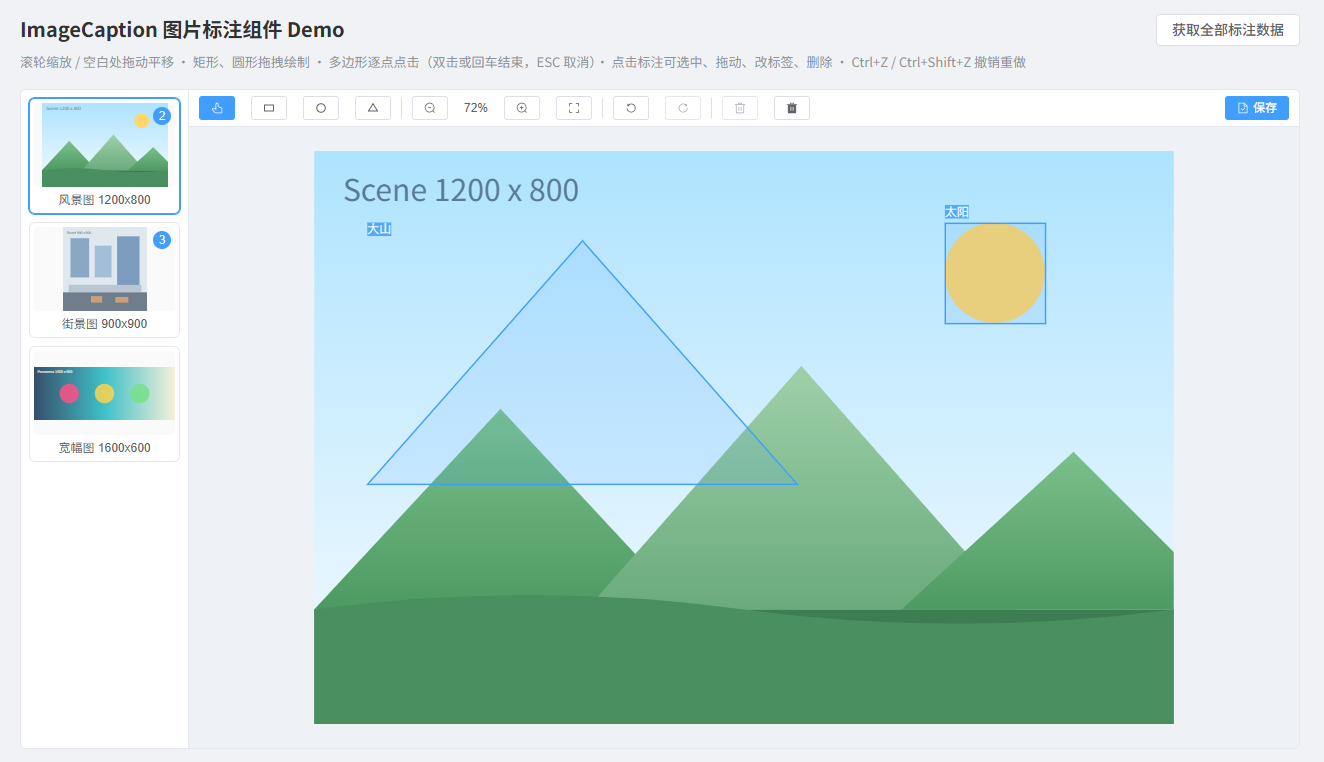
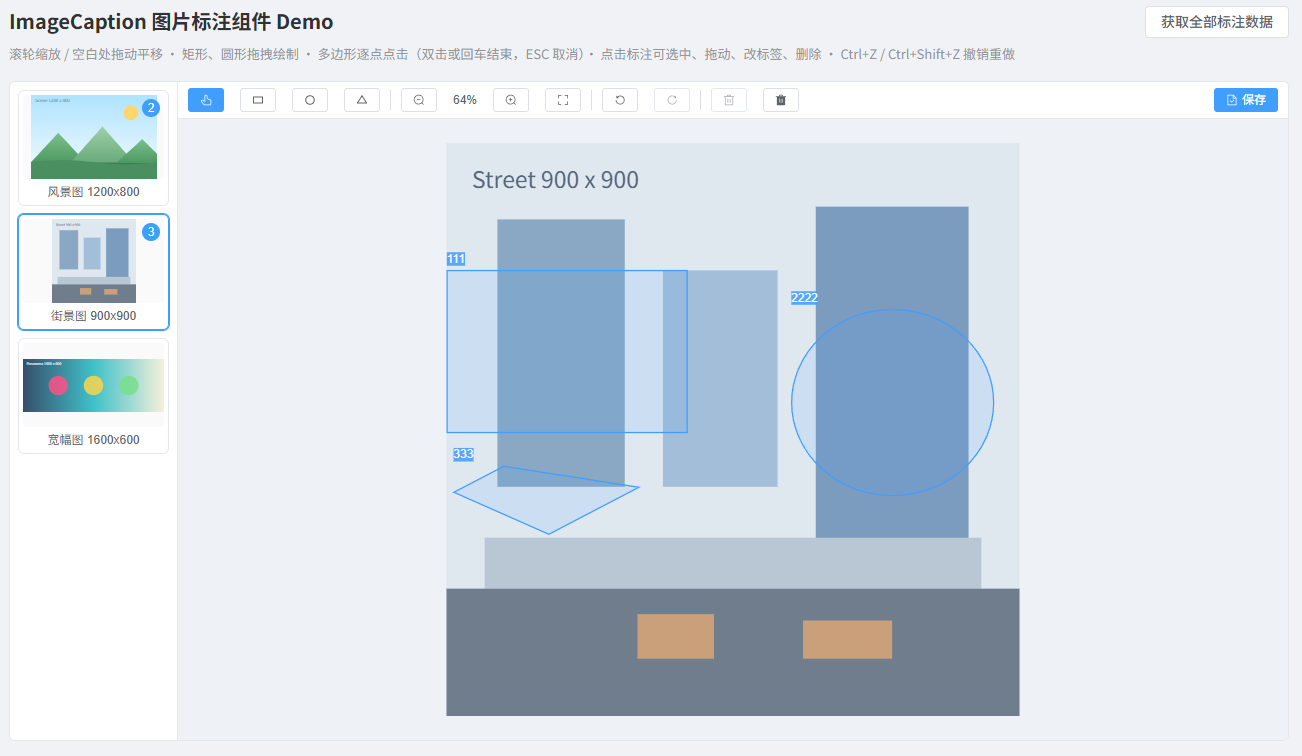
环境要求
- Vue
^3.2.0 - Node
>= 18(仅本地开发/构建需要)
fabric 为组件库唯一运行时依赖(dependencies),安装本组件时会自动安装,无需手动处理。
安装
pnpm add vue3-image-annotation
# 或
npm install vue3-image-annotation
# 或
yarn add vue3-image-annotation
使用方式
方式一:全局注册(推荐,vue.use 方式)
// main.ts
import { createApp } from 'vue'
import ImageCaption from 'vue3-image-annotation'
import 'vue3-image-annotation/style.css'
import App from './App.vue'

const app = createApp(App)
app.use(ImageCaption) // 全局注册 <ImageCaption /> 组件
app.mount('#app')
<!-- 任意组件中直接使用 -->
<template>
  <ImageCaption
    :images="images"
    :labels="['行人', '车辆', '建筑']"
    style="height: 640px"
  >
    <!-- 可选:自定义操作区(工具栏右侧),如保存按钮 -->
    <template #actions>
      <button class="ic-btn ic-btn--primary" @click="handleSave">保存</button>
    </template>
  </ImageCaption>
</template>
方式二:按需引入
<script setup lang="ts">
import { ImageCaption } from 'vue3-image-annotation'
import 'vue3-image-annotation/style.css'
</script>

<template>
  <ImageCaption :images="images" />
</template>
非 TypeScript 项目中按普通组件使用即可(组件已编译为 JS,类型声明可选)。
组件 API
Props
| 名称 | 类型 | 必填 | 默认值 | 说明 |
|---|---|---|---|---|
images |
ImageItem[] |
是 | [] |
图片列表,项内含 annotations 则加载后回显 |
labels |
string[] |
否 | [] |
预设标签列表,标签输入时可选择(也可自由输入) |
downloadable |
boolean |
否 | false |
是否开启下载功能(工具栏显示下载按钮,导出含标注的 PNG 图片) |
Events
| 名称 | 参数 | 说明 |
|---|---|---|
change |
(imageId: string, annotations: AnnotationData[]) |
标注数据发生变化时触发(新增/删除/移动/标签修改/撤销/重做/清空) |
download |
(imageId: string, filename: string) |
点击下载按钮导出成功后触发(需开启 downloadable) |
插槽
| 名称 | 说明 |
|---|---|
actions |
自定义操作区,渲染在工具栏最右侧,适合放置保存/提交/下一步等宿主业务按钮。可直接复用内置按钮样式类 ic-btn(默认)、ic-btn--primary(主要)、ic-btn--danger-plain(危险),也可完全自定义 |
保存数据最佳实践
组件不内置保存按钮(数据何时、如何持久化由宿主决定),提供两种常用模式:
模式一:实时保存 —— 监听 change 事件,标注每次变化自动提交:
<script setup lang="ts">
import { ref } from 'vue'
import type { AnnotationData } from 'vue3-image-annotation'

const images = ref([
  { id: 'img-1', url: 'https://example.com/a.jpg' },
])

async function handleChange(imageId: string, annotations: AnnotationData[]) {
  await fetch(`/api/annotations/${imageId}`, {
    method: 'POST',
    headers: { 'Content-Type': 'application/json' },
    body: JSON.stringify(annotations),
  })
}
</script>

<template>
  <ImageCaption :images="images" @change="handleChange" style="height: 640px" />
</template>
模式二:手动保存 —— 通过 actions 插槽放自己的按钮,点击时从 ref 获取数据(可携带页面其他表单字段一起提交):
<script setup lang="ts">
import { ref } from 'vue'

const captionRef = ref()

async function handleSave() {
  const imageId = captionRef.value.currentImageId
  const annotations = captionRef.value.getAnnotations()
  await fetch(`/api/annotations/${imageId}`, {
    method: 'POST',
    headers: { 'Content-Type': 'application/json' },
    body: JSON.stringify(annotations),
  })
}
</script>

<template>
  <ImageCaption ref="captionRef" :images="images" style="height: 640px">
    <template #actions>
      <button class="ic-btn ic-btn--primary" @click="handleSave">保存</button>
    </template>
  </ImageCaption>
</template>
组件方法(通过 ref 调用)
import { ref } from 'vue'

const captionRef = ref()

// 获取当前图片标注数据
captionRef.value.getAnnotations()
// 获取指定图片标注数据
captionRef.value.getAnnotations('img-1')
// 获取全部图片标注数据 { [imageId]: AnnotationData[] }
captionRef.value.getAllAnnotations()
// 撤销 / 反撤销
captionRef.value.undo()
captionRef.value.redo()
// 删除当前选中标注
captionRef.value.deleteSelected()
// 清空当前图片标注
captionRef.value.clearCurrent()
// 视图控制
captionRef.value.zoomIn()
captionRef.value.zoomOut()
captionRef.value.fitView()
// 导出当前图片(含标注)的 PNG dataURL(图片原始像素尺寸,可用于自定义上传等场景)
const dataUrl = captionRef.value.exportImage()
// 当前图片 id(手动保存时配合 getAnnotations 使用)
const imageId = captionRef.value.currentImageId
// 切换图片
captionRef.value.switchImage('img-2')
数据类型
type AnnotationType = 'rect' | 'circle' | 'polygon'

interface Point {
  x: number
  y: number
}

interface AnnotationData {
  id: string
  type: AnnotationType
  label: string
  /** rect / circle:外接框左上角坐标与宽高 */
  x?: number
  y?: number
  width?: number
  height?: number
  /** polygon:顶点列表 */
  points?: Point[]
}

interface ImageItem {
  id: string
  url: string
  name?: string
  /** 已有标注,加载后回显 */
  annotations?: AnnotationData[]
}
所有坐标均为图片原始像素坐标(与画布缩放无关),可直接用于业务存储与换算。
交互说明
| 操作 | 行为 |
|---|---|
| 鼠标滚轮 | 以鼠标位置为中心放大 / 缩小 |
| 左键拖动空白处 | 平移图片 |
| 点击标注 | 选中(弹出标签编辑浮层,可改标签、删除) |
| 拖动选中标注 | 移动位置(限制在图片范围内),松开后自动更新坐标 |
| Delete / Backspace | 删除选中标注 |
| Ctrl+Z / Ctrl+Shift+Z(或 Ctrl+Y) | 撤销 / 反撤销 |
| 清空按钮 | 首次点击进入红色确认态,3 秒内再次点击执行清空,超时自动还原 |
| ESC | 取消绘制 / 取消选中 / 关闭浮层 |
| Enter | 结束多边形绘制 |
| 双击 / 点击起始顶点 | 结束多边形绘制 |
标注对象不支持控制柄缩放(避免坐标换算误差),画错可删除重画或撤销。
本地开发
本项目统一使用 pnpm 作为包管理工具。
# 安装依赖
pnpm install

# 启动 demo 演示页(examples/)
pnpm dev

# 库构建(产物输出至 dist/)
pnpm build

# 类型检查
pnpm typecheck
License
MIT
Related Packages
Version History
| Version | Released | Vue | License |
|---|---|---|---|
| 1.0.0 | ^3.2.0 | MIT |