vue-circular-count-down-timer
| Install | |
|---|---|
npm install vue-circular-count-down-timer |
|
| Latest Version: | 3.0.0 |
| Vue: | 3 |
| Older releases: | 2 |
| License: | MIT |
| Last Updated: | Oct 9, 2026 |
| Links: | GitHub · npm |
Vue Circular Count Down Timer


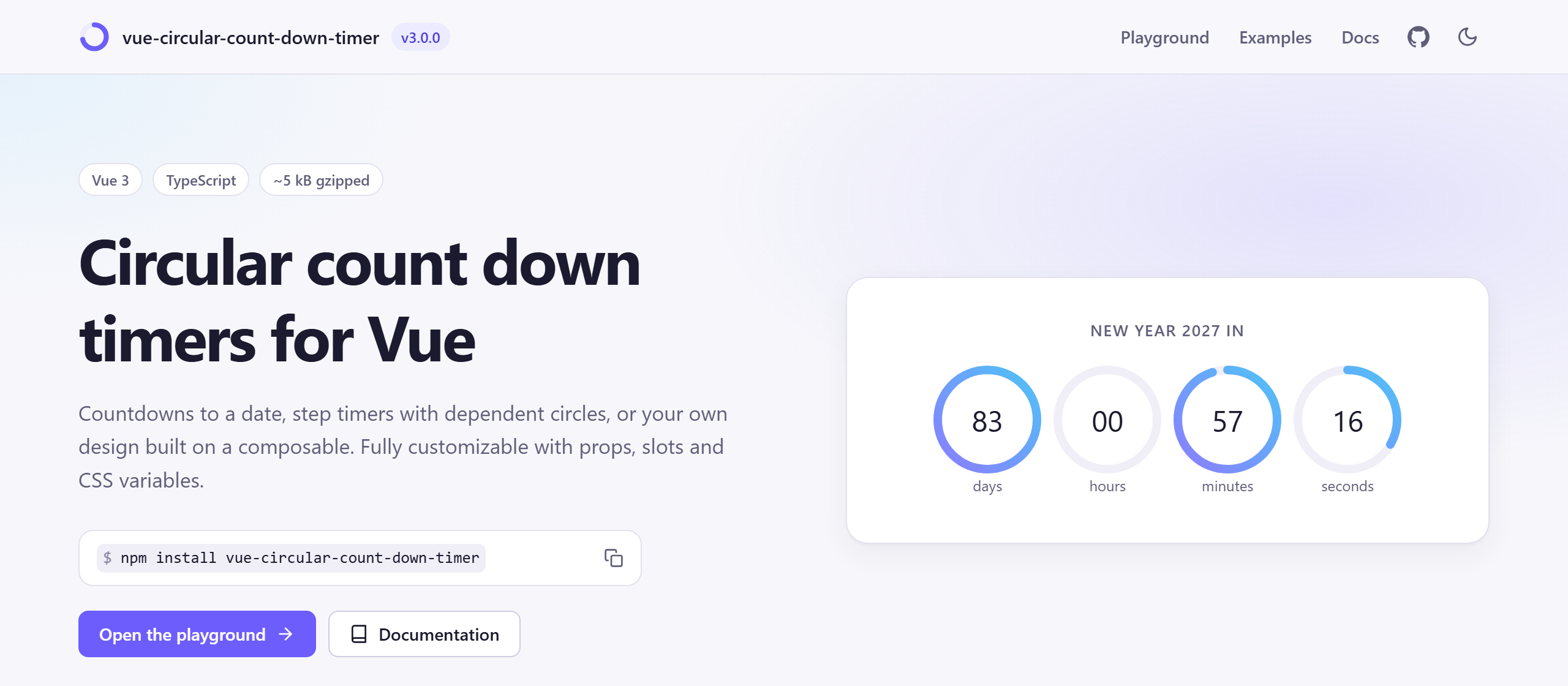
Fully customizable circular count down timers for Vue 3: countdowns to a date or for a duration, step timers with dependent circles, and a composable to build your own design.
Open the playground and examples →
Features
- Two timers:
CircularTimeCountDowncounts down to a date or for a duration;CircularCountDownTimermoves circles step by step, with dependent circles and stop conditions. - Controls: start, pause, resume and reset through a template ref, with events for every change.
- Accurate: based on the clock, so timers don't drift and catch up after the browser throttles a background tab.
- Customizable: props for every circle or per circle,
valueandlabelslots, value formatting, and CSS variables for theming. - Build your own: the
useCountdowncomposable and theCountDownCirclecomponent. - TypeScript types, an accessible
role="timer", SSR-safe, and about 5 kB gzipped with styles included.
Contents
- Installation
- CircularTimeCountDown
- CircularCountDownTimer
- Appearance options
- Controlling a timer
- Slots
- Theming with CSS variables
- Build your own: useCountdown and CountDownCircle
- TypeScript
- Accessibility
- Migrating from version 2
- Development
Installation
npm install vue-circular-count-down-timer
Version 3 requires Vue 3.5 or later. For Vue 2, install version 2: npm install vue-circular-count-down-timer@2.
Import the components where you use them:
<script setup>
import { CircularTimeCountDown } from 'vue-circular-count-down-timer';
</script>
Or register all components globally in your main.js:
import { createApp } from 'vue';
import CircularCountDownTimer from 'vue-circular-count-down-timer';
import App from './App.vue';

createApp(App)
    .use(CircularCountDownTimer)
    .mount('#app');
Styles are included in the JavaScript bundle, so there is no CSS file to import.
Without a build step, load it from a CDN after Vue:
<script src="https://unpkg.com/vue@3"></script>
<script src="https://unpkg.com/vue-circular-count-down-timer@3"></script>
<script>
    Vue.createApp({ /* ... */ })
        .use(VueCircularCountDownTimer.default)
        .mount('#app');
</script>
CircularTimeCountDown
Counts down to a date (end) or for a duration in milliseconds (duration), with one circle per time unit.
<template>
    <!-- Until New Year, in days, hours, minutes and seconds -->
    <CircularTimeCountDown :end="new Date('2027-01-01T00:00:00')" :size="90" />

    <!-- 5 minutes, in minutes and seconds -->
    <CircularTimeCountDown
        :duration="5 * 60 * 1000"
        :units="['minutes', 'seconds']"
        :format-value="(value) => String(value).padStart(2, '0')"
        @finished="onFinished"
    />
</template>
The largest unit holds everything above it: 50 hours with units: ['hours', 'minutes'] shows 50 hours. Its circle starts full; the other circles use their natural range (24 hours, 60 minutes, 60 seconds).
Props
All appearance options are also available.
| Prop | Description | Type | Default |
|---|---|---|---|
end |
Date to count down to. Takes precedence over duration. |
Date | number | string |
|
duration |
Time to count down from, in ms. | number |
|
units |
Units to show. They are always shown from largest to smallest. | ('days' | 'hours' | 'minutes' | 'seconds')[] |
all four |
labels |
Labels of the units, e.g. for translations. An empty string hides a label. | { days?: string, ... } |
unit names |
circle-options |
Appearance options, steps, label and classList per unit. |
{ days?: {...}, ... } |
{} |
autostart |
Start counting when the component is mounted. | boolean |
true |
container-classes |
Classes of the container element. | string[] |
[] |
circle-classes |
Classes of each circle element. | string[] |
[] |
aria-label |
Accessible name of the timer. | string |
values and labels |
Changing end or duration resets the countdown.
Events
| Event | Payload | Description |
|---|---|---|
update |
{ days?, hours?, minutes?, seconds?, remaining } |
Every time the smallest unit changes. remaining is in ms. |
finished |
The countdown reached zero. | |
started |
The countdown started or resumed. | |
paused |
The countdown was paused. | |
reset |
The countdown was reset. |
With duration, pausing freezes the remaining time. With end, pausing only stops the updates: the end date doesn't move, so resuming jumps to the real remaining time.
CircularCountDownTimer
Moves the main circle one step every interval ms. Circles can depend on each other, like the hands of a clock.
<template>
    <CircularCountDownTimer
        :circles="circles"
        main-circle-id="seconds"
        :stop-conditions="{ minutes: 0, seconds: 0 }"
        :size="100"
        @update="onUpdate"
        @finished="onFinished"
    />
</template>

<script setup>
import { CircularCountDownTimer } from 'vue-circular-count-down-timer';

const circles = [
    { id: 'minutes', steps: 60, value: 1, stepLength: -1, label: 'minutes' },
    { id: 'seconds', steps: 60, value: 30, stepLength: -1, label: 'seconds', dependentCircles: ['minutes'] }
];
</script>
Define circles in your script rather than inline in the template: a new array resets the timer, and an inline array is recreated on every render.
- Steps: a circle holds
stepsvalues, fromstartValuetostartValue + steps - 1, and wraps around. - Dependent circles: each time a circle wraps around, the circles in its
dependentCirclesmove one step. - Counting down: a negative
stepLengthmakes a circle count down. - Stop conditions: the timer stops and emits
finishedwhen all circles instop-conditionsreach their values. - Arrangement: circles are placed in a row; change the layout with
container-classesandcircle-classes.
Props
All appearance options are also available and apply to every circle.
| Prop | Description | Type | Default |
|---|---|---|---|
circles |
Circles configuration, see circle options. | CircleConfig[] |
[] |
main-circle-id |
Id of the circle that moves on every step. Required. | string | number |
|
interval |
Time between steps in ms. | number |
1000 |
stop-conditions |
Circle values (by circle id) at which the timer stops. | { [id]: number } |
{} |
trigger-update |
Emit an update event on every step. |
boolean |
true |
autostart |
Start counting when the component is mounted. | boolean |
true |
container-classes |
Classes of the container element. | string[] |
[] |
circle-classes |
Classes of each circle element. | string[] |
[] |
aria-label |
Accessible name of the timer. | string |
values and labels |
Circle options
Each circle can also set any of the appearance options, which override the props of the component.
| Option | Description | Type | Default |
|---|---|---|---|
id |
Id of the circle. Required. | string | number |
|
steps |
Number of values of the circle. Required. | number |
|
value |
Initial value. | number |
0 |
startValue |
First value of the circle, used after it wraps around. | number |
0 |
stepLength |
How much the value changes on each step. Negative counts down. | number |
1 |
dependentCircles |
Ids of circles that move one step each time this circle wraps around. | (string | number)[] |
[] |
label |
Label of the circle. | string |
|
classList |
Classes of the circle element; replaces circle-classes. |
string[] |
Events
| Event | Payload | Description |
|---|---|---|
update |
{ [id]: number } |
Values of all circles after each step. |
finished |
The stop conditions were reached. | |
started |
The timer started or resumed. | |
paused |
The timer was paused. | |
reset |
The timer was reset. |
Appearance options
Available as props on both timers, as options per circle or per unit, and as props of CountDownCircle.
| Option | Description | Type | Default |
|---|---|---|---|
size |
Width and height of the circles in px. 0 fits the circles to the height of their container. |
number |
0 |
stroke-width |
Thickness of the circle strokes in px. | number |
10 |
stroke-color |
Color of the filled part. | string |
#9d989b |
underneath-stroke-color |
Color of the empty part. | string |
#eee |
fill-color |
Background color of the circles. | string |
#ffffff |
value-font-size |
Font size of the values in px. | number |
20 |
label-font-size |
Font size of the labels in px. | number |
15 |
label-position |
Position of the labels. | 'bottom' | 'top' |
'bottom' |
show-value |
Show the values inside the circles. | boolean |
true |
stroke-linecap |
Shape of the ends of the filled part. | 'butt' | 'round' | 'square' |
'butt' |
direction |
Direction the circles fill in. | 'clockwise' | 'counterclockwise' |
'clockwise' |
format-value |
Formats the displayed values. | (value: number) => string | number |
The default colors and font sizes come from CSS variables, so you can also set them with CSS.
Controlling a timer
Both timers expose methods and state through a template ref. Use autostart: false to start them yourself.
<template>
    <CircularTimeCountDown ref="timer" :duration="25 * 60 * 1000" :autostart="false" />
    <button @click="timer.start()">Start</button>
    <button @click="timer.pause()">Pause</button>
    <button @click="timer.resume()">Resume</button>
    <button @click="timer.reset()">Reset</button>
</template>

<script setup>
import { useTemplateRef } from 'vue';
import { CircularTimeCountDown } from 'vue-circular-count-down-timer';

const timer = useTemplateRef('timer');
</script>
| Member | Description |
|---|---|
start() |
Starts the timer, or restarts it from the beginning if it has finished. |
pause() |
Pauses the timer. |
resume() |
Continues a paused timer. |
reset() |
Stops the timer and restores its initial values. |
isRunning |
Whether the timer is running. |
isFinished |
Whether the timer has finished. |
values |
CircularCountDownTimer only: current value of each circle. |
remaining |
CircularTimeCountDown only: remaining time in ms. |
Slots
The value slot replaces the value inside a circle and the label slot replaces its label.
<CircularTimeCountDown :duration="90 * 60 * 1000" :units="['hours', 'minutes', 'seconds']">
    <template #value="{ value, unit }">
        <strong>{{ value }}</strong><small>{{ unit[0] }}</small>
    </template>
    <template #label="{ label }">
        {{ label.toUpperCase() }}
    </template>
</CircularTimeCountDown>
| Slot | Props |
|---|---|
value |
value, formattedValue, steps, and circle (CircularCountDownTimer) or unit (CircularTimeCountDown) |
label |
label, value, and circle or unit |
Theming with CSS variables
Set these custom properties on any parent element to theme every timer inside it. Props take precedence over the variables.
.my-theme {
    --cdt-stroke-color: #6d5dfc;
    --cdt-underneath-stroke-color: #ecebff;
    --cdt-value-color: #1b1a2e;
}
| Variable | Default |
|---|---|
--cdt-stroke-color |
#9d989b |
--cdt-underneath-stroke-color |
#eee |
--cdt-fill-color |
#ffffff |
--cdt-value-color |
inherit |
--cdt-label-color |
inherit |
--cdt-value-font-size |
20px |
--cdt-label-font-size |
15px |
--cdt-transition-duration |
0.5s |
--cdt-circle-margin |
5px |
Stroke colors can also be SVG paint servers, such as a gradient defined elsewhere on the page: --cdt-stroke-color: url(#my-gradient).
Build your own: useCountdown and CountDownCircle
useCountdown provides the countdown logic of CircularTimeCountDown for your own markup. CountDownCircle is a single circle you can place anywhere, and splitTime splits milliseconds into units.
<template>
    <CountDownCircle :value="Math.ceil(remaining / 1000)" :steps="total / 1000" :size="150">
        <template #value>{{ time.minutes }}:{{ String(time.seconds).padStart(2, '0') }}</template>
    </CountDownCircle>
    <button @click="isRunning ? pause() : start()">{{ isRunning ? 'Pause' : 'Start' }}</button>
</template>

<script setup>
import { computed } from 'vue';
import { CountDownCircle, splitTime, useCountdown } from 'vue-circular-count-down-timer';

const { remaining, total, isRunning, start, pause } = useCountdown({ duration: 90 * 1000 });
const time = computed(() => splitTime(remaining.value, ['minutes', 'seconds']));
</script>
useCountdown(options) accepts values, refs or getters for its options:
| Option | Description | Default |
|---|---|---|
end |
Date to count down to. Takes precedence over duration. |
|
duration |
Time to count down from, in ms. | |
precision |
How often remaining is updated, in ms. |
1000 |
autostart |
Start when the component is mounted. | true |
onTick, onFinish, onStart, onPause, onReset |
Callbacks. |
It returns remaining and total (in ms), isRunning, isFinished, start, pause, resume and reset. The timer stops automatically when the component unmounts.
splitTime(ms, units?) returns { days, hours, minutes, seconds } for the given units. The smallest unit is rounded up, so a countdown shows its full starting value and reaches zero exactly when it ends.
TypeScript
The package ships with types. Components are typed for props, events, slots and template refs, and these types are exported:
import type {
    CircleConfig,          // a circle of CircularCountDownTimer
    CircleAppearance,      // the appearance options
    CircleValues,          // payload of the update event of CircularCountDownTimer
    StopConditions,
    TimeUnit,              // 'days' | 'hours' | 'minutes' | 'seconds'
    TimeUpdate,            // payload of the update event of CircularTimeCountDown
    TimeUnitCircleOptions, // circle-options of CircularTimeCountDown
    UseCountdownOptions,
    UseCountdownReturn
} from 'vue-circular-count-down-timer';
Registering the plugin with app.use() also types the global components in templates.
Accessibility
Timers have role="timer" and an aria-label made of the values and labels of the circles, such as "01 minutes, 30 seconds". Set the aria-label prop to provide your own. The SVG circles are hidden from screen readers.
Migrating from version 2
Most apps only need to change how the plugin is registered: app.use(CircularCountDownTimer) instead of Vue.use(CircularCountDownTimer). Also check:
- Vue 3.5+ is required. Vue 2 reached end of life on December 31, 2023; version 2 of this package keeps working with it.
- Imports: the files in
distwere renamed. Import from the package root. startValue: a circle now holdsstepsvalues fromstartValuetostartValue + steps - 1. Before, a circle counting up withstartValue: 1, steps: 12never showed 12.- Default colors and font sizes now come from CSS variables. Nothing changes visually unless you set the variables.
undefinedcircle options now fall back to the options of the component.- Background tabs: after the browser throttles timers, the timer catches up in a single
updateevent instead of a burst of events.
See the changelog for all changes.
Development
npm install
npm run dev                 # playground with hot reload (playground/)
npm test                    # unit tests (tests/)
npm run lint
npm run type-check
npm run build               # library and types in dist/
npm run build:playground    # GitHub Pages site in playground-dist/
npm run deploy:playground   # builds the site and pushes it to the gh-pages branch
The playground imports the library from src/. Its examples in playground/src/examples/ are shown live on the site along with their source code.
License
Related Packages
A simple countdown timer component for Vue 3 written using the composition API.
Version History
| Version | Released | License |
|---|---|---|
| 3.0.0 | MIT | |
| 2.0.0 | MIT | |
| 1.0.4 | MIT | |
| 1.0.3 | MIT | |
| 1.0.2 | MIT | |
| 1.0.1 | MIT | |
| 1.0.0 | MIT |