vitepress-plugin-chartjs
vitepress-plugin-chartjs




A powerful VitePress plugin for rendering Chart.js charts directly from markdown code blocks with full TypeScript support.
Features
- All Chart Types: Line, Bar, Pie, Doughnut, Radar, Polar Area, Bubble, Scatter and more
- Any Plugin Support: Register any Chart.js plugin or chart type extension in your theme — the core is completely plugin-agnostic
- Build-Time Resolution: All chart data (YAML, JSON, JS modules) is resolved at build time — no runtime fetching
- Lazy Loading: Charts initialize only when visible on screen (IntersectionObserver)
- External Config: Load chart configurations from YAML, JSON, or JavaScript files
- Dark Mode Support: Automatic theme switching
- Responsive: Charts adapt to container size
- Simple Syntax: YAML or JSON configuration in code blocks
Installation
# npm
npm install vitepress-plugin-chartjs chart.js

# pnpm
pnpm add vitepress-plugin-chartjs chart.js

# yarn
yarn add vitepress-plugin-chartjs chart.js
Quick Start
1. Configure VitePress
// .vitepress/config.mts
import { defineConfig } from 'vitepress'
import { withChartjs } from 'vitepress-plugin-chartjs'

export default withChartjs(
  defineConfig({
    title: "My Docs",

    // Plugin options (optional)
    chartjs: {
      defaultHeight: '400px',
      colorPalette: [
        'rgba(54, 162, 235, 0.8)',
        'rgba(255, 99, 132, 0.8)',
        'rgba(75, 192, 192, 0.8)',
      ],
    },
  })
)
2. Setup Theme
Create .vitepress/theme/index.ts to import plugin styles and optionally register Chart.js plugins:
import DefaultTheme from 'vitepress/theme'
// Import plugin styles (required)
import 'vitepress-plugin-chartjs/style.css'

export default {
  extends: DefaultTheme,
  async enhanceApp({ app }) {
    // Only load on client (SSR-safe)
    if (typeof window !== 'undefined') {
      // Optional: register Chart.js plugins
      const { Chart } = await import('chart.js')

      const zoomPlugin = (await import('chartjs-plugin-zoom')).default
      Chart.register(zoomPlugin)
    }
  }
}
If you don't need plugins, you still need to import styles:
import DefaultTheme from 'vitepress/theme'
import 'vitepress-plugin-chartjs/style.css'

export default DefaultTheme
3. Create Charts in Markdown
Use chart or chartjs as the code block language:
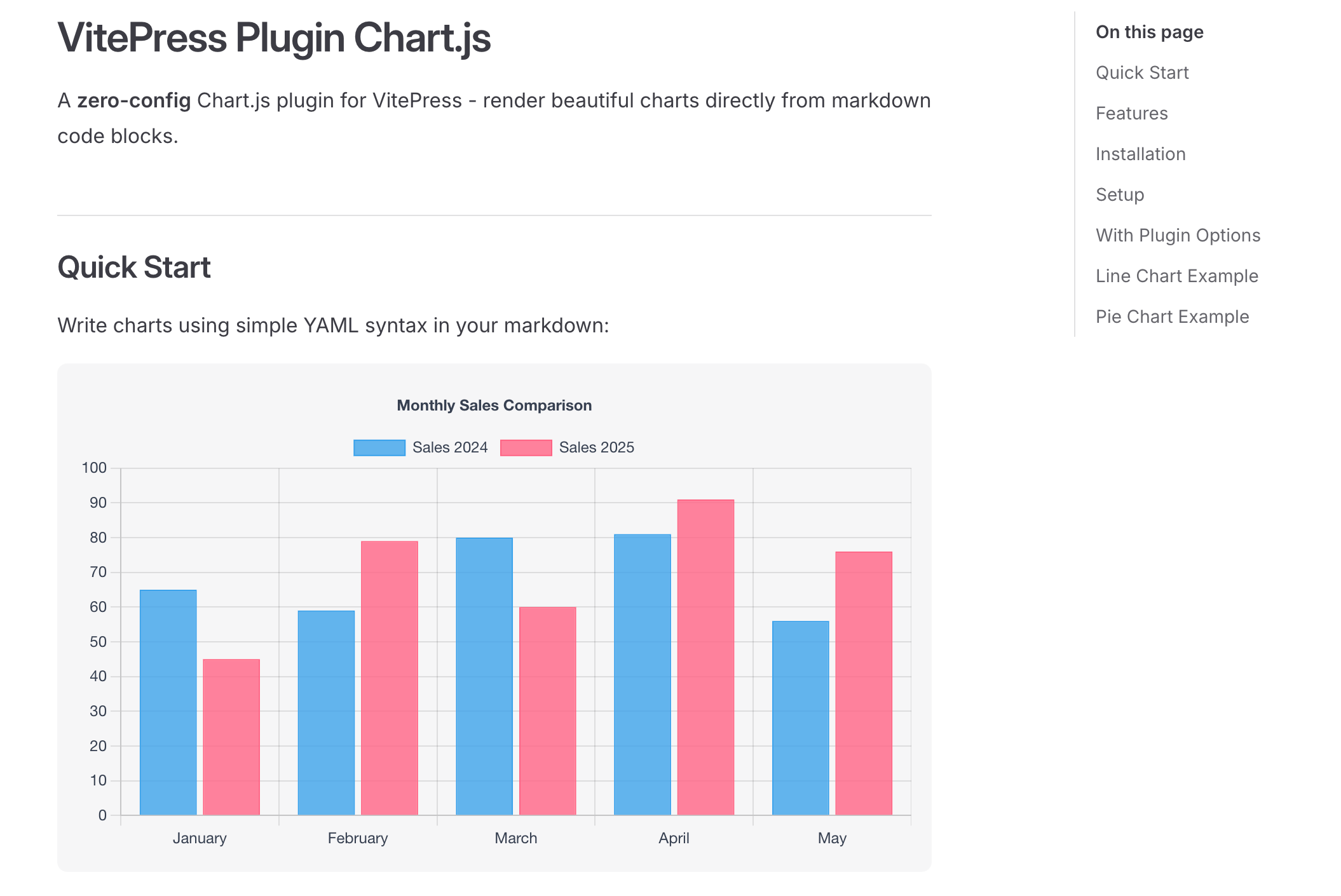
```chart
type: bar
data:
  labels: [January, February, March, April, May]
  datasets:
    - label: Sales 2024
      data: [65, 59, 80, 81, 56]
    - label: Sales 2025
      data: [45, 79, 60, 91, 76]
options:
  plugins:
    title:
      display: true
      text: Monthly Sales Comparison
```
4. Load Configuration from File
You can load chart configuration from external files in your public folder. All files are resolved at build time — no runtime fetching.
YAML/JSON Files
```chart
url: /charts/my-chart.yaml
```
Example YAML file (public/charts/my-chart.yaml):
type: line
data:
  labels: [January, February, March, April, May, June]
  datasets:
    - label: Sales 2024
      data: [65, 59, 80, 81, 56, 55]
      borderColor: rgba(54, 162, 235, 1)
      tension: 0.4
JavaScript Files (Dynamic Data)
JavaScript files are executed at build time in Node.js. You can use fs, path, fetch and any installed npm packages.
```chart
url: /charts/dynamic-chart.js
```
Example JS file (public/charts/dynamic-chart.js):
export default function() {
  const randomData = Array.from({ length: 6 }, () =>
    Math.floor(Math.random() * 100)
  );

  return {
    type: 'bar',
    data: {
      labels: ['Jan', 'Feb', 'Mar', 'Apr', 'May', 'Jun'],
      datasets: [{
        label: 'Random Data',
        data: randomData
      }]
    }
  };
}
Async functions are also supported:
export default async function() {
  const response = await fetch('https://api.example.com/data');
  const data = await response.json();

  return {
    type: 'line',
    data: data
  };
}
| File Type | Extension | Description |
|---|---|---|
| YAML | .yaml |
Static configuration |
| JSON | .json |
Static configuration |
| JavaScript | .js, .mjs |
Dynamic/computed configuration (runs in Node.js at build time) |
Chart Types
Line Chart
type: line
data:
  labels: [Mon, Tue, Wed, Thu, Fri]
  datasets:
    - label: Visitors
      data: [120, 190, 300, 250, 420]
      tension: 0.4
      fill: true
Bar Chart
type: bar
data:
  labels: [Q1, Q2, Q3, Q4]
  datasets:
    - label: Revenue
      data: [50, 60, 70, 80]
Pie / Doughnut
type: doughnut
data:
  labels: [Desktop, Mobile, Tablet]
  datasets:
    - data: [55, 30, 15]
Radar Chart
type: radar
data:
  labels: [Speed, Power, Defense, Stamina, Agility]
  datasets:
    - label: Player A
      data: [80, 90, 70, 85, 75]
Scatter / Bubble
type: scatter
data:
  datasets:
    - label: Data Points
      data:
        - { x: 10, y: 20 }
        - { x: 20, y: 30 }
Extended Chart Types
With additional Chart.js plugins you can use:
| Package | Chart Types |
|---|---|
@sgratzl/chartjs-chart-boxplot |
boxplot, violin |
chartjs-chart-geo |
choropleth, bubbleMap |
chartjs-chart-matrix |
matrix |
chartjs-chart-treemap |
treemap |
chartjs-chart-graph |
forceDirectedGraph, tree, dendrogram |
Register them in your theme and use any type string — the plugin accepts any chart type.
Plugin Configuration
Configure per chart in YAML
options:
  plugins:
    zoom:
      zoom:
        wheel:
          enabled: true
        mode: xy
      pan:
        enabled: true
    datalabels:
      display: true
      color: white
    annotation:
      annotations:
        line1:
          type: line
          yMin: 50
          yMax: 50
          borderColor: red
Configuration Options
Options are passed via chartjs in your VitePress config:
| Option | Type | Default | Description |
|---|---|---|---|
defaultOptions |
object |
{} |
Default options for all charts |
defaultWidth |
string | number |
'100%' |
Default chart width |
defaultHeight |
string | number |
'400px' |
Default chart height |
colorPalette |
string[] |
Built-in | Custom color palette |
enableZoom |
boolean |
false |
Enable zoom plugin globally |
enableDatalabels |
boolean |
false |
Enable datalabels plugin globally |
root |
string |
process.cwd() |
Root directory for resolving url: paths |
TypeScript Support
import type {
  ChartConfig,
  PluginConfig,
  ChartData,
  ChartOptions,
  DatasetConfig,
  SupportedChartType,
} from 'vitepress-plugin-chartjs'
How It Works
withChartjs()wraps your VitePress config, adding markdown and Vite plugins- Markdown plugin converts
```chartblocks to<VpChart />Vue components at build time - Build-time resolver handles
url:directives — reads YAML/JSON files, executes JS modules, fetches HTTP URLs - Vite plugin registers the
VpChartVue component in the client app - Vue component renders the chart with Chart.js when it becomes visible (IntersectionObserver)
All data resolution happens at build time. The client only receives pre-computed chart configurations.
Dependencies
Any Chart.js plugins you want to use should be installed separately and registered in your theme.
License
MIT License
Related Packages
Interactive, collapsible file/folder tree diagrams for VitePress — supports YAML...
Markdown-it plugin to display Vue Single File Component as tabs snippets in mark...
A VitePress plugin that automatically identifies and links glossary terms with i...
Vue 3 charting library built on ECharts with advanced formatting and theming
Version History
| Version | Released | Vue | License |
|---|---|---|---|
| 1.2.1 | ^3.5.0 | MIT | |
| 1.2.0 | ^3.5.0 | MIT | |
| 1.1.2 | ^3.5.0 | MIT | |
| 1.1.1 | ^3.5.0 | MIT | |
| 1.1.0 | ^3.5.0 | MIT | |
| 1.0.3 | ^3.4.0 | MIT | |
| 1.0.2 | ^3.4.0 | MIT | |
| 1.0.1 | ^3.4.0 | MIT | |
| 1.0.0 | ^3.4.0 | MIT |