sileojs
| Install | |
|---|---|
npm install sileojs |
|
| Latest Version: | 0.1.11 |
| License: | MIT |
| Last Updated: | Oct 4, 2026 |
| Links: | GitHub · npm |
Sileo (vanilla JS)
English · Español



Docs · Documentación en español · Demo · npm · GitHub
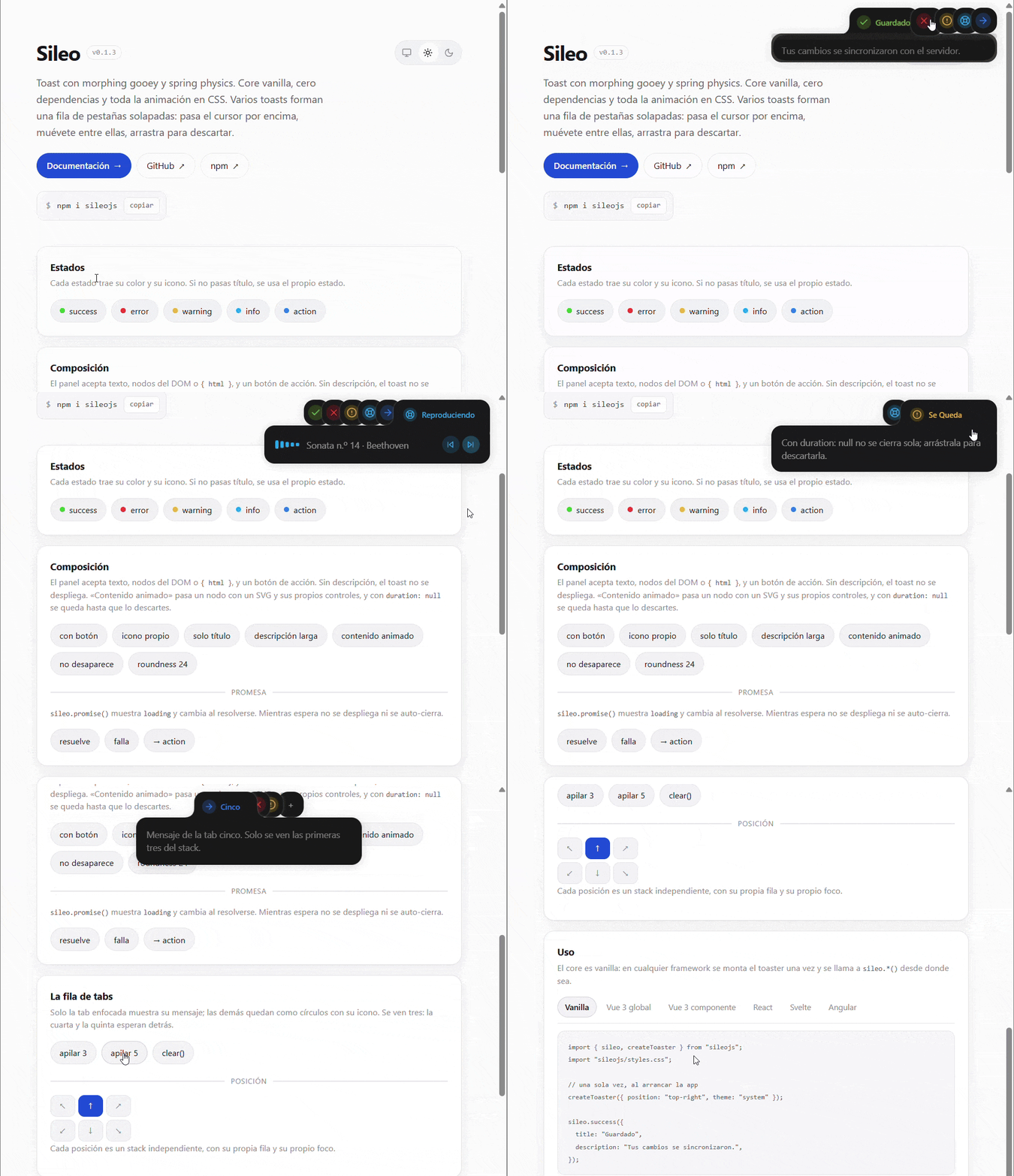
A rewrite of sileo.aaryan.design — toasts with gooey morphing and spring physics — rebuilt as a vanilla core with zero dependencies that works with any JS framework. Ships a Vue 3 adapter.
The original is React + motion. Here all the animation
lives in CSS: the spring is a native linear() easing and the geometry is
resolved with calc() / max() over custom properties. JS only keeps state,
builds the DOM, measures two things (pill width and panel height), places the
tabs in the row and runs the timers.
src/sileo.css   animation engine (spring, morph, gooey, themes)
src/sileo.js    vanilla core — store + renderer + API
src/vue.js      Vue 3 adapter (component, plugin, composable)
docs/en.html    full documentation (sidebar, live examples)
docs/index.html the same, in Spanish — the page picks the language from the browser
docs/docs.css   stylesheet and script shared by both languages
docs/docs.js
demo/index.html playground, no build
README.es.md    this same file, in Spanish
Full documentation → — install, usage per framework, API reference, CSS variables and accessibility, with examples you can fire right on the page.
Install
npm i sileojs
import { sileo, createToaster } from "sileojs";
import "sileojs/styles.css";

createToaster({ position: "top-right", theme: "system" });

sileo.success({ title: "Saved", description: "Your changes were synced." });
createToaster() is optional: the first sileo.*() mounts a toaster with the
defaults.
Vue 3
<script setup>
import { SileoToaster } from "sileojs/vue";
import { sileo } from "sileojs";
import "sileojs/styles.css";
</script>

<template>
  <SileoToaster position="top-right" theme="system" />
  <button @click="sileo.success({ title: 'Done' })">Save</button>
</template>
No component (plugin + global $sileo)
The plugin mounts the toaster on boot and makes $sileo available in every
template, so you never place <SileoToaster /> anywhere nor import anything in
each component:
// main.js
import { createApp } from "vue";
import { SileoPlugin } from "sileojs/vue";
import "sileojs/styles.css";
import App from "./App.vue";

createApp(App)
  .use(SileoPlugin, {
    position: "top-right",
    theme: "light",
    options: { roundness: 14, styles: { toast: "top-90" } },
  })
  .mount("#app");
<template>
  <button @click="$sileo.success({ title: 'Saved' })">Save</button>
</template>
$sileo only exists inside the template (it is a globalProperty). In
<script setup> use import { sileo } from "sileojs" or inject("sileo").
Pass { mount: false } if you would rather mount the toaster yourself (or use
the component).
Theme, position and styles on the fly
useSileoConfig() returns a reactive object shared by the whole app.
Mutating it reconfigures the toaster live, including the toasts already on
screen:
<script setup>
import { useSileoConfig } from "sileojs/vue";

const cfg = useSileoConfig();

const dark  = () => (cfg.theme = "dark");
const below = () => (cfg.position = "bottom-center");
const big   = () => (cfg.styles.title = "text-lg font-bold");
</script>
| Field | What it is |
|---|---|
cfg.position |
one of the 6 positions |
cfg.theme |
light | dark | system |
cfg.offset |
number/string or { top, right, bottom, left } |
cfg.visibleToasts |
tabs visible in the stack |
cfg.options |
defaults for every toast (roundness, duration…) |
cfg.styles |
per-part styles (see Per-part styles) |
In templates it is also available as $sileoConfig, and the component takes the
same things as props:
<SileoToaster position="top-right" theme="light" :styles="{ toast: 'top-90' }" />
Other frameworks
The core knows nothing about frameworks. The pattern is always the same:
// React
useEffect(() => {
  const toaster = createToaster({ position: "top-right" });
  return () => toaster.destroy();
}, []);

// Svelte
onMount(() => {
  const toaster = createToaster({ position: "top-right" });
  return () => toaster.destroy();
});

// Angular / vanilla
ngOnInit()   { this.toaster = createToaster(); }
ngOnDestroy(){ this.toaster.destroy(); }
destroy uses this, so call it on the toaster (() => toaster.destroy())
rather than passing it bare as a callback.
Changing theme, position or styles on the fly needs neither the toaster instance
nor an adapter: configure() (or the sileo shorthands) reaches it from
anywhere.
import { configure, sileo } from "sileojs";

configure({ theme: "dark" });                     // or sileo.setTheme("dark")
configure({ position: "bottom-center" });         // or sileo.setPosition(...)
configure({ styles: { toast: "top-90" } });       // or sileo.setStyles(...)
sileo.getConfig();                                // the current config
Everything applies live: the toasts already on screen switch theme, move to the new position and repaint with the new styles.
The demo (demo/index.html) carries the same example for each framework in
tabs.
API
sileo
| Method | Description |
|---|---|
sileo.show(opts) |
Uses opts.type as the state |
sileo.success/error/warning/info/action/loading(opts) |
Shorthands per state |
sileo.promise(promise | () => promise, opts) |
loading → success / error / action |
sileo.update(id, opts) |
Mutates a live toast (collapses, swaps, reopens) |
sileo.dismiss(id) |
Animated exit |
sileo.clear(position?) |
Clears everything, or one position |
sileo.configure(opts) |
Reconfigures the toaster live (mounts it if missing) |
sileo.setTheme / setPosition / setStyles(v) |
configure shorthands |
sileo.getConfig() |
The current config (or null with no toaster) |
They return the toast's id. Every call is a notification: with no id one
is generated for it, so two calls in a row both show. Pass your own id when
you want the next call to replace that same notification (that is how you
follow a task: sileo.promise(), sileo.update()).
Toast options
| Option | Type | Default |
|---|---|---|
title |
string |
the state |
description |
string | Node | { html } |
— |
type / state |
success | loading | error | warning | info | action |
success |
position |
one of the 6 positions | the toaster's |
duration |
number | null (null = it stays) |
6000 |
icon |
string | Node | { html } |
the state's icon |
styles |
per-part styles, see Per-part styles | — |
fill |
panel colour | per theme |
roundness |
number (scales the gooey blur) |
16 |
autopilot |
false | { expand, collapse } (ms) |
opens at 150ms, closes at 4000ms |
button |
{ title, onClick } |
— |
id |
string |
a unique one per call |
Toaster options
position, theme (light \| dark \| system), offset (number/string or
{ top, right, bottom, left }), options (defaults for every toast), styles
(shorthand for options.styles), visibleToasts (tabs visible in the stack),
container (default document.body).
The toaster is a single one for the whole page: createToaster() returns the
existing one (applying the new options to it). getToaster() returns the mounted
one or null, and the Vue component uses it to destroy only the one it created.
toaster.set(opts) takes the same fields and applies them live. options and
styles are merged with whatever was there; null clears them and
replace: true swaps them wholesale (that is what the Vue adapter uses, since
it already sends the full state). toaster.config returns the current config.
Per-part styles
styles is a part → style object. Nothing in it is framework-specific: what
you hand over are classes, CSS properties, or both.
| Part | Node |
|---|---|
viewport |
the container for that position |
toast |
the toast root |
canvas, pill, body |
the gooey layers |
header, badge, title |
the header (the tab itself) |
content, description, button |
the open panel |
count |
the +N chip |
Three shapes, mixable across parts:
sileo.success({
  title: "Saved",
  description: "All good.",
  styles: {
    toast: "rounded-2xl shadow-lg",              // classes
    description: { color: "#64748b" },           // CSS properties
    badge: { class: "ring-2", style: { "--x": "1" } }, // both
  },
});
camelCase and kebab-case properties work the same, and so do custom
properties (--sileo-*), so any CSS variable can be reached from here.
To apply them to every toast put them on the toaster — and change them whenever you like:
createToaster({ position: "top-right", styles: { toast: "top-90" } });

// later on, and it reaches what is already on screen
configure({ styles: { title: "text-lg", toast: null } }); // null drops that part
They merge per part and the toast wins: if the toaster sets styles.toast
and the call does too, the call's value is used. Applying new styles always
removes the previous ones, so swapping them live leaves nothing behind.
Interaction
- Hover / focus → opens the panel and pauses the auto-dismiss.
- Drag vertically > 30px → dismisses.
prefers-reduced-motionturns off all movement.
The cursor counts even when it does not move: if the toast is born under the
pointer the browser fires no pointerenter, so Sileo checks where the pointer
is on mount and on every relayout. The panel stays open and the auto-dismiss
paused until the cursor leaves, and only then does the clock start again.
No call ever gets swallowed. With no id, each one is its own notification and
they coexist in the row. With the same id, the new one replaces the previous
but still shows: it comes back to the front of the row (even if it was buried
under the stack cut, or halfway out), the header replays its entrance even when
the text is identical, and the timer starts from zero.
The overlapping tab row
When several toasts share a position they do not stack as a list: they form an overlapping row of tabs at the title's height. The focused tab shows its icon, its title and its message; the rest shrink to a circle with just the icon and ride over their neighbour. Nothing drops but the focused one's panel.
- At rest the tabs behind sit on top of one another like a deck, showing only their icon. Focus goes to the tab at the screen edge (the newest toast), and a new toast takes focus.
- The icon hugs the edge the tab peeks from, which depends on the position: in the right-hand ones the row grows inwards and the left side peeks; in the left and centre ones, the right side.
- When the pointer comes in the deck opens: every notification shows up (the cut at three is only for the resting state) and the front tab opens its panel.
- Only the focused tab widens; the rest stay as their icon. But it always widens to the same width, that of the widest in the stack: what it grows offsets what it shifts, so the tab you are pointing at does not slip away from the pointer. If it took its own width, focusing a short-titled one would bounce focus to its neighbour.
- The focused tab keeps its natural
z-index: below the ones in front of it and above the ones behind, like a real tab. Put on top of everything, focusing a middle one would swallow the ones between it and the screen edge. - If the row does not fit the toaster's width, the focused tab's width is trimmed first and then how much each icon peeks, rather than overflowing: a tab outside the viewport would fall outside the hover area and be unreachable.
- Moving the pointer to another circle jumps focus to that tab: it widens in place to show its title, opens its message, pushes the ones behind and the previous one goes back to being a circle.
- While the pointer is inside, the
autopilotstops counting: it will not close the panel you are pointing at. - When the pointer leaves, focus goes back to the front and everything closes.
- At rest 3 tabs are visible (
--sileo-stack-max/ thevisibleToastsoption) and, if there are more, a+shows up at the end of the deck: it only tells you there are others; the exact number shows when the row opens. The focused tab is never hidden, even as new toasts arrive.
The positions are a single recurrence, from the screen edge inwards:
x[0]   = 0
x[i+1] = x[i] + width(i) - tab-overlap
width(i) = (i focused ? its pill's width : the toast's height)
The JS publishes --_tx (shift along the row), --_i (depth in z) and --_sh
(stack height); CSS derives the translate, the z-index and each tab's width
(--_rw, which is --_pw on the focused one and --sileo-height on the rest).
The shift goes on the pill and the header, not on the root, so the panel always
stays glued to the edge. The viewport measures exactly the stack and acts as the
hover area, so moving between tabs never closes it.
How the CSS works
The original's visual trick is two rectangles and an SVG filter:
- pill (the header capsule) and body (the panel) are two
divs withborder-radius, inside a layer withfilter: url(#sileo-goo-N). - The filter is
feGaussianBlur→feColorMatrix(alpha ×20 −10): it turns the blur into a hard edge, and that is where two nearby shapes merge (metaballs). - The bridge's colour does not come from the blur: in unpremultiplied sRGB
transparent is black, so the bridge came out dark grey. It is flooded with
feFlood(whoseflood-colorisvar(--sileo-fill), inherited from the toast) and clipped by the thresholded alpha; theSourceGraphicgoes on top so the shapes keep their crisp edge. That is why there is one filter per toast. - On expanding, the pill grows
blur × 3downwards to force that overlap. - The top edge (
top-*) reuses the same geometry withscaleY(-1). - The shadow goes after in the canvas's filter chain
(
filter: var(--sileo-goo) var(--sileo-shadow)), so it falls on the already merged silhouette. Inside the filter it would be useless: the alpha threshold would eat it.
JS only publishes two measurements through ResizeObserver:
--_pw   pill width     = header scrollWidth + padding + 10
--_ch   content height = panel scrollHeight
and CSS derives the rest:
--_exp: max(calc(var(--sileo-height) * 2.25),
            calc(var(--sileo-height) + var(--_ch)));
The spring (bounce: 0.25) is the linear() function in
--sileo-spring-easing; on collapse it switches to --sileo-ease-flat (no
overshoot), reproducing the original's bounce: 0.
Customising
It is all custom properties:
:root {
  --sileo-width: 380px;
  --sileo-height: 44px;
  --sileo-roundness: 20px;
  --sileo-duration: 500ms;
  --sileo-state-success: oklch(0.72 0.19 150);

  /* tab row */
  --sileo-tab-overlap: 20px;     /* overlap at rest (the deck) */
  --sileo-tab-overlap-hot: 12px; /* overlap with the pointer inside */
  --sileo-stack-max: 3;          /* visible tabs */
  --sileo-gap: 12px;             /* distance from the screen edge */
  --sileo-shadow: drop-shadow(0 2px 8px rgb(0 0 0 / 0.18));
}
The shadow depends on the fill, not on taste: it is what separates a tab from the
one behind it. With light capsules a dark shadow is enough; with
theme: "light" the capsule is dark and a black shadow over another dark capsule
separates nothing, so there it also gets a light rim. If you change
--sileo-fill by hand, adjust --sileo-shadow too.
--sileo-height, --sileo-tab-overlap and --sileo-stack-max are declared with
@property, so the JS reads them already resolved to px and you can write them
in any unit.
Tests
Two assertion suites that run in the browser, with no dependencies:
demo/spec.html— the core: stack order, shifts, focus,z-index, timers, autopilot versus the pointer, dragging andpromise.demo/spec-vue.html— the Vue 3 adapter (plugin with global$sileo, component withuseSileo(), and that unmounting a component does not take down a toaster someone else mounted). Loads Vue from a CDN with an import map.
Open them in the browser: each prints PASS/FAIL and a TODO OK at the end.
Demo
ES modules need a server with the right MIME type (python -m http.server
serves .js as text/plain on Windows and Chrome rejects it):
npx serve .
# open http://localhost:3000/demo/
Browser support
Chrome/Edge 113+, Safari 16.4+, Firefox 128+ (linear(), oklch(),
color-mix(), @property, the translate/scale properties). No build step,
no dependencies.
Original design: Aaryan Kapoor · MIT.
Related Packages
Extremely lightweight (~2.7 KB gzipped), zero-dependency toast notification libr...
Universal, modern toast notification engine for all JavaScript frameworks and pl...
Lightweight and customizable toast notifications for web applications.
Version History
| Version | Released | License |
|---|---|---|
| 0.1.11 | MIT | |
| 0.1.10 | MIT | |
| 0.1.9 | MIT | |
| 0.1.8 | MIT | |
| 0.1.7 | MIT | |
| 0.1.6 | MIT | |
| 0.1.5 | MIT | |
| 0.1.4 | MIT | |
| 0.1.3 | MIT | |
| 0.1.2 | MIT | |
| 0.1.1 | MIT | |
| 0.1.0 | MIT |