pptx-viewer-core
| Install | |
|---|---|
npm install pptx-viewer-core |
|
| Latest Version: | 4.13.5 |
| License: | Apache-2.0 |
| Last Updated: | Oct 21, 2026 |
| Links: | GitHub · npm |
pptx-viewer-core



A TypeScript library that reads, creates, edits, and saves PowerPoint (
.pptx) files. It runs in the browser and in Node.js, with no native or system dependencies.
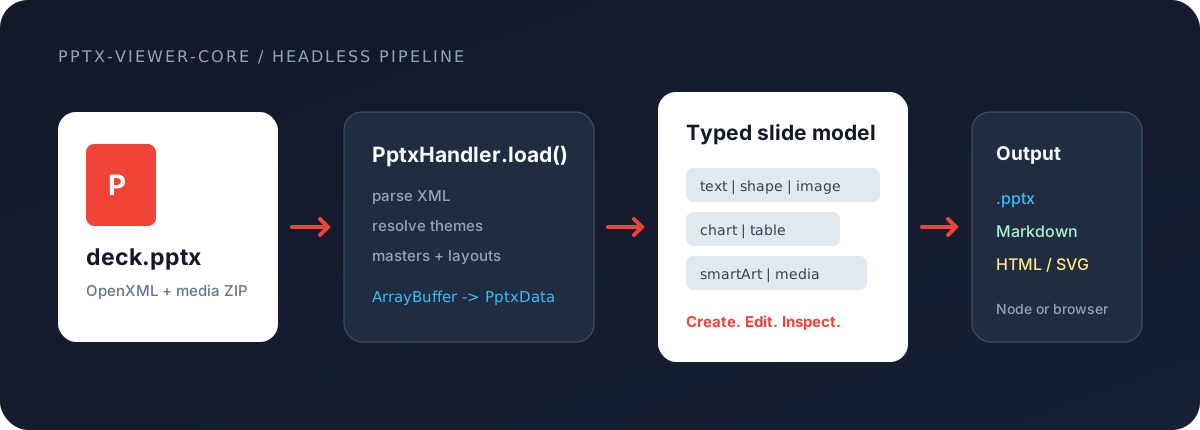
Hand it the bytes of a .pptx file and it gives you back a structured, fully typed object that describes every slide: text, shapes, images, charts, tables, and more. Change anything in that object and write it back to a valid .pptx. You can also build new presentations from scratch with a simple chainable API, or turn a deck into Markdown.
For portable interchange, PptxJsonConverter exports that model as a versioned, self-contained pptx-viewer-json document. PptxHandler.load() recognizes those JSON bytes as well as .pptx and legacy .ppt input, then prepares a normal in-memory archive so you can edit and save it as a .pptx.
There is no UI here: this is the engine on its own. Use it directly when you need to process .pptx files without a screen, for example on a server, in a script, or in a build step. The same engine powers the React, Vue, Angular, Svelte, and Vanilla JavaScript viewers.
📦 npm · 📖 Full docs · ▶️ Live demo · Choose a viewer
Part of ooxml: Office · Word · Excel · PowerPoint · Visio · OpenTeams · Core
Install
npm install pptx-viewer-core
That's it, nothing else to install. All runtime dependencies are pulled in automatically by your package manager. Password protection needs nothing extra (it runs on the Web Crypto API). Only Node-side digital-signature signing/verification pulls in a few more packages (
node-forge,xml-crypto,@xmldom/xmldom), and only if you actually use it.
What it does
| Capability | Description |
|---|---|
| Read | Open a .pptx and pull out slides, text, shapes, images, charts, tables, SmartArt, themes, comments, animations, transitions, and document info |
| Import | Open a legacy binary .ppt (PowerPoint 97-2003) too: load() detects the compound file and converts it, so you get the same PptxData. |
| Export | save(slides, { outputFormat: 'ppt' }) writes a real binary .ppt (MS-PPT/OfficeArt records in an OLE2 container), optionally RC4-encrypted via pptPassword; see the Limitations page for current fidelity notes. Saving without an explicit outputFormat still writes .pptx. |
| Edit | Change the data in memory: add, remove, or reorder slides; insert elements; edit text; restyle; switch themes |
| Save | Write the changed data back to a valid .pptx, leaving everything you did not touch untouched |
| Convert | Turn a deck into Markdown, optionally pulling the images out alongside it |
| Split | Save any subset of slides as its own standalone .pptx by passing just those slides to save() |
| Protect | Open and save password-protected files (AES-128/256 encryption) |
Positions and sizes use PowerPoint's own internal unit, the EMU (English Metric Unit): 1 inch = 914,400 EMU, 1 point = 12,700 EMU, and 1 pixel = 9,525 EMU at 96 DPI. You rarely deal with the raw numbers: helpers (inches, cm, mm, pt) let you work in familiar units instead.
Quick start
import { PptxHandler } from 'pptx-viewer-core';

// 1. Open a .pptx file
const handler = new PptxHandler();
const buffer = await fetch('presentation.pptx').then((r) => r.arrayBuffer());
const data = await handler.load(buffer);

console.log(`${data.slides.length} slides, canvas ${data.width}x${data.height}`);

// 2. Change a slide
data.slides[0].elements[0].text = 'Updated title';

// 3. Save it back to .pptx bytes
const outputBytes = await handler.save(data.slides); // => Uint8Array

// 4. Or write just a few slides out as their own deck
const excerpt = await handler.save([data.slides[0]!, data.slides[2]!]); // => Uint8Array
load() gives you a PptxData object: a plain, fully typed description of the presentation. Read from it, change it, and pass its slides back to save() to get a valid .pptx file as bytes.
Build a presentation from scratch
The chainable API lets you create a deck step by step, without touching any file format details:
import { Presentation, ThemePresets, ChartBuilder } from 'pptx-viewer-core';

const pptx = await Presentation.create({
	title: 'Sales Report',
	theme: ThemePresets.MODERN_BLUE,
});

// Each slide is added to the deck automatically: no manual .build() or .push() needed
pptx
	.addSlide('Title Slide')
	.addText('Q4 Sales Report', { fontSize: 44, bold: true, x: 100, y: 200, width: 800, height: 80 });

pptx
	.addSlide('Blank')
	.addText('Revenue by Region', { fontSize: 28, x: 50, y: 30, width: 600, height: 50 })
	.addBuilderElement(
		ChartBuilder.create('bar')
			.categories(['North', 'South', 'East', 'West'])
			.addSeries('2026', [210, 150, 180, 120], '#2563EB')
			.title('Revenue ($M)')
			.bounds(50, 100, 860, 420),
	);

pptx.replaceText('2026', 'FY2026'); // find/replace, merge, and templates all chain the same way

const bytes = await pptx.save();
The builder API comes in three levels, from highest to lowest:
Presentation: the whole deck at once (slides, text operations, sections, templates, merging, saving).- Element builders: one per element type, for fine-grained control:
TextBuilder,ShapeBuilder,ChartBuilder,TableBuilder,ImageBuilder,ConnectorBuilder,MediaBuilder,GroupBuilder. PptxXmlBuilder: raw XML, for the rare cases the higher levels do not cover.
It also ships unit helpers (inches, cm, mm, pt), common slide sizes (SlideSizes), and 8 ready-made themes (ThemePresets). The full docs cover every builder.
Turn a deck into Markdown
import { PptxHandler, PptxMarkdownConverter } from 'pptx-viewer-core';

const handler = new PptxHandler();
const data = await handler.load(buffer);

const converter = new PptxMarkdownConverter(
	'./output', // output directory for the .md file and extracted media
	{
		sourceName: 'presentation.pptx',
		includeMetadata: true,
		includeSpeakerNotes: true,
		mediaFolderName: 'media',
		semanticMode: true, // clean headings/lists instead of positioned HTML
	},
	fileSystemAdapter,
);

const markdown = await converter.convert(data); // => the Markdown text
To write files to disk, pass a FileSystemAdapter (an object with writeFile, writeBinaryFile, and createFolder methods); this keeps the converter free of any assumptions about where it runs. By default it keeps each element where it sat on the slide (absolutely positioned HTML); set semanticMode: true to get clean headings, paragraphs, and lists instead.
Exchange a deck as JSON
import { PptxHandler, PptxJsonConverter } from 'pptx-viewer-core';

const json = PptxJsonConverter.toJson(data, { pretty: true, generator: 'my-app' });

// `load()` detects the format marker and returns a normal editable model.
const imported = new PptxHandler();
const restored = await imported.load(new TextEncoder().encode(json).buffer);
const bytes = await imported.save(restored.slides);
The JSON document has a format: "pptx-viewer-json" marker and version number. It embeds binary model data as tagged base64, so it is self-contained; it is intended for model interchange, not a byte-for-byte copy of the source ZIP archive.
PptxHandler API
PptxHandler is the one class you use to open, change, and save files. Its main methods:
| Method | Signature | What it does |
|---|---|---|
load |
(data, options?) => Promise<PptxData> |
Open a .pptx and return the structured data |
save |
(slides, options?) => Promise<Uint8Array> |
Write slides back to .pptx bytes |
exportSlides |
(slides, options) => Promise<Map<number, Uint8Array>> |
Backend hook, not a working exporter: the default runtime has no rendering backend, so it reports an EXPORT_BACKEND_UNAVAILABLE warning and returns empty buffers. Use SvgExporter for headless per-slide output, or a viewer binding's export pipeline in a browser |
getImageData |
(path) => Promise<string | undefined> |
Get an embedded image as a base64 data URL |
getMediaArrayBuffer |
(path) => Promise<ArrayBuffer | undefined> |
Get the raw bytes of an embedded media file |
getLayoutOptions |
() => PptxLayoutOption[] |
List the slide layouts available |
getCompatibilityWarnings |
() => PptxCompatibilityWarning[] |
List features in the file that are not fully supported |
applyTheme |
(colors, fonts, name?) => Promise<void> |
Apply a complete theme |
setPresentationTheme |
(path, applyToAll?) => Promise<void> |
Load a .thmx theme file |
The PptxData you get from load() exposes slides, width / height (and the exact widthEmu / heightEmu), theme, slideMasters, slideLayouts, sections, coreProperties, embeddedFonts, and more. See the full docs for the complete PptxHandler, chart/SmartArt, and theme APIs.
What's supported
| Category | Details |
|---|---|
| Element types | 16: text, shape, connector, image, picture, table, chart, smartArt, ole, media, group, ink, contentPart, zoom, model3d, unknown |
| Preset shapes | All 187 ST_ShapeType presets (the complete ECMA-376 enumeration), including the ones with adjustable handles |
| Chart types | 23, including waterfall, funnel, treemap, sunburst, box-whisker, region-map, and combo charts; with trendlines, error bars, and embedded Excel data |
| Transitions | 57 types (including morph, vortex, ripple, and shred) |
| Animations | 39 editor presets and 26 motion paths, including colour animation and text that builds in by word, letter, or paragraph |
| SmartArt | 14 layout types resolved from 35 named presets, broken into editable shapes with a live reflow engine for structural edits |
| Table styles | 74 built-in PowerPoint gallery styles resolved against the deck's own theme, plus any style the deck itself defines |
| Fills | Solid, gradient (linear, radial, path), image, and 56 patterns |
| Themes | 8 built-in presets, switchable at runtime, with layout and placeholder remapping |
| Security | AES-128/256 encryption and decryption, modify-password (SHA), and detection of digital signatures |
| Preserved | VBA macros, custom XML, comment authors, and strict-format files are kept intact through a save |
How it works
You only ever work with one class, PptxHandler, and one data object, PptxData. The engine takes care of the rest: when you call load() it unzips the file, reads the XML, resolves the theme, masters, and layouts, and hands you a clean object. save() runs those same steps in reverse.
A few things worth knowing as you use it:
- Every element has a
typefield (text,shape,image,chart,table, and so on). Check it before reading element-specific properties, for exampleif (element.type === 'image'). TypeScript then knows exactly which fields exist. - Shapes are drawn from a built-in catalogue covering all 187 PowerPoint preset shapes, so curves, arrows, and callouts come out with the right outlines.
- Colours follow PowerPoint's theme rules, so a colour defined as "accent 1, but 20% lighter" resolves to the correct final value for the active theme.
Under the hood the engine is split into many small, focused modules. If you want the full load and save pipeline, the complete type system, and a module-by-module map, see the full documentation.
Limitations
- SmartArt is broken into editable shapes. It uses PowerPoint's own pre-computed shape geometry when present; after structural edits (add/remove/reorder/promote/demote nodes) a live reflow engine rebuilds the shapes, with an algorithmic fallback covering 13 layout families for diagrams PowerPoint never rendered.
- Chart editing covers data, categories, and chart type, plus legend, axes (scale, format, titles, gridlines, log/display units), data labels, trendlines, error bars, and per-series/per-point markers and fills. A handful of rarely-used chart properties remain read-only for display.
- Strict-format files (ISO/IEC 29500 Strict) are converted to the more common Transitional form when opened and converted back when saved.
See the full docs for the details behind each of these.
License
Apache-2.0. Please keep the NOTICE file with redistributions.
Related Packages
pptx-viewer for Vue 3: a PowerPoint viewer and editor component to render, edit,...
Headless presentation state machine for Web-PPT: navigation, zoom, search and cl...
Version History
| Version | Released | License |
|---|---|---|
| 4.13.5 | Apache-2.0 | |
| 4.13.4 | Apache-2.0 | |
| 4.13.3 | Apache-2.0 | |
| 4.13.1 | Apache-2.0 | |
| 4.13.0 | Apache-2.0 | |
| 4.12.0 | Apache-2.0 | |
| 4.11.2 | Apache-2.0 | |
| 4.11.1 | Apache-2.0 | |
| 4.11.0 | Apache-2.0 | |
| 4.10.0 | Apache-2.0 | |
| 4.9.4 | Apache-2.0 | |
| 4.9.3 | Apache-2.0 | |
| 4.9.2 | Apache-2.0 | |
| 4.9.1 | Apache-2.0 | |
| 4.9.0 | Apache-2.0 | |
| 4.8.0 | Apache-2.0 | |
| 4.7.2 | Apache-2.0 | |
| 4.7.1 | Apache-2.0 | |
| 4.7.0 | Apache-2.0 | |
| 4.6.0 | Apache-2.0 | |
| 4.5.0 | Apache-2.0 | |
| 4.4.0 | Apache-2.0 | |
| 4.3.1 | Apache-2.0 | |
| 4.3.0 | Apache-2.0 | |
| 4.2.0 | Apache-2.0 | |
| 4.1.0 | Apache-2.0 | |
| 4.0.2 | Apache-2.0 | |
| 4.0.1 | Apache-2.0 | |
| 4.0.0 | Apache-2.0 | |
| 3.15.5 | Apache-2.0 |
Showing the latest 30 of 174. See every release on npm