ide-byebye
| Install | |
|---|---|
npm install ide-byebye |
|
| Latest Version: | 0.6.6 |
| License: | MIT |
| Last Updated: | Oct 20, 2026 |
| Links: | GitHub · npm |
ide-byebye




可能是让 AI 改前端最省心的办法。
它能大幅降低 AI 写前端时的幻觉。
AI 改前端翻车,问题很少出在代码本身,而是出在改哪儿。你给它一张截图,或者一句 「首页那个黑色按钮」,它只能猜:哪个组件?哪个文件?页面上三个一模一样的按钮,你说的是 哪一个?猜错了,它就一本正经地去改一个长得像的组件。
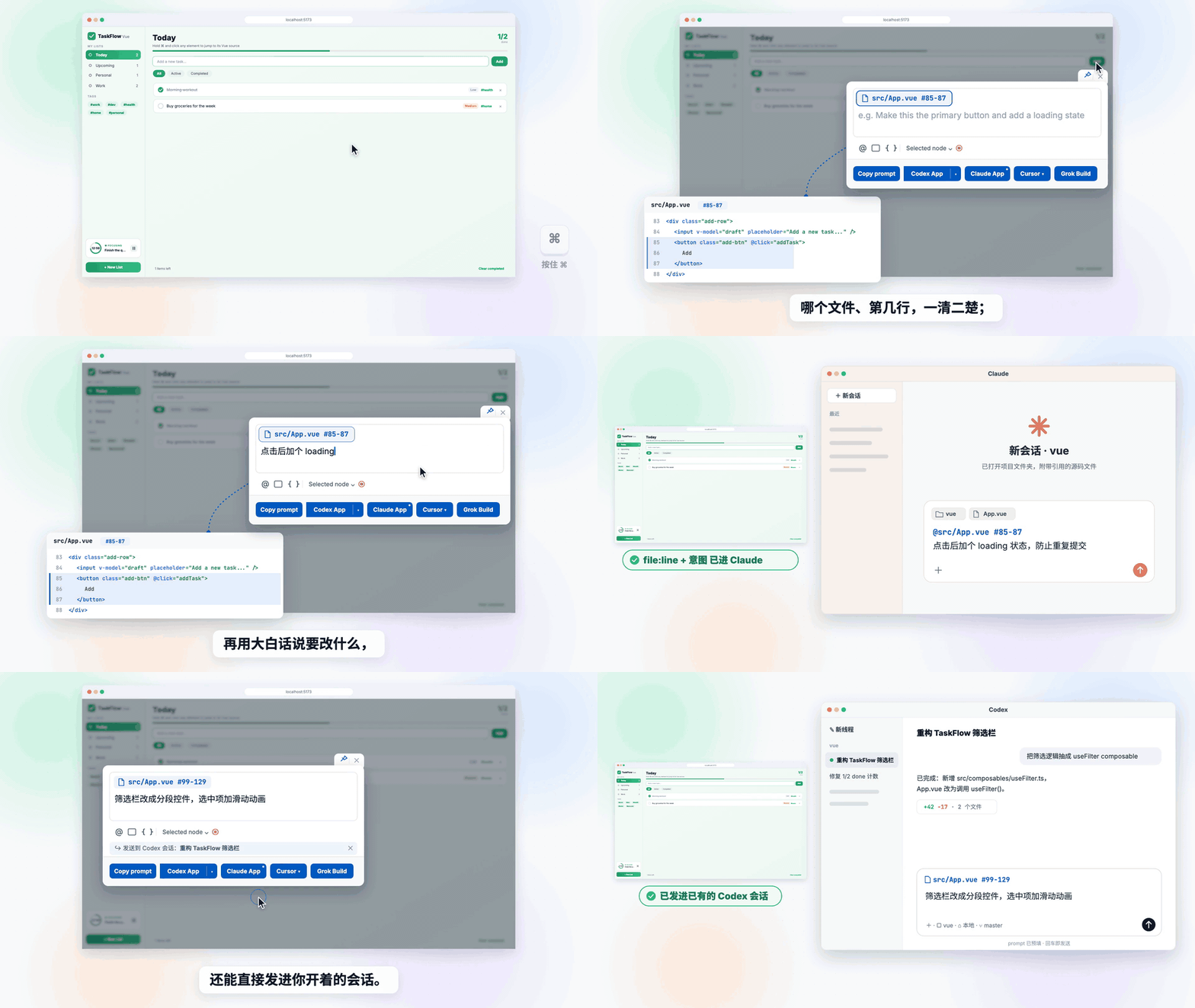
ide-byebye 把「猜」这一步删掉了。在运行中的页面上按住 ⌘ 点一下那个元素,写一句要改 什么,回车。Agent 读到的第一行就是精确位置:
@src/components/Hero.tsx #83

文案改成 Start Writing
没什么可猜的,也就没什么可幻觉的。
和你正在用的 Agent 无缝衔接。 Claude、Codex、Cursor、Grok Build、Claude Code CLI、 OpenCode、Devin、Antigravity、Windsurf:回车,它就在你的项目里打开,prompt 已经放好。 不用复制粘贴,常用的几个也不用额外配置。还能把 prompt 直接发进你已经开着的 Codex、Grok 或 Devin 会话。
实测数据
没有位置,Agent 只能自己找:grep、一个个读文件,一行代码还没改,token 和上下文已经 涨上去了。

用 Grok Build 在一个真实的 React 项目(875 个 TS/TSX 文件)里测:3 处 UI 改动,每处用 三种方式告诉它改哪,每种跑 3 次。27 次最终都改对了地方,差别全在「找」花了多少(中位数):
| 文字描述 | 截图 + 描述 | ide-byebye | |
|---|---|---|---|
| Token | 28.6 万 | 38.6 万 | 10.6 万 |
| 耗时 | 99 秒 | 88 秒 | 48 秒 |
| 读文件次数 | 11 | 11 | 3 |
| 上下文峰值 | 4.0 万 | 3.8 万 | 1.8 万 |
token 少约 2/3,耗时少一半,上下文少一半。Codex、Claude、Cursor 等收到的也是同一种
@文件 #行号 prompt。
支持范围
| 框架 | React、Vue、Svelte、Solid、Preact、Angular,以及 Next.js、Nuxt、SvelteKit |
| 构建工具 | Vite、webpack、rspack、rsbuild、esbuild、Farm、Next.js(Turbopack 和 webpack)、Angular CLI |
| Agent | Codex App、Claude App、Cursor、Grok Build、Claude Code CLI、OpenCode、Devin CLI、Antigravity IDE、Antigravity。可选开启:Devin Desktop、Windsurf,或者你自己的客户端 |
只在开发环境运行,不带模型、不带 AI SDK,也从不改你的文件。它负责拼好 prompt、打开 Agent,改代码的是 Agent。
安装
让 Agent 帮你装
在 Codex、Claude、Cursor 或 Grok 里打开你的项目,发送:
按 https://github.com/bo-516/ide-byebye/blob/main/README.zh-CN.md 把 ide-byebye 接到这个项目里
或者自己装
npm i -D ide-byebye
Vite(React、Vue、Svelte、Solid、Preact、Nuxt、SvelteKit、Astro……):
// vite.config.js
import { defineConfig } from 'vite';
import react from '@vitejs/plugin-react';
import ideByebye from 'ide-byebye';

export default defineConfig({
  plugins: [ideByebye(), react()], // 放在框架插件之前
});
Next.js(14.2+,Turbopack 或 --webpack,App Router 或 Pages Router):
// next.config.mjs
import withIdeByebye from 'ide-byebye/next';

export default withIdeByebye({ reactStrictMode: true }); // 你的 Next 配置
Angular CLI:CLI 没有插件钩子,所以在 angular.json 里加两处配置。
// ide-byebye.proxy.mjs(workspace 根目录)
import { angularProxy } from 'ide-byebye/angular';

export default await angularProxy();
// angular.json → projects.<app>.architect
"build": { "configurations": { "development": {
  "scripts": ["node_modules/ide-byebye/dist/angular/bootstrap.js"]
} } },
"serve": { "options": { "proxyConfig": "ide-byebye.proxy.mjs" } }
其他构建工具:导入对应的子路径。
| 构建工具 | 导入 | 写法 |
|---|---|---|
| webpack | ide-byebye/webpack |
inspector() 放进 plugins,和 HtmlWebpackPlugin 并列 |
| rspack | ide-byebye/rspack |
inspector() 放进 plugins,和 HtmlRspackPlugin 并列 |
| rsbuild | ide-byebye/rsbuild |
plugins: [inspector()] |
| esbuild | ide-byebye/esbuild |
plugins: inspector({ htmlFiles: ['./index.html'] })(HTML 不在 outdir 时才需要 htmlFiles) |
| Farm | ide-byebye/farm |
plugins: [...inspector()] |
| Nuxt | ide-byebye/vite |
nuxt.config 里写 vite: { plugins: [inspector()] } |
| Mako(Umi) | ide-byebye/mako |
只做源码打点,bootstrap 需自行挂载 |
然后:
- 把
.intent-inspector/加进.gitignore,截图和交接文件都写在这里。 - Vue 2.7 还需要
npm i -D @vue/compiler-dom。 - 想附带交互录制:
npm i -D @rrweb/record @rrweb/replay,再设recording: true。 - Node 需要
^20.19.0或>=22.12.0。
使用
- 选取:按住 ⌘(Windows / Linux 上是 Ctrl)点击元素,或按
Alt+Shift+I。 - 描述:写要改什么。还可以再选几个元素作为
@code引用,或附上截图、计算样式、录制, 以及组件当前的 state;也可以开始监听,操作一遍页面,把 state 的变化一起发过去。 - 发送:回车发给发送按钮旁显示的 Agent(默认 Claude App)。在那个选择器里可以切换 Agent,或者选一个已经开着的会话。⧉ 则改为复制 prompt。
用 createPortal 或 <Teleport> 渲染的弹窗和浮层,会定位到它自己的源码,而不是 <body>。
Agent
| Agent | 默认 | 打开方式 | 发进已有会话 |
|---|---|---|---|
| Claude App | 开启,Enter 目标 | 新会话,预填 | — |
| Codex App | 开启 | 新线程,预填 | ✓ 预填进该线程 |
| Cursor | 开启 | prompt 窗口,预填 | — |
| Grok Build | 开启 | Terminal,直接提交 | ✓ 恢复已关闭的会话 |
| Claude Code CLI | 开启 | 你的终端,预填(或 Terminal,直接提交) | — |
| OpenCode | 开启 | 1.x 桌面版预填,或 CLI 直接提交 | — |
| Devin CLI | 开启 | Terminal,直接提交 | ✓ 恢复该会话 |
| Antigravity IDE | 开启 | agent 输入框,预填 | 实验性 |
| Antigravity | 开启 | 桌面版输入框,预填 | — |
| Devin Desktop | 需开启 | Cascade 输入框,预填 | — |
| Windsurf | 需开启 | Cascade 输入框,预填 | — |
| 你自己的客户端 | 需开启 | 经 postMessage 或 HTTP 送进已在运行的 app |
— |
没装对应的 App 或 CLI 时,按钮置灰,tooltip 会写明要装什么。
配置
零配置就能用。最常改的是这几项:
ideByebye({
  defaultAgent: 'codex-app',  // Enter 目标(默认 'claude-app')
  theme: 'auto',              // 'light'(默认)| 'auto' | 'dark'
  locale: 'zh',               // 界面语言(默认跟随浏览器)
  recording: true,            // 需要 @rrweb/record + @rrweb/replay
  agents: {
    cursorApp: { workspace: 'my-app' },
    grokBuild: { permissionMode: 'plan' },
    codexApp: false,          // 隐藏某个 Agent
    windsurfIde: true,        // 开启一个可选 Agent
  },
});
全部选项、各 Agent 的设置、Windows 打开方式、自定义客户端、录制和输出文件,见 CONFIGURATION.zh-CN.md。
隐私与安全
- 仅开发环境:生产构建完全不受影响。
- 只在本机:页面只和
127.0.0.1上的服务通信,每个进程一个 token。除了你发给 Agent 的 prompt,没有任何东西离开你的机器。 - 限定在项目内:页面传来的文件路径出不了项目根,交接文件也写在项目里。
- 不碰你的代码:它只写 prompt,代码由 Agent 来改。
开发
需要 Node.js 22.13+ 和 pnpm 11(版本写在 packageManager 里,Corepack 或 pnpm 10
会自动切过去)。只是使用插件的话,Node.js 20.19+ 就够了。
pnpm install
pnpm build
pnpm test
demo/ 演示场为每种框架和构建工具组合都准备了 pnpm dev:* 脚本,见
demo/README.md。
欢迎提 issue 和 PR,流程和 PR 的要求见 CONTRIBUTING.md。
许可证
MIT © dravenLee
Related Packages
Universal bundle analyzer and visualizer that works with most popular bundlers a...
Unplugin to strip inter-node whitespace in Astro and Svelte templates (Vite/Roll...
Dev-only UI feedback overlay: pin comments, sketches and text changes on any web...
Version History
| Version | Released | License |
|---|---|---|
| 0.6.6 | MIT | |
| 0.6.5 | MIT | |
| 0.6.4 | MIT | |
| 0.6.3 | MIT | |
| 0.6.2 | MIT | |
| 0.6.1 | MIT | |
| 0.6.0 | MIT | |
| 0.5.0 | MIT | |
| 0.4.0 | MIT | |
| 0.3.2 | MIT | |
| 0.3.1 | MIT | |
| 0.3.0 | MIT | |
| 0.2.4 | MIT | |
| 0.2.3 | MIT | |
| 0.2.2 | MIT | |
| 0.2.1 | MIT | |
| 0.2.0 | MIT | |
| 0.1.3 | MIT | |
| 0.1.2 | MIT | |
| 0.1.1 | MIT | |
| 0.1.0 | MIT |