@umage.ai/redline
| Install | |
|---|---|
npm install @umage.ai/redline |
|
| Latest Version: | 0.4.0 |
| Vue: | 3 |
| License: | MIT |
| Last Updated: | Oct 20, 2026 |
| Links: | GitHub · npm |
Redline
Mark up a running web UI, and let an AI agent apply the changes.
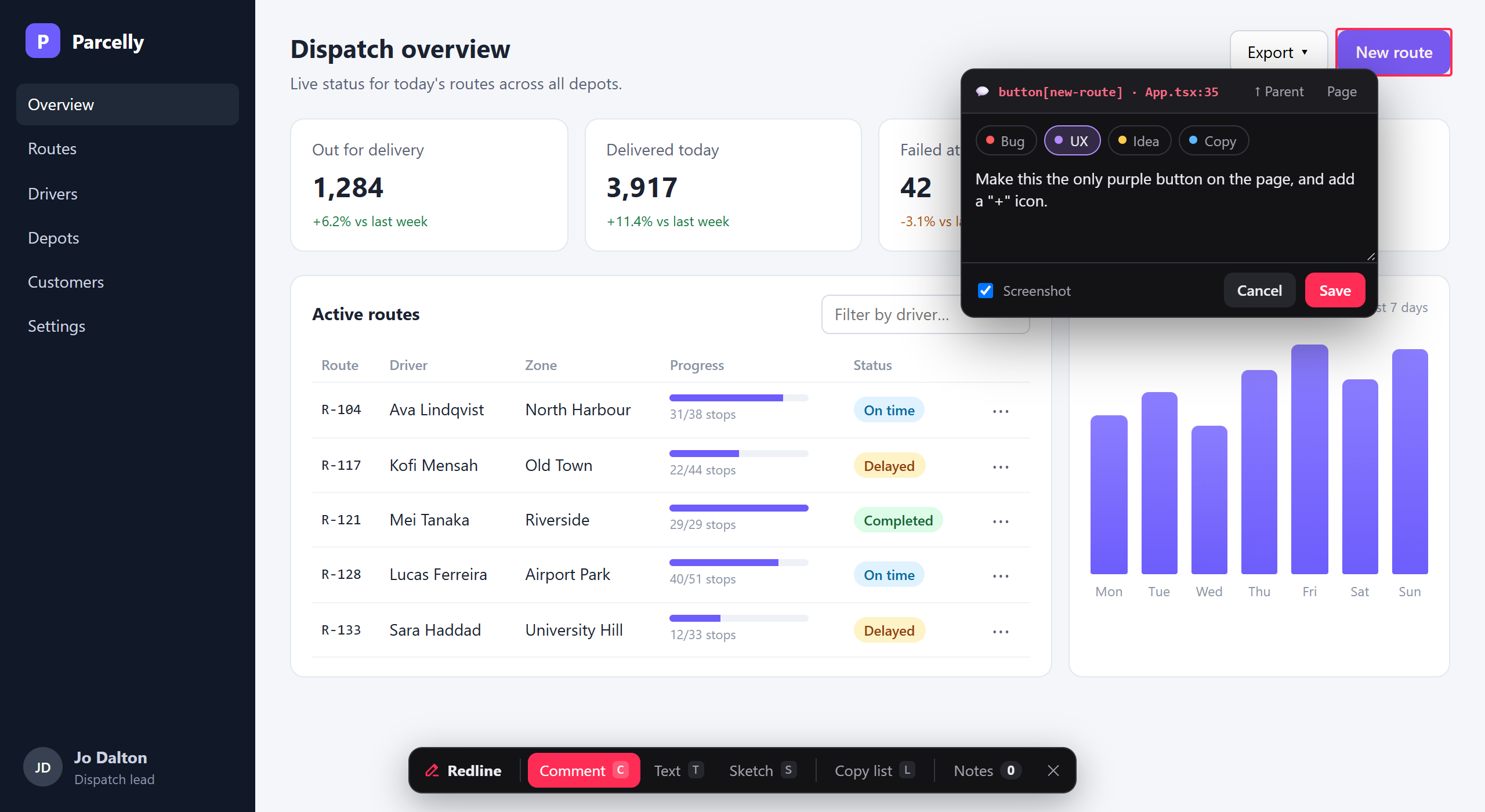
Redline is a dev-only overlay for any web app. Press Alt+Shift+R in the browser, then pin
comments on elements, rewrite text in place, or sketch on the page. Each note is saved by the
dev server as markdown under .redline/ with everything an agent needs to find the code:
- the URL, a CSS selector and XPath, and the test id
- the source file:line and the component chain
- the viewport and theme, recent console errors, and a screenshot with the target outlined
Any coding agent (Claude Code, Codex, Cursor, Copilot, Gemini CLI, …) works through the notes with the bundled
redline skill. It ticks each note off and replies inline, and the replies show up live in the overlay.
It works with React, Vue, Svelte/SvelteKit, Solid, Preact and Astro on Vite, with Next.js (15+), Angular (CLI 17+), with ASP.NET Core, Blazor and Optimizely coming as NuGet packages. Nothing ships to production: it only runs in the dev server (vite dev, astro dev, next dev, ng serve, Debug builds), unless you opt in for a review site. Local, shared, deployed or wired into your own systems: docs/SETUPS.md says which setup fits.
Modes
| Key | Mode | What you do | What's saved |
|---|---|---|---|
C |
Comment | Click an element and type. Alt+click picks its parent, Shift+click comments on the whole page. Use ↑ Parent to widen the target. |
The instruction plus element context and a cropped screenshot |
T |
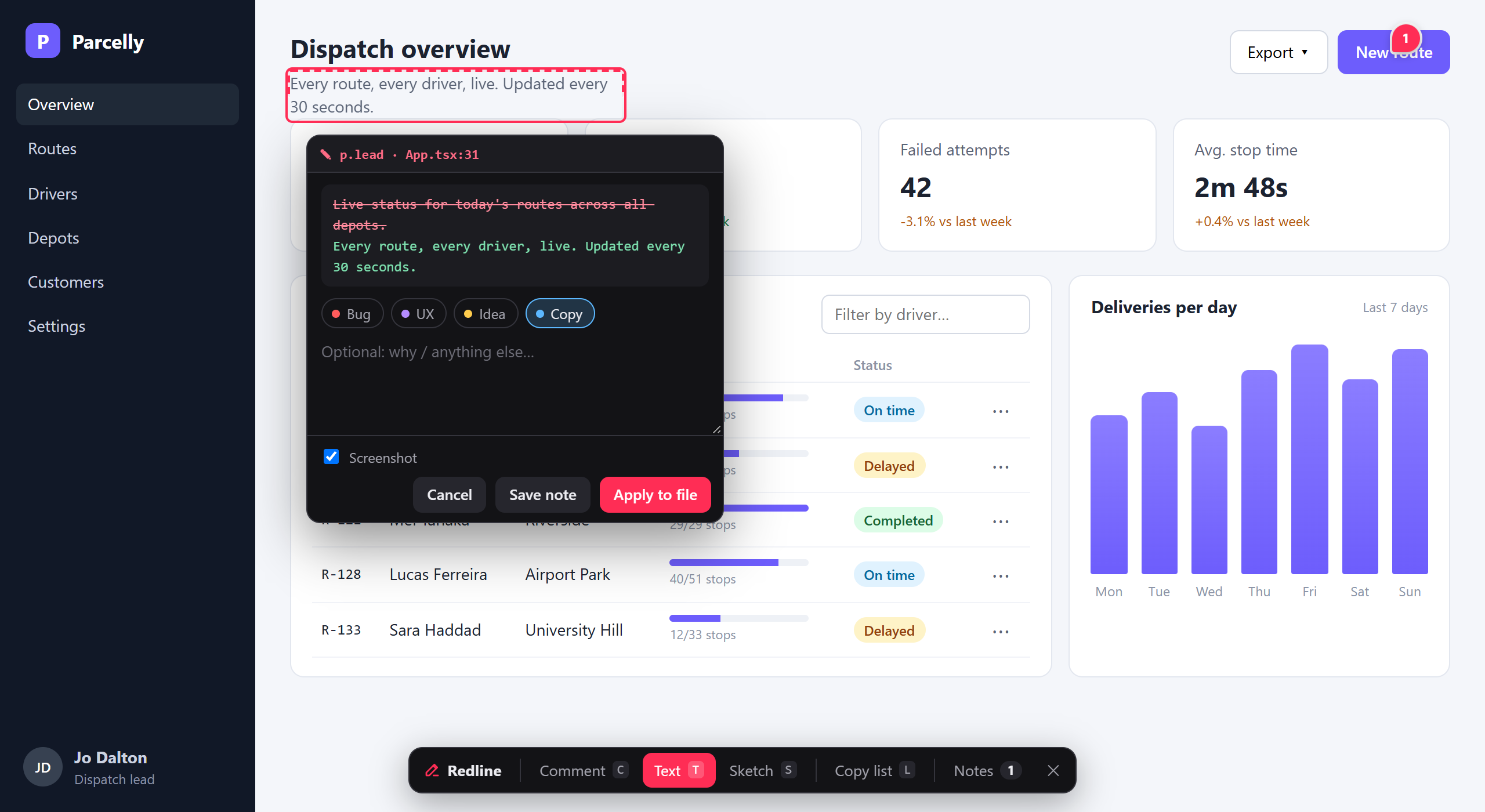
Text | Click any text and edit it in place. Enter (or clicking outside) keeps the edit. |
A diff block (- old / + new) plus an optional note |
S |
Sketch | Draw with box 1, arrow 2, pen 3 and text 4, in six colours (tap the colour dot to fold out the palette, or C to cycle). Ctrl+Z undoes, Enter finishes. |
The SVG plus a viewport screenshot with the sketch drawn on top |
N |
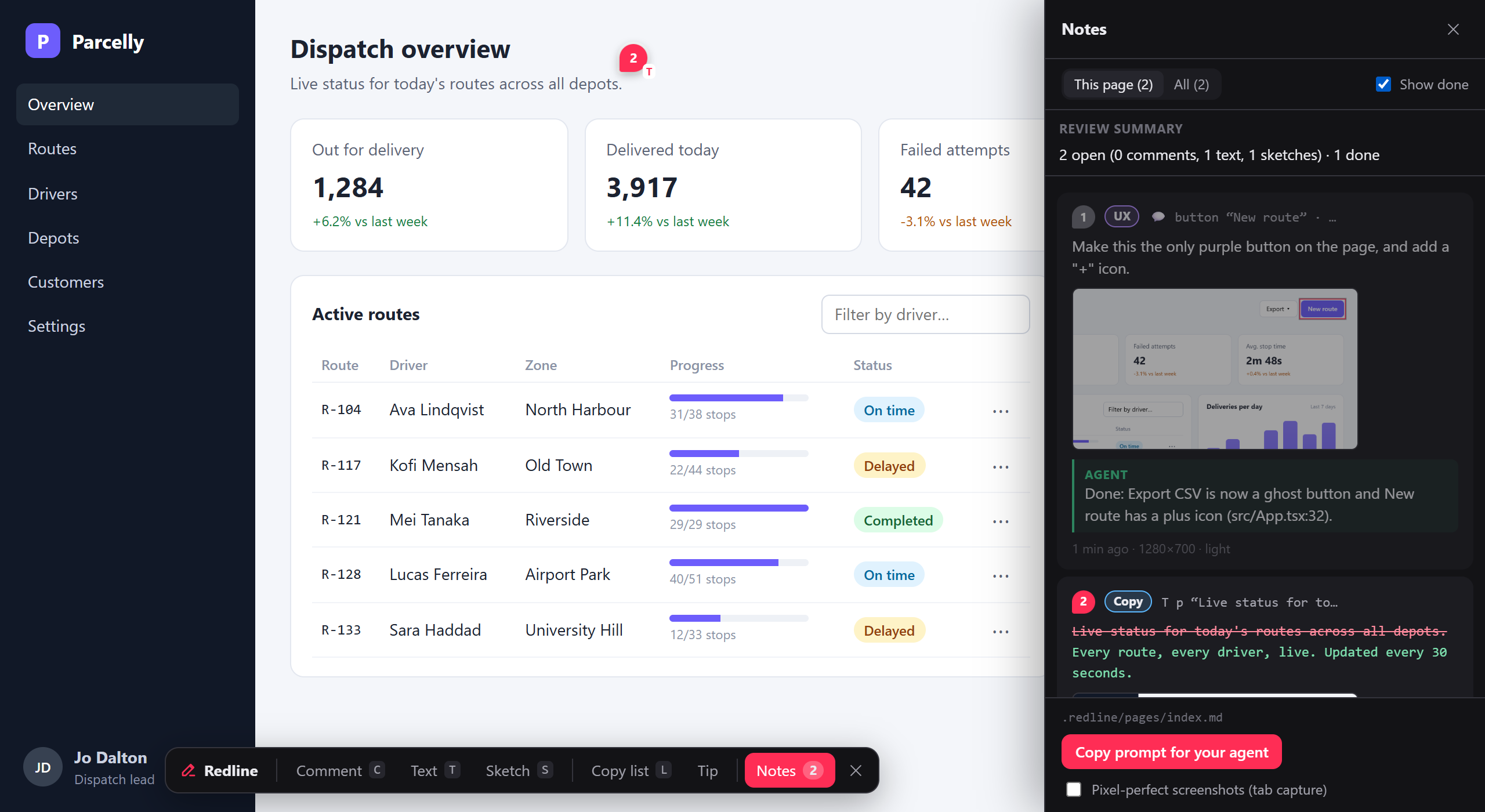
Notes | Open the panel: this page or all pages, done/reopen, edit, delete, agent replies, and Copy prompt for your agent. | |
Esc |
Steps back one level: draft → mode → panel → closed. |
Saving a note returns to idle; press C (or tap Comment) for the next one. Clicks never reach the app while you're picking,
and the app never sees you using the overlay, so an open dropdown, popover or combobox stays open: open it, press C and click
the item (try the Export menu, ⋯ row menus and driver filter in npm run demo). Notes show as numbered pins that follow their element; hovering a pin shows the note and the agent's reply.
Tag a note with a label from the chips above the text box (Bug, UX, Idea, Copy), or start it with #bug. The label
leads the note's heading, so the agent sees it first. Your own: labels: ['Bug', { name: 'Perf', color: '#0c0' }]; none: labels: false.
Phones and tablets work too: open the app over your LAN (vite --host), tap the launcher, then the mode buttons. Toolbars grow their
targets, a tap picks while a swipe scrolls, the popover stays above the keyboard and the panel goes full width. ↑ Parent / Page replace Alt/Shift+click.
| Text: edit in place, saved as a diff | Sketch: box, arrow, pen and labels |
|---|---|
 |
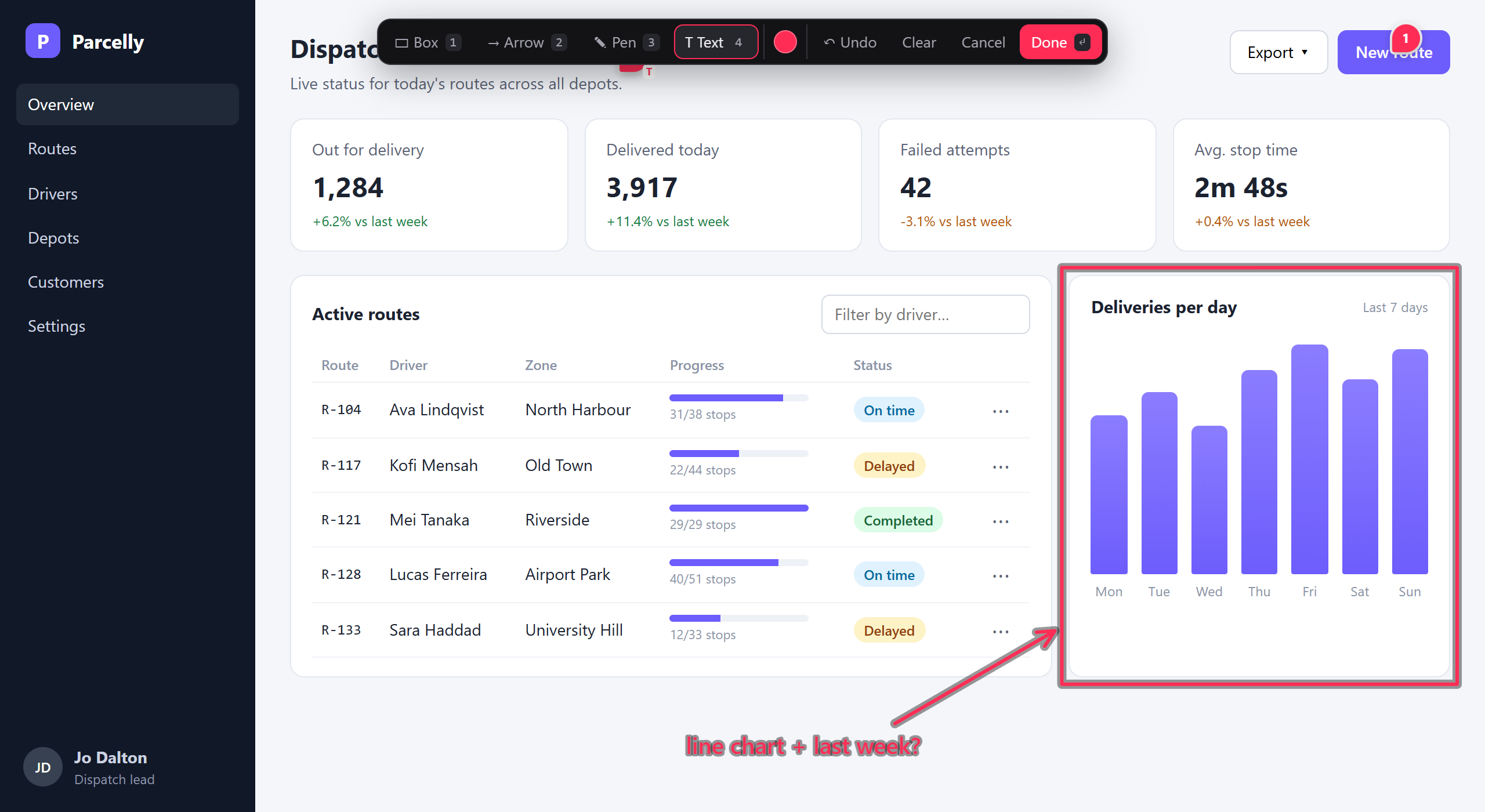 |
Screenshots are from the fictional demo app in examples/demo (npm run demo; regenerate with npm run screenshots).
Setup in a repo
npm install -D @umage.ai/redline
npx redline init        # agent guide + AGENTS.md section, .redline/ in .gitignore (see Coding agents)
Vite (React, Vue, Svelte/SvelteKit, Solid, Preact; vite.config.ts). Put Redline first, before the framework plugin:
import redline from '@umage.ai/redline/vite'

export default defineConfig({ plugins: [redline(), react()] })   // or vue(), sveltekit(), solid(), preact()
Astro (astro.config.mjs). It only activates under astro dev:
import redline from '@umage.ai/redline/astro'

export default defineConfig({ integrations: [redline()] })
Angular (CLI 17+, angular.json): swap the serve builder; the options are @angular/build:dev-server's plus redline.
In dev it turns on Angular's template source locations, so notes point at the template line. ng build is untouched.
"serve": { "builder": "@umage.ai/redline:dev-server", "options": { "buildTarget": "app:build:development", "redline": { "directEdit": true } } }
Next.js (15+, webpack or Turbopack; only next dev): wrap the config; put <Redline /> last in the root layout's <body> (Pages Router: pages/_document.tsx). next dev listens on your network and /__redline/* has no login, so Redline checks each caller's own address, as Next's server received it, and answers this machine only (see network).
export default withRedline(nextConfig, { directEdit: true })   // next.config.ts, from '@umage.ai/redline/next'; keeps nextConfig's type (NextConfig)
<body>{children}<Redline /></body>   // app/layout.tsx, from '@umage.ai/redline/next/script'; renders nothing outside development
ASP.NET Core, Blazor, Optimizely CMS (upcoming, not on NuGet yet): UmageAI.Redline.AspNetCore / UmageAI.Redline.Optimizely, then AddRedline().
Notes name the .cshtml/.razor line or the CMS property; an online mode serves editors on a live site. See dotnet/README.md.
Other Node dev servers: redlineMiddleware() → { api, inject } from @umage.ai/redline/server. Working on Redline: npm link a built checkout.
Options: redline({ root, dir: '.redline', hotkey: 'alt+shift+r', launcher: true, labels: [...], jsxSource: true, vueSource: true }). root is
where notes go and what source paths are relative to (default: the nearest folder with .git). launcher: false hides the round button.
app names the app in a monorepo (default: the dev server's folder, e.g. apps/web). pageKey: 'path' makes hash routes (a deck's #/3)
share one notes file. labels may be a function of the request. prompt replaces the Copy prompt text ({open}, {page}), or false
hides it (the default with a remote store). The overlay and its API answer this machine only; network adds addresses, subnets and host names (['192.168.1.20', '172.17.0.1', 'myapp.test']), or true for everyone (redlineMiddleware's default). Phones, Docker, nginx: docs/SETUPS.md.
Monorepos work without extra setup: each app adds the plugin to its own dev server. Notes from every app go to one .redline/
at the repo root, tagged with the app (pages/apps-web--settings.md); each app pins only its own (the panel's All tab lists the rest). Source paths are repo-relative. npx redline init anywhere sets up the repo root (--here: this folder).
Extending
All optional; without them Redline behaves as described above. Types come from @umage.ai/redline/server.
directEdit: true: the text popover gets Apply to file when the edited text is static in source (Astro, Svelte, JSX, Vue, Angular templates, plain.html). Inline markup such as<b>and links is kept as written; Ctrl+B / Ctrl+I add it. Entities stay as the file wrote them (—); repeated text on a static page is told apart by position. Expressions like{t('title')}, components and rendered or translated text are refused with the reason, and you save a note as usual.[myWriter(), ...defaultWriters()]adds your own writers (i18n files, a CMS).store: aNoteStore(version,list,create,update,remove,asset, optionalsubscribe) or({ root, dir, app }) => store.remoteStore({ url, token })(orREDLINE_STORE_URL/_TOKEN) shares notes through a hosted store, live, with authors and resolved notes in green (docs/PROTOCOL.md);npx @umage.ai/redline-hubruns one, with projects, tokens, MCP and a UI (hub/README.md).hooks:onCreate,onUpdate,onRemove,onSourceWrite.buildSource: truekeeps source stamps invite build(a review build behindredlineMiddleware);buildrecords the commit.extensions: browser ES modules that add toolbar buttons (with keys), panel sections and event listeners. A file path is served as plain JS;{ url: '/src/redline.ext.ts' }lets Vite compile it, or push ontowindow.redlineExtensions. API v2:removeButton,panelState()+panelevent,setPageKey(fn)+pageevent.
Coding agents
Redline isn't tied to one agent. The notes are plain markdown, and npx redline init installs the guide where agents look for it:
| Written | Read by |
|---|---|
.agents/skills/redline/SKILL.md (always) |
Agent Skills: Codex, Cursor, GitHub Copilot / VS Code, OpenCode, … |
a Redline section in AGENTS.md (always; created if missing) |
Codex, Cursor, Copilot, Windsurf, Zed, Amp, Jules, Devin, Factory, … |
.claude/skills/redline/SKILL.md + a CLAUDE.md section pointing at it |
Claude Code (the skill also shows up as /redline) |
a GEMINI.md section + .gemini/commands/redline.toml |
Gemini CLI (/redline) |
.github/prompts/redline.prompt.md |
Copilot Chat in VS Code (/redline) |
The last three are added when the repo already uses that agent (CLAUDE.md or .claude/, GEMINI.md or .gemini/,
.github/copilot-instructions.md…), or when you ask: npx redline init --agents=claude,gemini (all / none work too). Re-running init refreshes the guide after an upgrade. In a terminal, init lists the changes and asks first (--yes skips the question); --dry-run only lists them.
Copy prompt for your agent in the notes panel copies a ready prompt, e.g. Apply the open Redline
notes in .redline/pages/settings.md (3 open). Follow .agents/skills/redline/SKILL.md. Without
init, the prompt spells out the note format itself, so any agent can work from it.
MCP server (optional): npx redline init --mcp registers redline mcp (.mcp.json, plus VS Code, Gemini, Cursor)
with list_notes, get_note (with the screenshot) and update_note. It goes through the running dev server, so a custom
store works; without one it reads .redline/. Codex: codex mcp add redline -- npx -y @umage.ai/redline mcp. The dev server
also serves the tools over HTTP at /__redline/mcp (local callers; mcpTokens: ['…'] lets bearer-token agents in from elsewhere;
through next dev too).
What gets written
.redline/
  INDEX.md               page → open/done counts (regenerated on every change)
  pages/<page>.md        one file per URL path
  assets/<id>.png|svg    screenshots and sketches
### [ ] Comment · `button` “Next” · src/components/LoginForm.tsx:48
<!-- redline {"id":"…","type":"comment","url":"http://localhost:5173/login","target":{"selector":"div > form > button",
"source":{"file":"src/components/LoginForm.tsx","line":48,"col":9},"components":["LoginForm"],…},"viewport":[1366,860,1],"theme":"dark",…} -->
Make this full-width on mobile only.

> Added `sm:w-auto`; full width below 640px (LoginForm.tsx:48).
The markdown is the source of truth. Every write from the overlay re-reads the file first, so an agent's ticks and replies are never overwritten. The overlay polls about every 2 s, which is why replies appear without a reload.
How source locations are found
| Stack | Source of file:line |
Components |
|---|---|---|
| Svelte 5 / SvelteKit | __svelte_meta (built into Svelte dev builds) |
__svelte_meta.parent chain |
| Astro | data-astro-source-file/-loc (snapshotted at parse time, because Astro's dev toolbar strips them) |
.astro files up the tree |
| React 19 (Vite) | The plugin stamps data-redline-src="file:line:col Component" on HTML elements in .jsx/.tsx during dev |
Fiber owner chain, with router and provider plumbing filtered out |
| Solid, Preact (Vite) | The same JSX stamp | The components the stamped elements are written in |
| Next.js 15+ | The same JSX stamp, from a loader withRedline adds (webpack and Turbopack) |
Client components that own the element, then every Server Component around it (page, route-group layouts, root layout) |
| Vue 3 (Vite) | The plugin stamps HTML elements in .vue templates during dev |
__vueParentComponent chain |
| Angular 17+ | data-ng-source-location (Angular's enableTemplateSourceLocations, turned on by the builder in dev) |
ng.getOwningComponent, then the host components around it |
| Razor, Blazor (.NET) | Debug builds compile .cshtml/.razor copies stamped with data-redline-src; Optimizely adds CMS content + property |
Stamped files up the tree |
| Anything else | n/a | n/a. The selector, test id and text still identify the element. |
Screenshots
By default the DOM is rendered to a canvas with modern-screenshot, page scroll and inner scroll containers included. WebGL canvases, cross-origin map tiles and video may come out blank this way. For those apps, tick Pixel-perfect screenshots (tab capture) in the panel: it captures the real tab pixels, and Chrome asks once per page load.
Develop
npm run dev         # rebuild dist/ on change (reload the app for client changes, restart it for server changes)
npm test            # unit tests (node:test) + docs check
npm run test:e2e    # Playwright against fixture apps: vanilla, React, SvelteKit, Astro, Angular, Vue, Solid, Preact, Next
npm run check       # typecheck + unit + docs + e2e
npm run test:package   # install the packed tarball into fresh apps per framework and test it end to end
Releasing: on an up-to-date main, npm run release -- patch (or minor, major, x.y.z) bumps, tags v<version> and
pushes; publish.yml runs every check, publishes via Trusted Publishing and creates the release.
Contributor guidance: CLAUDE.md. State, decisions, learnings and roadmap: docs/.
License
Related Packages
Install framework house-rule agent skills (Angular, React, Vue + vault workflow)...
Dev plugin for Vite, webpack, rspack, Rsbuild, esbuild, Farm, Next.js and the An...
Project-specific Cursor, Codex, Claude Code and GitHub Copilot rules, deep frame...
AI agent skills for Contentrain — workflow procedures, framework integration gui...
Version History
| Version | Released | License |
|---|---|---|
| 0.4.0 | MIT | |
| 0.3.0 | MIT | |
| 0.2.0 | MIT | |
| 0.1.0 | MIT |
Pre-releases (1)
| Version | Released | License |
|---|---|---|
| 0.0.0-stage |