el-table-jsx
文档地址
2,079
5
| Install | |
|---|---|
npm install el-table-jsx |
|
| Latest Version: | 0.8.23 |
| Vue: | 3 |
| License: | MIT |
| Last Updated: | Jul 27, 2025 |
| Links: | GitHub · npm |
Maintainer: constconst123
文档
为什么用el-table-jsx
当后台模块都需重复开发时,利用基于 Vue 3 和 Element Plus 的
JSX封装组件,您只需专注于配置,无需处理内部逻辑。无论是表格table、表单form,还是对话框dialog等组件,统一管理和快速开发都变得异常简便!
1. 先说说背景
- 后台大多数都是 table 表单,重复性的工作,根本提不起精神,就差睡着了
- 之前也封装了一个 table 组件,用的是 template 写法(https://juejin.cn/post/7260783336217329724),但是当需求越复杂,用 template 就不灵活
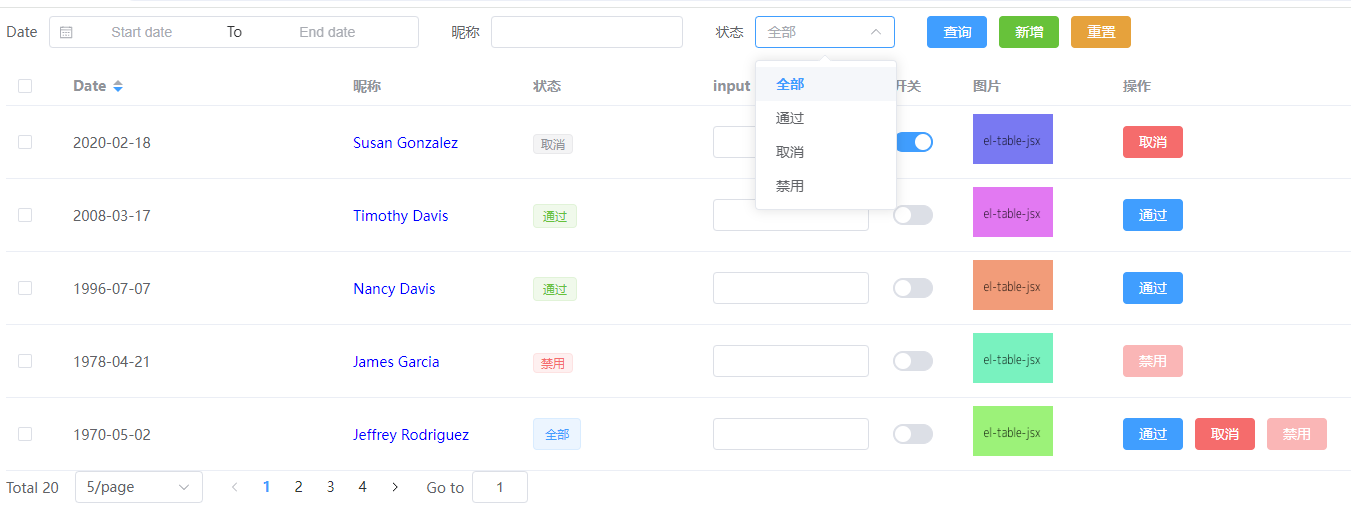
2. 上预览图,持续更新中
3. 目录机构
 ├── src/
 │   ├── dist/
 │   │   ├── components/
 │   │   │   ├── MTable.jsx       # 合并所有组件
 │   │   │   ├── Form.jsx       # form表单
 │   │   │   ├── Paginate.jsx     # 分页
 │   │   │   ├── Table.jsx        # table
 │   │   │   ├── Dialog.jsx       # Dialog
 │   │   │   ├── index.js         # 导出组件
 │   ├── pages/
 │   │   ├── config.js            # 数据配置项
 │   │   ├── index.jsx            # 使用jsx引入table组件
 │   │   └── index.vue            # 使用template引入table组件
 │   ├── mock.jsx                 # mock数据
 │   └── App.jsx
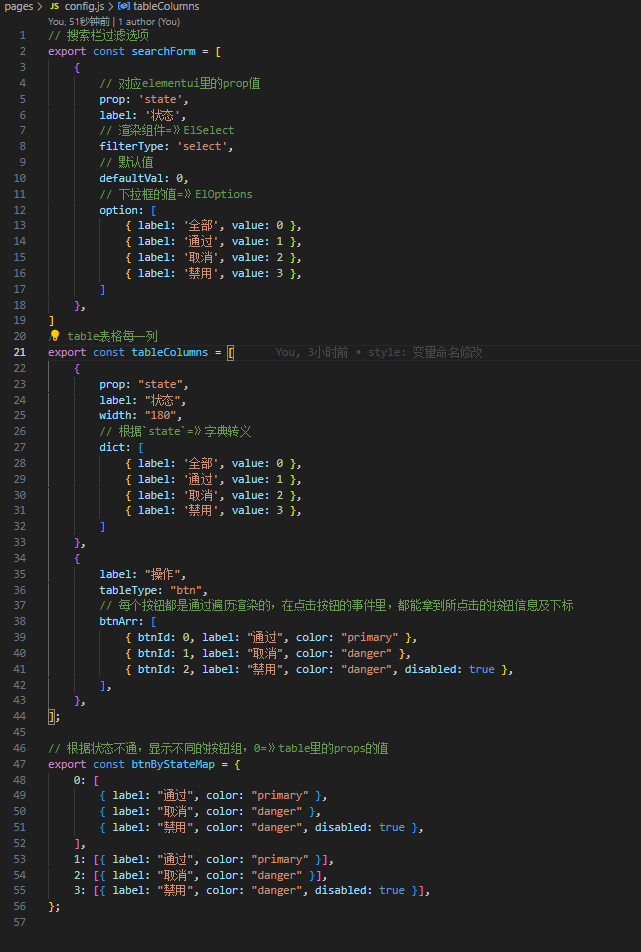
4. 重点看下config.js文件配置
5. 使用方法
- 安装依赖
npm i el-table-jsx @vitejs/plugin-vue-jsx
1.1 vite.config.js 引入插件
import { defineConfig } from "vite";
import vue from "@vitejs/plugin-vue";
import vueJsx from "@vitejs/plugin-vue-jsx";

export default defineConfig({
  plugins: [vue(), vueJsx()],
});
- 引入组件(具体用法,可以看 src/pages/index.jsx, 或者 src/pages/index.vue)
// template用法
<template>
  <MTable :columns="columns" :tableData="tableData" />
</template>
<script setup>
import { MTable } from 'el-table-jsx'

const columns = [
  {
    prop: "date",
    label: "Date",
    width: "280",
    sortable: true,
  },
  {
    prop: "name",
    label: "昵称",
    width: "180",
    color: "blue",
  },
]

const tableData = [
  {
    data: '2020-09-01',
    name: '张三'
  },
  {
    data: '2020-09-02',
    name: '李四'
  }
]
</script>
// jsx用法
import { defineComponent, reactive } from "vue";
import { MTable } from "el-table-jsx";

const columns = [
  {
    prop: "date",
    label: "Date",
    width: "280",
    sortable: true,
  },
  {
    prop: "name",
    label: "昵称",
    width: "180",
    color: "blue",
  },
];

const tableData = [
  {
    date: "2020-09-01",
    name: "张三",
  },
  {
    date: "2020-09-02",
    name: "李四",
  },
];

defineComponent({
  name: "TableComponent",
  setup() {
    const state = reactive({
      columns,
      tableData,
    });

    return () => <MTable columns={state.columns} tableData={state.tableData} />;
  },
});
按钮权限
- 提供了按钮指令
vHasPermi - 项目自定义指令
export default {
  mounted(el, binding, vnode) {
    const { value } = binding

    const all_permission = '*:*:*'
    const permissions = useUserStore().permissions

    if (value && value instanceof Array && value.length > 0) {
      const permissionFlag = value

      const hasPermissions = permissions.some((permission) => {
        return all_permission === permission || permissionFlag.includes(permission)
      })

      if (!hasPermissions) {
        el.parentNode && el.parentNode.removeChild(el)
      }
    } else {
      throw new Error(i18n.global.t('common.pleaseSetOperateAuthLabelValue'))
    }
  }
}

export default function directive(app) {
  app.directive('hasPermi', hasPermi)
}

最后再main.js引入
更新包命令
npm publish --access public
Related Packages
element-plus-table-dragable
A directive what used sortablejs to add drag support for element-plus's table co...
19,522
14
Version History
| Version | Released | Vue | License |
|---|---|---|---|
| 0.8.23 | ^3.2.20 | MIT | |
| 0.8.22 | ^3.2.20 | MIT | |
| 0.8.21 | ^3.2.20 | MIT | |
| 0.8.20 | ^3.2.20 | MIT | |
| 0.8.19 | ^3.2.20 | MIT | |
| 0.8.18 | ^3.2.20 | MIT | |
| 0.8.17 | ^3.2.20 | MIT | |
| 0.8.16 | ^3.2.20 | MIT | |
| 0.8.15 | ^3.2.20 | MIT | |
| 0.8.14 | ^3.2.20 | MIT | |
| 0.8.13 | ^3.2.20 | MIT | |
| 0.8.12 | ^3.2.20 | MIT | |
| 0.8.11 | ^3.2.20 | MIT | |
| 0.8.10 | ^3.2.20 | MIT | |
| 0.8.9 | ^3.2.20 | MIT | |
| 0.8.8 | ^3.2.20 | MIT | |
| 0.8.7 | ^3.2.20 | MIT | |
| 0.7.7 | ^3.2.20 | MIT | |
| 0.7.6 | ^3.2.20 | MIT | |
| 0.7.5 | ^3.2.20 | MIT | |
| 0.7.4 | ^3.2.20 | MIT | |
| 0.7.3 | ^3.2.20 | MIT | |
| 0.7.2 | ^3.2.20 | MIT | |
| 0.7.1 | ^3.2.20 | MIT | |
| 0.7.0 | ^3.2.20 | MIT | |
| 0.6.9 | ^3.2.20 | MIT | |
| 0.6.8 | ^3.2.20 | MIT | |
| 0.6.7 | ^3.2.20 | MIT | |
| 0.6.6 | ^3.2.20 | MIT | |
| 0.6.5 | ^3.2.20 | MIT |
Showing the latest 30 of 90. See every release on npm