@reelkit/vue-stories-player
| Install | |
|---|---|
npm install @reelkit/vue-stories-player |
|
| Latest Version: | 0.4.1 |
| Vue: | 3 |
| License: | MIT |
| Last Updated: | Oct 22, 2026 |
| Links: | GitHub · npm |
@reelkit/vue-stories-player


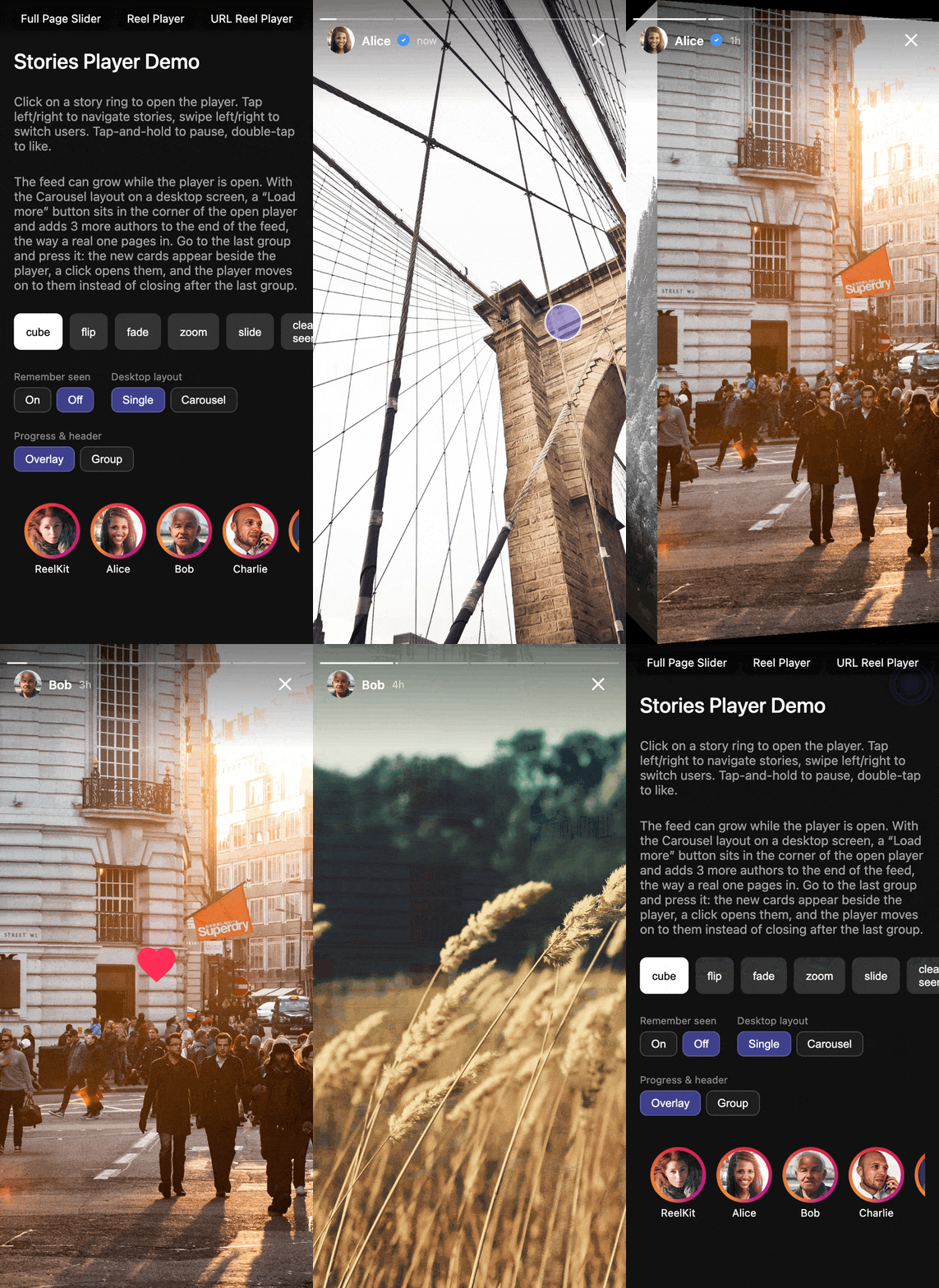
Instagram-style stories player for Vue 3. Full-screen overlay with tap-to-advance navigation, 3D cube transition between users, auto-advance timer, segmented progress bar, and double-tap heart animation. ~7.9 kB gzip.
Installation
npm install @reelkit/vue-stories-player @reelkit/vue lucide-vue-next
Requires Vue 3.3 or later.
Quick Start
<script setup lang="ts">
import { ref } from 'vue';
import {
  StoriesOverlay,
  StoriesRingList,
  type StoriesGroup,
} from '@reelkit/vue-stories-player';
import '@reelkit/vue-stories-player/styles.css';

const groups: StoriesGroup[] = [
  {
    author: { id: 'u1', name: 'Alice', avatar: '/alice.jpg' },
    stories: [
      { id: 's1', mediaType: 'image', src: '/story1.jpg' },
      {
        id: 's2',
        mediaType: 'video',
        src: '/story2.mp4',
        poster: '/poster.jpg',
      },
    ],
  },
  {
    author: { id: 'u2', name: 'Bob', avatar: '/bob.jpg' },
    stories: [{ id: 's3', mediaType: 'image', src: '/story3.jpg' }],
  },
];

const isOpen = ref(false);
const groupIndex = ref(0);

const openGroup = (index: number) => {
  groupIndex.value = index;
  isOpen.value = true;
};
</script>

<template>
  <StoriesRingList :groups="groups" @select="openGroup" />
  <StoriesOverlay
    v-model:is-open="isOpen"
    :groups="groups"
    :initial-group-index="groupIndex"
  />
</template>
Features
- Tap left/right to navigate stories within a group
- Swipe left/right with 3D cube transition between users
- Auto-advance timer with segmented progress bar
- Tap-and-hold to pause (auto-hides UI)
- Double-tap heart animation
- Video stories with autoplay and sound toggle
- Swipe down to close
- Keyboard navigation (Arrow keys, Escape)
- Story ring list with viewed/unviewed gradient
- Sliding window progress bar for 50+ stories
- Scoped slots for header, footer, slides and more
- Desktop navigation arrows
- Optional Instagram-style desktop carousel of neighbouring groups
- URL-driven overlay: a shareable link per story, back button closes
API Reference
StoriesOverlay Props
| Prop | Type | Default | Description |
|---|---|---|---|
isOpen |
boolean |
required | Controls overlay visibility; bind with v-model:is-open |
groups |
StoriesGroup[] |
required | Story groups to display |
ariaLabel |
string |
Stories player |
Accessible label of the dialog |
initialGroupIndex |
number |
0 |
Starting group index |
initialStoryIndex |
number |
resumed or 0 |
Starting story index; wins over any resume |
groupTransition |
TransitionTransformFn |
cube | Transition between groups |
defaultImageDuration |
number |
5000 |
Image auto-advance duration (ms) |
tapZoneSplit |
number |
0.3 |
Left zone ratio (0-1) |
hideUiOnPause |
boolean |
true |
Hide the progress bar and header while paused by a long press |
enableKeyboard |
boolean |
true |
Enable keyboard navigation |
innerTransitionDuration |
number |
200 |
Story crossfade duration (ms) |
minSegmentWidth |
number |
8 |
Min progress segment width (px) |
desktopLayout |
'single' | 'carousel' |
'single' |
'carousel': neighbouring groups as preview cards beside the story on desktop |
chromePlacement |
'overlay' | 'group' |
'overlay' |
'group': each group carries its own progress bar and header, turning with it like Instagram |
viewed |
StoriesViewedStateController |
— | From createStoriesViewedStateController(): resume, recording and muted card rings for watched groups |
resumeStoryIndex |
(groupIndex) => number |
— | Where an unvisited group opens; wins over viewed |
Events
| Event | Payload | Description |
|---|---|---|
close |
— | The viewer closed the player |
update:is-open |
boolean |
Emitted on close — enables v-model:is-open |
story-change |
groupIndex, storyIndex |
After story navigation |
group-change |
groupIndex |
After group switch |
story-viewed |
groupIndex, storyIndex |
When a story is shown |
story-complete |
groupIndex, storyIndex |
When a story's timer runs out |
double-tap |
groupIndex, storyIndex |
On double-tap (heart) |
pause |
— | On tap-and-hold or the pause button |
resume |
— | On release or the play button |
api-ready |
StoriesApi |
Emitted with the imperative API |
The same StoriesApi (nextStory, prevStory, nextGroup, prevGroup, goToGroup, pause, resume) is available through a template ref.
Scoped Slots
| Slot | Scope |
|---|---|
header |
author, story, storyIndex, isPaused, isMuted, isVideo, groupIndex, isActive, onToggleSound, onTogglePause, onClose |
footer |
author, story, storyIndex |
slide |
story, index, groupIndex, isActive, size, activeGroupIndex, activeStoryIndex, onDurationReady, onReady, onWaiting, onError, onEnded |
navigation |
onPrevStory, onNextStory, onPrevGroup, onNextGroup |
progressBar |
totalStories, activeIndex, progress, group, groupIndex, isActive |
loading |
story, storyIndex, groupIndex |
error |
story, storyIndex, groupIndex |
groupPreview |
group, groupIndex, story, offset, viewedCount, onOpen |
A slot that renders nothing falls back to the default.
StoriesUrlOverlay
Takes every StoriesOverlay prop except isOpen, initialGroupIndex and initialStoryIndex, plus a controller from useOverlayUrlState spread with urlIndexTwoAxisKey(...). The ?story=<group>.<story> parameter opens the player, every story change updates it, and one back step closes.
StoriesRingList Props
| Prop | Type | Description |
|---|---|---|
groups |
StoriesGroup[] |
Story groups |
viewed |
StoriesViewedStateController |
Rings follow it by themselves; the same controller the overlay takes |
ringSize |
number |
Ring diameter (px) |
Emits select with the group index when a ring is tapped.
Types
StoriesOverlay and StoriesUrlOverlay are generic over the story shape:
extend StoryItem with your own fields and the type is inferred from groups,
so passing anything else is a type error. Vue does not carry that type into a
scoped slot, so annotate a slot binding with its exported scope type, for
example #header="{ story }: HeaderSlotScope<MyStory>".
interface StoryItem {
  id: string;
  mediaType: 'image' | 'video';
  src: string;
  poster?: string;
  duration?: number;
  createdAt?: string | Date;
  /** Media aspect ratio (width / height). */
  aspectRatio?: number;
}

interface AuthorInfo {
  id: string;
  name: string;
  avatar: string;
  verified?: boolean;
}

interface StoriesGroup<T extends StoryItem = StoryItem> {
  author: AuthorInfo;
  stories: T[];
}
Keyboard Shortcuts
| Key | Action |
|---|---|
ArrowLeft |
Previous story; on a group's first story, the previous group where it was left |
ArrowRight |
Next story; past a group's last story, the next group (the last group closes) |
Escape |
Close overlay |
Styling
Class names (.rk-stories-*) and theme tokens (--rk-stories-*) are the same as in @reelkit/react-stories-player, so one theme fits both. Override the tokens at :root (or any ancestor of .rk-stories-overlay) — see the Theming docs for the full token table.
Story rings take their colours from --rk-stories-ring-active-gradient (stories left to watch) and --rk-stories-ring-viewed-color (everything seen). The defaults suit a dark page; on a light one, set them on .rk-stories-ring-list rather than :root, so the rings of the player's own carousel keep theirs.
Documentation
Docs, demos, and customization examples at reelkit.dev/docs/vue-stories-player.
Support
If ReelKit saved you some time, a star on GitHub would mean a lot.
License
Related Packages
Full-screen vertical-swipe video/image reel player for Vue 3, inspired by Instag...
Full-screen image and video gallery lightbox for Vue 3 with touch gestures, tran...
Vue 3 components and composables for building TikTok/Instagram Reels-style slide...
Version History
| Version | Released | Vue | License |
|---|---|---|---|
| 0.4.1 | >=3.3.0 | MIT | |
| 0.4.0 | >=3.3.0 | MIT | |
| 0.3.1 | >=3.3.0 | MIT | |
| 0.3.0 | >=3.3.0 | MIT | |
| 0.2.2 | >=3.0.0 | MIT | |
| 0.2.1 | >=3.0.0 | MIT | |
| 0.2.0 | >=3.0.0 | MIT | |
| 0.1.0 | >=3.0.0 | MIT |