@reelkit/vue-lightbox
| Install | |
|---|---|
npm install @reelkit/vue-lightbox |
|
| Latest Version: | 0.4.1 |
| Vue: | 3 |
| License: | MIT |
| Last Updated: | Oct 22, 2026 |
| Links: | GitHub · npm |
@reelkit/vue-lightbox


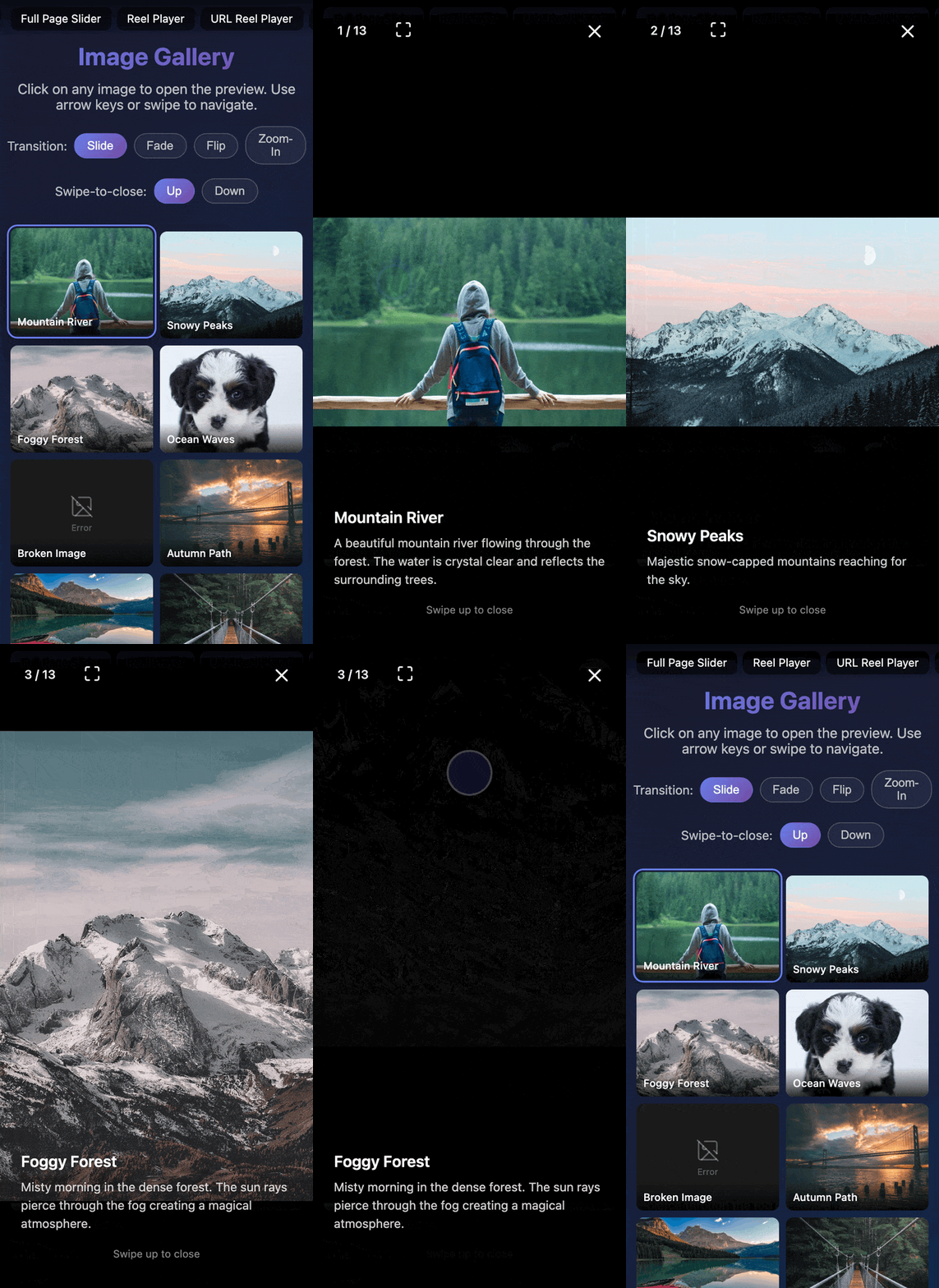
Full-screen image and video gallery lightbox for Vue 3. Horizontal swipe navigation, fullscreen toggle, opt-in video support, and four built-in transitions. ~4.9 kB gzip.
Installation
npm install @reelkit/vue-lightbox @reelkit/vue lucide-vue-next
Quick Start
<script setup lang="ts">
import { ref } from 'vue';
import { LightboxOverlay, type LightboxItem } from '@reelkit/vue-lightbox';
import '@reelkit/vue-lightbox/styles.css';

const open = ref(false);
const items: LightboxItem[] = [
  {
    src: 'https://example.com/image-01.jpg',
    title: 'Mountain River',
    description: 'A beautiful mountain river flowing through the forest',
    width: 1600,
    height: 1000,
  },
];
</script>

<template>
  <button @click="open = true">Open Gallery</button>
  <LightboxOverlay v-model:is-open="open" :items="items" />
</template>
Features
- Horizontal swipe navigation (touch, mouse, keyboard, wheel)
- Tree-shakable transitions —
slideTransition,flipTransition,lightboxFadeTransition,lightboxZoomTransition(import only what you use) - Fullscreen toggle with two-step Escape (exit fullscreen → close)
- Swipe-up-to-close on mobile
- Opt-in video support via
useVideoSlideRenderer - Opt-in slideshow —
auto-advanceplays the gallery on its own, with aPlayPauseButtonandplay()/pause()on the api - Opt-in download —
show-downloadadds aDownloadButtonthat saves the active item, fromdownloadUrlwhen the preview is a resized copy - Desktop prev/next arrows with boundary hiding
- Dialog a11y:
role="dialog",aria-modal, focus trap + return - Themeable via
--rk-lightbox-*CSS custom properties - Shareable URLs —
LightboxUrlOverlayopens itself from the address bar
Scoped Slots
| Slot | Scope |
|---|---|
slide |
item, index, size, isActive, autoAdvance, onReady, onWaiting, onError, onEnded |
controls |
item, activeIndex, count, isFullscreen, isAutoAdvancing, isDownloading, onClose, onToggleFullscreen, onToggleAutoAdvance?, onDownload? |
navigation |
item, activeIndex, count, onPrev, onNext |
info |
item, index |
loading |
item, activeIndex |
error |
item, activeIndex |
Props
| Prop | Type | Default | Description |
|---|---|---|---|
isOpen |
boolean |
required | Controls overlay visibility |
items |
LightboxItem[] |
required | Images/videos to display |
initialIndex |
number |
0 |
Starting slide index |
ariaLabel |
string |
'Image gallery' |
Dialog aria-label |
transitionFn |
TransitionTransformFn |
slideTransition |
Slide transition fn (built-in or custom) |
swipeToCloseDirection |
SwipeToCloseDirection |
'up' |
Which way a swipe dismisses the lightbox |
loop |
boolean |
false |
Enable infinite loop |
enableNavKeys |
boolean |
true |
Arrow-key navigation |
enableWheel |
boolean |
true |
Wheel navigation |
wheelDebounceMs |
number |
200 |
Wheel debounce duration (ms) |
transitionDuration |
number |
300 |
Animation duration (ms) |
swipeDistanceFactor |
number |
0.12 |
Swipe threshold (0-1) |
showInfo |
boolean |
true |
Show title/description overlay |
showControls |
boolean |
true |
Show controls bar |
showNavigation |
boolean |
true |
Show prev/next arrows on desktop |
autoAdvance |
boolean |
false |
Play the gallery as a slideshow |
autoAdvanceInterval |
number |
5000 |
Image time in a slideshow (ms), from load |
showDownload |
boolean |
false |
Add a download button |
Events
| Event | Payload | Description |
|---|---|---|
close |
void |
Emitted when the overlay closes |
slide-change |
number |
Emitted after the active slide changes |
api-ready |
LightboxApi |
Emitted with the imperative lightbox API |
update:is-open |
boolean |
Emitted on close — enables v-model:is-open |
The LightboxApi from api-ready (also on the template ref) has next(),
prev(), goTo(), adjust(), observe(), unobserve(), close(), and
play() / pause() for the slideshow.
Slideshow and download (opt-in)
<LightboxOverlay
  v-model:is-open="open"
  :items="items"
  auto-advance
  :auto-advance-interval="4000"
  show-download
/>
auto-advance counts each image's interval from the moment it has loaded,
plays a video once and moves on when it ends, waits while the mouse rests on a
control, during a swipe and while the page is hidden, and stops on the last
slide unless loop is set. A PlayPauseButton joins the controls.
show-download adds a DownloadButton that saves the active item from
downloadUrl (or src) under downloadName; a LightboxItem takes both as
optional fields. The file is fetched so a cross-origin link still downloads;
when the server sends no CORS headers it opens in a new tab instead.
Video support (opt-in)
<script setup lang="ts">
import { ref } from 'vue';
import {
  LightboxOverlay,
  useVideoSlideRenderer,
  type LightboxItem,
} from '@reelkit/vue-lightbox';
import '@reelkit/vue-lightbox/styles.css';

const open = ref(false);
const items: LightboxItem[] = [
  { src: '/image.jpg' },
  { type: 'video', src: '/clip.mp4', poster: '/clip.jpg' },
];
const { VideoSlideRenderer, VideoControlsRenderer, SoundProvider } =
  useVideoSlideRenderer(items);
</script>

<template>
  <SoundProvider>
    <LightboxOverlay v-model:is-open="open" :items="items">
      <template #slide="scope">
        <VideoSlideRenderer v-bind="scope" />
      </template>
      <template #controls="scope">
        <VideoControlsRenderer v-bind="scope" />
      </template>
    </LightboxOverlay>
  </SoundProvider>
</template>
URL-driven lightbox
LightboxUrlOverlay takes the same props except isOpen — the address bar owns
the open state, so a shared link opens the gallery on the right image:
<script setup lang="ts">
import { LightboxUrlOverlay, type LightboxItem } from '@reelkit/vue-lightbox';
import { useOverlayUrlState, urlIndexKey } from '@reelkit/vue';
import '@reelkit/vue-lightbox/styles.css';

const props = defineProps<{ images: LightboxItem[] }>();

const photo = useOverlayUrlState({
  param: 'photo',
  ...urlIndexKey(() => props.images.length),
});
</script>

<template>
  <!-- Opening is a link — the overlay reads the URL and opens itself. -->
  <RouterLink
    v-for="(img, i) in props.images"
    :key="img.src"
    :to="`?photo=${i}`"
  >
    <img :src="https://raw.githubusercontent.com/KonstantinKai/reelkit/HEAD/img.src" />
  </RouterLink>

  <LightboxUrlOverlay :controller="photo" :items="props.images" />
</template>
In a vue-router application pass adapter: useVueRouterUrlAdapter() from
@reelkit/vue/vue-router-url-adapter, otherwise the router's own location goes
stale. Swap urlIndexKey for urlStableIdKey({ items: () => props.images }) to
key the URL by image id.
Sub-components
For composing your own controls or slides: CloseButton, Counter,
FullscreenButton, SoundButton, PlayPauseButton, DownloadButton,
LightboxNavigation, ImageSlide, LightboxVideoSlide.
Keyboard Shortcuts
| Key | Action |
|---|---|
ArrowLeft |
Previous slide |
ArrowRight |
Next slide |
Escape |
Exit fullscreen (if active), then close the lightbox |
Documentation
Docs, runnable StackBlitz examples, and customization guides at reelkit.dev/docs/vue-lightbox.
Support
If ReelKit saved you some time, a star on GitHub would mean a lot — it's a small thing, but it really helps the project get noticed.
License
Related Packages
Full-screen vertical-swipe video/image reel player for Vue 3, inspired by Instag...
Instagram-style stories player overlay for Vue 3 with cube transitions and auto-...
Version History
| Version | Released | Vue | License |
|---|---|---|---|
| 0.4.1 | >=3.0.0 | MIT | |
| 0.4.0 | >=3.0.0 | MIT | |
| 0.3.4 | >=3.0.0 | MIT | |
| 0.3.3 | >=3.0.0 | MIT | |
| 0.3.2 | >=3.0.0 | MIT | |
| 0.3.1 | >=3.0.0 | MIT | |
| 0.3.0 | >=3.0.0 | MIT | |
| 0.2.2 | >=3.0.0 | MIT | |
| 0.2.1 | >=3.0.0 | MIT | |
| 0.2.0 | >=3.0.0 | MIT | |
| 0.1.0 | >=3.0.0 | MIT |