wp-migrate-core
| Install | |
|---|---|
npm install wp-migrate-core |
|
| Latest Version: | 1.0.1 |
| License: | MIT |
| Last Updated: | Oct 21, 2026 |
| Links: | GitHub · npm |
wp-migrate-core
AI-assisted WordPress migrations to Astro, Next.js, Payload and Pruvious.
Turn a WordPress XML export into a migration plan and a generated site or CMS app. Use your own AI endpoint and key to prioritize the repair queue, draft missing image descriptions, propose shortcode replacements and match old URLs to existing routes. Review the suggestions, accept decisions, then regenerate from the same export.
- Automate the repetitive work: triage, alt-text drafts, shortcode and widget mappings, route suggestions and constrained markup repair.
- Keep decisions reviewable: local HTML reviews, a client-readable brief and a reusable decisions file. AI runs only when you invoke
assist; the migration engine works locally. - Check the handoff: content, media, navigation, URL coverage, host redirect rules and a verification command for the built site.
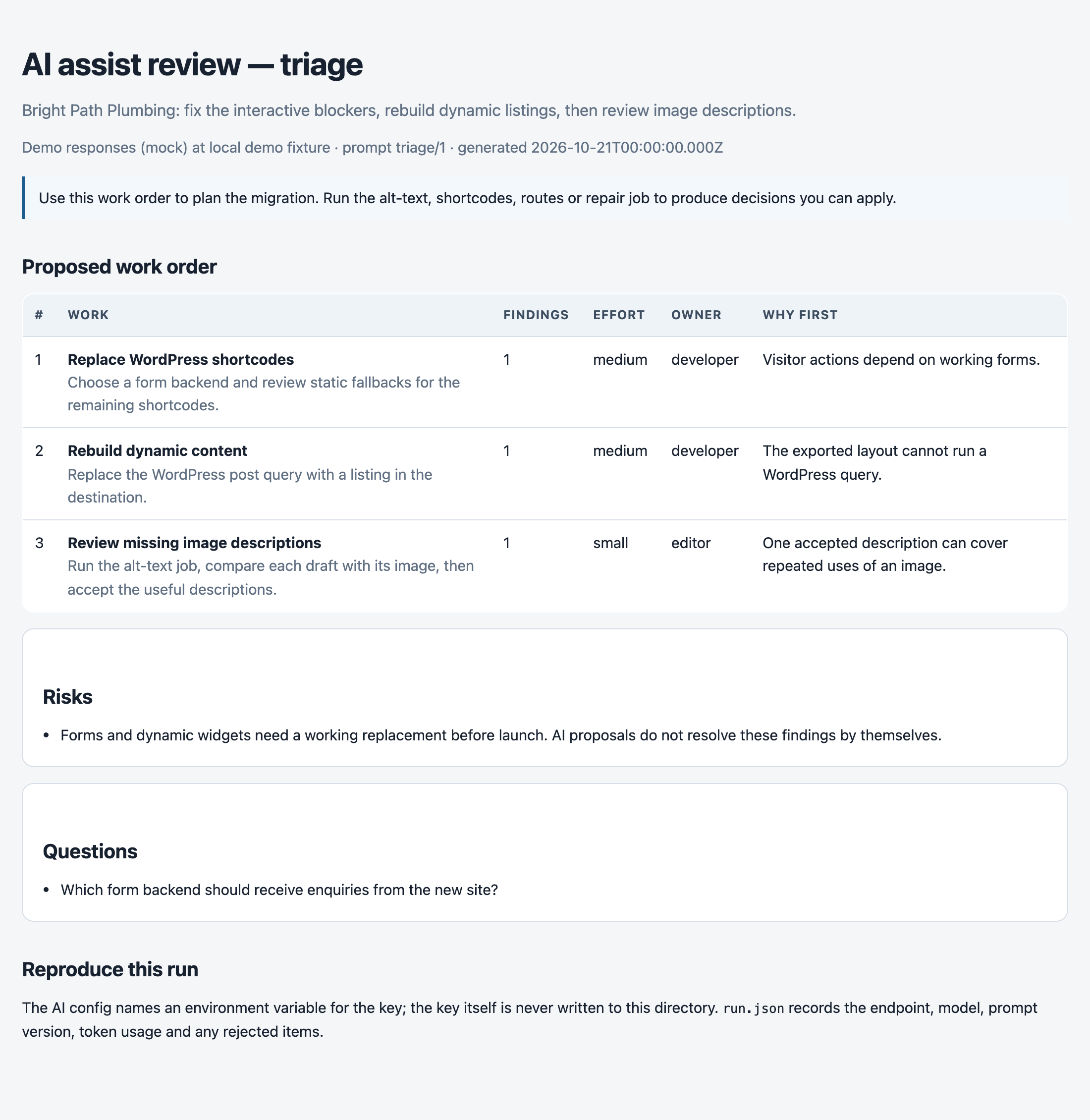
Actual review page for the fictional Bright Path Plumbing demo, using deterministic mock AI responses. Your provider generates the proposals for your export.
Generate a static Astro or Next.js site, or an editable Payload or Pruvious CMS app. Supply a local uploads directory or a media host to bring over images. Themes, forms and plugin behavior still need implementation and review.
Automate the repair queue with AI
Automate triage, alt-text drafting, shortcode mapping, route matching and markup repair. assist reads the plan artifacts and writes suggestions for review. It is the
only command that talks to the network, and only when you invoke it. The key is
read from the environment variable named in wp-migrate-core.ai.json; it is
never written to a config, an artifact or a generated site.
Install with Node.js 22.12 or later:
npm install --save-dev wp-migrate-core
Save this as wp-migrate-core.ai.json in your working directory, with your endpoint and model names:
{
  "schemaVersion": "0.1",
  "provider": {
    "baseUrl": "https://api.openai.com/v1",
    "model": "your-chat-model",
    "apiKeyEnv": "OPENAI_API_KEY",
    "embeddingsModel": "your-embedding-model"
  }
}
export OPENAI_API_KEY="..."
npx wp-migrate-core inspect export.xml --out migration-plan
npx wp-migrate-core assist migration-plan --job triage
npx wp-migrate-core assist migration-plan --job alt-text

# Open migration-plan/ai/alt-text/review.html.
# Keep only the items you accept in suggestions.json, then apply them.
npx wp-migrate-core assist apply migration-plan/ai/alt-text/suggestions.json
npx wp-migrate-core convert export.xml --out new-site \
  --uploads ../wordpress/wp-content/uploads \
  --decisions wp-migrate-core.decisions.json
Open migration-plan/ai/triage/review.html for the prioritized work order and brief.md for a client-readable brief. Alt-text drafts are deduplicated by image, even when many pages use it. Review the wording against the actual image before accepting it.
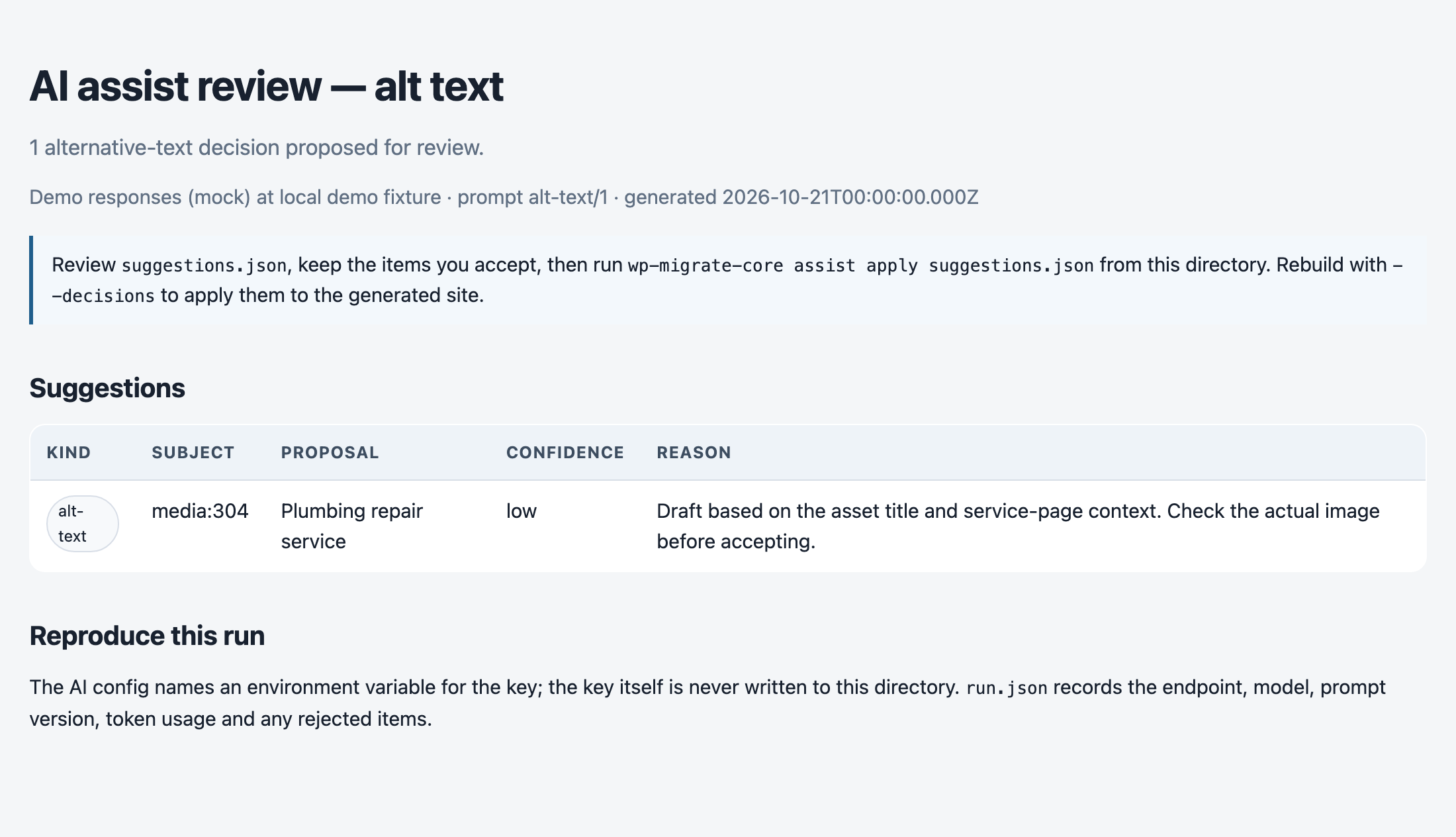
Actual review page from the bundled demo, using deterministic mock AI responses. Drafts use text context; this job does not inspect image pixels.
The jobs are:
| Job | What it proposes |
|---|---|
triage |
A ranked work order and a client-readable brief.md from the finding queue. It does not read post bodies. |
alt-text |
One alt-text decision per asset, deduplicated by asset id and only where alt text is absent. |
shortcodes |
A static fallback, component name, removal or deliberate block for unsupported shortcodes, Elementor widgets and dynamic Gutenberg blocks. |
routes |
A target chosen only from routes the plan already has, using embeddings and a score threshold. |
repair |
A content patch for malformed block markup, accepted only if it passes the parser with no new findings. |
assist apply accepts alt text, routes and shortcode mappings by default.
Content repair requires privacy.send: "content" in the AI config and --accept repair when applying a reviewed patch. --decisions also works with
inspect, report and verify, so a preview and a launch check can use the
same accepted decisions.
Bring-your-own-key also means bring-your-own-endpoint: configure an OpenAI-compatible chat server through baseUrl, model and optional headers. Route matching also needs an embeddings endpoint. Triage sends finding metadata, not
post bodies. Alt text sends asset titles, dimensions and the pages that
reference them. Repair is the only job that sends page content, and it says so
in --dry-run. The full configuration, limits, artifacts and guardrails are in
docs/ai.md.
Try it with the demo
Requires Node.js 22.12 or later.
npm install --save-dev wp-migrate-core
npx wp-migrate-core demo --out wp-migrate-core-demo
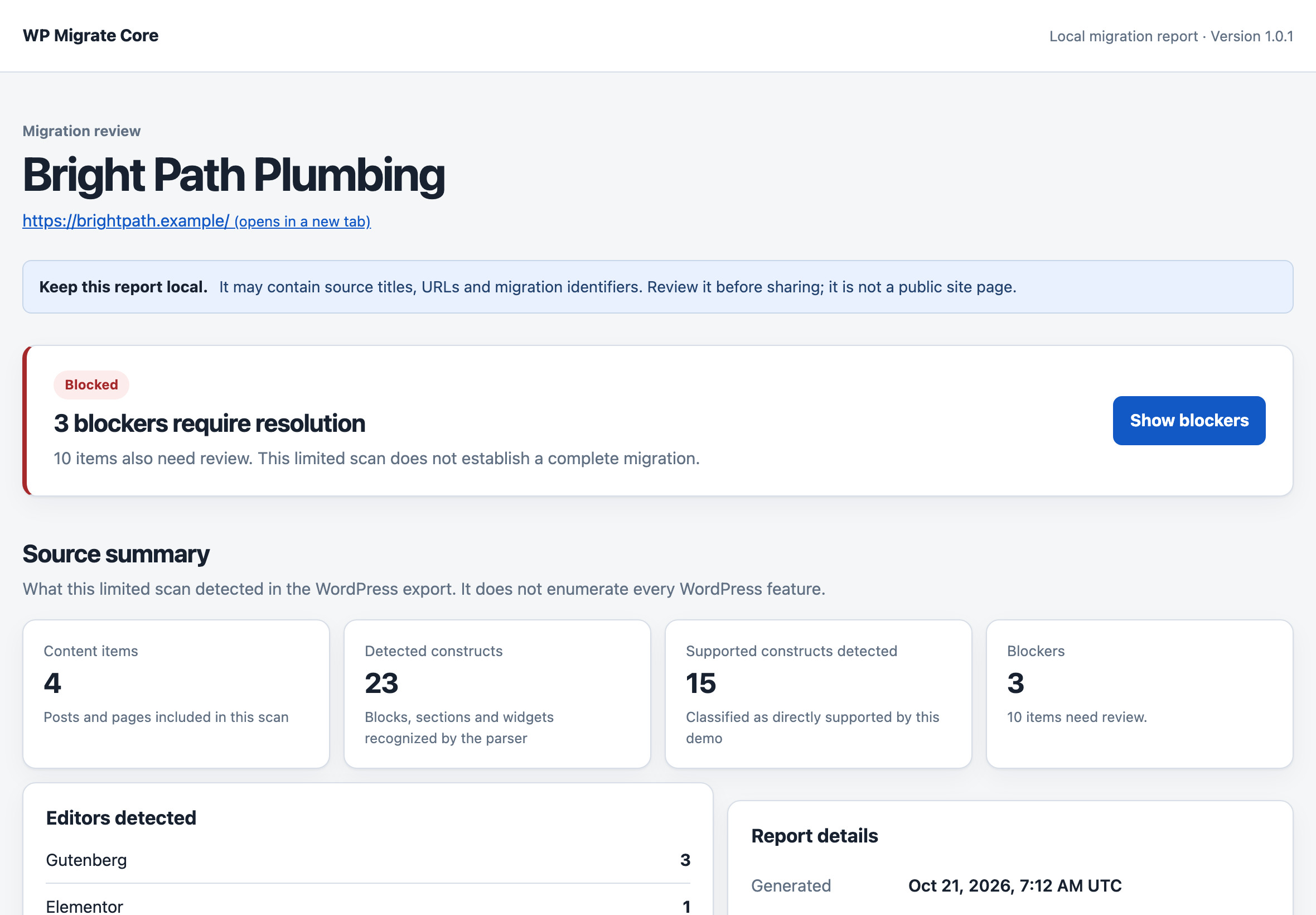
Open wp-migrate-core-demo/migration-plan/report.html in your browser. The fictional Bright Path Plumbing site includes Gutenberg and Elementor content, missing features, and URLs that need attention. Explore the generated project and its checks in wp-migrate-core-demo/astro-site/.
The demo includes placeholder images. You'll find the copied files in astro-site/public/wp-content/uploads/ and their delivery details in migration/media.json. Try --uploads with your own media library when you're ready to convert a real export.
It also carries a category and an author, so astro-site/src/content/listings/ holds the archive pages WordPress would have served and migration/archives.json says how each route was decided. Add --publish-ready to the demo command to see the indexable version of the same handoff.
Use your own export
Save your WordPress WXR export as export.xml, then inspect it:
npx wp-migrate-core inspect export.xml --out migration-plan
Open migration-plan/report.html to see the repair queue, media inventory, URL map, and link map. migration-plan/migration-plan.json contains the detailed plan if you want to work with it in code.
Then check the URLs your live site already serves. Download the sitemap yourself and pass the local file; the tool never fetches one:
npx wp-migrate-core inspect export.xml --out migration-plan-with-coverage --live-urls sitemap.xml
Repeat --live-urls to check several files, such as the child sitemaps of a sitemap index. The report then lists every live URL that no route and no rule accounts for.
When you are ready to work on the Astro project:
npx wp-migrate-core convert export.xml --out new-site --live-urls sitemap.xml
cd new-site
npm install
npm run dev
Choose a new output directory for each run. Inspection refuses an existing output path; conversion accepts a new or empty directory and refuses to overwrite files.
The project starts with indexing disabled and placeholders for source images and unsupported behavior. Review the report, bring in your media, rebuild the missing features, and compare the result with WordPress before publishing.
What you get
Conversion writes one content collection per post type in the export, such as src/content/pages/ and src/content/posts/, plus a src/content/listings/ collection for the archive pages it generates. Alongside them it writes:
| File | Use it to |
|---|---|
migration/report.html |
Read the findings and work through the repair queue. |
migration/issues.json |
Process warnings and blockers in your own tooling. |
migration/media.json |
Find referenced images, matching attachment records, available alt text and dimensions, uploads no included content uses, and where the generated site serves each file from. |
migration/redirects.json |
Review old page/post permalinks, proposed routes, path redirect rules, and URLs needing a decision. |
migration/links.json |
Check recognized content links, their routes, proposed rewrites, and targets this export cannot vouch for. |
migration/coverage.json |
Compare every live URL you supplied with the routes and rules this plan has. |
migration/archives.json |
Review the archive pages this run generated, what each one lists, and how its route was decided. |
migration/menus.json |
Rebuild the navigation WordPress served in the new theme, including the entries nothing generated yet. |
migration/checks/ |
Audit WordPress and your preview with matching SSRWire checks. |
migration/redirect-rules/ |
Publish the redirect rules in the format your host expects: Netlify, Vercel, nginx or Apache. |
migration/manifest.json |
Connect WordPress IDs to generated files and routes. |
public/sitemap.xml |
List the generated routes, using the configured site URL or the URL from the export. |
The redirect map uses schemaVersion: "0.2", the link inventory uses "0.3", and the coverage check uses "0.4". The media inventory uses "0.7". The archive and menu inventories use "0.8". The Astro manifest uses "0.9", the Next.js manifest and its content/routes.json use "0.12", the Payload and Pruvious manifests use "0.11" (their destination block names the config file, the admin host and the collections), and the verification artefact uses "0.9" (the import evidence). These describe each file's data format separately from the npm package version, and docs/artifacts.md is the full catalog.
The Next.js destination
--target next writes a static-export Next.js app from the same plan as the Astro handoff. Content is JSON — the exported HTML, already cleaned, escaped and rewritten — so the project needs no Markdown or MDX pipeline to boot:
npx wp-migrate-core convert export.xml --out next-site --target next --uploads ../wordpress/wp-content/uploads --publish-ready
cd next-site
npm install
npm run dev        # http://localhost:3000
npm run build      # a static export, written to out/
| File | Use it to |
|---|---|
app/ |
Read the App Router shell: the layout, the home page, and one catch-all that renders every planned route. |
content/ |
Review the content: one JSON file per page, plus routes.json, the index the app reads. |
lib/content.ts |
See the loader. It reads content/ at build time; there is no database and no network. |
components/Nav.tsx |
Read the menu WordPress served, with the rewrites the plan applied. |
out/ |
Deploy. npm run build writes one HTML file per route here. |
migration/ |
The same repair queue, inventories, redirect rules and SSRWire checks the other destinations write. |
next build with output: "export" writes out/, and wp-migrate-core verify --html-dir out reads exactly that, so the Next handoff is checked by the same launch gate as the Astro one:
npx wp-migrate-core verify export.xml --html-dir out --fail-on blocker
One thing the destination cannot do on its own: a static export has no server, so redirects() is not allowed and the app serves no redirect. The plan's redirect map is published in migration/redirect-rules/ for Netlify, Vercel, nginx or Apache instead, and the handoff's README says so.
npm run test:next in this repository is the round trip behind those claims: it installs Next 16 and React 19 into a temporary workspace, type-checks the generated app, runs a real next build, and points the launch gate at out/.
The Payload CMS destination
A static site gives you a foundation; a CMS destination also gives you an admin, media management and a publishing workflow. --target payload writes a reviewable Payload + Next app instead of pages:
npx wp-migrate-core convert export.xml --out payload-bundle --target payload --uploads ../wordpress/wp-content/uploads
cd payload-bundle
npm install
cp .env.example .env      # then set PAYLOAD_SECRET
npm run import            # writes migration-import.json
npm run dev               # the admin is at http://localhost:3000/admin
The bundle contains one collection module per content type plus media, categories, tags and authors, a payload.config.js, the app/(payload) admin host, a content and media drop under import/, and the generated importer. npm run import uses Payload's CLI to load the same .env settings as the admin app. Payload adds its own users collection for admin accounts, and the first one is created in the browser. wp-migrate-core itself never talks to a database.
| File | Use it to |
|---|---|
payload.config.js |
Read the Payload config; it is built and checked against Payload 3.90.2. |
app/(payload)/ |
Open the admin. npm run dev serves it at /admin; the route handlers expose Payload's REST and GraphQL APIs. |
collections/ |
Read the fields each collection carries before you run the import. |
import/content/ |
Review the drop: one file per collection, with { "$ref": ... } markers the importer resolves. |
import/import.mjs |
Run the import (npm run import); it writes migration-import.json. |
import/redirects.json, next.config.mjs |
Publish the redirect map on a Next front end. |
migration/ |
The same review artifacts the Astro handoff writes. |
.env.example, .gitignore |
Set the secret and the database, and keep the database, the uploaded media and the build out of git. |
Posts and pages keep their title, slug, route, dates, author, taxonomy and the source publication status. Only WordPress publish becomes published in Payload; draft, pending, future, private and other unpublished statuses remain drafts, with the original status in wordpressStatus. Authors become an authors collection rather than Payload users, because dc:creator is a WordPress login. The body is native rich text for a documented subset — headings, paragraphs, lists, quotes, code, links, emphasis and delivered images — and everything else (images with no delivered upload, embeds, forms, tables, shortcodes and layout containers) becomes a contentReview entry rather than a guess, with sourceHtml keeping the original HTML alongside it. An image the export ties to an upload this run delivered becomes a media node in the body, so it lands in the page as well as in the library. Preformatted code becomes code-formatted text with line breaks in the default editor.
The WordPress menus become a navigation collection, so the site's menu is edited in the admin rather than in a deploy. A menu entry nothing in the plan serves keeps a reason for a human to resolve, exactly as migration/menus.json reports it. A non-image upload the content links to — a PDF, a price list, a zip — travels with the site the same way an image does, and becomes a media record instead of being left behind on the source host.
Re-imports are safe. The importer finds each record by its stable wordpressSourceId (wp:post:20), updates it when the source changed, and skips a record that was edited in the CMS, reporting it as record-modified instead of overwriting it. Its re-run hash covers the delivered file as well as the record's fields, so replacing an image re-uploads it rather than reading as unchanged. It writes migration-import.json next to the bundle, and a drop file it cannot read is one reported failure instead of a run that stops before writing a report. Point verify at the import report to check the outcome:
npx wp-migrate-core verify export.xml --import-report migration-import.json --fail-on blocker
npm run test:payload in this repository is the round trip behind that claim: it installs Payload 3.90.2, imports a generated export into SQLite, re-imports it, edits a record in the CMS to prove the re-import leaves it alone, checks the media node in the body, and builds the generated admin app with Next.js. A migration of a real site remains the next validation gate. When updating a bundle written before 0.10.0, copy the regenerated collections, importer, package.json and next.config.mjs, rename payload.config.mjs to payload.config.js, and add the app/, tsconfig.json, .env.example and .gitignore files so the admin host has what it needs. For a 0.10.0 bundle, copy the regenerated importer and change its import script to payload run import/import.mjs so it reads .env and waits for completion.
The Pruvious CMS destination
Pruvious is the second CMS destination, and this time for Nuxt. --target pruvious writes a Nuxt app with the pruvious module: collections, a dashboard, a media library and a publishing workflow, plus a content and media drop and a generated importer.
npx wp-migrate-core convert export.xml --out pruvious-bundle --target pruvious --uploads ../wordpress/wp-content/uploads
cd pruvious-bundle
npm install
cp .env.example .env
# Set WP_MIGRATE_IMPORT_TOKEN in .env to a random secret before starting.
npm run dev             # the dashboard is at http://localhost:3000/dashboard
npm run migrate         # in another terminal, once the app is up
The bundle writes nuxt.config.ts (the pruvious module), one collections/<name>.ts per content type plus media, categories, tags, authors and navigation, the drop and importer under import/ and server/, the redirect map as Nitro middleware, and the same migration/ review artifacts the other targets write. Posts and pages keep their title, slug, route, dates, author, taxonomy, the source status and the menu; the body is stored as HTML in Pruvious's editor field with same-site links rewritten, and delivered files are served from public/wp-content/uploads/ at their original paths.
The importer runs inside the Nuxt app, because Pruvious's collection API is a server API: npm run migrate reads the token from .env and posts to the protected /api/migrate route. The route reads the drop, upserts by wordpressSourceId, preserves dashboard edits and writes the same migration-import.json the Payload importer does. Set WP_MIGRATE_URL for an app running somewhere other than http://localhost:3000. Both importers accept a full report file path through WP_MIGRATE_IMPORT_REPORT. Verification reads either destination the same way:
npx wp-migrate-core verify export.xml --import-report migration-import.json --fail-on blocker
npm run test:pruvious in this repository is the repeatable check behind that claim: it installs Nuxt and Pruvious, boots the generated app, imports through the app's own protected route, imports a second time and requires every record to come back unchanged, then reads the report with the import gate. A stub-based suite covers the mapping and hash logic without an install. A migration of a real WordPress site remains the one validation gate for both CMS destinations. The front end is yours to build; delivered files are served from public/, and nested navigation entries are stored as JSON in a text field.
Content types
Every content post type in the export comes across, not just pages and posts. A portfolio, a testimonial or a case study becomes a collection of its own under src/content/, with its own files and routes, and migration/manifest.json records what the export carried and what this run did with it.
Types that are not content — revisions, customizer drafts, WordPress's own caches — are reported once per type rather than dropped in silence, and postTypes.include or postTypes.exclude in the migration config decides anything you want decided differently:
{ "postTypes": { "include": ["page", "post", "portfolio"] } }
An include list brings across exactly those types; an exclude list leaves the named ones out while everything else still comes across. Items of a type you leave out keep a route entry marked excluded, so the URLs they served still show up as something to decide.
Listings and feeds
WordPress served archive pages that a WXR export does not describe, and dropping them is how a migration loses URLs. This tool generates the ones it can justify:
- Term archives for the categories, tags and custom taxonomies the included content uses.
- Author archives for the people who wrote it, listing posts rather than pages, as WordPress does.
Both default on. When a live URL you supplied serves the archive, its route is taken from that URL and the plan says so; otherwise the route uses the WordPress default base (/category/guides/, /author/niko/) and the plan reports it as an assumption (ARCHIVE_ROUTE_ASSUMED) rather than presenting a guess as fact.
The rest need a setting the export does not carry, so each one is opt-in:
| Setting | What it generates |
|---|---|
archives.postsIndex |
A posts index at the route you name, such as /blog/. |
archives.perPage |
Paginated listings, /page/2/ and on, at that many records per page. |
archives.dates |
Month archives such as /2026/06/. |
archives.feeds |
Static RSS 2.0 files, plus a redirect rule from the address WordPress served. |
archives.attachmentPages |
redirect (the default) sends an attachment page to its upload; ignore leaves it alone. |
{
  "archives": {
    "postsIndex": "/blog/",
    "perPage": 10,
    "dates": true,
    "feeds": ["/feed/"],
    "attachmentPages": "redirect"
  }
}
Listing pages are written as ordinary content entries, so the sitemap, redirect map, coverage check and delivery checks treat them like any other page. They are not judged by text similarity, though: a listing carries titles, not the source site's prose.
Feeds are assembled from the records themselves rather than through a dependency. An item carries a publication date only when the export recorded one in GMT, so the feed never asserts a timezone WordPress did not.
Navigation
The menu items in the export become src/components/Nav.astro, rendered by the layout, with nesting, custom links and entries that point at a taxonomy archive. migration/menus.json records the tree, and an entry nothing in the plan serves is reported as MENU_TARGET_UNRESOLVED instead of quietly disappearing. Where the menu appears in the new theme is still yours to decide.
Images
The inventory reads attachment records from the WXR and looks for images in supported Gutenberg blocks, Elementor image and background settings, Elementor text/HTML widgets, featured images, and <img> tags. Matching uses attachment IDs or file paths; resized, scaled, rotated, cropped, and edited filenames are matched when they identify one upload. It does not guess that files from different hosts or folders are the same image.
References are grouped per asset within each page or post. A reference is marked matched, missing-alt-text, or not-in-export. Alt text can come from the content or the attachment metadata; this is an inventory check, not an accessibility audit.
Missing media and alt text create one warning per problem type per content record. Unreferenced uploads stay in the inventory without adding warnings. Trashed attachments are skipped.
An attachment match tells you what the export knows about an image; it doesn't prove the file is available. Supply the files through media delivery to include them in the generated site. Custom widgets and unsupported media formats may need a separate check.
Media delivery
To move your images along with the content, use one of these options:
# Copy files from a local WordPress uploads directory
wp-migrate-core convert export.xml --out new-site --uploads ../wordpress/wp-content/uploads

# Keep files on a CDN or another media host
wp-migrate-core convert export.xml --out new-site --media-base https://cdn.example.com/uploads
--uploads copies referenced files into public/wp-content/uploads/, keeping the original upload paths. It also includes uploads listed in --live-urls, even if no included page uses them. Add --copy-unused-media to copy the other attachments in the export too. --media-base points the generated markup at your media host.
Image and picture sources, including srcset, are updated to use the delivered files. Missing alt text and dimensions are filled in from the attachment record; an existing alt="" is preserved. If a resized file is missing locally, the original can be used in its place. The delivery plan records that substitution.
Without either media option, images stay as repair markers. With media delivery enabled, files that couldn't be delivered keep their source URLs and appear in the inventory for review.
Each file ends up as one of four things:
| Status | What it means |
|---|---|
copied |
The uploads directory carries the file, and the copy is written into the handoff. |
linked |
The file stays on the media host you named, and the markup points there. |
remote |
No local file or media host was available, and the export has no matching attachment. The source URL is kept. |
missing |
A matching attachment exists, but the file couldn't be delivered. Referenced missing files produce a MEDIA_NOT_LOCAL warning. |
Check migration/media.json for the status of each file and the manifest for the totals. Neither records your local uploads directory. Files outside that directory are skipped, including symlinks that point elsewhere. Media is never downloaded: --uploads reads local files, and --media-base only writes URLs into the output.
Migration config
Save your migration choices in wp-migrate-core.config.json beside the export. For example, this config chooses routes, excludes a page, accepts a reviewed finding and supplies the uploads directory:
{
  "schemaVersion": "0.7",
  "site": { "title": "Bright Path Plumbing", "url": "https://www.brightpath.example" },
  "failOn": "blocker",
  "routes": {
    "?p=123": "/about/",
    "wp:post:82": "/guides/stop-a-leaking-tap/",
    "/old-pricing/": "/pricing/"
  },
  "exclude": ["wp:page:404"],
  "ignoreIssues": ["ELEMENTOR_WIDGET_UNKNOWN"],
  "media": { "uploadsDir": "../wordpress/wp-content/uploads" }
}
Use --config <file> to load a config from somewhere else. Route and exclusion keys can be content ids (wp:page:12), exported paths (/old-page/), query permalinks (?p=123) or full exported URLs. Relative media.uploadsDir paths are resolved from the config file's directory.
Command-line options override the corresponding config settings. Unknown settings and invalid values stop the run with an error. A route or exclusion that matches no item produces a CONFIG_ENTRY_UNMATCHED warning.
ignoreIssues accepts finding codes you've reviewed. Those findings stay in the plan as ignored and appear as waived in the report, but don't count towards warnings, blockers or --fail-on.
URLs and redirects
The map covers exported content permalinks, custom post types, generated archive routes and supported attachment-page redirects, including records excluded from the scan or skipped because of invalid IDs. Supply saved sitemaps with --live-urls to check URLs outside the export.
For example, an exported /guides/stop-a-leaking-tap becomes /guides/stop-a-leaking-tap/, so the map includes that redirect. Apply reviewed rules on your hosting platform yourself.
Query-string permalinks such as ?p=123 need a manual decision and never become automatic path redirects. Colliding routes are listed in the map, and conversion refuses to generate duplicate routes. targetRoute on an unresolved entry is a proposed path, not an approved mapping for that source URL.
Conversion writes the rules this map describes in the formats hosts expect, under migration/redirect-rules/. See redirect rules.
Links
The link map reads <a href> from rendered HTML and from Elementor text and HTML widgets, button settings in Gutenberg and Elementor, and reports one entry per distinct href per page or post.
Each link is one of five things: it already resolves to the generated route, it needs rewriting, the export knows the URL but generates no page for it, it points at a same-site URL no item in this export declares, or it leaves the site. Links are classified against the same route map the redirect inventory uses, so the two always agree.
Conversion rewrites same-site links whose target route differs — a missing trailing slash, a permalink form, an absolute link back to the source domain — so the generated content points at its own routes. It preserves query strings and fragments while doing so, and leaves everything else exactly as the export wrote it. Pass --keep-source-links to keep the original targets in the content; the link inventory still lists every rewrite that was skipped.
This is a static check. It does not request any URL, so it cannot tell you whether an external link is alive, whether a target redirects on the live site, or whether a link that resolves today actually serves the page you expect. outside-export means the export you provided does not contain that URL, not that the page is gone.
Missing and unverifiable targets create one warning per problem type per content record. Link rewrites do not, because they are a change the tool made and reported rather than work left for you.
Live URLs and coverage
--live-urls reads the file you give it: a downloaded sitemap, a sitemap index, or a plain list with one URL or path per line, and it can be repeated to check several files at once. A sitemap index names child sitemaps this tool does not fetch, so pass those files as well; the report says how many it saw.
Every live URL is then one of six things: served by a generated route, covered by a proposed redirect rule that still has to be published, declared by the export but left without a confirmed route, a WordPress shape no static route serves, on a different host, or uncovered. The shapes listed rather than pursued are feeds, uploads, WordPress endpoints, category and tag archives, date archives, author archives, paginated archives and query-string URLs, each with the reason it has no route.
Every uncovered URL gets its own warning, so --fail-on warning can stop a migration that would drop URLs, and a source that lists no readable URLs gets a warning of its own. Excluded WordPress shapes and URLs declared by excluded content still need a decision; the uncovered-URL gate does not cover those categories. Unreadable entries are counted separately without echoing their contents.
A trailing slash is part of the URL. /guides/tap and /guides/tap/ are compared separately, so a route that serves one of them does not cover the other.
The check compares paths against the URLs you supplied. It requests nothing, so it cannot tell you whether a live URL still returns a page, where it redirects today, or what a URL serves that you did not supply. URLs are compared by host and path; credentials, query strings and fragments never reach a report, a plan or an inventory, and an entry that cannot be read is never echoed.
Redirect rules
Conversion writes the redirect map in four formats under migration/redirect-rules/: Netlify _redirects, vercel.json, an nginx server snippet, and an Apache .htaccess. Each file is a starting point to review; nothing is uploaded, and no file is written when the plan needs no rule.
- Netlify normalizes trailing slashes before matching, so slash-only changes are recorded as comments and rely on Pretty URLs. Enable it on the host; a slash-only redirect rule can loop.
- Vercel uses literal path patterns with an explicit end anchor, so a rule cannot also match its trailing-slash destination.
- nginx matches the original request URI, preserving percent-encoded paths and repeated slashes. Include the snippet inside the site's
serverblock. - Apache uses
mod_rewriteconditions on the original request, with encoded destinations protected against backreference expansion and double encoding. Put the rules in the document root's.htaccessor the site's server configuration. URLs containing encoded slashes also requireAllowEncodedSlashes NoDecodein server configuration.
Check these files alongside any existing redirects and host URL-normalization settings before publishing.
Verification
verify compares the site you built — or a site someone already crawled — with the export, and reports the routes whose content did not arrive. It reads local files only and makes no network request.
cd new-site
npm install
npm run build
npx wp-migrate-core verify ../export.xml --html-dir dist --out migration-verification.json --fail-on blocker
--html-dir reads *.html from a directory, so point it at the dist folder after astro build. Both guides/tap/index.html and file-style guides/tap.html map to the planned /guides/tap/ content route. This checks content on disk; it does not establish the host's trailing-slash behavior. Conflicting files for one route, duplicate planned routes and exports with no planned routes are rejected.
Pass --routelint-report instead when the site is already crawled: RouteLint's JSON report carries the same content evidence, so nothing has to be fetched again. Planned routes use the report's origin, allowing staging domains; other origins are excluded. The browser response is preferred when available, otherwise the first response is used. Failed or incomplete responses and redirects to a different URL cannot verify a route. Older compatible reports without content evidence leave the comparison unjudged.
Every planned route is classified as verified, diverged (substantially less or different text), missing-content, route-missing, or skipped (too little source text or no observed content evidence). Missing pages remain blockers even for short records. --fail-on blocker gates on missing pages and nearly empty content; --fail-on warning also gates on diverged text. The summary separately counts observed pages without a <title> and without an <h1>.
RouteLint measures normalized text; the comparison uses word counts and 64-bit SimHash distances. Records below 12 words are not compared. A page with no words or less than 10% of the source word count is a blocker; less than 60% or a SimHash distance above 12 bits is a warning. These are heuristics: navigation and boilerplate can affect the result, so review both passing pages and findings. migration-verification.json stores counts, fingerprint distances, delivery finding codes and indexing decisions, and never the text of either page. Routes and local file paths remain visible. Layout, media and behavior still need separate review.
The launch gate
Checking content is not the same as being ready for DNS. When verify reads a built site, it also checks the build itself:
| Check | Code | Severity |
|---|---|---|
| Every copied media file is in the build and carries bytes | MEDIA_MISSING_IN_BUILD, MEDIA_EMPTY_IN_BUILD |
blocker, warning |
| Internal links resolve to a route, a rule or a built file | LINK_TARGET_MISSING_IN_BUILD |
warning |
| Each page carries a canonical URL that points at itself | CANONICAL_MISSING |
warning |
robots.txt does not disallow crawling |
ROBOTS_BLOCKED |
blocker |
| The sitemap lists every generated route | SITEMAP_INCOMPLETE |
warning |
Links are grouped by target rather than by page, because a link in a shared layout is one problem even when it appears on every page. A link that misses only the trailing slash is reported as exactly that, since the host may or may not normalize it.
The generated handoff starts private on purpose: robots.txt disallows crawling and the layout sets noindex, nofollow. convert --publish-ready writes the other version — a canonical URL per page, no noindex, and a robots.txt that allows crawling and names the sitemap — so the same command that produced the site can produce the one you launch:
npx wp-migrate-core convert export.xml --out new-site --uploads ../uploads --publish-ready
npx wp-migrate-core verify export.xml --html-dir new-site/dist --uploads ../uploads --fail-on blocker
migration-verification.json (schema version 0.9) records every check with a checked flag. A check that needs the built site on disk is not checked when you pass a crawl report instead of a build, and the summary counts those separately: a check that could not run is never reported as passed.
For media verification, reuse the conversion's --uploads, --media-base, and --copy-unused-media options, or its media config. Verification reads the delivery sources without copying files. If the export contains media but no delivery plan is available, the media check is marked unchecked. Archive pages are checked for presence and indexing; their generated listing text has no WXR body to compare.
Check the CMS import
A Payload bundle's importer writes migration-import.json. Pass it with --import-report and the launch gate gains an import check: a planned record the report never mentions is IMPORT_RECORD_MISSING (warning), a record the importer failed on is a blocker (IMPORT_RECORD_FAILED), a record it skipped because the CMS copy was edited is IMPORT_RECORD_SKIPPED (warning), and a content id the plan does not carry is IMPORT_RECORD_UNKNOWN (warning). Missing relationships produce IMPORT_REFERENCE_UNRESOLVED warnings even when the record itself imported successfully. Taxonomies, authors and media are expected in the report and are never reported as unknown.
The import report can be the whole check when you only care that the CMS import landed, or it can join --html-dir/--routelint-report and --ssrwire-report so one run answers every question at once:
npx wp-migrate-core verify export.xml --import-report migration-import.json --fail-on blocker
npx wp-migrate-core verify export.xml --html-dir dist --import-report migration-import.json --fail-on warning
Check responses and metadata
A build folder tells you what was generated. To check what your server actually sends, save an SSRWire audit and pass it to verify alongside --html-dir or --routelint-report.
The generated Astro project includes two check files under migration/checks/. One targets the WordPress URLs; the other targets your preview at http://localhost:4321. They use matching IDs so the reports can compare the same pages across different domains.
Capture the WordPress site before moving DNS:
cd new-site
npm install
npm run check:source
Then build and start your preview:
npm run build
npm run preview
In another terminal, from new-site, capture the preview and compare both reports:
npm run check:preview
npx wp-migrate-core verify ../export.xml --html-dir dist \
  --ssrwire-report ssrwire-preview.json --ssrwire-baseline ssrwire-source.json
The scripts write ssrwire-source.json and ssrwire-preview.json. They save findings without failing on them, but still fail if the audit cannot complete. verify --fail-on controls which findings stop your migration check. You can omit --ssrwire-baseline if you only have a preview audit.
Both checks ask for a title, description, canonical URL, H1, main text, Open Graph tags and Twitter Card tags. If WordPress served og:image and the new page loses it, the report names that tag and the affected routes. A shared layout problem is grouped into one finding where possible.
| Finding | What needs attention |
|---|---|
INDEXING_BLOCKED |
A meta robots tag or X-Robots-Tag header tells search engines not to index the page. |
DELIVERY_FAILED |
At least one request returned an unsuccessful status. |
DELIVERY_INCOMPLETE |
A request timed out, was truncated, or otherwise failed to finish. |
DELIVERY_CONTRACT |
The response failed a configured SSRWire check, such as a required canonical URL. |
DELIVERY_REGRESSION |
The comparison found a new problem, slower delivery or lost social metadata. |
DELIVERY_UNOBSERVED |
Some routes have no audit evidence, or their source audit is unusable. |
The generated checks cover the first 50 planned routes. Edit both files to cover more pages or point the preview check at a deployed site. Partial coverage produces a warning; a report that covers none of the plan is a blocker. A missing or unsuccessful source capture produces a warning and cannot establish a regression. Problems observed on the new site still count.
--fail-on blocker fails on missing content or pages, blocked indexing, failed responses and delivery findings marked as blockers. --fail-on warning also includes changed content, contract warnings, timing regressions, lost social tags and incomplete audit coverage.
The generated site starts with noindex, nofollow in its layout and Disallow: / in public/robots.txt. verify reports both as publishing blockers, and convert --publish-ready writes the indexable version instead. Change the site URL in astro.config.mjs and the canonical URLs follow it.
verify reads saved files and never runs a browser or requests a URL. Keep the original SSRWire reports for full timings and metadata values; the migration report includes only the details needed to review the findings.
Commands and options
wp-migrate-core inspect <export.xml> [--out migration-plan] [--target astro] [--live-urls sitemap.xml]
wp-migrate-core convert <export.xml> --out <new-site> [--target astro] [--live-urls sitemap.xml]
wp-migrate-core convert <export.xml> --out <next-site> --target next --publish-ready
wp-migrate-core convert <export.xml> --out <payload-bundle> --target payload --uploads ../uploads
wp-migrate-core convert <export.xml> --out <pruvious-bundle> --target pruvious --uploads ../uploads
wp-migrate-core convert <export.xml> --out <new-site> --uploads ../wordpress/wp-content/uploads
wp-migrate-core convert <export.xml> --out <new-site> --media-base https://cdn.example.com/uploads
wp-migrate-core convert <export.xml> --out <new-site> --publish-ready
wp-migrate-core report <export.xml> [--out migration-report.html] [--live-urls sitemap.xml]
wp-migrate-core verify <export.xml> --html-dir dist [--out migration-verification.json]
wp-migrate-core verify <export.xml> --routelint-report routelint.json
wp-migrate-core verify <export.xml> --html-dir dist --ssrwire-report ssrwire-preview.json
wp-migrate-core verify <export.xml> --html-dir dist --ssrwire-report ssrwire-preview.json --ssrwire-baseline ssrwire-source.json
wp-migrate-core verify <export.xml> --import-report migration-import.json
wp-migrate-core assist <plan-dir> --job triage|alt-text|shortcodes|routes [--ai-config ai.json]
wp-migrate-core assist <plan-dir> --job repair --export export.xml [--ai-config ai.json]
wp-migrate-core assist apply <suggestions.json> [--accept alt-text,routes,shortcodes,repair]
wp-migrate-core demo [--out wp-migrate-core-demo] [--live-urls sitemap.xml]
wp-migrate-core schema [--ai] [--out wp-migrate-core.config.schema.json]
wp-migrate-core --version
wp-migrate-core inspect --help
report writes just the HTML report. verify compares a built site, a saved RouteLint report, or a CMS import report with the export, and adds delivery evidence when you give it an SSRWire audit. demo runs inspection and conversion using the bundled fixture, including its small uploads directory. schema prints the JSON Schema for the migration config, which editors can use for completion and CI can use to check a config before a run; schema --ai prints the assist schema. --config applies a migration config to any migration command. assist reads its own --ai-config; assist apply writes a decisions file that --decisions gives to inspect, convert, report or verify. --uploads, --media-base and --copy-unused-media apply to convert, demo and verify; verification only reads the files. --publish-ready belongs to convert and demo. --help / -h works after any command; --version / -v prints the installed version. --target takes astro, next, payload or pruvious; nuxt and svelte are declared, planned targets and currently return an error that names the reasons.
| Option | What it does |
|---|---|
--include-drafts |
Includes non-published posts and pages, such as drafts, pending, and private items. The default reads published content only. |
--keep-source-links |
Keeps exported link targets in the generated content instead of rewriting same-site links to the generated routes. |
--config <file> |
Reads a migration config that decides routes, excludes items, waives reviewed findings, and supplies the media source. Without it, a wp-migrate-core.config.json next to the export is used. |
--uploads <dir> |
Copies referenced uploads from a local copy of the media library into the generated site. Nothing is fetched: the directory has to exist on this machine. |
--media-base <url> |
Points the generated markup at a host that already serves the uploads, such as a CDN origin, instead of copying files. |
--copy-unused-media |
Also delivers attachments no included content record references, for uploads whose URLs still have to resolve. |
--publish-ready |
Writes a site ready to be indexed: a canonical URL per page, no noindex meta, and a robots.txt that allows crawling and names the sitemap. The default handoff stays private. |
--live-urls <file> |
Compares a downloaded sitemap, sitemap index, or URL list with the routes and rules in the plan. Repeat it to check several files. It reads local files only and never fetches one. |
--html-dir <dir> |
Compares every planned route with the page built for it in a local directory, such as Astro's dist. |
--routelint-report <file> |
Reads a saved RouteLint JSON report instead of a local build, for a site that is already crawled. |
--ssrwire-report <file> |
Adds delivery evidence from a saved SSRWire JSON audit: response status, metadata and crawler delivery per planned route. |
--ssrwire-baseline <file> |
Compares that audit with one taken before the migration. The two reports pair up on their target ids. |
--import-report <file> |
Reads the migration-import.json a generated CMS importer wrote and checks the imported records against the plan. It can stand alone, or join a build check. |
--decisions <file> |
Applies accepted AI decisions to inspect, convert, report or verify. Config routes win over a suggestion when both decide the same key. |
--job <name> |
Runs one assist job: triage, alt-text, shortcodes, routes or repair. |
--ai-config <file> |
Reads the endpoint, model, limits and privacy settings for assist. The key is named by provider.apiKeyEnv, never stored in this file. |
--export <file> |
Gives --job repair the export it needs to read page bodies. |
--accept <list> |
assist apply only: comma-separated alt-text, routes, shortcodes and repair. The default excludes repair. |
--dry-run |
assist only: prints the destination, privacy mode and input counts without a request or output file. |
--force |
assist only: replaces an existing AI artifact or decisions file. |
--json |
Prints one JSON result instead of the terminal summary, with scan settings, counts for every inventory, sanitized issues, output paths, and a failed flag. Full inventories are in the output files. |
--fail-on none|warning|blocker |
Exits unsuccessfully for findings at or above the chosen severity, after writing the output. Defaults to none. |
For a CI check that stops on blockers while keeping the report available:
npx wp-migrate-core inspect export.xml --out migration-plan --json --fail-on blocker
Argument, input, and write errors go to stderr without a JSON result. A successful command with no severity gate does not mean the migration is complete.
What still needs manual work
The parser supports a limited subset of Gutenberg blocks and Elementor data. It keeps classic HTML for review and flags dynamic blocks, unsupported shortcodes, forms, queries, and unknown widgets. Items with missing, invalid, or duplicate WordPress IDs are skipped and reported.
You'll need to rebuild the theme, responsive layouts and features such as forms, search, comments, memberships and ecommerce. Media delivery copies files or updates their URLs; it doesn't recreate missing images or the original design. Content verification compares text, so review layout, images and behavior yourself. URL coverage is limited to the files you supply; include every relevant sitemap.
What the export cannot tell us
A WXR file carries content, not the settings behind it. These are the places where this tool has to be told, or has to say that it guessed:
| WordPress setting | Where it lives | How this tool fills the gap |
|---|---|---|
| Permalink structure and the taxonomy base | wp_options |
--live-urls first, a WordPress default second, and the plan labels which it used |
posts_per_page |
wp_options |
archives.perPage in the migration config, or no pagination at all |
show_on_front, page_on_front |
wp_options |
archives.postsIndex, when you name one; no posts index is invented |
| Menu locations (primary, footer) | theme and options | the menu tree is generated; placement is left to your theme |
| Sticky posts, custom queries, related posts | post meta and plugins | still manual, still flagged |
| WooCommerce and other plugin archives | plugin tables, not WXR | reported as unsupported shapes, never guessed |
The rule behind that table is simple: every generated route is traceable to the export, to a live URL you supplied, or to a decision in your config. Where WordPress generated a page from a setting the export does not carry, the plan says so rather than guessing.
SSRWire audits capture one point in time using crawler user-agent strings. They don't prove what a real search engine will receive or how a shared link will look. Repeat the preview audit after changing your layout or host, and check browser behavior, accessibility and social previews manually. Review and publish the generated redirect rules on your host.
Your data stays local
The migration commands read your export, migration config, saved sitemaps, uploads directory, build output and reports, then write local files. They make no network requests and don't change WordPress or your hosting configuration: a media base URL is written into the generated markup, never fetched. The optional assist command is the exception: it talks only to the endpoint named in wp-migrate-core.ai.json, only when you run it. Triage sends finding metadata, not post bodies; assist --dry-run shows the job inputs and destination before a request. Installing dependencies uses npm, and running the generated SSRWire scripts makes requests to the sites listed in their check files.
Exports and generated files can contain private content, names, URLs and post metadata. Review them before committing, sharing or deploying them. Plan, report and inventory URLs omit credentials and query strings; link fields retain fragments. Generated content can still contain source markup and link query strings, so these files are not anonymized. Media delivery omits local directory paths, but preserves the files themselves, including any embedded metadata.
The verification JSON stores content counts, fingerprint distances, finding codes, field names, crawler profiles, metadata presence and numeric timings. It does not copy page text or the metadata values compared by SSRWire. Keep the original audits locally if you need those details.
Use it from JavaScript
import { readFile } from 'node:fs/promises';
import {
  applyMediaDelivery,
  deliveryCheckFiles,
  deliveryLaunchFindings,
  generateAstroProject,
  generateNextProject,
  generatePayloadBundle,
  htmlToPayloadRichText,
  importLaunchFindings,
  linkRewrites,
  loadMigrationConfig,
  planMediaDelivery,
  parseLiveUrlSource,
  parseWxr,
  readDeliveryEvidence,
  readImportEvidence,
  redirectRuleFiles,
  verifySite
} from 'wp-migrate-core';

const xml = await readFile('export.xml', 'utf8');
const liveUrlSource = parseLiveUrlSource(await readFile('sitemap.xml'));
const { config } = await loadMigrationConfig('wp-migrate-core.config.json');
const parsed = parseWxr(xml, { config, liveUrlSource });

console.log(parsed.media.summary);
console.log(parsed.routes.redirects);
console.log(parsed.links.summary);
console.log(parsed.coverage.summary);
console.log(parsed.types.map((type) => [type.name, type.records]));
console.log(parsed.archives.summary);
console.log(parsed.menus.summary);
console.log(linkRewrites(parsed.links));
console.log(redirectRuleFiles(parsed));
console.log(deliveryCheckFiles(parsed).map((file) => file.path));

// Decide what the generated site does with every referenced image, then write it.
const mediaPlan = await planMediaDelivery(parsed, { uploadsDirectory: '../wordpress/wp-content/uploads' });
const project = applyMediaDelivery(parsed, mediaPlan);
console.log(project.media.delivery.summary);
await generateAstroProject(project, 'new-site');

// Or write the Payload CMS app: collections, an admin host, a drop, an importer.
await generatePayloadBundle(project, 'payload-bundle');
// Or a static-export Next.js app: JSON content, one catch-all route, out/ to deploy.
await generateNextProject(project, 'next-site', { publishReady: true });
const richText = htmlToPayloadRichText('<h1>Title</h1><p>Body text.</p>');
console.log(richText.body, richText.review);
// Pass an ImageResolver to turn a delivered body image into a media node:
console.log(htmlToPayloadRichText('<img src="https://raw.githubusercontent.com/lame13/wp-migrate-core/HEAD/uploads/tap.jpg">', new Map(), () => ({ sourceId: 'media:302' })).body);

// The same check the CLI runs: content evidence plus both audits.
const verification = await verifySite(project, {
  htmlDirectory: 'new-site/dist',
  ssrwireReportPath: 'ssrwire-preview.json',
  ssrwireBaselinePath: 'ssrwire-source.json'
});
console.log(verification.summary);
console.log(verification.launch);

// Or read the delivery evidence on its own.
const delivery = await readDeliveryEvidence(project, { reportPath: 'ssrwire-preview.json' });
console.log(delivery.summary);
console.log(deliveryLaunchFindings(delivery));

// Or read the CMS importer's report and turn it into publishing findings.
const imports = await readImportEvidence('migration-import.json');
console.log(imports.summary, importLaunchFindings(project, imports));
Pass { includeDrafts: true } as the second argument to include non-published content, and parseLiveUrlSource(contents, { sourcePath: 'sitemap.xml' }) to name the file in an error message. mergeLiveUrlSources([...]) combines several files, and coverageEntryRecords(project.coverage) is the sanitized shape the CLI writes. generateAstroProject(project, directory, { rewriteLinks: false }) is the library equivalent of --keep-source-links. generatePayloadBundle(project, directory) writes the CMS bundle, htmlToPayloadRichText(html) is the HTML → rich-text conversion on its own, and targetDefinitions / targetAdapters describe every destination and its kind. The library model also retains raw source content, link targets, and metadata; handle it with the same care as the export.
loadMigrationConfig(path) reads a config file and parseMigrationConfig(text) validates one you already have; either way it is the config option for parseWxr. planMediaDelivery(project, { uploadsDirectory }) reads the files and measures them, applyMediaDelivery(project, plan) folds the decisions into the project, and generateAstroProject() then writes the copies along with the rewritten markup. mediaDeliveryRecord(plan) is the sanitized shape the artifacts use. A plan holds the absolute paths it read, so keep it out of anything you publish; applyMediaDelivery never copies a file itself, which is what lets a caller inspect the plan before anything is written.
The same config decides what the scan brings across: postTypes.include and postTypes.exclude widen or narrow the content types, and archives turns the generated listings on and off. contentCollectionName(postType) is the collection name a type maps to, so a library caller can find the files this tool would write. generateAstroProject(project, directory, { publishReady: true }) is the library equivalent of --publish-ready, and verifySite(project, { htmlDirectory }) returns both the content comparison and the launch checks it was able to take.
verifySite() requires either htmlDirectory or routelintReportPath; the SSRWire report and baseline are optional additions. Its launch list contains the publishing findings. Use readDeliveryEvidence() and deliveryLaunchFindings() when you only need the audit results. For custom integrations, deliveryCheckTargets() maps routes to audit targets, and launchFindings({ indexing, delivery }) combines audit results with indexing evidence from indexingFromSignals().
Development
Reference documentation: API, artifacts, AI assist, compatibility, destinations and fixture corpus.
From a checkout:
npm ci
npm test
npm run test:package
npm run test:next        # installs Next and React, builds the generated app
npm run test:payload     # installs Payload, imports into SQLite
npm run test:pruvious    # installs Nuxt and Pruvious, boots the app, imports
npm run demo
The package check builds a tarball, installs it in a temporary project outside the checkout, and exercises the executable, demo, types, and ESM exports. It cleans up its temporary files afterward. The three test:<target> scripts are the round trips: they install the real toolchain into a temporary workspace, build or boot the generated project, and point the launch gate at the result. npm run test:round-trips runs all three. Skip them when you only changed something the text-level tests already cover — npm test includes the corpus matrix, which runs every fixture through parse, plan, all four destinations and a verification against a build that does not exist yet.
The round trips run in CI on a weekly schedule, on demand, and as the gate a release is cut against, rather than on every pull request: between them they install a few hundred megabytes and take minutes, and the default suite covers the same code at the text level. See .github/workflows/round-trips.yml and the note in docs/roadmap.md.
Every fixture in this repository is fictional, and docs/corpus.md says what each one is for. See the changelog for release history and GitHub issues to report a bug.
License
Related Packages
Official JavaScript SDK for Cosmic. Fetch content, manage media, and generate AI...
CLI to scaffold the official Strapi LaunchPad demo application with the frontend...
Build static sites faster with AI. Framework detection, quality guardrails, and...
Version History
| Version | Released | License |
|---|---|---|
| 1.0.1 | MIT | |
| 0.11.1 | MIT | |
| 0.10.1 | MIT | |
| 0.9.1 | MIT | |
| 0.8.1 | MIT | |
| 0.7.0 | MIT | |
| 0.6.1 | MIT | |
| 0.6.0 | MIT | |
| 0.5.0 | MIT | |
| 0.4.0 | MIT | |
| 0.3.0 | MIT | |
| 0.2.0 | MIT | |
| 0.1.3 | MIT | |
| 0.1.2 | MIT | |
| 0.1.1 | MIT |
Pre-releases (1)
| Version | Released | License |
|---|---|---|
| 0.1.0-demo | MIT |