vuex-multi-tab-state
| Install | |
|---|---|
npm install vuex-multi-tab-state |
|
| Latest Version: | 1.0.17 |
| Vue: | 2 |
| License: | MIT |
| Last Updated: | Mar 4, 2023 |
| Links: | GitHub · npm |
vuex-multi-tab-state







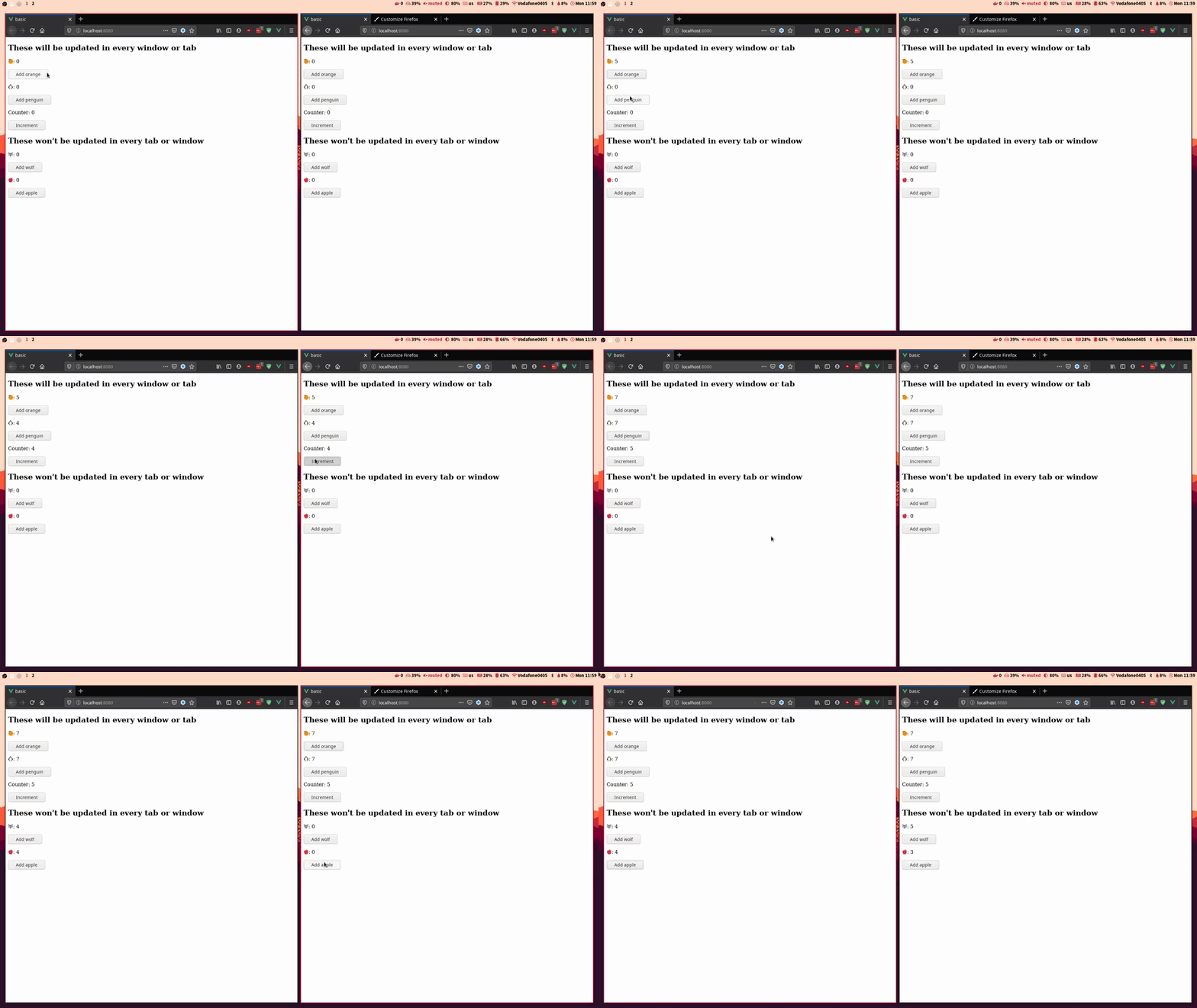
This Vuex plugin allows you to sync and share the status of your Vue application across multiple tabs or windows using the local storage.
This repository has a gitter chat where you can ask questions and propose new features:

Vue 3 and Vuex 4 compatibility :warning:
The plugin has been tested with Vue 3 and Vuex 4 and no problems have been found. There is an issue where you can find how the plugin has been used using the new Vue 3 Composition API. If you encounter a problem using the plugin with Vue 3 and Vuex 4, please post it there.
Installation
vuex-multi-tab-state is available in npm and can be installed with the following command:
npm i vuex-multi-tab-state
Usage
Just import vuex-multi-tab-state and add it in the plugins list of your Vuex Store object.
import Vue from 'vue';
import Vuex from 'vuex';
import createMultiTabState from 'vuex-multi-tab-state';

Vue.use(Vuex);

export default new Vuex.Store({
  state: { ... },
  mutations: { ... },
  actions: { ... },
  getters: { ... },
  plugins: [
    createMultiTabState(),
  ],
});
You can check the example provided here
NuxtJS
Integrating the plugin in NuxtJS requires a little more effort than in Vue. First
of all, we have to create a file inside the plugins directory.
// ~/plugins/multiTabState.client.js
import createMultiTabState from 'vuex-multi-tab-state';

export default ({ store }) => {
  createMultiTabState()(store);
};
Note that the filename must have the following format *.client.js. The next
step is to add this plugin to NuxtJS in nuxt.config.js:
// nuxt.config.js
export default {
  ...
  plugins: [{ src: '~/plugins/multiTabState.client.js' }],
  ...
}
If you didn't name the file according to the specified format, you can add the plugin this way:
// nuxt.config.js
export default {
  ...
  plugins: [{ src: '~/plugins/multiTabState.client.js', mode: 'client' }],
  ...
}
Both ways tell NuxtJS that the plugin should only be run client-side
(because the plugin uses window, not available server-side).
API
createMultiTabState({options})
Creates a new instance of the plugin with the given options. The possible options are as follows:
-
statesPaths Array<String>: contains the name of the states to be synchronized with dot notation. If the param is not provided, the whole state of your app will be sync. Defaults to[].Example: Only the oranges will be synchronized.
export default new Vuex.Store({ state: { fruits: { oranges: 0, apples: 0, }, }, plugins: [createMultiTabState({ statesPaths: ['fruits.oranges'], })], }); -
key? <String>: key of the local storage in which the state will be stored. Defaults to'vuex-multi-tab'. -
onBeforeReplace? <Function>: hook function that receives the state and allows to modify it before replacing it. The function can return either a modified state or afalsyvalue (which means that no modifications has been done inside the hook). -
onBeforeSave? <Function>: hook function that receives the state and allows to modify it before saving it in local storage. The function can return either a modified state or afalsyvalue (which means that no modifications has been done inside the hook).export default new Vuex.Store({ state: { fruits: { oranges: 0, apples: 0, }, }, plugins: [createMultiTabState({ statesPaths: ['fruits.oranges'], onBeforeSave: (state) => { // Modify state here return state; }, onBeforeReplace: (state) => { // Modify state here return state; } })], });
Test
The tests have been written with mocha and chai.
npm install
npm run test
Collaborate

If you feel that something can be improved, go on, create a pull request! Please follow the programming style and document your changes correctly.
License

This project is under the MIT license. More information here.
Related Packages
Unified syntax with simple set() and get() store access + auto generate mutation...
Version History
| Version | Released | License |
|---|---|---|
| 1.0.17 | MIT | |
| 1.0.16 | MIT | |
| 1.0.15 | MIT | |
| 1.0.14 | MIT | |
| 1.0.13 | MIT | |
| 1.0.12 | MIT | |
| 1.0.11 | MIT | |
| 1.0.10 | MIT | |
| 1.0.9 | GPL-3.0 | |
| 1.0.7 | GPL-3.0 | |
| 1.0.6 | GPL-3.0 | |
| 1.0.5 | GPL-3.0 | |
| 1.0.4 | GPL-3.0 | |
| 1.0.3 | GPL-3.0 | |
| 1.0.2 | GPL-3.0 | |
| 1.0.1 | GPL-3.0 | |
| 1.0.0 | GPL-3.0 |