vue3-two-side-multiple-select
vue3-two-side-multiple-select
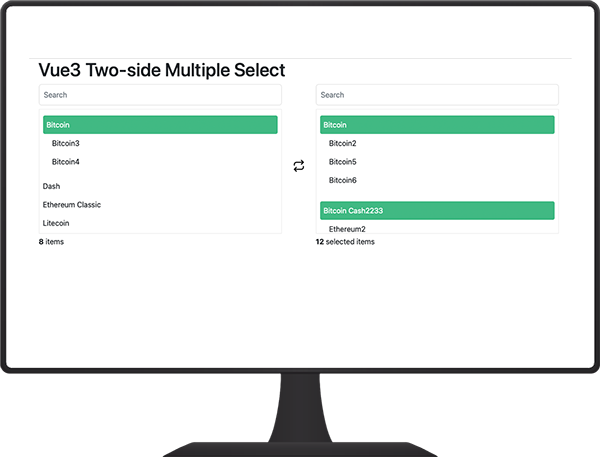
A MultiSelect with two lists for Vue.js v.3, searchable, sorting and action buttons.
enable group list move and remove
Install npm
npm install vue3-two-side-multiple-select --save
Import and use
Import for global usage
import { createApp } from 'Vue'
import MultipleSelect from 'vue3-two-side-multiple-select'
import App from "./App"

const app = createApp(App)
app.component('multiple-select', MultipleSelect)
app.mount('#app')
...
Or on a single component
import MultipleSelect from 'vue3-two-side-multiple-select'
...
},
components: { MultipleSelect }
...
Props
| Name | Type | Default | Description |
|---|---|---|---|
| items | Array | Array of items to select | |
| selectedItems | Array | Array of selected items | |
| valueField | String | value | Value field |
| textField | String | text | Text field |
| childField | String | children | Text field |
| showField | String | disabled | Text field |
| searchable | Boolean | false | If enabled, it will display search fields for lists. |
| searchablePlaceholder | String | Search | Placeholder of inputs search |
| sorteable | Boolean | false | Sort array by property name |
| orderBy | String | id | Property name to sort |
| textItems | String | items | Counter text that is below the left list |
| textSelectedItems | Object | {one: 'selected item', greaterThanOne: 'selected items'} | Counter text that is below the right list |
| limitSelectedItems | Number | 999 | Limit items that the user can select |
| disabled | Boolean | false | Disable select |
| frontEnd | String | bootsrap | bootsrap, bulma |
Events
| Name | Description |
|---|---|
| itemAdded | When an item has been added to the list |
| itemRemoved | When an item has been removed from the list |
| selectedListModified | When the selected list has been modified |
How to use
After you have installed the package and imported it, call the component's html and pass its properties.
<multiple-select
  :items="arrayOfItems"
  :selectedItems="arrayOfSelectedtems"
  :searchable="true"
  :disabled="false"
  :sorteable="true"
  :orderBy="'name'"
  :showTextSelectedItem="true"
  :limitSelectedItems="999"
  text-field="name"
  value-field="id"
  ></multiple-select>
arrayOfItems: [
    {
        id: 1,
        name: 'Bitcoin',
        children: [
            {
                id: 22,
                name: 'Bitcoin2'
            },
            {
                id: 23,
                name: 'Bitcoin3',
                disabled: true
            },
            {
                id: 24,
                name: 'Bitcoin4'
            },
            {
                id: 25,
                name: 'Bitcoin5'
            },
            {
                id: 26,
                name: 'Bitcoin6'
            }
        ]
    },
    {
        id: 2,
        name: 'Ethereum',
        disabled: true
    },
    {
        id: 3,
        name: 'Ripple'
    }
Rtl is available when the body has the class is-rtl
<body class="is-rtl"></body>
Contributing
To contribute to this project you can clone the repository and run the npm run dev command to test.
npm install

npm run dev

npm publish
Related Packages
treeselectjs
Vanilla JavaScript and TypeScript tree select component with nested options, sea...
110,815
110
vue-treeselectjs
Vue 3 tree select component with nested options, search, checkboxes, and multi-s...
21,517
110
Version History
| Version | Released | Vue | License |
|---|---|---|---|
| 0.0.3 | ^3.2.41 | MIT | |
| 0.0.2 | ^3.2.41 | MIT | |
| 0.0.1 | ^3.2.41 | MIT |