vue3-tree-vue
A Simple vue3 project for rendering items in a tree.
76,711
82
| Install | |
|---|---|
npm install vue3-tree-vue |
|
| Latest Version: | 2.0.16 |
| Vue: | 3 |
| License: | MIT |
| Last Updated: | Jul 5, 2026 |
| Links: | GitHub · npm |
Maintainer: geekhybrid
A Simple vue3 project for rendering items in a tree.
npm i vue3-tree-vue
<template>
    <vue3-tree-vue :items="items"
                   :isCheckable="false"  //Set to true if you want to get checkable items
                   :hideGuideLines="false"
                   @onCheck="onItemChecked"
                   @dropValidator="onBeforeItemDropped"
                   @onSelect="onItemSelected"
                   @onExpand="onItemExpanded"
                   @onCheckedChanged="onItemCheckedChanged"
                   @onUnchecked="onItemUnchecked"
                   >
      <!-- Applying some simple styling to tree-items -->
       <template v-slot:item-prepend-icon="treeViewItem" >
              <img src="https://raw.githubusercontent.com/geekhybrid/vue3-tree-vue/HEAD/assets/folder.svg"
                   alt="folder"
                   v-if="treeViewItem.type === 'folder'"
                   height="20" width="20" />
       </template>
    </vue3-tree-vue>
</template>
import 'vue3-tree-vue/dist/style.css'; // remember to add this in your component or maint.[ts/js]

  setup() {
    const onItemChecked = (checkedItems: TreeViewItem[]) => console.log(checkedItems);
    const onItemSelected = (item: TreeViewItem) => console.log(item);
    const onItemCheckedChanged = (checkedItem: TreeViewItem) => console.log('Item checked:', checkedItem);
    const onItemUnchecked = (uncheckedItem: TreeViewItem) => console.log('Item unchecked:', uncheckedItem);

    // How to handle drag and drop logic
    const onBeforeItemDropped = (droppedItem: TreeViewItem, destinationNode: TreeViewItem | undefined) => {
          // destinationNode == undefined means dropping at the root of the tree.

          // Here you can specify any kind of drop validation you will like.
          // this function should return true if the drop operation is valid.

        return new Promise((resolve, _) => {
          resolve(droppedItem !== destinationNode) // Replace this logic with your logic.
        });
    }
    const onItemExpanded = (expandedItem: TreeViewItem) => {
          //to use this feature properly you need to set lazyLoad property as true
          //fetch data
          const lazyLoadedItems = fetchFromApi(...);
          expandedItem.children.push(...lazyLoadedItems)
    }
    const items = ref<TreeViewItem[]>([]); // define your tree items here.

    return {
          onItemChecked,
          onItemSelected,
          onBeforeItemDropped,
          onItemExpanded,
          items
    }
  }
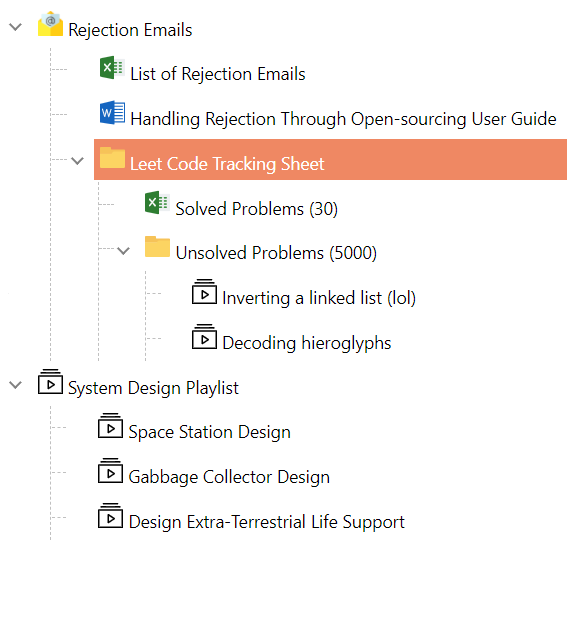
Selectable Tree Items
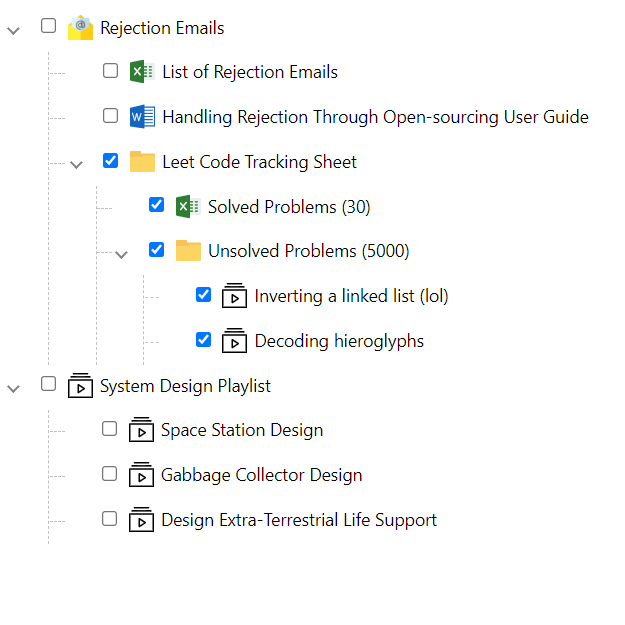
Checkable Tree Items
Drag and Drop
Properties of the TreeView
| Property | Default | Description |
|---|---|---|
| items | Empty array | An array of TreeViewItem. |
| hideGuideLines | false |
Determines the visibility of the guidelines |
| lazyLoad | false |
Determines if the tree supports lazy-loading |
| isCheckable | false |
Defines if items can be selected (one at a time) or selected (using a checkbox) |
| checkboxStyle | undefined | Defines the style to be applied to the checkboxes on the tree. |
| dropValidator | undefined | Specifies a callback of drag and drop rules. |
Basic properties of each tree-node.
export interface TreeViewItem {
  name: string;
  id?: string | number;
  children?: TreeViewItem[];
  checked?: boolean;
  selected?: boolean;
  expanded?: boolean;
  disableDragAndDrop?: boolean; // Disable drag and drop for a specific node.
  collapsible?: boolean; // When set to false, item can not be collapsed (children always visible)
  disabled?: boolean;// When disabled, an item can neither be selected nor checked
  styles?: string[]; // Add the .css styles for a given item
  meta?: any;// provides meta-data of any type per node.
}
Event Handlers
| Events | Description |
|---|---|
| onSelect | Callback function when an item is selected from the tree .Returns an ItemEventArgs. |
| onCheck | Callback function when an item is checked/unchecked from the tree. All checked nodes are fired as an object array. |
| onCheckedChanged | Callback function when an item is checked from the tree. The specific checked node is fired as an object. (Replaces the legacy onCheck behavior) |
| onUnchecked | Callback function when an item is unchecked from the tree. The specific unchecked node is fired as an object. |
| onExpand | Callback function when an item is expanded (Can be used for lazy-loading) |
| onCollapse | Callback function when an item is collapsed |
Styles
| Class | Description |
|---|---|
| selected-tree-item | Defines the style for the selectedItem |
Slots
The Vue3 Tree Vue component provides several slots for customizing the appearance and behavior of tree nodes:
| Name | Description |
|---|---|
| item-prepend-icon | Defines the node's prepend icon. |
| item-prepend | Defines a slot to house content before the node's label. |
| item-expander | Defines a slot for custom expander implementations |
| item-name | Defines a slot for customizing the node's name/label display |
| item-append | Defines a slot for adding custom content after the item name |
| child-append | Defines a slot that shows at the bottom of the child nodes for adding custom content |
Slot Examples
Custom Icons (item-prepend-icon)
<template>
  <vue3-tree-vue :items="items">
    <template v-slot:item-prepend-icon="treeViewItem">
      <img src="https://raw.githubusercontent.com/geekhybrid/vue3-tree-vue/HEAD/assets/folder.svg" alt="folder"
           v-if="treeViewItem.type === 'folder'"
           height="20" width="20">
      <img src="https://raw.githubusercontent.com/geekhybrid/vue3-tree-vue/HEAD/assets/word.svg"
           v-if="treeViewItem.type === '.doc'"
           height="20" width="20">
      <img src="https://raw.githubusercontent.com/geekhybrid/vue3-tree-vue/HEAD/assets/excel.svg"
           v-if="treeViewItem.type === '.excel'"
           height="20" width="20">
      <img src="https://raw.githubusercontent.com/geekhybrid/vue3-tree-vue/HEAD/assets/playlist.svg"
           v-if="treeViewItem.type === '.playlist'"
           height="20" width="20">
      <img src="https://raw.githubusercontent.com/geekhybrid/vue3-tree-vue/HEAD/assets/email.png"
           v-if="treeViewItem.type === 'emails'"
           height="20" width="20">
    </template>
  </vue3-tree-vue>
</template>
Custom Expander (item-expander)
<template>
  <vue3-tree-vue :items="items">
    <template v-slot:item-expander="item">
      <span>{{ item.expanded ? '-' : '+' }}</span>
    </template>
  </vue3-tree-vue>
</template>
Custom Node Names (item-name)
<template>
  <vue3-tree-vue :items="items">
    <template v-slot:item-name="treeViewItem">
      <span style="color: red" v-if="treeViewItem.name.includes('Sheet')">
        {{ treeViewItem.name }}
      </span>
    </template>
  </vue3-tree-vue>
</template>
Append Content (item-append)
<template>
  <vue3-tree-vue :items="items">
    <template v-slot:item-append="treeViewItem">
      <span class="on-item-hover">
        <button title="New Email">Action</button>
      </span>
    </template>
  </vue3-tree-vue>
</template>
Child Append (child-append)
<template>
  <vue3-tree-vue :items="items">
    <template v-slot:child-append="treeViewItem">
      <span v-if="treeViewItem.id === 6">
        <button>Add New Item</button>
      </span>
    </template>
  </vue3-tree-vue>
</template>
Classes
| Name | Description |
|---|---|
| on-item-hover | Use in child-append and item-append slots to only show when the cursor is hovering on the node |
Related Packages
v-tree-vue
A light-weight library for management of hierachical content. Most solutions I f...
1,957
30
@bimetal/tree-vue-components
Default Vue 3 tree / treeview — multi-select, expand/collapse, tri-state checkbo...
1,849
Version History
| Version | Released | License |
|---|---|---|
| 2.0.16 | MIT | |
| 2.0.15 | MIT | |
| 2.0.14 | MIT | |
| 2.0.13 | MIT | |
| 2.0.12 | MIT | |
| 2.0.11 | MIT | |
| 2.0.10 | MIT | |
| 2.0.9 | MIT | |
| 2.0.8 | MIT | |
| 2.0.7 | MIT | |
| 2.0.6 | MIT | |
| 2.0.5 | MIT | |
| 2.0.4 | MIT | |
| 2.0.3 | MIT | |
| 1.0.22 | MIT | |
| 1.0.21 | MIT | |
| 1.0.20 | MIT | |
| 1.0.19 | MIT | |
| 1.0.18 | MIT | |
| 1.0.17 | MIT | |
| 1.0.16 | MIT | |
| 1.0.15 | MIT | |
| 1.0.14 | MIT | |
| 1.0.13 | MIT | |
| 1.0.12 | MIT | |
| 1.0.11 | MIT | |
| 1.0.10 | MIT | |
| 1.0.9 | MIT | |
| 1.0.8 | MIT | |
| 1.0.7 | MIT |
Showing the latest 30 of 37. See every release on npm
Pre-releases (4)
| Version | Released | License |
|---|---|---|
| 2.0.2-alpha | MIT | |
| 2.0.1-alpha | MIT | |
| 2.0.0-alpha | MIT | |
| 1.0.20-nullable-patch | MIT |