vue3-timetable
A versatile timetable component for Vue 3
3,045
6
| Install | |
|---|---|
npm install vue3-timetable |
|
| Latest Version: | 1.1.0 |
| Vue: | 3 |
| License: | MIT |
| Last Updated: | Jul 13, 2024 |
| Links: | GitHub · npm |
Maintainer: michelvermeer
Vue 3 Timetable
A versatile, configurable and responsive timetable component for Vue 3. Ideal for showing the agenda for locations on a specific date.
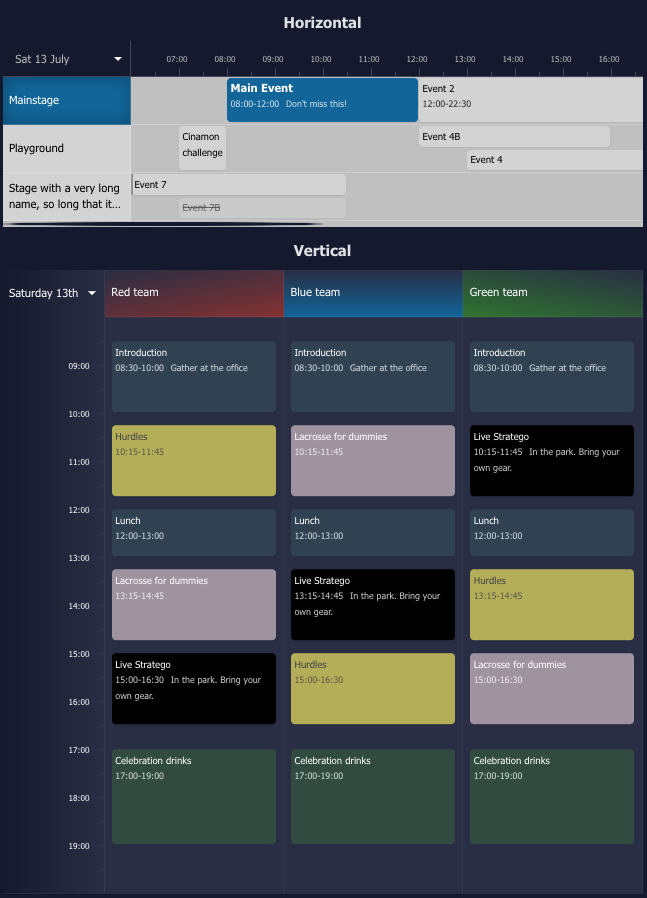
Changes in version 1.1
- Items can contain a
cancelledproperty - Increased test coverage
- Items starting before or ending after the timetable scope show an indicator
- Increased configurability of the timetable style and its locations and items
- The current time indicator can be hidden
- Fixed the horizontal scrollbar which was hidden, so mouse-only users couldn't scroll horizontally
- The display format of the dates is now configurable
- Selectable dates can be predefined using the
datesoption - Timetable data can be loaded asynchronously using
onDateChange
Installation
npm i vue3-timetable
Usage example
<script lang="ts">
import { defineComponent } from 'vue';
import { TimeTable, type TimeTableItem, type TimeTableLocation } from 'vue3-timetable';

export default defineComponent({
    name: 'App',
    components: { TimeTable },
    setup() {
      const items: TimeTableItem[] = [
        {
          id: "e3",
          locationId: 2,
          startDate: `2024-07-09T14:00:00`,
          endDate: `2024-07-09T16:00:00`,
          name: "Surprise Event",
        }
      ];

      const locations: TimeTableLocation[] = [
        {
            id: 1,
            name: "Mainstage",
            items: [
              {
                id: "e1",
                startDate: `2024-07-09T08:00:00`,
                endDate: `2024-07-09T11:00:00`,
                name: "Main Event",
                info: "Don't miss it!",
                style: {
                  backgroundColor: "#999",
                  color: "#000",
                },
              },
            ],
          },
          {
            id: 2,
            name: "Playground",
            items: [
              {
                id: "e2",
                startDate: `2024-07-09T12:00:00`,
                endDate: `2024-07-09T17:00:00`,
                name: "Fun Time",
                cancelled: true,
              },
            ],
          }
      ];

      return {
        items,
        locations,
      };
    },
  });
</script>

<template>
  <div class="timetable">
    <TimeTable variant="horizontal" :items="items" :locations="locations" />
  </div>
</template>
API Reference
TimeTable
Options
| Option | Type | Required | Default | Description |
|---|---|---|---|---|
| locations | TimeTableLocation[] | yes | The locations to show in the timetable | |
| items | TimeTableItem[] | no | [] | The events to show in the timetable |
| variant | string | no | horizontal | The display style of the timetable. Can be horizontal or vertical. Defaults to vertical when unspecified and there is only 1 location |
| dates | string[] | no | Predefined dates to choose from to load timetable data async with onDateChange. The first date will be selected by default. The format needs to be yyyy-MM-dd |
|
| startingHour | number | no | 6 | Starting hour of a day |
| numberOfHours | number | no | 24 | Number of hours to display for a single day |
| styles | TimeTableStyles | no | Custom styling to apply to the timetable | |
| onDateChange | function(date: string) => void |
no | Callback function when a date is changed | |
| onItemClick | function(item: TimeTableRenderedItem<T>) => void |
no | Callback function when an item is clicked | |
| onLocationClick | function(item: TimeTableLocation) => void |
no | Callback function when a location is clicked | |
| dateFormat | string | no | eee dd MMMM | Date format of the date picker. Guide |
| showTimeMarker | boolean | no | true | Show or hide the current time marker |
TimeTableLocation
Options
| Option | Type | Required | Default | Description |
|---|---|---|---|---|
| id | string / number | yes | Location ID | |
| name | string | yes | Location name | |
| items | TimeTableItem[] | no | Event items for the location | |
| style | CustomCSSProperties | no | Custom style for the location |
TimeTableItem
Options
| Option | Type | Required | Default | Description |
|---|---|---|---|---|
| id | string / number | yes | Item ID | |
| name | string | yes | Item name | |
| info | string | no | Item extra information | |
| startDate | Date / string | yes | Item start date | |
| endDate | Date / string | yes | Item end date | |
| data | {} | no | Optional extra data. Useful for callbacks | |
| style | CustomCSSProperties | no | Custom style for the item | |
| className | string | no | Custom additional class for the item | |
| cancelled | boolean | no | false | Shows the item as cancelled |
TimeTableStyles
Options
| Option | Type | Default | Description |
|---|---|---|---|
| backgroundColor | string | #1f2937 | Timetable Background |
| borderStyle | string | solid 2px #374151 | CSS Border style, specify "none" to remove borderStyle |
| dateBackgroundColor | string | #1f2937 | Background of the date and hours. Avoid using "transparent" |
| dateTextColor | string | inherit | Text color of the date and hours |
| datePickerBackgroundColor | string | #1f2937 | Background of the date picker |
| itemBackgroundColor | string | #304151 | Background of an item |
| itemTextColor | string | inherit | Text color of an item |
| locationBackgroundColor | string | #000 | Background of a location |
| locationTextColor | string | inherit | Text color of a location |
| textColor | string | #fff | General text color used in the timetable |
| timeMarkerColor | string | rgba(255, 255, 255, 0.3) | Color of the current time indicator |
CustomCSSProperties
Options
| Option | Example | Description |
|---|---|---|
| background | #1f2937 | Background |
| backgroundColor | red | Background color |
| border | solid 2px #000 | Border style |
| boxShadow | inset 0 0 5px 5px #000 | Box shadow |
| color | blue | Text color |
| font | italic small-caps bold 16px/2 cursive | Font properties |
| fontWeight | bold | Font weight |
| fontSize | 14px | Font size |
| fontFamily | Arial, sans-serif | Font family |
| fontStyle | italic | Font style |
| opacity | 0.8 | Opacity |
Related Packages
Version History
| Version | Released | Vue | License |
|---|---|---|---|
| 1.1.0 | >=3 | MIT | |
| 1.0.1 | >=3 | MIT | |
| 1.0.0 | >=3 | MIT | |
| 0.2.2 | >=3 | MIT | |
| 0.2.1 | >=3 | MIT | |
| 0.2.0 | >=3 | MIT | |
| 0.1.0 | >=3 | MIT |