vue3-range-picker
vue3-range-picker
A Vue 3 date range picker component with multiple panel types (day, week, month, quarter, year). This is a Vue 3 compatible version of the original vue-mj-daterangepicker by damien roche.
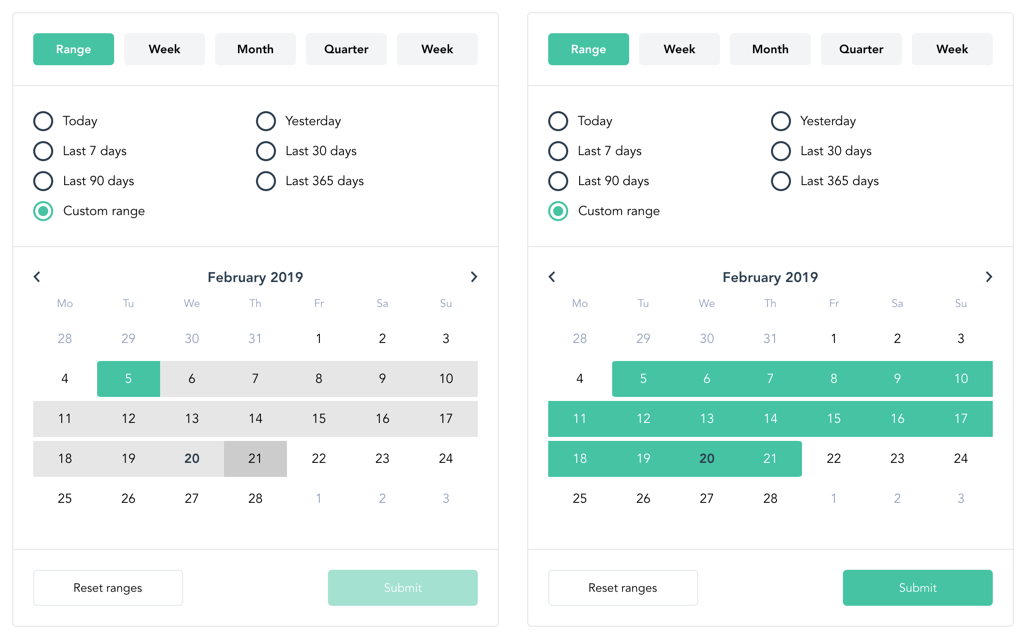
Features
- 📅 Multiple panel types: range, week, month, quarter, year
- 🌍 Internationalization support (en, de, es, fr, ru)
- 🎨 Customizable theme colors
- ⚡ Vue 3 compatible
- 📦 TypeScript support
- 🎯 Preset date ranges
Installation
You need Vue.js version 3.0+.
1. Install via npm
npm install vue3-range-picker
# or
yarn add vue3-range-picker
2. Import and use
Global Registration (Vue 3)
import { createApp } from 'vue'
import DateRangePicker from 'vue3-range-picker'
import 'vue3-range-picker/dist/vue3-range-picker.css'

const app = createApp(App)
app.component('DateRangePicker', DateRangePicker)
Local Registration (Vue 3)
<script>
import DateRangePicker from 'vue3-range-picker'
import 'vue3-range-picker/dist/vue3-range-picker.css'

export default {
  components: {
    DateRangePicker
  }
}
</script>
Nuxt 3 Configuration
<script>
import DateRangePicker from 'vue3-range-picker'
import 'vue3-range-picker/dist/vue3-range-picker.css'

export default {
  components: {
    DateRangePicker
  }
}
</script>
Or if you prefer using it in nuxt.config.ts:
export default defineNuxtConfig({
  css: ['vue3-range-picker/dist/vue3-range-picker.css']
})
Then use it in your components:
<script setup>
import DateRangePicker from 'vue3-range-picker'

const handleUpdate = (values) => {
  console.log('Date range:', values)
}
</script>

<template>
  <DateRangePicker @update="handleUpdate" />
</template>
Props
| Name | Type | Default | Description |
|---|---|---|---|
locale |
String | en | set the locale ['de', 'es', en', 'fr', 'ru'] |
from |
String | null | ISO-8601 date of start range |
to |
String | null | ISO-8601 date of end range |
begin |
String | null | ISO-8601 date to display since beginning range |
allowFrom |
String | null | ISO-8601 date to disable selection of all dates before (strict) |
allowTo |
String | null | ISO-8601 date to disable selection of all dates after (strict) |
past |
Boolean | true | allow/disallow user to select past dates |
future |
Boolean | true | allow/disallow user to select future dates |
panel |
String | null | choose which panel to be open by default |
panels |
Array | [ 'range', 'week', 'month', 'quarter', 'year' ] | choose which panels to be available |
yearsCount |
Number | 2 | number of past/future years to display in year panel |
showControls |
Boolean | true | show bottom controls |
theme |
Object | see customize section | customize colors |
width |
String | 'auto' | set component width |
resetTitle |
String | 'Reset' | change Reset button title |
submitTitle |
String | 'Submit' | change Submit button title |
presets |
Array | see preset section | select which presets to be available |
rangeDisplayed |
String | 'to' | select which range is visible when calendar is displayed |
Customize
theme = {
  primary: '#3297DB',
  secondary: '#2D3E50',
  ternary: '#93A0BD',
  border: '#e6e6e6',
  light: '#ffffff',
  dark: '#000000',
  hovers: {
    day: '#CCC',
    range: '#e6e6e6'
  }
}
Presets
available presets: ['custom', 'today', 'yesterday', 'tomorrow', 'last7days', 'next7days', 'last30days', 'next30days', 'last90days', 'next90days', 'last365days', 'next365days', 'forever']
Warning: forever preset requires the begin prop to be set.
Events
This datepicker emits three events: @update, @select, and @reset
@updateis triggered when submit button is clicked.@selectis triggered when a range is selected, can be useful if you don't want to show bottom controls (withshowControls = false)@resetis triggered when reset button is clicked
All return an object with the start and end date, plus the active panel:
{
  to: '2019-04-23T10:26:00.996Z',
  from: '2018-04-23T10:26:00.996Z',
  panel: 'range'
}
Examples
Basic Usage
<template>
  <date-range-picker
    :from="from"
    :to="to"
    @update="handleUpdate"
  />
</template>

<script>
export default {
  data() {
    return {
      from: null,
      to: null
    }
  },
  methods: {
    handleUpdate(values) {
      this.from = values.from
      this.to = values.to
      console.log('Date range updated:', values)
    }
  }
}
</script>
With Router Query
<template>
  <date-range-picker
    :from="$route.query.from"
    :to="$route.query.to"
    :panel="$route.query.panel"
    @update="update"
  />
</template>

<script>
export default {
  methods: {
    update(values) {
      this.$router.push({
        query: Object.assign({}, this.$route.query, {
          to: values.to,
          from: values.from,
          panel: values.panel
        })
      })
    }
  }
}
</script>
Custom Theme and Locale
<template>
  <date-range-picker
    locale="fr"
    :theme="customTheme"
    @update="handleUpdate"
  />
</template>

<script>
export default {
  data() {
    return {
      customTheme: {
        primary: '#46C3A3',
        secondary: '#2D3E50',
        ternary: '#93A0BD',
        border: '#e6e6e6',
        light: '#ffffff',
        dark: '#000000',
        hovers: {
          day: '#CCC',
          range: '#e6e6e6'
        }
      }
    }
  },
  methods: {
    handleUpdate(values) {
      console.log('Date range:', values)
    }
  }
}
</script>
Restrict Date Selection
<template>
  <date-range-picker
    :past="false"
    :future="true"
    allowFrom="2024-01-01T00:00:00.000Z"
    allowTo="2024-12-31T23:59:59.999Z"
    @update="handleUpdate"
  />
</template>
Migration from Vue 2 Version
If you're migrating from the original vue-mj-daterangepicker (Vue 2), here are the key changes:
- Installation name changed:
vue-mj-daterangepicker→vue3-range-picker - Vue 3 API: Use
createApp()andapp.use()instead ofVue.use() - All props and events remain the same - no breaking changes in the component API
- Dependencies updated: date-fns v1 → v3, Vue Router 3 → 4
Credits
This package is a Vue 3 migration of the original vue-mj-daterangepicker created by damien roche. All credit for the original design and functionality goes to the original author.
Changes in Vue 3 Version
- Upgraded to Vue 3 with Options API
- Updated to date-fns v3
- Updated to Vue Router 4
- Removed deprecated filters API
- Updated build tooling to Vue CLI 5
- Migrated from node-sass to Dart Sass
License
MIT
Contributing
Contributions are welcome! Please feel free to submit a Pull Request.
Issues
If you encounter any issues, please report them at: https://github.com/TusharJoy/vue3-range-picker/issues
Related Packages
Version History
| Version | Released | Vue | License |
|---|---|---|---|
| 1.0.4 | ^3.2.0 | MIT | |
| 1.0.3 | ^3.2.0 | MIT | |
| 1.0.2 | ^3.2.0 | MIT | |
| 1.0.1 | ^3.2.0 | MIT | |
| 1.0.0 | ^3.2.0 | MIT |