vue3-next-qrcode
| Install | |
|---|---|
npm install vue3-next-qrcode |
|
| Latest Version: | 4.1.1 |
| Vue: | 3 |
| License: | MIT |
| Last Updated: | Aug 13, 2026 |
| Links: | GitHub · npm |


vue3-next-qrcode
English | 简体中文
面向 Vue 3 的二维码组件,支持 Logo、图片/GIF 背景、状态 UI、useQRCode,并且包入口可在 SSR 中安全导入。
效果预览
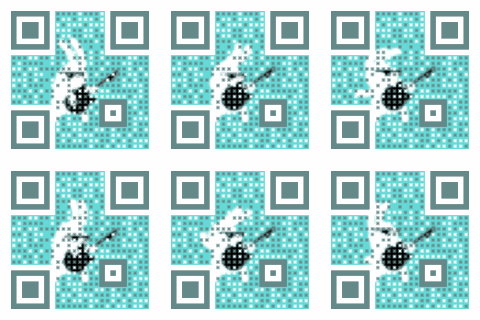

为什么用它
- 既可以作为 Vue 组件使用,也可以用
useQRCode编程式生成二维码。 - 支持 Logo、图片背景、GIF 背景、自定义点样式、加载/错误状态和下载。
- 根入口在 Nuxt 等 SSR 框架中可以安全导入。
- 渲染核心按需懒加载,GIF parser/encoder 只在使用 GIF 背景时加载。
- GIF 渲染带资源保护并按需加载;当前包构建使用已验证的主线程渲染路径。
- 使用 TypeScript 编写,提供组件、composable 和实例类型。
安装
pnpm add vue3-next-qrcode
npm install vue3-next-qrcode
支持 Vue 3.0.1 及以上版本,peer 范围继续保持 ^3.0.1。
快速开始
<script setup lang="ts">
import { Vue3NextQrcode } from 'vue3-next-qrcode'
import 'vue3-next-qrcode/style.css'
</script>

<template>
  <Vue3NextQrcode text="https://github.com/XiaoDaiGua-Ray/vue3-next-qrcode" />
</template>
如果你更喜欢全局注册:
import { createApp } from 'vue'
import Vue3NextQrcode from 'vue3-next-qrcode'
import 'vue3-next-qrcode/style.css'
import App from './App.vue'

createApp(App).use(Vue3NextQrcode).mount('#app')
常见用法
自定义大小和颜色
<script setup lang="ts">
import { QRErrorCorrectLevel } from 'vue3-next-qrcode'
</script>

<template>
  <Vue3NextQrcode
    text="Hello QR"
    :size="240"
    :margin="16"
    colorDark="#111827"
    colorLight="#ffffff"
    :correctLevel="QRErrorCorrectLevel.H"
  />
</template>
中间添加 Logo
<Vue3NextQrcode
  text="https://example.com"
  logoImage="https://example.com/logo.png"
  :logoScale="0.28"
  :logoMargin="8"
  :logoCornerRadius="6"
/>
GIF 背景
<script setup lang="ts">
const gifUrl = 'https://example.com/background.gif'
</script>

<template>
  <Vue3NextQrcode
    text="动态二维码"
    :gifBackgroundURL="gifUrl"
    :dotScale="0.5"
    colorDark="#64d9d6"
  />
</template>
普通二维码不会加载 GIF parser 和 encoder 代码。只有使用 gifBackgroundURL 或 gifBackground 时才会按需加载。
加载和错误状态
<template>
  <Vue3NextQrcode text="loading" status="loading" />

  <Vue3NextQrcode
    text="expired"
    status="error"
    errorDescription="二维码已过期"
    errorActionDescription="重新加载"
    :onReload="refreshQRCode"
  />
</template>
默认 UI 不够时可以使用插槽:
<Vue3NextQrcode text="loading" status="loading">
  <template #loading>
    <span>生成中...</span>
  </template>
</Vue3NextQrcode>
下载二维码
<script setup lang="ts">
import { ref } from 'vue'
import type { QRCodeInst } from 'vue3-next-qrcode'

const qrcodeRef = ref<QRCodeInst>()

const download = () => {
  qrcodeRef.value?.downloadQRCode('qrcode.png')
}
</script>

<template>
  <Vue3NextQrcode ref="qrcodeRef" text="下载我" />
  <button @click="download">下载</button>
</template>
Nuxt 4 和 SSR
包入口可以在 SSR 阶段安全导入。二维码图片生成仍然依赖浏览器 Canvas,因此组件渲染请放到 <ClientOnly> 或等价的客户端边界中。
<template>
  <ClientOnly>
    <QRCodeClient text="Hello Nuxt" />
    <template #fallback>
      <span>二维码加载中...</span>
    </template>
  </ClientOnly>
</template>

<script setup lang="ts">
import { QRCodeClient } from 'vue3-next-qrcode/client'
import 'vue3-next-qrcode/style.css'
</script>
也可以对特定路由关闭 SSR:
export default defineNuxtConfig({
  routeRules: {
    '/qrcode': { ssr: false },
  },
})
Nuxt 4 项目应把页面或组件放在 app/pages/ 或 app/components/ 下,并显式导入
vue3-next-qrcode/style.css。Nuxt 会从服务端构建中 tree-shake 掉 <ClientOnly>
默认插槽,因此只由内部组件引入的 CSS 不一定出现在首屏 HTML 中;建议同时提供
#fallback,保证 SSR 占位稳定并减少布局抖动。多数项目不需要 transpile、alias
或 optimizeDeps 配置。
参考官方 Nuxt <ClientOnly> 文档
和 Nuxt 4 升级指南。
编程式生成
当你只想拿到二维码图片,而不想使用组件内置 UI 时,可以使用 useQRCode。
<script setup lang="ts">
import { ref } from 'vue'
import { QRCodeGenerationCancelledError, useQRCode } from 'vue3-next-qrcode'

const text = ref('Hello from useQRCode')
const { qrcodeURL, isLoading, status, error, generate, cancel, reset } =
  useQRCode({ concurrency: 'latest' })

const create = async () => {
  try {
    await generate({ text: text.value, size: 300, margin: 20 })
  } catch (cause) {
    if (!(cause instanceof QRCodeGenerationCancelledError)) throw cause
  }
}
</script>

<template>
  <input v-model="text" />
  <button :disabled="isLoading" @click="create">
    {{ isLoading ? '生成中...' : '生成' }}
  </button>
  <button @click="cancel">取消</button>
  <button @click="reset">重置</button>

  <p>状态:{{ status }}</p>
  <p v-if="error">{{ error.message }}</p>
  <img v-if="typeof qrcodeURL === 'string'" :src="https://raw.githubusercontent.com/XiaoDaiGua-Ray/vue3-next-qrcode/HEAD/qrcodeURL" alt="二维码" />
</template>
useQRCode 返回值
function useQRCode(): {
  qrcodeURL: Ref<string | ArrayBuffer | Uint8Array | undefined>
  isLoading: Ref<boolean>
  status: Ref<'idle' | 'loading' | 'success' | 'error' | 'cancelled'>
  error: Ref<Error | null>
  generate: (
    options: UseQRCodeOptions,
  ) => Promise<string | ArrayBuffer | Uint8Array | undefined>
  canDownload: ComputedRef<boolean>
  download: (fileName?: string) => Promise<void>
  cancel: () => void
  reset: () => void
  clear: () => void
  dispose: () => void
}
useQRCode({ defaultOptions, concurrency }) 支持兼容默认值 reject 和
latest。当 defaultOptions.text 完整提供时,可以无参数调用 generate()。
被替代、取消或 dispose 的调用会以 QRCodeGenerationCancelledError 拒绝。
cancel() 保留上一次成功图片;reset() 清空结果;clear() 继续作为
reset() 的兼容别名。Vue 作用域中的 Hook 会自动 dispose,也可以显式调用。
如果只需要复用下载行为,也可以直接使用导出的 useQRCodeDownload(sourceRef)。需要清理共享 GIF URL 缓存时,调用 clearQRCodeGIFCache()。
包导出
import {
  Vue3NextQrcode,
  useQRCode,
  useQRCodeDownload,
  clearQRCodeGIFCache,
} from 'vue3-next-qrcode'
import { QRCodeClient } from 'vue3-next-qrcode/client'
import 'vue3-next-qrcode/style.css'
旧样式路径仍然保留:
import 'vue3-next-qrcode/es/style.css'
import 'vue3-next-qrcode/lib/style.css'
Props
| Prop | 类型 | 默认值 | 说明 |
|---|---|---|---|
text |
string |
必填 | 编码到二维码里的文本。 |
size |
number |
160 |
二维码尺寸,单位像素。 |
margin |
number |
12 |
二维码主体周围的安静区边距。 |
correctLevel |
0 | 1 | 2 | 3 |
1 |
纠错级别映射:L=1、M=0、Q=3、H=2,推荐使用 QRErrorCorrectLevel。 |
watchText |
boolean |
true |
text 变化时自动重新渲染。 |
status |
'loading' | 'error' | 'success' |
undefined |
展示加载或错误状态。 |
colorDark |
string |
'#000000' |
二维码模块颜色。 |
colorLight |
string |
'#ffffff' |
二维码背景颜色。 |
autoColor |
boolean |
true |
尽可能根据图片/GIF 背景推导二维码颜色。 |
backgroundImage |
string |
undefined |
静态背景图 URL 或 data URL。 |
backgroundDimming |
string |
'rgba(0, 0, 0, 0)' |
背景图上方的遮罩颜色。 |
gifBackgroundURL |
string |
undefined |
GIF 背景 URL。 |
gifBackground |
ArrayBuffer |
undefined |
GIF 背景二进制数据。 |
logoImage |
string |
undefined |
中间 Logo 图片 URL 或 data URL。 |
logoScale |
number |
0.4 |
Logo 相对二维码尺寸的比例。 |
logoMargin |
number |
6 |
Logo 边距,单位像素。 |
logoCornerRadius |
number |
8 |
Logo 圆角,单位像素。 |
dotScale |
number |
undefined |
可选全局点阵比例 (0, 1];显式设置时覆盖 data/timing/alignment 比例。 |
whiteMargin |
boolean |
true |
使用白色安静区,而不是透明安静区。 |
components |
ComponentOptions |
内置默认值 | 精细控制二维码局部样式。 |
maskPattern |
number |
undefined |
强制指定 0 到 7 的 QR mask pattern,一般无需设置。 |
version |
number |
undefined |
强制指定 QR version,范围 1 到 40,一般无需设置。 |
defineProvider |
Partial<DefineProvider> |
undefined |
当前组件的 CSS 变量覆盖。 |
maskColor |
string |
'rgba(255, 255, 255, 0.96)' |
加载/错误遮罩颜色。 |
errorDescription |
string | VNode |
'二维码已过期' |
错误状态描述。 |
errorActionDescription |
string |
'重新加载' |
错误操作文案。 |
onSuccess |
(result) => void 或数组 |
null |
生成成功后触发,结果为 string | ArrayBuffer | Uint8Array | undefined。 |
onError |
(error) => void 或数组 |
null |
生成失败后触发。 |
onReload |
() => void 或数组 |
null |
点击内置错误操作时触发。 |
在 SFC 模板中,你可以按项目习惯使用 camelCase(gifBackgroundURL)或 kebab-case(gif-background-url)。
插槽和实例方法
| 插槽 | 说明 |
|---|---|
loading |
自定义加载状态。 |
errorAction |
自定义错误操作区域。 |
interface QRCodeInst {
  downloadQRCode: (fileName?: string) => Promise<void>
}
CSS 变量
| 区域 | 变量 |
|---|---|
| 尺寸 | --r-qrcode-width、--r-qrcode-height |
| 容器 | --r-qrcode-background-color、--r-qrcode-border-width、--r-qrcode-border-style、--r-qrcode-border-color、--r-qrcode-border-radius、--r-qrcode-overflow、--r-qrcode-font-family |
| 图片/遮罩 | --r-qrcode-image-object-fit、--r-qrcode-mask-color |
| Loading | --r-qrcode-loading-spinner-size、--r-qrcode-loading-spinner-border-width、--r-qrcode-loading-spinner-color、--r-qrcode-loading-animation-duration |
| Error | --r-qrcode-error-z-index、--r-qrcode-error-gap、--r-qrcode-error-color、--r-qrcode-error-content-padding |
| Action | --r-qrcode-action-color、--r-qrcode-action-hover-color、--r-qrcode-action-active-color、--r-qrcode-action-transition-duration |
旧变量 --r-qrcode-primary-color、--r-qrcode-primary-color-2、
--r-qrcode-spin-size 继续作为兼容 fallback。
使用 defineProvider 可以对单个组件覆盖:
<Vue3NextQrcode
  text="Styled QR"
  :defineProvider="{
    '--r-qrcode-background-color': '#101828',
    '--r-qrcode-border-color': '#6941c6',
    '--r-qrcode-border-radius': '16px',
    '--r-qrcode-loading-spinner-color': '#9e77ed',
    '--r-qrcode-action-color': '#fdb022',
    '--r-qrcode-action-hover-color': '#f79009',
  }"
/>
TypeScript
import type {
  QRCodeInst,
  QRCodeLevel,
  QRCodeStatus,
  QRCodeProps,
  QRCodeOptions,
  ComponentOptions,
  UseQRCodeOptions,
  UseQRCodeReturnType,
  QRCodeDownloadSource,
  UseQRCodeDownloadReturn,
} from 'vue3-next-qrcode'
测试
当前包同时覆盖单元测试和发布 smoke:
vitest+happy-dom覆盖 prop 校验、GIF URL 缓存/请求去重、下载行为、渲染队列语义、useQRCode、QRCode组件异步渲染,以及当前包构建的主线程渲染路径。scripts/smoke.mjs校验 ESM/CJS 根入口、client 子路径、样式导出、发布文件完整性、声明文件消费、私有路径残留、packaged worker 禁用引用,以及 emoji 二维码编码。
执行完整验证:
pnpm run test
迁移说明
v4.1.0
- 推荐使用
vue3-next-qrcode/style.css引入样式。 - Nuxt 中推荐使用
vue3-next-qrcode/client和<ClientOnly>。 - 根入口和
useQRCode导入是 SSR-safe 的,但二维码图片生成仍在客户端。 - 浏览器侧二进制结果使用
Uint8Array,不再暴露 NodeBuffer类型。 downloadQRCode()返回Promise<void>。- 非法
version、maskPattern、dotScale会直接校验失败。 - 未列入 package
exports的内部深层导入不受支持。 - Vue 最低版本仍是
3.0.1,不是破坏性升级。
详见 v4.1.0 迁移文档。
从 v3 迁移
- CSS 类名前缀从
ray-qrcode改为r-qrcode。 img_tag改为data-component。- GIF 和图片渲染逻辑现在会按需懒加载。
常见问题
SSR 中能 import 吗?
可以。根入口和 useQRCode 都可以在 SSR 阶段安全导入。二维码图片渲染仍需要放到客户端。
Nuxt SSR 时为什么看不到二维码?
QRCodeClient 是客户端渲染组件。如果需要 SSR 占位内容,可以给 <ClientOnly> 添加 fallback。
GIF 渲染需要配置 Worker 吗?
不需要。当前包构建使用已验证的主线程 GIF 渲染。Worker 渲染会等相对 worker URL 通过 ESM 和 CJS 包 smoke 后再恢复。
可以在小程序里使用吗?
不能直接使用。小程序使用平台特定 Canvas API,需要单独适配。
License
Related Packages
Version History
| Version | Released | Vue | License |
|---|---|---|---|
| 4.1.1 | ^3.0.1 | MIT | |
| 4.1.0 | ^3.0.1 | MIT | |
| 4.0.0 | ^3.0.1 | MIT | |
| 3.1.0 | ^3.0.1 | MIT | |
| 3.0.2 | ^3.0.1 | MIT | |
| 3.0.1 | ^3.0.1 | MIT | |
| 3.0.0 | ^3.0.0 | MIT | |
| 2.0.10 | ^3.3.13 | MIT | |
| 2.0.9 | ^3.3.13 | MIT | |
| 2.0.8 | ^3.3.13 | MIT | |
| 2.0.7 | ^3.3.13 | MIT | |
| 2.0.6 | ^3.3.13 | MIT | |
| 2.0.5 | ^3.3.13 | MIT | |
| 2.0.4 | ^3.3.4 | MIT | |
| 2.0.3 | ^3.3.4 | MIT | |
| 2.0.2 | ^3.3.4 | MIT | |
| 2.0.1 | ^3.3.4 | MIT | |
| 2.0.0 | ^3.3.4 | MIT |
Pre-releases (2)
| Version | Released | Vue | License |
|---|---|---|---|
| 4.1.0-beta.1 | ^3.5.0 | MIT | |
| 4.1.0-beta.0 | ^3.0.1 | MIT |