vue3-mobile-nav
Vue Mobile Nav
Eight animated mobile navigation styles for Vue 3. Configure labels, Iconify icons, active states, destinations, item order, and item count through one component.
Build a polished mobile tab bar without wiring selection, links, keyboard behavior, reduced motion, or safe-area spacing yourself.
Documentation: vue3-mobile-nav.netlify.app Try it: Open the live playground Release notes: CHANGELOG.md
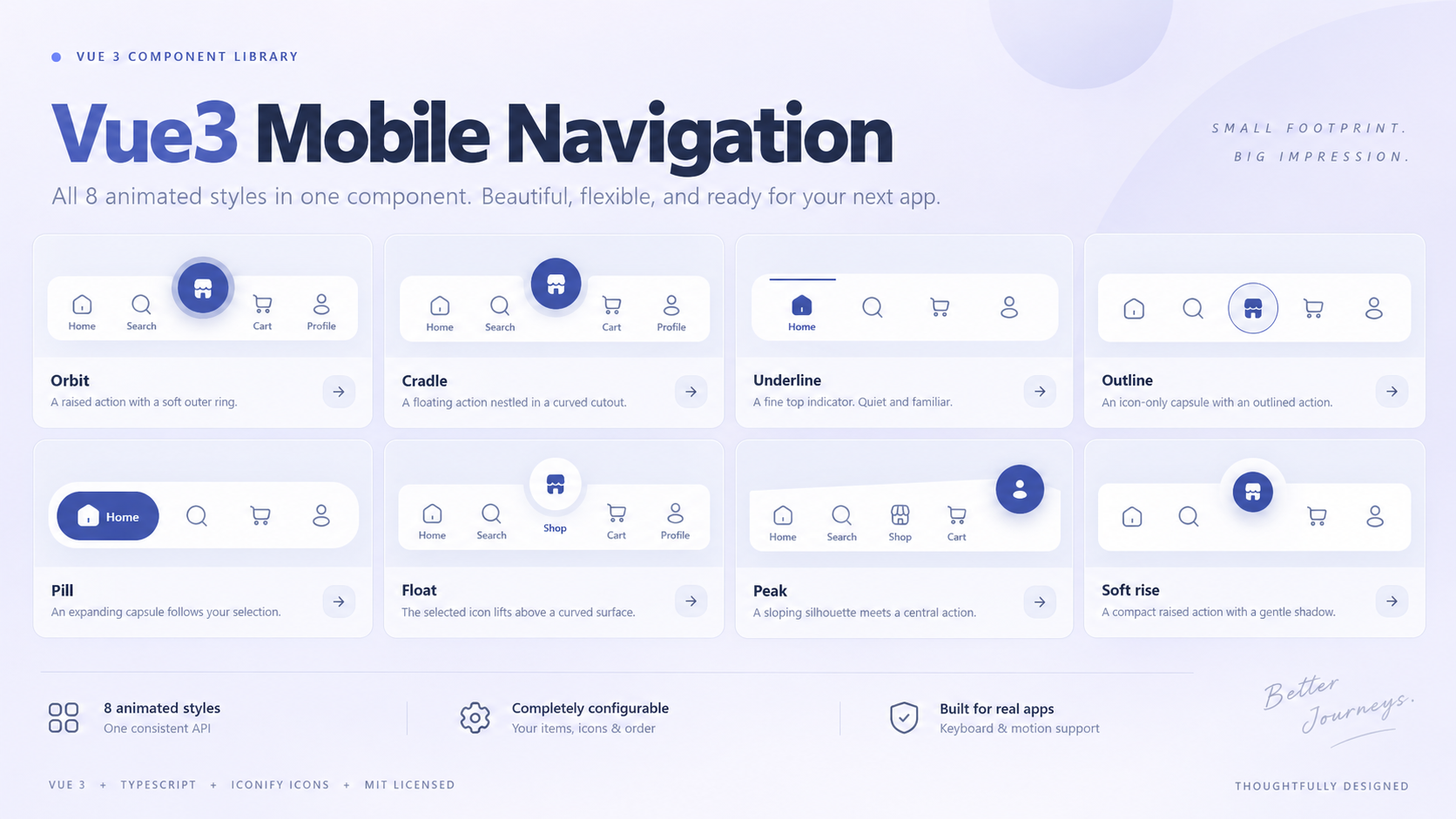
Choose a style
| Use case | Try | Why |
|---|---|---|
| Familiar app tabs | pill or underline |
Clear selection with a compact footprint |
| A prominent central action | cradle, orbit, or peak |
Raises a featured item above the bar |
| A subtle custom look | float, outline, or soft-rise |
Adds motion without a large filled tab |
All styles use the same props, events, and NavItem shape. Preview them and copy working setup code in the playground.
Install
Install the published vue3-mobile-nav package with your preferred package manager:
| Package manager | Command |
|---|---|
| npm | npm install vue3-mobile-nav |
| pnpm | pnpm add vue3-mobile-nav |
| Yarn | yarn add vue3-mobile-nav |
| Bun | bun add vue3-mobile-nav |
Requires Vue 3.5+. No CSS framework or router dependency. @iconify/vue is a runtime dependency for rendering Iconify icons; the package does not bundle an icon collection. Use imported icon data for offline or server-rendered apps.
Quick start
<script setup>
import { MobileNav } from 'vue3-mobile-nav'
import 'vue3-mobile-nav/style.css'

const items = [
  {
    id: 'home',
    label: 'Home',
    icon: 'solar:home-2-linear',
    activeIcon: 'solar:home-2-bold',
    to: '/',
  },
  {
    id: 'profile',
    label: 'Profile',
    icon: 'solar:user-rounded-linear',
    activeIcon: 'solar:user-rounded-bold',
    to: '/profile',
  },
]
</script>

<template>
  <MobileNav :items="items" variant="pill" />
</template>
icon is the default icon; activeIcon is the selected icon. If activeIcon is omitted, the default icon keeps the active styling and animation. to creates a real link. Omit to to render an action button.
Reorder the array to change placement. Add or remove items to change the count. Circle styles feature the active item. They start on the middle enabled item by default; featured-id sets a different initial selection and follows later clicks. Changing it updates uncontrolled selection. A controlled model or route takes precedence.
Vue Router
Pass the router's navigation function and reactive route path. The component handles selection after back/forward navigation without a second route map.
<script setup>
import { useRoute, useRouter } from 'vue-router'
import { MobileNav } from 'vue3-mobile-nav'
import 'vue3-mobile-nav/style.css'

const route = useRoute()
const router = useRouter()
const items = [
  { id: 'home', label: 'Home', icon: 'solar:home-2-linear', to: '/' },
  { id: 'profile', label: 'Profile', icon: 'solar:user-rounded-linear', to: '/profile' },
]
</script>

<template>
  <MobileNav :items="items" :active-path="route.path" :navigate="router.push" variant="underline" />
</template>
For nested routes, use v-model or a computed active ID instead of exact activePath matching. In Nuxt or another SSR app, pass imported Iconify icon data for server rendering and include the stylesheet in your app entry; keep browser-only APIs in client-side code.
activePathexactly matches an item'sto. Unmatched paths leave all items in their default state.- Use
v-modelor:model-valuefor custom matching, nested routes, or named routes. A supplied model value takes precedence overactivePath. navigatereceives relative destinations only. Absolute URLs, mail/phone links, modified clicks, middle-click, and non-self targets preserve native browser behavior.target: '_blank'automatically addsrel="noopener noreferrer".- Provide
activePathor a controlled model when using a router so rejected/redirected navigation cannot leave the wrong page highlighted. - Executable URL schemes and control characters are rejected.
Selection and custom actions
Without v-model or activePath, selection is internal. Set default-active="profile" for the initial selection. Otherwise, circle styles select the enabled item nearest the center (ties choose the left item); Pill and Underline select the first enabled item. Removing/disabling the selection uses the same fallback, preferring a valid featuredId.
<MobileNav v-model="active" :items="items" @select="handleSelect" />
function handleSelect(item, event) {
  if (item.id === 'compose') {
    event.preventDefault() // cancel selection and navigation
    openComposeDialog()
  }
}
Items without to work as buttons. select(item, event) fires before the default selection/navigation behavior. It fires again when clicking the current item. Modified/new-tab link activations do not change the current selection or fire select.
Thrown or rejected navigate calls emit navigation-error(error, item); handle that event to show application-specific feedback.
Styles
| Variant | Design and motion |
|---|---|
orbit |
Ringed raised action with icon/color transitions |
cradle |
Floating action in a curved cutout |
underline |
Sliding top line and fading labels |
outline |
Icon capsule with an animated outlined action |
pill |
Sliding filled capsule with expanding labels |
float |
Lifting icons and a moving cutout |
peak |
Sloping surface with a raised action |
soft-rise |
Compact raised action and fading labels |
All styles animate icons and active/default colors. When both icons are supplied, they crossfade. Reduced-motion preferences disable transitions. Cutout interpolation uses registered CSS properties; older browsers may update the cutout immediately while retaining the other transitions.
navPresets exports the style metadata for selectors.
API
| Prop | Type | Default |
|---|---|---|
items |
readonly NavItem[] |
required |
variant |
NavVariant |
pill |
modelValue |
string |
internally managed |
defaultActive |
string |
middle for circle styles; first otherwise |
activePath |
string |
active item in circle styles |
navigate |
(destination: string) => unknown |
native links |
featuredId |
string |
active item in circle styles |
theme |
'light' | 'dark' |
light |
position |
'inline' | 'fixed' |
inline |
label |
string |
Main navigation |
TypeScript is optional. Types are exported:
import type { NavItem, NavVariant, NavTheme } from 'vue3-mobile-nav'

interface NavItem {
  id: string
  label: string
  icon: string | IconifyIcon
  activeIcon?: string | IconifyIcon
  to?: string
  target?: '_self' | '_blank' | '_parent' | '_top'
  disabled?: boolean
  badge?: string | number
}
Use unique, nonempty, stable IDs. Empty IDs and subsequent duplicates are ignored. Invalid/disabled controlled IDs select nothing.
Events: update:modelValue(id), select(item, event), navigation-error(error, item).
Slots: #icon="{ item, active }" replaces icon content; #empty replaces the empty-state message. Do not nest interactive elements inside icon slots.
Icons and offline use
Iconify string names load on demand. For offline apps or server rendering, pass bundled icon data:
npm install @iconify-icons/solar
import home from '@iconify-icons/solar/home-2-linear'
import homeActive from '@iconify-icons/solar/home-2-bold'

const items = [{ id: 'home', label: 'Home', icon: home, activeIcon: homeActive, to: '/' }]
See Iconify Vue documentation. Invalid names or unavailable networks can leave icons blank; accessible labels remain. Use trusted icon data and follow your selected icon pack's license. The library does not bundle an icon collection.
Theme and animation
<MobileNav :items="items" theme="dark" style="--mn-primary: #ADBBDA; --mn-duration: 350ms" />
| CSS variable | Light default | Controls |
|---|---|---|
--mn-primary |
#3D52A0 |
Active foreground/fill |
--mn-accent |
#7091E6 |
Focus and default featured action |
--mn-muted |
#66769D |
Default foreground |
--mn-ring |
#ADBBDA |
Featured ring |
--mn-surface |
#FFFFFF |
Bar surface |
--mn-on-primary |
#FFFFFF |
Filled-action foreground |
--mn-duration |
280ms |
Transition duration |
--mn-easing |
cubic-bezier(.22, 1, .36, 1) |
Transition easing |
Items expose data-state="active" or data-state="default". Use CSS variables or these attributes for additional customization. Check color contrast in custom themes.
Accessibility and layout
- Native links/buttons, visible keyboard focus, full accessible labels, and
aria-current="page". - Tab/Enter work natively; Space activates action buttons. Left/Right and Home/End move focus without activation and skip disabled items.
- Long menus scroll horizontally rather than shrinking touch targets. Labels truncate visually but retain accessible names.
- Fixed mode includes safe-area padding. Reserve roughly 128px plus the device safe area below page content and avoid transformed ancestors around fixed navigation.
- Empty/all-disabled lists are supported. Reduced motion disables animations.
- Use modern browsers for CSS masks and smoothly interpolated cutouts.
For fixed navigation, set position="fixed"; reserve about 128px plus the device safe area below the page content. The component is attached to the viewport, so test it at narrow phone widths and avoid transformed ancestors.
Compatibility and dependencies
- Vue 3.5 or newer is required.
- Vue Router is optional; native destinations work without it.
- Iconify string names are fetched on demand by Iconify. Network-restricted apps can provide imported icon data instead.
- Cutout shapes use CSS masks. Browsers without registered CSS properties still show the navigation, but the cutout may jump instead of interpolating smoothly.
Common setup issues
- Icons are blank: verify the Iconify name and network access, or import icon data from an icon package.
- No item is active:
activePathuses exact matching. For nested paths or named routes, control selection withv-model. - Fixed bar overlaps content: reserve bottom space in the page layout and account for the safe area.
- The bar is clipped or misplaced: remove transformed ancestors around fixed navigation.
Contributing
Contributions are welcome. See the contribution guide for development setup and pull request instructions.
License
Related Packages
Version History
| Version | Released | Vue | License |
|---|---|---|---|
| 0.2.1 | ^3.5.0 | MIT | |
| 0.2.0 | ^3.5.0 | MIT | |
| 0.1.0 | ^3.5.0 | MIT |