vue3-i18n-service
vue3-i18n-service
The translation team (not developers) wants a file with all the keys to translate. But I love to use translations in Single File Components.
And I found a solution to make everyone happy: vue3-i18n-service export|import
Vue I18n Service makes to manage SFC translations easier in a file. It collects all the <i18n> definitions in Single File Components and collects them into a file.
What's the flow:
Hello.vue
<template>
  <div>{{ hello }}</div>
</template>

<i18n>
{
  "en": {
    "hello": "Hi 🙁"
  },
  "tr": {
    "hello": "Selam"
  }
}
</i18n>
⬇️npx vue3-i18n-service export > translations.json
{
  "src/components/Hello.vue": {
    "en": {
      "hello": "Hi 🙁"
    },
    "tr": {
      "hello": "Selam"
    }
  }
}
✏️translations.edited.json
{
  "src/components/Hello.vue": {
    "en": {
      "hello": "Hello 🙂"
    },
    "tr": {
      "hello": "Merhaba"
    }
  }
}
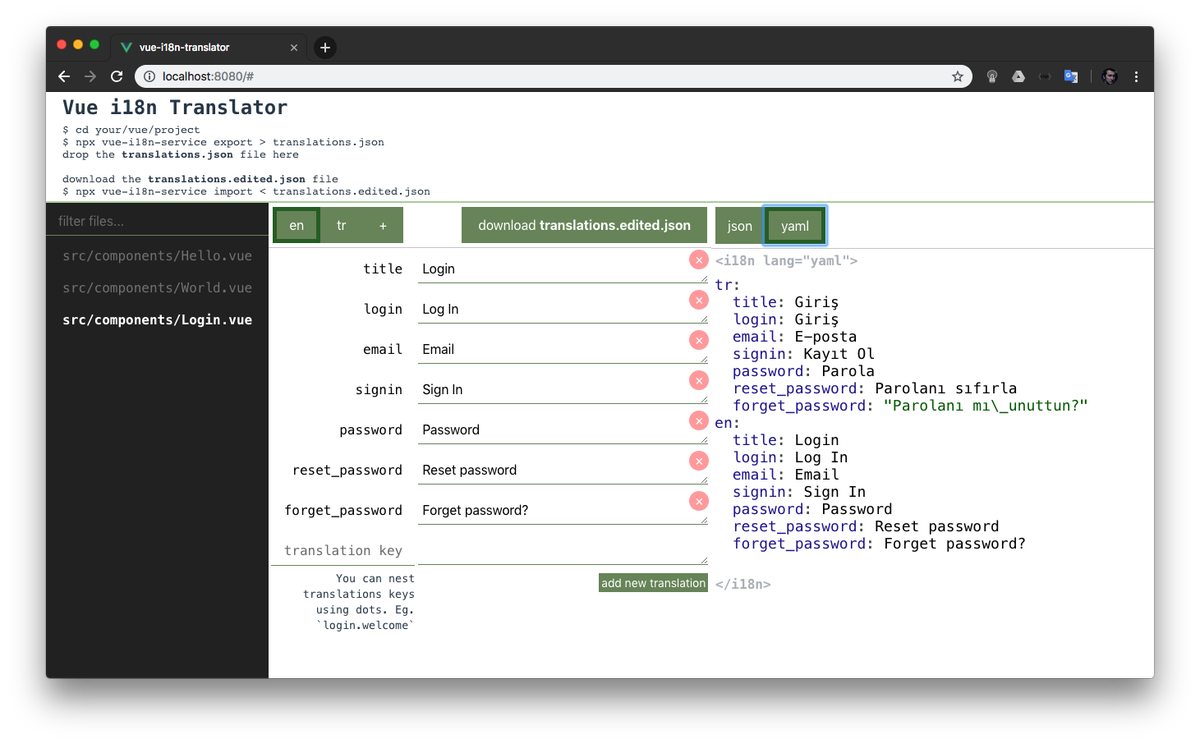
Editing translations.json using Web UI
Open https://edisdev.github.io/vue-i18n-translator/ and drop translations.json file which you've just generated. It will parse it and generate an useful interface to translate.
⬇️npx vue3-i18n-service import < translations.edited.json
updating file src/components/Hello.vue
<template>
  <div>{{ hello }}</div>
</template>

<i18n>
{
  "en": {
    "hello": "Hello 🙂"
  },
  "tr": {
    "hello": "Merhaba"
  }
}
</i18n>
And all is OK. Doesn't matter how many files you have, it simply distributes without any problem and any conflict.
Exporting i18n's in SFCs
This will generate a translations.json file (or whatever you named).
npx vue3-i18n-service export > translations.json
It has a simple format:
{
  "<file path>": {
    "<locale>": {
      "<key>": "<value>"
    }
  }
}
Here is an example:
{
  "src/components/Hello.vue": {
    "en": {
      "hello": "Hello"
    },
    "tr": {
      "hello": "Merhaba"
    }
  },
  "src/views/World.vue": {
    "en": {
      "world": "World"
    },
    "tr": {
      "world": "Dünya"
    }
  }
}
--dir
By default, vue3-i18n-service looks for SFCs in the src/ directory, if your components are in another directory, specify it by passing the --dir flag:
npx vue3-i18n-service export --dir=client/ > translations.json
Importing translations.json file to the SFCs
After bulk changing files, you can distribute import all the files calling import command.
npx vue3-i18n-service import < translations.json
This will update .vue files and replace them with changes.
Creating new locale from other locale
You can creating a new locale by copying another locale create command
npx vue3-i18n-service create --new=newlocale --extend=extendedLocale
Contributors
License
MIT.
Related Packages
Vue 3 + TypeScript UI components and contract layer for the umutcangungormus/lar...
i18n transform plugin for vite/vue which can generate message key automatically
Version History
| Version | Released | License |
|---|---|---|
| 0.2.4 | MIT | |
| 0.2.3 | MIT | |
| 0.2.2 | MIT | |
| 0.2.1 | MIT | |
| 0.2.0 | MIT |
Pre-releases (1)
| Version | Released | License |
|---|---|---|
| 0.0.1-security |