vue3-highlight-component
With vue3-highlight-component, you can highlight code blocks within your application using the power of Highlight.js. In addition to supporting multiple programming languages, the component can be customized with different pr
1,367
2
| Install | |
|---|---|
npm install vue3-highlight-component |
|
| Latest Version: | 0.3.4 |
| Vue: | 3 |
| License: | MIT |
| Last Updated: | Aug 3, 2023 |
| Links: | GitHub · npm |
Maintainer: eliahu-satat
vue3-highlight-component
Description
With vue3-highlight-component, you can highlight code blocks within your application using the power of Highlight.js. In addition to supporting multiple programming languages, the component can be customized with different props to match the design of your application.
Installation
npm i highlight.js vue3-highlight-component
Basic Usage
<template>
  <HighLight  :with-header="true" language="js" header-language="JavaScript"  :code="code"/>
</template>

<script>
import hljs from 'highlight.js'
import HighLight from "vue3-highlight-component";

// Register the language if it's not supported by default
hljs.registerLanguage('js', require('highlight.js/lib/languages/javascript'))

export default {
  name: 'App',
  data() {
    return {
      code: `your js code...`
    }
  },
  components: {
    HighLight
  }
}
</script>
<!-- you can choose alot of diffrent styles from highlight.js/styles in your node_modules -->
<style src="highlight.js/styles/panda-syntax-dark.css"></style>
Example
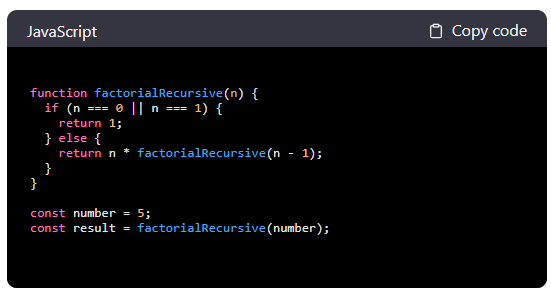
Props
| Name | Type | Description | Required | Default |
|---|---|---|---|---|
| code | String | The text of the code displayed by the component | ✔️ | |
| language | String | The language of the code (is optional since highlight.js could automatically infer the language if it's not set.) | ❌ | highlight.js output |
| withHeader | Boolean | For headers with language name and copy option set to true. | ❌ | false |
| copyText | String | If you would like to add custom text to the copy option . Only relevant if withHeader is set. | ❌ | Copy code |
| copySuccessText | String | If you would like to add custom text to the success copy (Following the copy option click) . Only relevant if withHeader is set. | ❌ | Copied! |
| headerLanguage | String | If you want the language displayed in the header to have a custom name. Only relevant if withHeader is set. | ❌ | dispaly the props language |
on npm
on github
Related Packages
@wdns/vue-code-block
Vue 3 CodeBlock - Highlight your code with ease using this syntax highlighting c...
422,578
53
Version History
| Version | Released | Vue | License |
|---|---|---|---|
| 0.3.4 | ^3.2.13 | MIT | |
| 0.3.3 | ^3.2.13 | MIT | |
| 0.3.2 | ^3.2.13 | MIT | |
| 0.3.1 | ^3.2.13 | MIT | |
| 0.3.0 | ^3.2.13 | MIT | |
| 0.2.9 | ^3.2.13 | MIT | |
| 0.2.8 | ^3.2.13 | MIT | |
| 0.2.7 | ^3.2.13 | MIT | |
| 0.2.6 | ^3.2.13 | MIT | |
| 0.2.5 | ^3.2.13 | MIT | |
| 0.2.4 | ^3.2.13 | MIT | |
| 0.2.3 | ^3.2.13 | MIT | |
| 0.2.2 | ^3.2.13 | MIT | |
| 0.2.1 | ^3.2.13 | MIT | |
| 0.1.9 | ^3.2.13 | MIT | |
| 0.1.8 | ^3.2.13 | MIT | |
| 0.1.7 | ^3.2.13 | MIT | |
| 0.1.6 | ^3.2.13 | MIT | |
| 0.1.5 | ^3.2.13 | ||
| 0.1.4 | ^3.2.13 | ||
| 0.1.3 | ^3.2.13 | ||
| 0.1.2 | ^3.2.13 | ||
| 0.1.1 | ^3.2.13 | ||
| 0.1.0 | ^3.2.13 |