vue3-google-oauth2
DEPRECATED - no longer actively maintained
You can use this plugin vue3-google-login instead to have support for the new Google Identity Services JavaScript library.
vue3-google-oauth2
Handling Google sign-in and sign-out for Vue3 applications.
Please refer to here for Vue2 applications.



Installation
Installation with npm
npm install vue3-google-oauth2
Installation with yarn
yarn add vue3-google-oauth2
Initialization
import { createApp } from 'vue'
import App from './App.vue'
import GAuth from 'vue3-google-oauth2'
const app = createApp(App)

const gAuthOptions = { clientId: 'YOUR_CLIENT_ID', scope: 'email', prompt: 'consent', fetch_basic_profile: false }
app.use(GAuth, gAuthOptions)
Options
| Property | Type | Required | Description |
|---|---|---|---|
| clientId | String | Required. | The app's client ID, found and created in the Google Developers Console. |
| scope | String | Optional. | Default value is profile email. Full list of scopes. |
| prompt | String | Optional. | This value using for authCode. The possible values are select_account or consent. Default value is select_account. To get refresh token from auth code, use consent. |
| fetch_basic_profile | Boolean | Optional. | If set to true, email profile openid will be automatically added as scope. Default value is true. |
Methods
| Property | Description | Type |
|---|---|---|
| instance | return of gapi.auth2.getAuthInstance() | Object |
| signIn | function for sign-in | Function |
| getAuthCode | function for getting authCode | Function |
| signOut | function for sign-out | Function |
Reactivity
We support reactivity by Provide/Injection. Refer to sample project.
| Property | Description | Type |
|---|---|---|
| Vue3GoogleOauth.isInit | it will return reactivity object value({isInit, isAuthorized}) | Object |
| Vue3GoogleOauth.isAuthorized | it will return reactivity object value({isInit, isAuthorized}) | Object |
Usages
Refer to sample project.
Extra - Directly get access_token and refresh_token on Server-side
To get access_token and refresh_token in server side, the data for redirect_uri should be postmessage. postmessage is magic value for redirect_uri to get credentials without actual redirect uri.
Curl
curl -d "client_id=YOUR_CLIENT_ID&\
  client_secret=YOUR_CLIENT_SECRET&\
  redirect_uri=postmessage&\
  grant_type=authorization_code&\
  code=YOUR_AUTH_CODE" https://accounts.google.com/o/oauth2/token
Sample Code
Additional Help
- sample login page HTML file.
- Google API Client Libraries : Methods and Classes
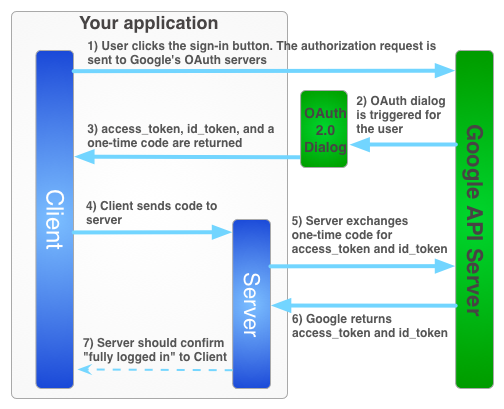
- If you are curious of how the entire Google sign-in flow works, please refer to the diagram below
FAQ
The failure of initialization happens
You can check the brower console to check errors which occur during initialization. The most of errors are from inproper setting of google oauth2 credentials setting in Google Developer Console. After changing the settings, you have to do hard refresh to clear your caches.
Related Packages
This vue 2 plugin is a wrapper for the script needed to do client side operation...
Using the Google Identity Services authorization code model a popup dialog for u...
Version History
| Version | Released | License |
|---|---|---|
| 1.0.7 | MIT | |
| 1.0.6 | MIT | |
| 1.0.4 | MIT | |
| 1.0.3 | MIT | |
| 1.0.2 | MIT | |
| 1.0.1 | MIT |
Pre-releases (1)
| Version | Released | License |
|---|---|---|
| 0.0.1-security |