vue3-colorful
vue3-colorful 🎨




Lightweight, accessible color pickers for Vue 3, built with TSX render functions and designed for app-level theming.
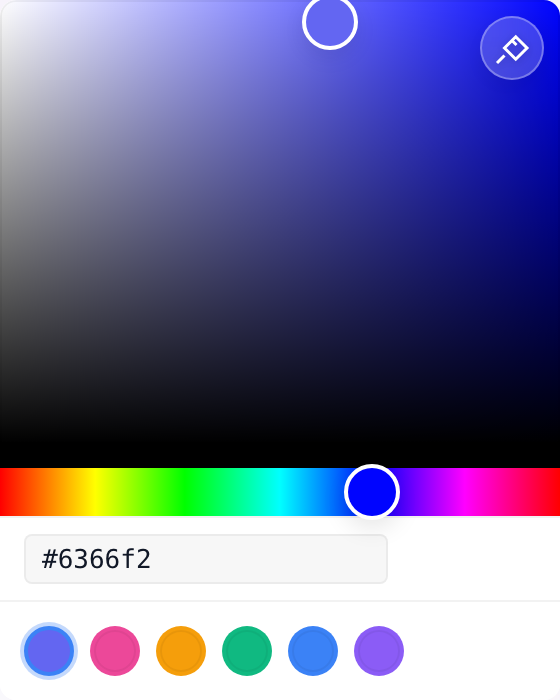
Quick Start
Install
pnpm add vue3-colorful
If you use ColorPickerPopover, install its optional peer dependency too:
pnpm add @floating-ui/vue
Minimal Example
import { defineComponent, ref } from 'vue'
import { HexColorPicker } from 'vue3-colorful'

export default defineComponent({
  name: 'QuickStartHexPicker',
  setup() {
    const color = ref('#3b82f6')

    return () => <HexColorPicker v-model={color.value} />
  },
})
Default styles are imported automatically; add the stylesheet explicitly if your toolchain strips CSS side effects:
import 'vue3-colorful/style.css'
Why This Library
- Tree-shakable specialized pickers for
hex,rgb,hsl,hsv,hwb, andcmyk - Accessible sliders, inputs, and popovers with keyboard support
- TSX-first Vue 3 API that fits composable-heavy codebases
- CSS variable theming with optional dark mode and custom slots
- Optional popover entrypoint that keeps the core picker bundle lighter
Pick The Right Component
| Component | Use it when | Notes |
|---|---|---|
HexColorPicker |
Your app stores HEX strings | Best default for simple product UIs |
RgbColorPicker / HslColorPicker / HsvColorPicker / HwbColorPicker / CmykColorPicker |
Your app already uses one fixed format | Smallest, clearest API for that model |
ColorPicker / ColorPickerPanel |
You want the raw panel without a trigger | ColorPicker is a compatibility alias; add colorModel to control parsing and output |
ColorPickerPopover |
You need a compact picker opened from a trigger | Import from vue3-colorful/popover and install @floating-ui/vue |
ColorPicker is a compatibility alias for ColorPickerPanel. ColorPickerPanel is the clearer triggerless API when you mount the panel directly. If the color model is fixed, prefer a specialized picker for the simplest bundle and API surface.
Components
Specialized Pickers
import { defineComponent, ref } from 'vue'
import { HexColorPicker } from 'vue3-colorful'

export default defineComponent({
  name: 'ExampleHexPicker',
  setup() {
    const color = ref('#3b82f6')

    return () => <HexColorPicker v-model={color.value} showInput />
  },
})
Available specialized pickers:
HexColorInputHexColorPickerRgbColorPickerHslColorPickerHsvColorPickerHwbColorPickerCmykColorPicker
Generic ColorPicker
Use the generic picker when you want the triggerless panel API and the active color model is user-configurable. ColorPicker and ColorPickerPanel share the same implementation.
import { defineComponent, ref } from 'vue'
import { ColorPicker } from 'vue3-colorful'
import type { ColorModel } from 'vue3-colorful'

export default defineComponent({
  name: 'ExampleColorPicker',
  setup() {
    const color = ref('#3b82f6')
    const colorModel = ref<ColorModel>('hex')

    return () => <ColorPicker v-model={color.value} colorModel={colorModel.value} showInput />
  },
})
| Prop | Type | Default | Description |
|---|---|---|---|
colorModel |
'hex' | 'rgb' | 'hsl' | 'hsv' | 'hwb' | 'cmyk' |
'hex' |
Controls parsing and emitted string format |
ColorPickerPanel
Use the panel component when your app already has its own dialog, drawer, or dropdown shell. It is functionally equivalent to ColorPicker.
import { defineComponent, ref } from 'vue'
import { ColorPickerPanel } from 'vue3-colorful'

export default defineComponent({
  name: 'ExamplePanelPicker',
  setup() {
    const color = ref('#0ea5e9')

    return () => <ColorPickerPanel v-model={color.value} showInput clearable />
  },
})
ColorPickerPopover
Popover mode is useful for buttons, dropdown forms, inspectors, and design tools.
import { defineComponent, ref } from 'vue'
import { ColorPickerPopover } from 'vue3-colorful/popover'

export default defineComponent({
  name: 'ExamplePopoverPicker',
  setup() {
    const color = ref('#8b5cf6')

    return () => <ColorPickerPopover v-model={color.value} showInput />
  },
})
Custom trigger via the default slot:
<ColorPickerPopover
  v-model={color.value}
  showInput
  v-slots={{
    default: ({ color: currentColor, isOpen }) => (
      <button type="button">
        {isOpen ? 'Close' : 'Open'} picker · {currentColor}
      </button>
    ),
  }}
/>
Return a single native element from the slot so the popover can attach the trigger ref and dialog attributes to that element.
Scoped slot data:
| Binding | Type | Description |
|---|---|---|
isOpen |
boolean |
Whether the popover is open |
color |
string | object |
Current color value |
disabled |
boolean |
Whether the trigger is disabled |
readOnly |
boolean |
Whether the panel is read-only |
toggle |
() => void |
Toggles the popover state |
Expose API:
open()close()toggle()focusTrigger()
Common Props
All specialized pickers, ColorPicker, ColorPickerPanel, and ColorPickerPopover accept these props:
Common interaction props such as showRecent, clearable, disabled, readOnly, and editable keep the experience consistent across release-ready scenarios.
| Prop | Type | Default | Description |
|---|---|---|---|
modelValue |
string | object |
'' |
Bound color string or typed object value |
showAlpha |
boolean |
false |
Shows the alpha slider |
showEyedropper |
boolean |
false |
Shows the native EyeDropper button |
presets |
PresetCollectionItem[] |
[] |
Renders flat swatches or labeled swatches when provided |
showRecent |
boolean |
false |
Shows a recent-colors section after the first committed color |
maxRecentColors |
number |
8 |
Limits the in-memory recent color history |
dark |
boolean |
false |
Applies the built-in dark theme |
showInput |
boolean |
false |
Shows the editable text input |
vertical |
boolean |
false |
Switches hue and alpha sliders to vertical layout |
colorLabel |
string |
'' |
Accessible label for the input |
labels |
Partial<ColorPickerLabels> |
{} |
Overrides built-in accessible labels and status text |
disabled |
boolean |
false |
Disables the trigger, sliders, input, presets, and eyedropper |
readOnly |
boolean |
false |
Keeps the UI visible while preventing value changes |
editable |
boolean |
true |
Controls whether the text input can be edited manually |
clearable |
boolean |
false |
Shows a clear action and allows committing a blank color |
valueType |
'string' | 'object' |
'string' |
Emits string values or typed object values |
Events
| Event | Payload | Description |
|---|---|---|
update:modelValue |
string | object |
Fires when a change is committed |
active-change |
string | object |
Fires while sliders move or valid input previews |
showRecent is independent from presets. Recent colors are tracked per component instance,
only after committed changes, never for blank clears, and they are not persisted to localStorage.
Controlled and Uncontrolled Patterns
Controlled usage:
<ColorPickerPanel
  modelValue={color.value}
  onUpdate:modelValue={(nextColor: string) => {
    color.value = nextColor
  }}
/>
Uncontrolled-style local state:
import { defineComponent, ref } from 'vue'
import { HexColorPicker } from 'vue3-colorful'

export default defineComponent({
  name: 'ExampleLocalPicker',
  setup() {
    const localColor = ref('#22c55e')

    return () => <HexColorPicker v-model={localColor.value} />
  },
})
Clearable and disabled examples:
<ColorPickerPanel v-model={color.value} showInput clearable />

<ColorPickerPopover v-model={color.value} disabled showInput />
Read-only input with interactive panel:
<ColorPickerPanel v-model={color.value} showInput editable={false} />
Custom labels:
<ColorPickerPanel
  v-model={color.value}
  showInput
  clearable
  labels={{
    colorInput: '颜色值',
    clearColor: '清空颜色',
    invalidColorFormat: '颜色格式错误',
    presets: '预设颜色',
    recentColors: '最近使用的颜色',
  }}
/>
Available label keys:
| Key | Default |
|---|---|
colorInput |
Color value |
clearColor |
Clear color |
invalidColorFormat |
Invalid color format |
chooseColor |
Choose color |
pickColorFromScreen |
Pick color from screen |
eyedropperUnsupported |
EyeDropper not supported in this browser |
presets |
Color presets |
recentColors |
Recent colors |
Accepted modelValue Formats
By default, modelValue is a string. The supported formats depend on the picker you use:
| Model | Example |
|---|---|
hex |
#3b82f6 |
rgb |
rgb(59, 130, 246) / rgba(59, 130, 246, 0.8) |
hsl |
hsl(217, 91%, 60%) / hsla(217, 91%, 60%, 0.8) |
hsv |
hsv(217, 76%, 96%) / hsva(217, 76%, 96%, 0.8) |
hwb |
hwb(217 4% 4%) / hwb(217 4% 4% / 0.8) |
cmyk |
cmyk(76%, 47%, 0%, 4%) |
Specialized pickers always emit their own model. ColorPicker emits the format selected by colorModel.
Object Value API
Set valueType="object" to emit typed color objects instead of strings:
import { defineComponent, ref } from 'vue'
import { RgbColorPicker, HsvColorPicker } from 'vue3-colorful'
import type { RgbColor, HsvaColor } from 'vue3-colorful'

export default defineComponent({
  name: 'ExampleObjectValues',
  setup() {
    const rgbColor = ref<RgbColor>({ r: 59, g: 130, b: 246 })
    const hsvaColor = ref<HsvaColor>({ h: 217, s: 76, v: 96, a: 1 })

    return () => (
      <>
        <RgbColorPicker v-model={rgbColor.value} valueType="object" />
        <HsvColorPicker v-model={hsvaColor.value} valueType="object" showAlpha />
      </>
    )
  },
})
Supported object outputs:
Picker / colorModel |
showAlpha=false |
showAlpha=true |
|---|---|---|
rgb |
RgbColor |
RgbaColor |
hsl |
HslColor |
HslaColor |
hsv |
HsvColor |
HsvaColor |
hwb |
HwbColor |
HwbaColor |
cmyk |
CmykColor |
CmykColor |
hex |
HsvaColor |
HsvaColor |
Blank values still use '' so clearable stays consistent across string and object modes.
HexColorInput
Use the standalone input when you want the library validation and clear action without the picker UI.
import { defineComponent, ref } from 'vue'
import { HexColorInput } from 'vue3-colorful'

export default defineComponent({
  name: 'ExampleHexInput',
  setup() {
    const color = ref('#3b82f6')

    return () => <HexColorInput v-model={color.value} clearable />
  },
})
Feature Matrix
| Feature | ColorPickerPanel |
ColorPickerPopover |
Specialized Pickers | HexColorInput |
|---|---|---|---|---|
| Triggerless panel | Yes | No | No | No |
| Disabled / readOnly | Yes | Yes | Yes | Yes |
| Clearable | Yes | Yes | Yes | Yes |
| Presets | Yes | Yes | Yes | No |
| Recent colors | Yes | Yes | Yes | No |
| Object value mode | Yes | Yes | Yes | No |
Presets
<ColorPickerPanel
  v-model={color.value}
  showInput
  presets={['#6366f1', { label: 'Accent', value: '#ec4899' }, '#10b981', '#3b82f6']}
/>
Recent Colors
<ColorPickerPanel v-model={color.value} showInput showRecent maxRecentColors={6} />
Recent colors render in a dedicated bottom section once the user commits a non-empty color. Selecting a recent swatch behaves like selecting a preset, while repeated colors move to the front instead of being duplicated.
Integration Examples
Form field:
<label>
  Brand Color
  <HexColorInput v-model={brandColor.value} clearable />
</label>
Dialog / drawer shell:
<Dialog open={dialogOpen.value}>
  <ColorPickerPanel v-model={color.value} showInput />
</Dialog>
Design token panel:
<ColorPickerPanel v-model={tokenColor.value} colorModel="hsl" presets={tokenPresets} />
Modern Color Spaces
HWBis supported today viaHwbColorPickerandcolorModel="hwb".OKLCH,OKLab, andDisplay-P3are still deferred to keep the core package lightweight.- If these land later, the plan is to add them behind focused APIs rather than expanding the default surface too aggressively.
Slots
All pickers support named slots for custom pointers and track backgrounds:
| Slot | Scope | Description |
|---|---|---|
saturation-pointer |
{ top, left, color } |
Custom pointer inside the 2D saturation area |
saturation-track |
— | Custom saturation background |
hue-pointer |
{ left, top, color } |
Custom hue pointer |
hue-track |
— | Custom hue background |
alpha-pointer |
{ left, top, color } |
Custom alpha pointer |
alpha-track |
— | Custom alpha background |
Customization
CSS Variables
Override CSS variables on a wrapper element to theme the picker:
| Variable | Default |
|---|---|
--vc-width |
200px |
--vc-height |
200px |
--vc-border-radius |
8px |
--vc-pointer-size |
28px |
--vc-slider-height |
24px |
--vc-accent-color |
#3b82f6 |
--vc-bg-color |
#fff |
--vc-text-color |
#111827 |
--vc-border-color |
rgba(0, 0, 0, 0.05) |
--vc-input-bg-color |
rgba(0, 0, 0, 0.03) |
--vc-pointer-border-color |
#fff |
--vc-focus-ring-color |
rgba(59, 130, 246, 0.1) |
--vc-error-color |
#ef4444 |
--vc-error-ring-color |
rgba(239, 68, 68, 0.1) |
--vc-preset-active-ring-color |
rgba(59, 130, 246, 0.3) |
--vc-shadow |
0 4px 12px rgba(0, 0, 0, 0.1) |
--vc-preset-gap |
8px |
.brand-picker {
  --vc-accent-color: #0ea5e9;
  --vc-width: 240px;
  --vc-height: 240px;
  --vc-border-radius: 16px;
  --vc-shadow: 0 18px 50px rgba(14, 165, 233, 0.18);
}
Dark Mode
Use the dark prop to switch to the bundled dark theme:
<HexColorPicker v-model={color.value} dark />
Accessibility
Keyboard Navigation
| Shortcut | Action |
|---|---|
Arrow Keys |
Move in small increments |
Shift + Arrow |
Move in larger increments |
Home / End |
Jump to min or max |
PageUp / PageDown |
Move in large steps |
Tab |
Move between sliders and input |
ARIA Support
- Sliders expose
role="slider"and value attributes - Inputs expose
aria-labelandaria-invalid - Popover triggers expose
aria-haspopupandaria-expanded
EyeDropper
showEyedropper uses the native EyeDropper API. It works in Chromium-based browsers and degrades gracefully elsewhere.
Browser Support
- Vue:
^3.2.0 - Browsers: current Chrome, Firefox, Safari, and Edge
- EyeDropper: Chromium-based browsers only
Troubleshooting
Styles are missing
Your bundler may be stripping CSS side effects. Import the stylesheet explicitly:
import 'vue3-colorful/style.css'
Popover does not render
Install the popover peer dependency and import from the subpath entry:
pnpm add @floating-ui/vue
import { ColorPickerPopover } from 'vue3-colorful/popover'
EyeDropper is disabled
That browser does not support the native EyeDropper API. This is expected in Firefox and Safari.
Contributing
- Use
pnpmfor repo commands - Keep components in TSX; do not add
.vueSFC files - Run
pnpm type-check,pnpm lint,pnpm format, andpnpm test:runbefore opening a PR
License
MIT (c) 2024-present edonfy
Related Packages
Version History
| Version | Released | Vue | License |
|---|---|---|---|
| 0.5.7 | ^3.2.0 | MIT | |
| 0.5.6 | ^3.2.0 | MIT | |
| 0.5.5 | ^3.2.0 | MIT | |
| 0.5.4 | ^3.2.0 | MIT | |
| 0.5.3 | ^3.2.0 | MIT | |
| 0.5.2 | ^3.2.0 | MIT | |
| 0.5.1 | ^3.2.0 | MIT | |
| 0.5.0 | ^3.2.0 | MIT | |
| 0.4.6 | ^3.2.0 | MIT | |
| 0.4.5 | ^3.2.0 | MIT | |
| 0.4.4 | ^3.2.0 | MIT | |
| 0.4.3 | ^3.2.0 | MIT | |
| 0.4.2 | ^3.2.0 | MIT | |
| 0.4.1 | ^3.2.0 | MIT | |
| 0.4.0 | ^3.2.0 | MIT | |
| 0.3.0 | ^3.2.0 | MIT | |
| 0.2.2 | ^3.2.0 | MIT | |
| 0.2.1 | ^3.5.0 | MIT | |
| 0.1.1 | ^3.4.21 | MIT | |
| 0.1.0 | ^3.4.21 | MIT | |
| 0.0.1 | ^3.4.21 | MIT |
Pre-releases (1)
| Version | Released | Vue | License |
|---|---|---|---|
| 0.5.0-alpha.2 | ^3.2.0 | MIT |