vue3-avatar
| Install | |
|---|---|
npm install vue3-avatar |
|
| Latest Version: | 5.0.0 |
| Vue: | 3 |
| License: | MIT |
| Last Updated: | Sep 23, 2026 |
| Links: | GitHub · npm |
vue3-avatar
A lightweight, customizable, and accessible avatar component for Vue 3 and Nuxt.
📖 Read the Documentation & Try the Interactive Playground
🆕 v5 is out — a real tooltip engine, badges, image fallback chains, as/disabled/selected/editable, and a TypeScript source.
What's new · Migrating from v4





Avatar Vue is a feature-rich component for displaying user profiles, team members, or entity icons. It supports initials-based avatars, custom images with lazy loading, deterministic pixel art (identicons), and avatar groups with overflow handling.
Whether you need a simple profile picture or a complex team display, Avatar Vue handles fallback logic, accessibility, and responsiveness out of the box.
Why vue3-avatar?
Most UI libraries include an avatar, but only as a primitive — a circle, maybe an image.
vue3-avatar is the choice when you need more without adding a full design system:
| Feature | vue3-avatar | Vuetify v-avatar |
PrimeVue Avatar |
|---|---|---|---|
| Initials (multi-word) | ✅ Smart extraction | ✅ | ✅ |
| Pixel art / identicons | ✅ 8 themes | ❌ | ❌ |
| Avatar groups + overflow | ✅ | ❌ | ❌ |
| Auto-contrast text | ✅ | ❌ | ❌ |
| Status badges | ✅ 4 positions | ❌ | ✅ |
| SSR / Nuxt safe | ✅ | ✅ | ✅ |
| Zero dependencies | ✅ | ❌ (full lib) | ❌ (full lib) |
| Custom image slot | ✅ (NuxtImg ready) | ❌ | ❌ |
Works with Tailwind CSS, UnoCSS, Headless UI, or any setup that doesn't include a UI library. Drop it in and it handles the rest.
Key Features
- ⚡ Lightweight & Fast: Optimized for Vue 3.
- 🎨 Smart Initials: Automatically extracts Unicode-safe initials from names (e.g., "Tony Stark" → "TS") without splitting emoji or combining accents.
- 🖼️ Image Support: Seamlessly handles image URLs with automatic fallback to initials or pixel art on error.
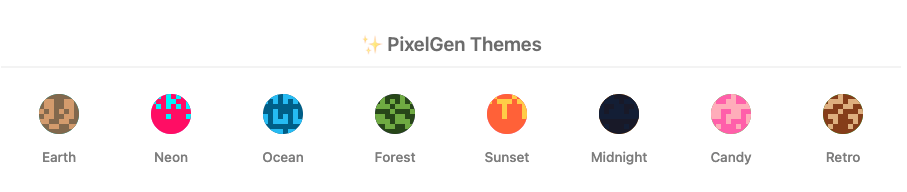
- 👾 PixelGen: Generates consistent, deterministic pixel art (identicons) like GitHub/Gravatar.
- 👥 Avatar Groups: Easily stack avatars for teams with
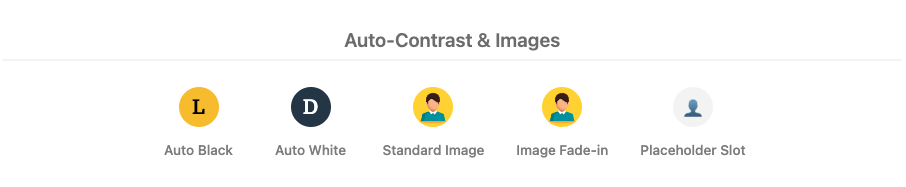
+Noverflow badges. - 🌗 Auto-Contrast: Automatically adjusts text color (black/white) based on background luminance.
- ♿ Accessible: Built with a11y in mind (ARIA roles, keyboard support).
- 🟢 Status Indicators: Built-in presence dots with custom statuses, sizes, colours, and an optional pulse.
- 💬 Built-in Tooltips: Styled, collision-aware tooltips with twelve placements — no Popper or Floating UI dependency.
- 🔴 Notification Badges: Counts, dots, and custom badge content in any corner.
- 🛡️ Resilient Images: Ordered fallback chains, a loading skeleton, and retina
srcsetsupport. - ☁️ SSR & Nuxt Ready: Safe for server-side rendering with no hydration mismatches.
Examples
- Tony will become T
- Tony Stark will become TS
- Tony Howard-Stark will become THS
- Albert Tony Howard Stark will become ATS
- 👩💻 Ada keeps the joined emoji intact as 👩💻A
Previews
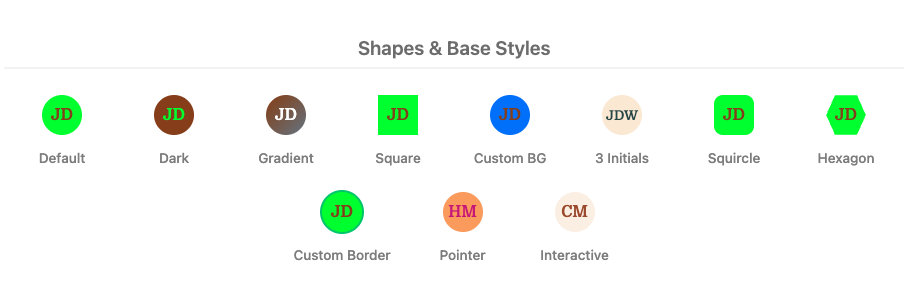
Shapes & Base Styles
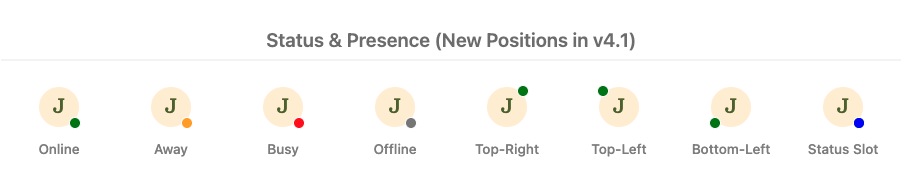
Status & Presence
PixelGen Themes
Auto-Contrast & Images
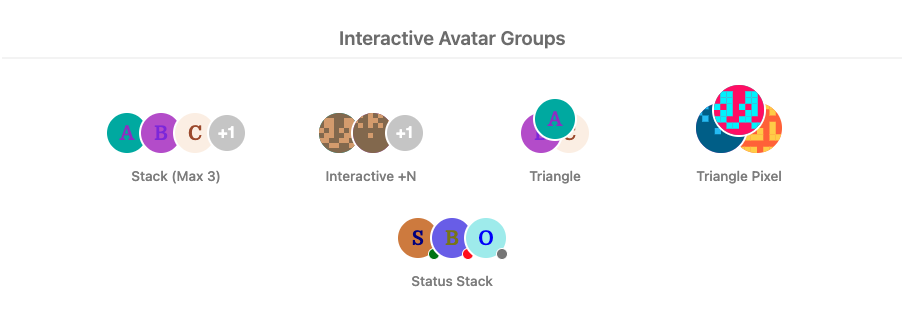
Interactive Avatar Groups
Installation
npm install vue3-avatar
Usage
Avatar Vue is very easy to use.
ES6
For Local Registration
import { Avatar, AvatarGroup } from "vue3-avatar";

export default {
  // ...
  components: {
    Avatar,
    AvatarGroup, // Optional: if you want to use grouping
    // ...
  },
  // ...
};
For Global Registration (with optional defaults)
Update main.js
import { createApp } from "vue";
import App from "./App.vue";
import Avatar from "vue3-avatar";

const app = createApp(App);

// Configure global defaults (Optional)
app.use(Avatar, {
  defaults: {
    size: 50,
    autoContrast: true,
    transition: true,
    loading: "lazy",
    shape: "circle",
  },
});
After importing the component, use it in your template:
<Avatar name="John Doe" />
An explicitly passed prop always wins over the app default, including a value
that matches the component default or an explicit false:
<Avatar name="Ada Lovelace" :size="40" :auto-contrast="false" />
Nuxt.js Support
Avatar Vue is fully SSR-safe and optimized for Nuxt.js 3+, and ships an official Nuxt module.
1. Installation in Nuxt (recommended: Nuxt module)
Add vue3-avatar/nuxt to your modules array — <Avatar> and <AvatarGroup> are then auto-imported, no manual plugin registration needed:
// nuxt.config.ts
export default defineNuxtConfig({
  modules: ["vue3-avatar/nuxt"],
  vue3Avatar: {
    defaults: {
      size: 40,
      autoContrast: true,
    },
  },
});
<template>
  <Avatar name="John Doe" />
</template>
See the full Nuxt module guide for all module options.
Manual plugin registration (fallback)
If you'd rather register the plugin yourself — or are using Vue 3 without Nuxt — create a plugin file plugins/avatar.ts:
import { defineNuxtPlugin } from "#app";
import Avatar from "vue3-avatar";

export default defineNuxtPlugin((nuxtApp) => {
  nuxtApp.vueApp.use(Avatar, {
    defaults: {
      size: 40,
      autoContrast: true,
    },
  });
});
2. Standard Scoped Slot for NuxtImg
Use the #image slot to integrate with custom image components like <NuxtImg> for better performance and automatic optimization.
<template>
  <Avatar name="John Doe" image-src="/profile.jpg">
    <template #image="{ src, srcset, sizes, alt, size, style, class: imageClass, onLoad, onError }">
      <NuxtImg
        :src="src"
        :srcset="srcset"
        :sizes="sizes"
        :alt="alt"
        :width="size"
        :height="size"
        :style="style"
        :class="imageClass"
        @load="onLoad"
        @error="onError"
        loading="lazy"
      />
    </template>
  </Avatar>
</template>
3. SSR-Safe Deterministic Colors
Colors and pixel patterns are generated deterministically from name, or from
the optional seed prop when supplied. Use the same value on the server and
client. Pass a stable user ID to preserve generated colors and artwork after a
rename; initials, tooltips, and accessible labels still follow name:
<Avatar :name="user.displayName" :seed="user.id" variant="pixel" />
Omitting seed preserves existing output. Seeds accept strings and numbers,
including 0 and an empty string. Different seeds can still produce the same
colors or pattern.
Props
| Property | Type | Default | Description |
|---|---|---|---|
name |
String | required | Name used for initials and the accessible label; seeds colours and pixel art when seed is omitted. |
seed |
String / Number | name |
Stable identity for generated colours and pixel art, independent of the display name. |
imageSrc |
String | — | Image URL. Use image-src in templates. |
size |
Number | 40 |
Avatar diameter in pixels. |
inline |
Boolean | false |
Displays the avatar inline. |
shape |
String | derived | circle, square, squircle, or hexagon. Overrides rounded. |
rounded |
Boolean | true |
Uses a circle when true or a square when false, if shape is omitted. |
variant |
String | initials |
initials or pixel. |
pixelTheme |
String | earth |
earth, neon, ocean, forest, sunset, midnight, candy, or retro. |
color / background |
String | generated | Override the foreground or background colour. |
dark / gradient |
Boolean | false |
Use the dark palette or a name-based gradient. |
autoContrast |
Boolean | false |
Choose black or white text for a hexadecimal background colour. |
border / borderColor |
Boolean / String | true / white |
Control the native image border; initials and pixel avatars keep their outline. |
alt |
String | derived | Accessible label; defaults to Avatar of {name}. |
loading / transition |
String / Boolean | lazy / true |
Native image loading and image fade-in behaviour. |
interactive |
Boolean | false |
Enables keyboard activation and emits activate. |
pointer / onClick |
Boolean / Function | false / — |
Shows a pointer cursor; onClick also receives activation events. |
customAvatarStyle / customStatusStyle |
Object | {} |
Inline style overrides. |
sameBorder / useTextColorForBorder |
Boolean | false |
Status-border and avatar-border colour options. |
useLegacyColors |
Boolean | false |
Uses the legacy vue-avatar palette. |
Tooltip props
Full reference in the tooltip documentation.
| Property | Type | Default | Description |
|---|---|---|---|
tooltip |
String / Boolean / Object | — | Content. Unset uses name; false disables it; an object supplies inline overrides. |
tooltipPlacement |
String | top |
top, bottom, left, right, each optionally suffixed -start or -end. |
tooltipTrigger |
String | hover focus |
Space-separated combination of hover, focus, click, manual. |
tooltipDelay / tooltipHideDelay |
Number | 200 / 100 |
Open and close delays in milliseconds. |
tooltipOffset |
Number | 8 |
Gap between the avatar and the tooltip. |
tooltipArrow |
Boolean | true |
Shows the arrow. |
tooltipTheme |
String | dark |
dark, light, or auto (follows prefers-color-scheme). |
tooltipInteractive |
Boolean | false |
Keeps the tooltip open while the pointer is inside it. |
tooltipDisabled |
Boolean | false |
Runtime kill switch, separate from tooltip: false. |
nativeTitle |
Boolean | false |
Restores the v4 title attribute and disables the styled tooltip. |
Status props
| Property | Type | Default | Description |
|---|---|---|---|
status |
String | — | online, away, offline, busy, or any key present in statusColors. |
statusPosition |
String | bottom-right |
top-right, top-left, bottom-right, or bottom-left. |
statusColor |
String | — | Overrides the colour for this avatar, whatever the status is. |
statusColors |
Object | {} |
Extra or replacement colours, merged over the built-in four. Also accepted in the global config. |
statusSize |
String / Number | md |
sm, md, lg, or explicit pixels. |
statusLabel |
String | — | Replaces "User is {status}" in the accessible label. |
statusPulse |
Boolean | false |
Animates a pulsing ring. Suppressed under prefers-reduced-motion. |
sameBorder |
Boolean | false |
Makes the status indicator use the avatar border colour. |
Badge props
| Property | Type | Default | Description |
|---|---|---|---|
badge |
String / Number | — | Badge content. Renders the badge when set. |
badgeVariant |
String | count |
count, dot, or icon. dot needs no badge value. |
badgeMax |
Number | 999 |
Counts above this render as {max}+. Digit strings are clamped like numbers. |
badgeMaxLength |
Number | 3 |
Letters kept in a non-numeric badge. "Promotional" renders as "Pro". |
badgePosition |
String | top-right |
Same four corners as statusPosition. |
badgeColor / badgeTextColor |
String | #ef4444 / derived |
Given only a hexadecimal background, the text colour is chosen for contrast. |
badgeLabel |
String | derived | Wording for the badge in the accessible label. |
customBadgeStyle |
Object | {} |
Inline style overrides for the badge, including maxWidth to allow a wider label. |
Badge content is capped so a corner marker stays one: counts above badgeMax
render as 999+, and other content is trimmed to badgeMaxLength letters — the
same three-character budget the initials use. The badge is also capped at the
avatar's own width, so a long label cannot run across the face.
Image props
| Property | Type | Default | Description |
|---|---|---|---|
fallbackSrc |
String / String[] | — | Sources tried in order when imageSrc fails, before falling back to initials or pixel art. |
skeleton |
Boolean | true |
Shimmer placeholder while the image loads. Rendered only after mount, so SSR output stays stable. |
retina |
Boolean | false |
Derives an @2x srcset from imageSrc when no explicit srcset is set. |
srcset / sizes |
String | — | Passed through to the <img>. An explicit srcset wins over retina. |
crossorigin |
String | — | anonymous or use-credentials. |
referrerpolicy |
String | — | Passed through to the <img>. |
decoding |
String | async |
async, sync, or auto. |
Interaction props
| Property | Type | Default | Description |
|---|---|---|---|
as |
String | div |
div, button, or a. Native elements bring real semantics and keyboard handling. |
href / target / rel |
String | — | Used when as="a". target="_blank" adds rel="noopener noreferrer" unless rel is set. |
disabled |
Boolean | false |
Blocks activation, dims the avatar, and sets aria-disabled or the native disabled. |
selected |
Boolean | — | Opt-in toggle state, rendered as aria-pressed. Leave unset for avatars that are not toggles. |
editable |
Boolean | false |
Adds an overlay for changing the picture. Emits edit. Decorative on button/a roots. |
accept |
String | — | With editable, wires a hidden file input and emits file-select. |
editLabel |
String | Change picture |
Accessible label for the edit overlay. |
Events
| Event | Arguments | Description |
|---|---|---|
error |
event |
Emitted when imageSrc fails to load |
load |
event |
Emitted when imageSrc successfully loads |
activate |
event |
Emitted when an interactive avatar is clicked or activated with Enter/Space |
fallback |
{ failedSrc, nextSrc, remaining, event } |
Emitted when an image fails and another source remains. error fires only once the chain is exhausted |
edit |
event |
Emitted when the editable overlay is activated |
file-select |
{ files, event } |
Emitted when a file is chosen through the accept file input |
Slots
| Slot | Description |
|---|---|
image |
Scoped slot for custom image components (e.g. <NuxtImg>). Provides { src, srcset, sizes, alt, size, style, class, onLoad, onError }. Bind the callbacks to keep loading and fallback state synchronized. src is the current link in the fallback chain. |
placeholder |
Scoped slot for a custom placeholder when no name/image is present. Provides { size, style }. |
status |
Custom status indicator content. Overrides default status rendering but keeps positioning. |
badge |
NEW (v5) Custom badge content. Keeps the badge's positioning and shape. |
overlay |
Custom overlay content (badges, icons). Positioned relative to container. |
tooltip |
NEW (v5) Rich tooltip body. Provides { nameValue, initials, status, imageSrc }. |
edit-overlay |
NEW (v5) Replaces the camera icon on the editable overlay. |
CSS Variables
The component exposes CSS variables on the root element for easier theming:
--va-size
--va-bg
--va-color
--va-border-color
--va-radius
--va-clip-path
--va-font-size
--va-status-color
--va-status-size
--va-badge-bg
--va-badge-color
These are read by the component and can be set by you:
--va-focus-ring          /* focus outline colour */
--va-ring-color          /* ring shown when `selected` */
--va-skeleton-bg
--va-skeleton-shimmer
--va-edit-overlay-bg
--va-edit-overlay-color
--va-tooltip-bg
--va-tooltip-color
--va-tooltip-radius
--va-tooltip-font-size
--va-tooltip-padding
--va-tooltip-shadow
--va-tooltip-z-index
AvatarGroup (New in v4)
You can group multiple avatars together with AvatarGroup.
<AvatarGroup :max="3">
  <Avatar name="Tony Stark" />
  <Avatar name="Bruce Banner" />
  <Avatar name="Steve Rogers" />
  <Avatar name="Natasha Romanoff" />
</AvatarGroup>
Props:
max: (Number) Maximum number of avatars to show. Overflow is shown as+N.overlap: (Number) Overlap size in pixels (default 10).borderColor: (String) Border color for separators (default 'white').size: (Number) Size for the overflow badge (default 40).layout: (String) Layout of the avatars.stack(default): Horizontal overlapping stack.triangle: Pyramid shape where the first avatar is on top, and subsequent avatars form the base. Note: Triangle layout is limited to 3 items (2 visible + 1 overflow badge if needed).
onClick: (Function) Click callback for the entire group.pointer: (Boolean) If true, appliespointercursor to the group.
Stack overlap and triangle edge placement follow the surrounding dir (ltr or rtl). When onClick is provided, only activation on the group root invokes the group callback; child avatars and the +N overflow badge retain their own interactions.
Events:
| Event | Arguments | Description |
|---|---|---|
@overflow-click |
(hidden: Array, all: Array) |
NEW (v4.1) Emitted when user clicks the +N badge. Provides list of hidden users AND list of all users. |
Tooltips:
- Hovering the group background shows all member names.
- Hovering the overflow badge (
+N) shows only the hidden member names. - Individual avatars show their own name on hover.
You can also pass props to individual Avatar components within the group. For example, you can set the status of each avatar.
<AvatarGroup :max="3">
  <Avatar name="Tony Stark" status="online" />
  <Avatar name="Bruce Banner" status="away" />
  <Avatar name="Steve Rogers" status="offline" />
  <Avatar name="Natasha Romanoff" />
</AvatarGroup>
Accessibility
- Roles: Renders as
role="img"by default, orrole="button"ifinteractiveis true. Useas="button"oras="a"to get real native semantics instead. - Labels: Automatically generates aria-labels from
altornameprops. - Keyboard: When
interactiveis true, supportsTabnavigation andEnter/Spaceactivation. A focus ring is shown on:focus-visible, styleable through--va-focus-ring. - Status: Status text is included in the accessible label (e.g., "Avatar of John Doe. User is online"), or replaced entirely by
statusLabel. - Badges: The badge is
aria-hiddenand its meaning is folded into the avatar's label, so it is announced once rather than twice. - Tooltips: Rendered as
role="tooltip"and referenced witharia-describedbyonly when they say something the label does not.Escapecloses an open tooltip. - Motion: The image fade, status pulse, skeleton shimmer and tooltip transition are all disabled under
prefers-reduced-motion: reduce.
Color Systems
Avatar Vue supports two color systems:
Default Colors (Modern)
By default, the component uses a modern color palette with light colors for text and dark colors for backgrounds. This provides better contrast and readability.
<avatar name="John Doe" />
Legacy Colors (vue-avatar compatible)
@deprecated For backwards compatibility with the original vue-avatar component, you can enable the legacy color palette by setting useLegacyColors to true. This uses the original 18-color palette from vue-avatar.
<avatar name="John Doe" :use-legacy-colors="true" />
Migration Guide (v4 -> v5)
v5 has two breaking changes:
- The native
titleattribute is gone. A styled tooltip replaces it. Setnative-titleto restore the old attribute, or:tooltip="false"for neither. - Status colours and positioning changed. CSS keywords became hexadecimal tokens, and the indicator is inset to sit on the avatar's outline.
The full migration guide covers both, with the code needed to pin the old behaviour.
Migration Guide (v4.0 -> v4.1)
v4.1 is fully backward compatible. Summary of new features:
- PixelGen: Choose
variant="pixel"for deterministic pixel art. Themes:earth,neon,ocean,forest,sunset,midnight,candy,retro. - Auto-Contrast: Set
:auto-contrast="true"to automatically pick black/white text based on background. - Global Config: Pass
defaultsobject toapp.use(Avatar, { defaults: { ... } }). - Framework Ready: Use the
#imageslot forNuxtImgor other custom image loading scenarios. - Interactive Groups: Hear when the overflow badge is clicked with
@overflow-click.
Migration Guide (v3 -> v4)
v4 is mostly backward compatible. Key changes:
- Deprecated:
useLegacyColorstriggers a console warning. - Removed:
invertedprop is removed. The default theme is now light. Use thedarkprop to enable the dark theme. - Accessibility: The DOM structure has
roleattributes and improved labels. Ensure your tests don't rely on specific internal DOM structure if not needed. - Strict Initials: The initials algorithm is now frozen and formalized.
Developer Notes
The source is TypeScript throughout — utilities, composables, and SFCs using
<script setup lang="ts">. The shipped declarations in dist/types are
emitted from source by vue-tsc, so the public API cannot drift from the
implementation. src/types.ts holds the exported type surface.
Node version
The published package is browser code and imposes no Node version of its own.
The toolchain does: Vitest 4 needs ^20 || ^22 || >=24 and Vite needs
^20.19 || >=22.12. On Node 18 Vitest does not fail with a version error — it
hangs at the RUN banner indefinitely. Develop and run CI on Node 20 or later.
Scripts
| Command | What it does |
|---|---|
npm test |
Component and unit tests in jsdom. |
npm run test:visual |
Pixel-by-pixel visual regression tests in real Chromium. |
npm run test:visual:update |
Re-record the reference images. |
npm run test:visual:headed |
Run the visual suite in a visible browser window. |
npm run test:all |
Typecheck, then both suites. |
npm run typecheck |
vue-tsc over source and tests. |
npm run build |
Rollup bundles, the Nuxt module, and the emitted types. |
npm run size |
Fails if the gzipped bundle exceeds its budget. |
VS Code users get the same entries in the Run and Debug panel.
Visual regression testing
tests/visual/ renders the real components in a real browser, screenshots
them, and compares against committed reference images pixel by pixel — plus
direct colour probes that assert the documented status, badge, and tooltip
palettes are painted exactly. jsdom cannot do this: it has no layout engine, so
it cannot tell you a status dot drifted off a hexagon's edge or that a tooltip
flipped to the wrong side.
232 reference images cover shape x variant, status x corner x shape, badge
variant x corner, all eight pixel themes, all twelve tooltip placements, group
layouts, and interaction states. Boolean props are covered pairwise in
tests/permutations.spec.ts, where they are far cheaper to run than as images.
See tests/visual/README.md for the details,
including how to add a Linux golden set for CI.
This package is built with the node v16.20.2 (npm v8.19.4)
Creator
Mohammad Dilshad Alam created and maintains this component.
Related Packages
Provides a design token-powered UI component library and styling system for Nuxt...
Mark Nuxt app hydration with a DOM attribute for CSS, scripts, and end-to-end te...
Nuxt module for easily integrating Solar Icons into your Nuxt 3+ applications.
Nuxt integration for Verbaly: zero-config module with per-request locale negotia...
Version History
| Version | Released | License |
|---|---|---|
| 5.0.0 | MIT | |
| 4.2.1 | MIT | |
| 4.1.2 | MIT | |
| 4.1.1 | MIT | |
| 4.1.0 | ||
| 4.0.1 | ||
| 4.0.0 | ||
| 3.2.0 | ||
| 3.1.0 | ||
| 3.0.0 | ||
| 2.1.0 | ||
| 2.0.0 | ||
| 1.0.3 | ||
| 1.0.2 | ||
| 1.0.1 | ||
| 1.0.0 |