vue-source
| Install | |
|---|---|
npm install vue-source |
|
| Latest Version: | 1.1.1 |
| License: | MIT |
| Last Updated: | Apr 14, 2021 |
| Links: | GitHub · npm |
Vue Source
Overview
Vue Source is a global Vue mixin which identifies components in source code by adding HTML comments:
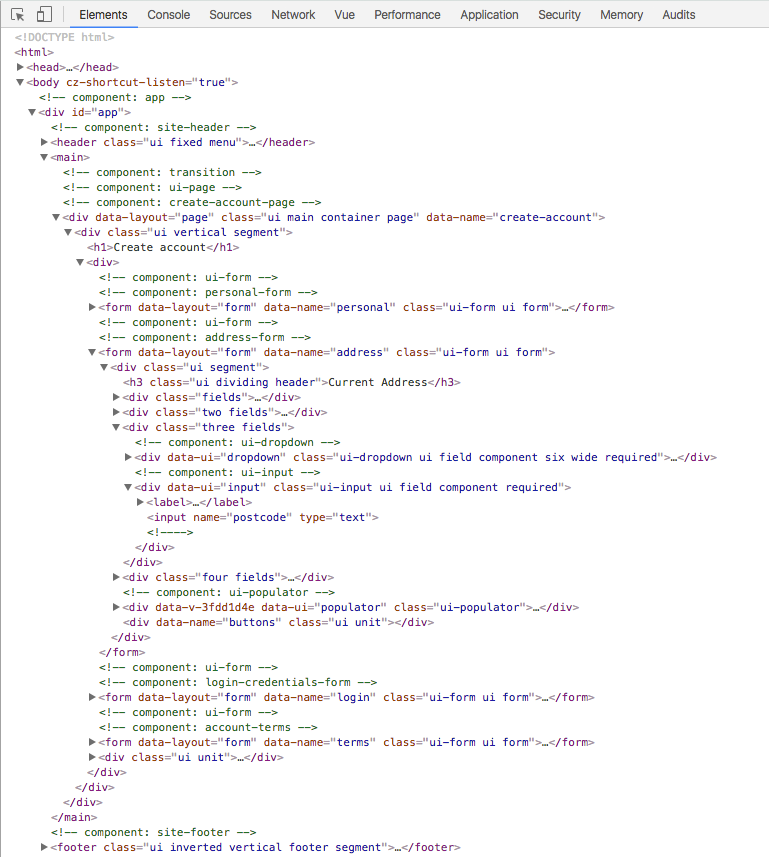
The plugin has various optional features:
- render comments as class names, tags, or file paths
- manual or automatic activation based on environment variable
- attach JavaScript references to DOM comments
- inspect in Vue Devtools v4
Installation and usage
Download via NPM:
npm install vue-source --save
Import and run from your main application file:
import VueSource from 'vue-source'

Vue.use(VueSource)
The default settings are:
- render comments as class names
- activate in development, but not in production
- attach component and file references to rendered comments
Settings
You can pass settings to Vue.use() to change Vue Source's behaviour:
import Vue from 'vue'
import VueSource from 'vue-source'

Vue.use(VueSource, {
  type: 'file',
  active: true,
  debug: true
})
Type
Render comment as class name, file path, or source code tag:
type:('class'|'file'|'tag')
Class names:

File paths:

Tags:

Where files don't exist (i.e router links) the plugin will attempt to render classes or tags instead.
Active
Activate or disable at startup:
active:('auto'|true|false|expression)
Pass:
'auto'(the default) which checksprocess.env.NODE_ENVto run in anything exceptproductiontrueto always enablefalseto always disable- any other expression which evaluates to
true/falseto choose whether to enable
Debug
Attach references to the rendered comment:
debug:(true|false)
By default, the plugin attaches the following references to the DOM comment:
vm: the Vue instancetag: the markup tagfile: the source file pathclass: the source class nameinspect(): a function to inspect the component in Vue's DevTools (v4 feature)
To access these references in your browser's Vue Devtools:
- inspect the HTML comment in the Elements panel
- reference it in the Console via
$0

Set debug to false if you want to disable this functionality.
Related Packages
A Vite plugin that adds source location and component information to DOM element...
A Vite plugin that adds source location and component information to DOM element...
Replace port numbers with stable, named .localhost URLs. For humans and agents.
Version History
| Version | Released | License |
|---|---|---|
| 1.1.1 | MIT | |
| 1.1.0 | MIT | |
| 1.0.4 | MIT | |
| 1.0.3 | MIT | |
| 1.0.2 | MIT | |
| 1.0.0 | MIT |