vue-router-ns
| Install | |
|---|---|
npm install vue-router-ns |
|
| Latest Version: | 0.1.0-rc.4 |
| Vue: | 3 |
| License: | MIT |
| Last Updated: | Oct 26, 2026 |
| Links: | GitHub · npm |

Vue Router's API for NativeScript-Vue 3, built on top of the native navigation stack instead of a URL history.



Documentation · Documentação em português · Documentación en español · 简体中文文档
const router = createRouter({
  routes: [
    { path: '/', name: 'inbox', component: () => import('./pages/Inbox.vue') },
    {
      path: '/messages/:id',
      name: 'message',
      component: () => import('./pages/Message.vue'),
    },
    { path: '/compose', component: () => import('./pages/Compose.vue'), modal: true },
  ],
})

router.push({ name: 'message', params: { id: 42 } })
Prefer file conventions? The optional file-routing setup generates typed native routes, with opt-in layouts, middleware discovery and webpack or Vite integration. Native Vite HMR uses adjacent JSON metadata; see the guide for setup and compiler limitations. Choose explicit records, native page files, or combine them on the same router. See the separate native example.
Learning path · Build your first app · Example gallery · Primeiro app (pt-BR)
Native capabilities and container choices · Capacidades e composição (pt-BR) — ownership, platform limits, runnable examples and rc.2 versus rc.3.
Airbnb NS example
A runnable Airbnb-inspired app built with NativeScript-Vue and vue-router-ns: accommodation carousels, favorites, native tabs, a search sheet and detail pages with UIKit zoom. The UI and catalog are local; stays and reservations are fictional.
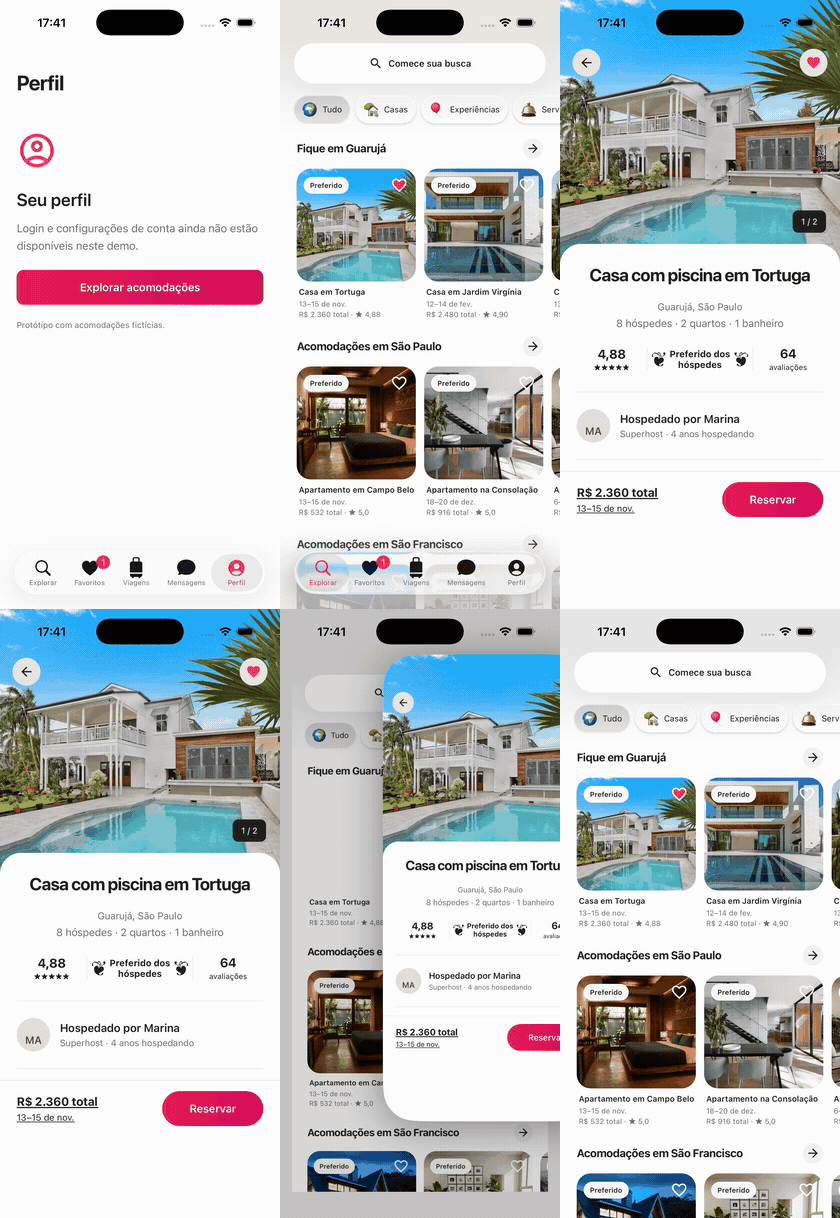
Watch the 27-second walkthrough · Source · Run the example
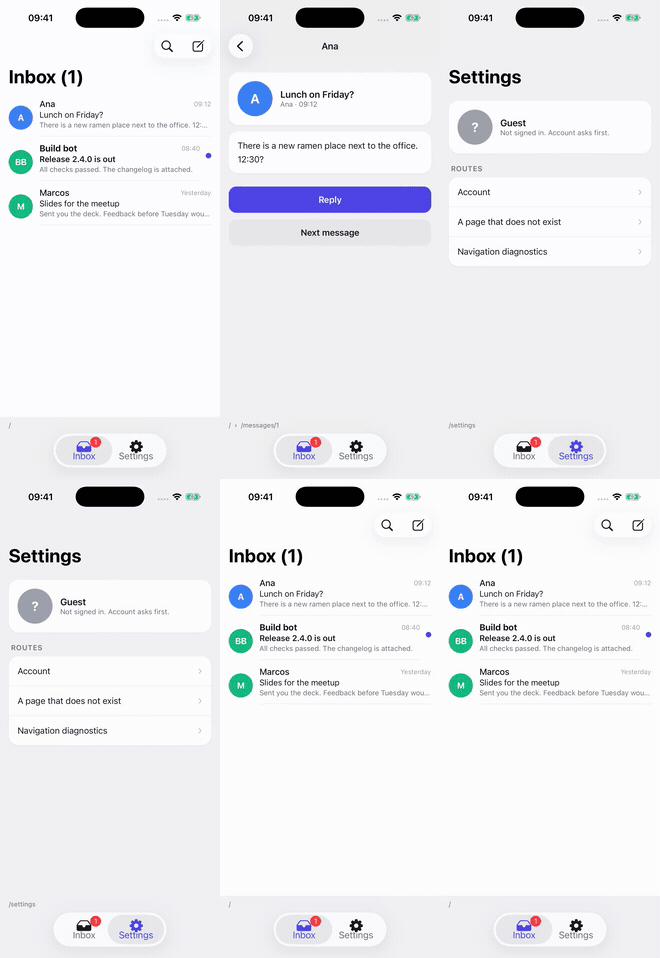
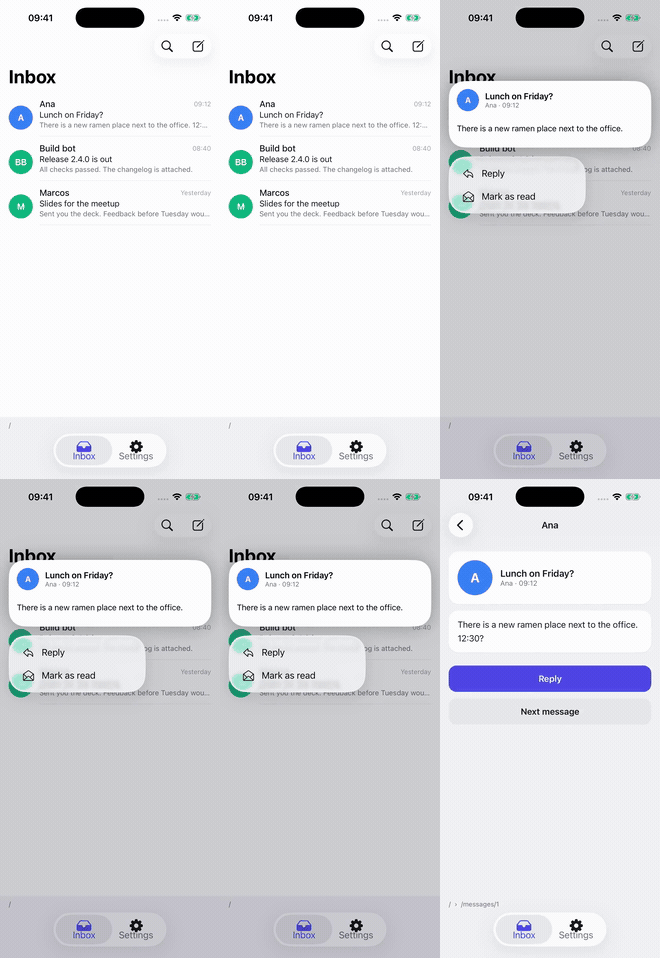
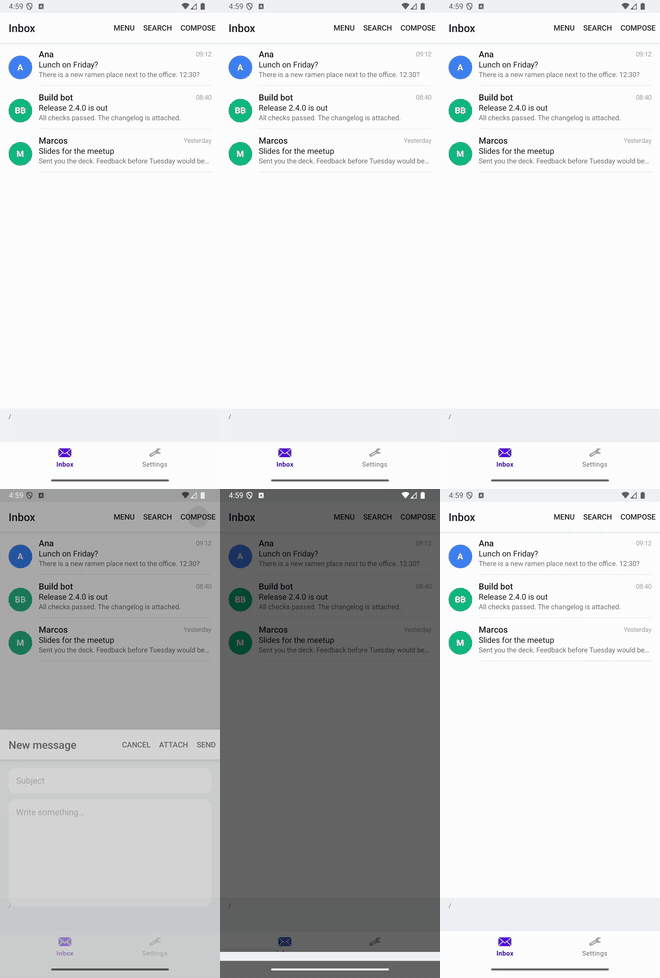
The recording shows native tabs, zoom and gesture dismissal, context-menu previews and favorite actions on an iPhone 17 / iOS 26 simulator. The example also uses pushForResult() for search, per-route tab visibility, an experimental offline route loader, <Deferred>, and usePageState() with persisted navigation. Android uses Material tabs, popup actions and a shared-element transition.
More focused clips, with the code for each feature, are in the visual guide.
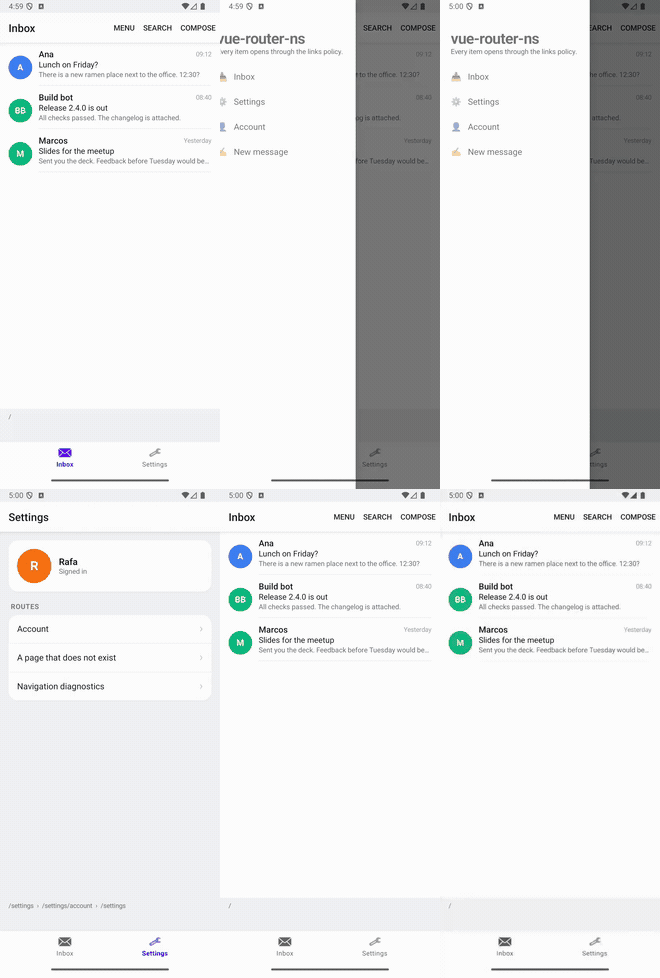
| Native tabs · iOS | Context menus · iOS | Sheets · Android | Drawer · Android |
|---|---|---|---|
 |
 |
 |
 |
Vue Router can't drive a mobile app: it models navigation as one URL that changes, with a <RouterView> that swaps components. A NativeScript app has a Frame with a stack of pages that stay alive underneath each other, a back button and an iOS swipe that pop pages without asking anyone, modals, and often one stack per tab.
So this is not a wrapper around Vue Router. The frame's back stack is the source of truth, and the router mirrors it after every native navigation. What you get is the API you already know (push, guards, useRoute, named routes, params) with semantics that make sense on a phone.
Features
- A route per page:
useRoute()inside a page never changes, even with other pages pushed on top. - Leave guards that the Android back button goes through, and that turn the iOS swipe off while they'd block it.
- Modal routes with their own stack, iOS sheet detents and Android Material bottom sheets, and
pushForResult()to get a value back from a page. - One stack per tab, with named
<RouterView>s, andsetStack()to set a stack as a list. - Adaptive list and detail with
<RouterSplitView>, preserving push history across layout changes. - A native drawer with
<RouterDrawer>: AndroidXDrawerLayoutaround your stacks; rc.3 adds an iOS UIKit overlay with the same API. - Native tabs with
<RouterTabs>: UIKit tabs and the iPad sidebar, Material bottom navigation or a rail, badges, public color props and per-routemeta.tabBarVisibilityon supported hosts. - Context menu previews with
v-route-previewand<RouterLink menu>: a long press shows the route in UIKit's preview with actions and commits it through the guards; Android offers the actions in a popup menu. - Typed routes: names and params checked across the app, with no code generation.
- Zoom and shared elements: iOS 18's zoom out of a view, and NativeScript's shared element transitions.
- Android predictive back for pages that want to follow the swipe.
- Restoring the stack after the app is killed in the background, with each page's own draft or reading position through
usePageState(). - Route data loaders (experimental): typed per-page data, pending/error/retry state and cancellation without blocking native presentation. Optional Suspense composition keeps asynchronous content inside a stable native Page.
- Native hosts (experimental): one contract between the router and the container it drives, so native drawers, sheets and controllers can be added as adapters.
Install
npm install vue-router-ns@next
The release candidate is published under next. Requires nativescript-vue 3.1.2+ (3.x), @nativescript/core 9.1.3+ (9.x), and Node 20.19.4+. See the RC scope and compatibility for tested versions and experimental features.
Getting started
Export the router from router.ts, then install it:
// app.ts
import { createApp } from 'nativescript-vue'
import App from './App.vue'
import { router } from './router'

createApp(App).use(router).start()
<!-- App.vue -->
<template>
  <RouterView />
</template>
<RouterView> renders a Frame and shows the route given in initial (/ by default). Every route component is a page, so it renders a <Page>:
<!-- pages/Message.vue -->
<script setup lang="ts">
import { useRoute, useRouter } from 'vue-router-ns'

const route = useRoute()
const router = useRouter()
</script>

<template>
  <Page>
    <ActionBar :title="`Message ${route.params.id}`" />
    <Button text="Reply" @tap="router.push('/compose')" />
  </Page>
</template>
Navigating
router.push('/messages/42?from=push')
router.push({ name: 'message', params: { id: 42 }, query: { from: 'push' } })
router.replace('/login')
router.back()
router.go(-2)
router.backTo({ name: 'inbox' }) // closest page below that matches
Everything returns a promise that settles once the page is on screen, with a NavigationFailure when a guard stopped it, like Vue Router.
A second argument takes what only makes sense on a device:
router.push('/messages/42', {
  transition: 'slideLeft', // or a full NativeScript transition object
  animated: false,
  clearHistory: true, // nothing left to go back to
  props: { preview }, // any value, unlike params
  frame: 'profile', // a named <RouterView>
  modal: true, // present modally, whatever the route says
})
Navigations queue behind native transitions, so a double tap on a button opens the page once: the second push finds the page already on top and resolves with a duplicated failure.
Setting the whole stack
Like SwiftUI's NavigationStack(path:), the stack can be set as a list, and the pages follow:
await router.setStack(['/', '/orders', { name: 'order', params: { id: 42 } }])
The router keeps the pages both stacks share from the bottom up, goes back to the last of them, then pushes the rest. Only the last step animates. Guards run for every step, and the first failure stops it. A modal route in the list becomes a plain page: the list describes one frame's stack.
It takes frame, animated and transition as a second argument, and it's what a deep link into a nested page or a "back to the first tab page" helper is built on.
Zoom and shared elements
transition takes NativeScript's SharedTransition, which morphs the views that share a sharedTransitionTag from one page into the next, on both platforms:
<!-- in the list -->
<Image :src="photo.thumb" :sharedTransitionTag="`photo-${photo.id}`" />

<!-- in the photo page -->
<Image :src="photo.full" :sharedTransitionTag="`photo-${photo.id}`" />
import { PageTransition, SharedTransition } from '@nativescript/core'

router.push(`/photos/${photo.id}`, {
  transition: SharedTransition.custom(new PageTransition()),
})
Going back plays it in reverse. Its interactive dismissal (interactive: { dismiss }, iOS only) is a native pop, like the swipe back: the router follows it, but a leave guard can't stop it.
On iOS 18 and later, zoomFrom hands the animation to UIKit's zoom: the page grows out of a view, and shrinks back into it when it closes, through the back button, an edge swipe or a drag down. While a leave guard is active, the drag is held, like the swipe back.
function open({ index, view }: ItemEventData) {
  router.push(`/photos/${photos[index].id}`, { zoomFrom: view })
}
zoomFrom takes a view, a template ref's element or a component, and <RouterLink zoom> zooms out of its own child. If the view is gone by the time the page closes, the page closes without zooming. Where the zoom doesn't apply (Android, iOS before 18, animated: false), the page gets its usual transition, so passing both gives each platform its own:
router.push(to, {
  zoomFrom: view, // iOS 18
  transition: SharedTransition.custom(new PageTransition()), // everywhere else
})
A default transition set on the frame (Frame.defaultTransition) takes the animation back from UIKit, so leave it unset where you zoom.
Every page keeps its route
Pushing a page doesn't destroy the one below: it stays mounted until it leaves the stack. That's why useRoute() inside a page returns that page's route, and it never changes. While /messages/2 sits on top of /messages/1, the first page still sees id: '1', and nothing re-runs because another page moved.
Outside pages (in App.vue, for example), useRoute() follows the page on screen. router.currentRoute is always the page on screen, and router.stack is the whole stack, bottom to top, reactive:
const { stack } = useRouter()
const canGoBack = computed(() => stack.value.length > 1)
useRouter() inside a page navigates in the stack that page lives in: its tab, or its modal.
Guards
Global guards and beforeEnter work as in Vue Router 4: return false to cancel, a location to redirect, or nothing to continue. They can be async. A third argument tells you what kind of navigation it is:
router.beforeEach((to, from, { type }) => {
  // type: 'push' | 'replace' | 'back'
  if (to.meta.requiresAuth && !session.user) {
    return { name: 'login', query: { next: to.fullPath } }
  }
})
onBeforeRouteLeave runs when its page is about to be removed from the stack: on back, replace or clearHistory, and also on the Android back button, which the router intercepts so your guard gets a say. Pushing another page on top keeps the page alive, so the guard doesn't run then.
const dirty = computed(() => draft.value.trim() !== '')

onBeforeRouteLeave(() => Dialogs.confirm('Discard this draft?'), { when: dirty })
when is optional, and it matters on iOS. A swipe back can't wait for an async guard, so while a leave guard is active the router turns swipe-back off for that page. With when, the guard only blocks while it's true: with an empty draft, the page swipes away as usual.
A modal is different: while a guard is active, swiping it down or tapping outside runs the guard instead, with the sheet staying put. Mail does this with a draft: the sheet bounces back and asks whether to discard. If the guard allows it, the modal closes.
Modals
Mark a route with modal: true, or pass ModalOptions (fullscreen, animated, cancelable, ios.presentationStyle…):
{ path: '/compose', component: Compose, modal: { fullscreen: true } }
router.push('/compose') presents it inside its own frame, so it has an ActionBar and its own stack. Pages inside push within the modal. router.back() from the first page of the modal closes it. Swiping it down, tapping outside or pressing the Android back button closes it too, through the leave guards of its pages. The router follows along and runs afterEach.
Sheets on iOS
iOS sheets can stop at medium height, at full height or at a fraction of the screen, show a grabber, and keep the page behind usable, like Maps. Set that in ios of the modal options:
{
  path: '/filters',
  component: Filters,
  modal: {
    ios: {
      detents: ['medium', 'large'], // or a fraction of the screen: 0.4 (iOS 16)
      selectedDetent: 'medium', // the height it opens at
      largestUndimmedDetent: 'medium', // the page behind stays usable up to here
      grabber: true,
      cornerRadius: 24,
    },
  },
}
The sheet is configured before it's presented, so it opens at the right height. push can pass the same options under modal.ios, merged with the record's. Android ignores them and has bottom sheets of its own.
Bottom sheets on Android
Material's bottom sheet rests collapsed at a peek height, half expanded, or expanded to its content. Set sheet in android of the modal options, with true for Material's defaults:
{
  path: '/filters',
  component: Filters,
  modal: {
    ios: { detents: ['medium', 'large'] },
    android: { sheet: { peekHeight: 320, state: 'expanded', skipCollapsed: true } },
  },
}
Pages push inside the sheet, pushForResult() works, and dragging it away, tapping outside or pressing back closes it through the leave guards; a held sheet can't be dragged away. The NativeScript Android runtime ships Material only in debug builds: add implementation "com.google.android.material:material:1.12.0" to App_Resources/Android/app.gradle for release, or push rejects with an error that says so. See modals.
Getting a result back
A page can return a value to whoever opened it. This works with modals and with plain pages:
// Message.vue
const reply = await router.pushForResult<string>('/compose')
if (reply) send(reply)
// Compose.vue
router.back({ result: text.value })
If the page closes any other way (a swipe, the back button) or a guard stops it from opening, the promise resolves with undefined.
Tabs and other independent stacks
Use <RouterTabs> with one named <RouterView> per tab:
<RouterTabs selectedTabTextColor="#ff385c" labelVisibility="labeled">
  <RouterTab name="inbox" title="Inbox" icon="tray" androidIcon="sys://ic_dialog_email">
    <RouterView name="inbox" initial="/" backToRootOnReselect />
  </RouterTab>
  <RouterTab name="settings" title="Settings" icon="gearshape" androidIcon="sys://ic_menu_preferences">
    <RouterView name="settings" initial="/settings" backToRootOnReselect />
  </RouterTab>
</RouterTabs>
Pages navigate in their own tab. From anywhere else, target one with { frame: 'settings' }.
Native tab bars go back to the first page when you tap the tab you're already on. backToRootOnReselect does that for a <RouterView> inside a tab, through the leave guards like any back:
<RouterView name="inbox" initial="/" backToRootOnReselect />
router.backToRoot() does the same on demand. Switching tabs preserves both histories; only a new tap on the already selected tab counts as reselection.
Set meta: { tabBarVisibility: 'hidden' } on a detail route to hide its owning bar after navigation commits. Back restores the previous page's policy; a cancelled gesture leaves it unchanged. Supported on iOS 18+ bottom bars and Android Material bars/rails; UIKit sidebar mode and the Core fallback keep navigation visible. See tab visibility, colors and labels.
List and detail
<RouterSplitView name="inbox" list="/">
  <template #empty><Label text="Select a message" /></template>
</RouterSplitView>
The list stays mounted. At 840 device-independent pixels of available width, details appear alongside it; below that they cover it. breakpoint and listWidth (default 320) customize the layout. Resizing preserves page instances and history.
push() retains every detail selection in history. Back walks through details, then returns to the list; replace() replaces the top detail, and clearHistory clears details while retaining the list. setStack, modal results, guards and restoration use the combined stack. The implementation uses two native Frames in a GridLayout; it is not a UIKit split controller or a drawer. See the complete split-view guide.
When a page comes back into view
A page that stays in the stack isn't mounted again when you return to it, so onMounted won't help you refresh it. Use these instead:
onPageActivated(() => refresh()) // shown, and every time the user comes back
onPageDeactivated(() => pause()) // covered by another page or a modal
When the page leaves the stack it is unmounted, so cleanup goes in onUnmounted.
Pages with a lot to lay out
In NativeScript the JavaScript runs on the main thread, so a page that takes a while to build delays its own push animation: the frame waits for the view before it moves. <Deferred> lets the transition finish before mounting its content: it renders its fallback until the page is on screen, after the transition, and only then its content.
<Page>
  <ActionBar title="Report" />
  <Deferred>
    <template #fallback><ActivityIndicator busy /></template>
    <ReportBody :report="report" />
  </Deferred>
</Page>
Measured on an Android emulator with a page of 400 rows in a StackLayout: the transition finished 1.1 to 2.7 seconds after the tap; with the rows inside <Deferred>, 0.3 to 0.7 seconds. The rows themselves take about as long to appear as before, since the work doesn't go away: it happens after the page is up instead of before. For long lists, a ListView or CollectionView is still the answer, since they only build what's visible.
Android predictive back
On Android 14 and later, back swipes reveal the previous page in the same stack. Cancelling restores both pages; completing the swipe goes back through the router. To provide your own animation, set createRouter({ routes, backPreview: false }) and use useBackGesture():
<script setup lang="ts">
import { computed } from 'nativescript-vue'
import { useBackGesture } from 'vue-router-ns'

const gesture = useBackGesture()
const scale = computed(() => 1 - (gesture.value?.progress ?? 0) * 0.1)
</script>

<template>
  <Page>
    <GridLayout :scaleX="scale" :scaleY="scale">...</GridLayout>
  </Page>
</template>
While the user drags, it's { progress, edge }, with progress going from 0 to 1. The rest of the time it's null: once the swipe is cancelled or released, on iOS, on the first page (where back leaves the app), on the first page of a modal with cancelable: false, and while a leave guard is active, since letting go won't simply close the page then. Releasing goes back through the router like the back button, guards included.
Set android:enableOnBackInvokedCallback="true" on <application> in AndroidManifest.xml to receive predictive back progress on Android 14 and 15, even when targeting API 36. The default opt-in for apps targeting API 36 applies only when running on Android 16 or later.
The preview also works between pages inside a modal. It does not preview the stack underneath a modal's first page, and pages with an active leave guard do not start a preview.
Deep links
Routes are paths, so wherever your app receives a link (a URL handler, a notification payload), hand the path to the router:
router.push('/messages/42')
That's safe on a cold start: a navigation requested before the first page is up waits for it and stacks on top, so back still lands on your home page.
With links, the router takes the URLs the operating system hands the app itself: Android launch and new intents, iOS openURL, Universal Links and scene connections, next to the handlers you already have. Allow schemes and hosts, map URLs to typed locations, pick the stack and select its tab, and the link lands with its parents, through the guards, after the first page and on top of a restored stack. router.openLink(url) is the same door for notifications and widgets, and tells you what happened. router.setShortcuts([...]) offers routes as home-screen shortcuts on both platforms; a tap comes back through the same pipeline. See deep links for the policy and the manifest, entitlements and association files each platform needs.
A link into a nested page can bring its parents along, so back walks up the app's hierarchy instead of jumping home:
router.push('/settings/account', { withParents: true })
// stack: / → /settings → /settings/account
The parents come from children nesting in the route table, and only those with a component become pages. Parents already on top are skipped, only the last page animates, and guards run for every page. With clearHistory, the parents and the page become the whole stack.
Restoring the stack after the app is killed
Android kills apps in the background all the time, and brings a native app back on the screen it was on, with its back stack. Every page here is a path, so the stack is a list of strings and the router can save it for you:
import { ApplicationSettings } from '@nativescript/core'

const router = createRouter({
  routes,
  restore: {
    save: (state) => ApplicationSettings.setString('stacks', JSON.stringify(state)),
    load: () => JSON.parse(ApplicationSettings.getString('stacks', 'null')),
  },
})
save runs after every navigation with the paths of every named <RouterView>, and with null when the app exits on its own, so a fresh start after the user left stays fresh. When a <RouterView> mounts, the router asks load once (it can be async) and rebuilds the saved stack without animating, through the guards, so a page that needs a session still sends you to the login. Saves older than maxAge (30 minutes by default) are ignored; pass Infinity to always restore.
What can't come back: modals, and props passed through push. A page that relies on them should cope with their absence, by reading its params instead. If a saved path matches no route anymore, after an update for example, the stack starts from initial instead.
Typed routes
Register the router once, and route names and params get checked across the app, inferred from the route table with no code generation:
declare module 'vue-router-ns' {
  interface Register {
    router: typeof router
  }
  interface RouteMeta {
    requiresAuth?: boolean
  }
}
router.push({ name: 'message', params: { id: 1 } }) // ✓
router.push({ name: 'mesage' }) // ✗ Did you mean 'message'?
router.push({ name: 'message' }) // ✗ missing param `id`

const route = useRoute('message')
route.params.id // string
Declare routes inline in createRouter, as above, and give components through a function: () => import('./Message.vue'), or () => Message for a page you'd rather import up front. Referenced directly (component: Message), a <script setup> page's type becomes part of the route table's type while the page itself uses the route table's types, and TypeScript gives up on the cycle with 'router' implicitly has type 'any'. Behind a function, the page's type is only looked at later.
Differences from Vue Router
| Vue Router | vue-router-ns |
|---|---|
createWebHistory() and friends |
No history option: the native stack is the history. |
<RouterView> swaps components |
<RouterView> is a Frame. Every navigation is a page in its stack. |
useRoute() is the current route |
Inside a page, it's that page's route. |
onBeforeRouteLeave runs on any departure |
Runs when the page leaves the stack. A push on top keeps it alive. |
onBeforeRouteUpdate |
Not available: different params mean a new page. |
router.forward(), go(n > 0) |
There is no forward history. |
Nested <RouterView> through children |
children nest paths and merge meta. Nested UI is another <RouterView>. |
beforeEnter runs on back navigations |
Going back reveals a page that already exists, so only leave guards and global guards run. |
| A guard redirect during back | Becomes a push to the redirect target. |
next() in guards |
Return values only. |
| Unknown paths render nothing | push rejects with No route matches. Add a catch-all route (/:pathMatch(.*)*) if you want a not-found page. |
scrollBehavior |
Not applicable. hash is kept in locations for parity. |
On iOS, the ActionBar's back button pops the page natively. While a leave guard is active, the router takes the button over (iOS 16 and later, through UINavigationItem.backAction): it looks the same, but tapping it goes through the guard like router.back(). The rest of the time, and on iOS 15, the pop is native: the router keeps its stack in sync and runs afterEach, but nothing can veto it.
API
Router: createRouter({ routes, restore, links, loaders, window, backPreview, diagnostics, motion }), push, replace, back, go, backTo, backToRoot, setStack, pushForResult, openLink, openWindow, resolve, addRoute, removeRoute, hasRoute, getRoutes, beforeEach, beforeResolve, afterEach, onError, isReady, currentRoute, stack, diagnostics.
Route records: path, name, component (or a function returning it, sync or async), children, redirect, meta (including tabBarVisibility and experimental loaders), props (true, an object or a function of the route), beforeEnter, plus modal and transition.
Composables: useRouter, useRoute, onBeforeRouteLeave, onPageActivated, onPageDeactivated, usePageState, useRouteData (experimental), useBackGesture, useNativeSearch, useNavigationCommands, useNavigationFocus.
Components: <RouterSplitView name list breakpoint listWidth backToRootOnReselect> (with an empty slot), <RouterDrawer width open closeOnNavigate direction> (with a drawer slot; iOS added for rc.3), <RouterTabs selected canSelect sidebar minimize rail tabBackgroundColor tabTextColor selectedTabTextColor labelVisibility> with <RouterTab name title icon androidIcon badge role> children, <RouterView name initial backToRootOnReselect>, <RouterLink to replace clearHistory withParents zoom transition frame menu>, <NavigationCommandScope :commands="commands"> and <Deferred>. RouterLink makes its only child navigate on tap, without adding a view:
<RouterLink to="/settings">
  <Button text="Settings" />
</RouterLink>
Helpers: isNavigationFailure, NavigationFailureType, START_LOCATION, getWindowRoute, defineRouteLoader (experimental), plus $router and $route in templates.
How it works
Each <RouterView> renders a NativeScript Frame. The router creates a NativeScript-Vue app for each page and owns its mount/unmount lifecycle, retaining it while its entry stays in history. A wrapper provides the page's route and a router bound to its stack; native Frame navigation presents it. This ownership also preserves Vue state across Android Activity recreation.
In a RouterView, the native stack is the source of navigation history. After every navigatedTo, it reads frame.backStack and the current page and mirrors them. Pops it didn't start, like an iOS swipe, are picked up the same way as its own. replace marks the current entry backstackVisible: false before navigating, which is how the frame drops a page natively.
Covered-page HMR reloads wait until the Frame returns to the page, then replace its native Page through NativeScript-Vue. History is preserved; remounting can reset local component state. See page lifecycle and HMR.
The full API reference documents signatures, defaults, errors, component slots and exported types. In particular, go(delta) takes no options; back, backTo and backToRoot accept animated, frame and result.
Native controls and accessibility
- Native bars and search: ActionBar titles/actions and page-owned UISearchController/SearchView with explicit query state.
- Keyboard commands: opt-in commands, iPad discovery and focused page/window ownership through
NavigationCommandScope. - Accessibility and motion: stable focus targets, modal initiator restoration and OS reduced-motion defaults.
- System pickers and native flows:
useNativeFlow()gives the document picker and other system-owned UI a typed result that settles once, outside the back stack.
Native hosts
Every stack runs in a native host: the Frame of a <RouterView>, the frame inside a modal, or the two Frames of a <RouterSplitView>. They all go through one experimental contract, NativeHost, so the router keeps a single implementation of guards, results, history and reconciliation while the host owns presentation and gestures. Mount your own container with mountNativeHost(router, name, host, initial) and navigate there with { frame: name }; inside a page, useNativeHost<Frame>() reaches the native container. Hosts declare capabilities such as replace, clearHistory and close, and the router rejects what a host can't do instead of faking it. A shared contract suite runs against the Frame hosts and an in-memory example. See native hosts for the contract and its versioning policy.
Navigation diagnostics
Opt in with createRouter({ routes, diagnostics: __DEV__ }). router.diagnostics provides a bounded navigation timeline, frozen logical/native snapshots, mismatch detection and JSON export. Guards, loading, mounting and transition completion have correlated timings; route values, props and results are omitted. The debug demo includes a native inspector with slow-guard, heavy-setup and unmanaged-Page scenarios. See diagnostics.
Try it online
Open in StackBlitz with NativeScript Preview. The example uses the published npm package and covers push/back history, modal results, leave guards and adaptive list/detail. Edit in the browser; scan the QR code to run natively on a device. See setup and Preview limitations.
Demo
demo/src/airbnb/ contains Airbnb NS, the accommodation app shown above. After the shared setup below, run npm run airbnb:ios or npm run airbnb:android. See the demo README for first-run native resources, platform limits and the route-to-feature map.
demo/ is a small mail app with two tabs. It covers typed params, a compose modal that returns its text, a leave guard that only asks while there's a draft, a login guard, a lazy page, clearHistory, a message page that follows the Android back swipe, and messages that zoom out of their row on iOS 18.
With the NativeScript CLI installed:
npm install
npm run build

cd demo
npm install
ns run ios         # or: ns run android
Development
npm run test:native:android drives the built demo on a connected Android emulator or device through adb, covering what the unit suite cannot: links, process death, the Material sheet, shortcuts, the drawer and the router's timings against scripts/native/baselines.json. The Native GitHub workflow runs the same suite on an emulator.
npm test           # unit tests, plus type tests for typed routes
npm run typecheck
npm run build
The tests run against a stand-in for NativeScript's Frame (test/shims/core.ts). It follows the real one's ordering: navigations finish on a later tick, and dropped pages are disposed before navigatedTo fires.
Releasing
Releases go out from main on their own. Bump the version and move the changes under it in CHANGELOG.md:
npm version 0.2.0 --no-git-tag-version
Once that lands on main, the release workflow sees a version that isn't on npm yet. It requires the full CI and native contract suites on that same commit, verifies the final npm tarball in fresh apps, publishes that tarball and creates the v0.2.0 GitHub release from the changelog entry. Versions with a suffix, like 0.2.0-beta.1, go out under next as pre-releases, and under latest too until a stable version is out. Pushes that don't change the version do nothing.
npm authenticates the workflow through trusted publishing, so the repository holds no npm token. An NPM_TOKEN secret works too, if you'd rather use one.
Native windows
On NativeScript Core 9.1.3+ and NativeScript-Vue 3.1.2+, create one router per NativeWindow with createRouter({ routes, window }). Stacks, modals, results and Android back handling stay within that window. router.openWindow(to, { data }) sends a typed destination to the OS; the app's window content resolver reads it with getWindowRoute(request.data) and mounts a new root/router.
This integration is experimental and requires native multi-window configuration. Android Activity recreation, restoration of original Android tasks and UIKit scene sessions after process death, and retained iPad scene reconnection are validated on the published dependencies. No dependency patch is required. Restoration callbacks receive a window context so app storage can separate snapshots; the app owns stable document identity. See native windows for platform limits and simulator/emulator evidence.
License
MIT. Maintained by Rafael Augusto and Cortex Labs.
Related Packages
Cmd/Ctrl+click support for newTab router.push() navigation for Vue 3 + Vue Route...
Version History
Pre-releases (21)
| Version | Released | License |
|---|---|---|
| 0.1.0-rc.4 | MIT | |
| 0.1.0-rc.3 | MIT | |
| 0.1.0-rc.2 | MIT | |
| 0.1.0-rc.1 | MIT | |
| 0.1.0-beta.15 | MIT | |
| 0.1.0-beta.14 | MIT | |
| 0.1.0-beta.13 | MIT | |
| 0.1.0-beta.12 | MIT | |
| 0.1.0-beta.11 | MIT | |
| 0.1.0-beta.10 | MIT | |
| 0.1.0-beta.9 | MIT | |
| 0.1.0-beta.8 | MIT | |
| 0.1.0-beta.7 | MIT | |
| 0.1.0-beta.6 | MIT | |
| 0.1.0-beta.5 | MIT | |
| 0.1.0-beta.4 | MIT | |
| 0.1.0-beta.3 | MIT | |
| 0.1.0-beta.2 | MIT | |
| 0.1.0-beta.1 | MIT | |
| 0.1.0-beta.0 | MIT | |
| 0.0.0-stage |