vue-notify-me
vue-notify-me
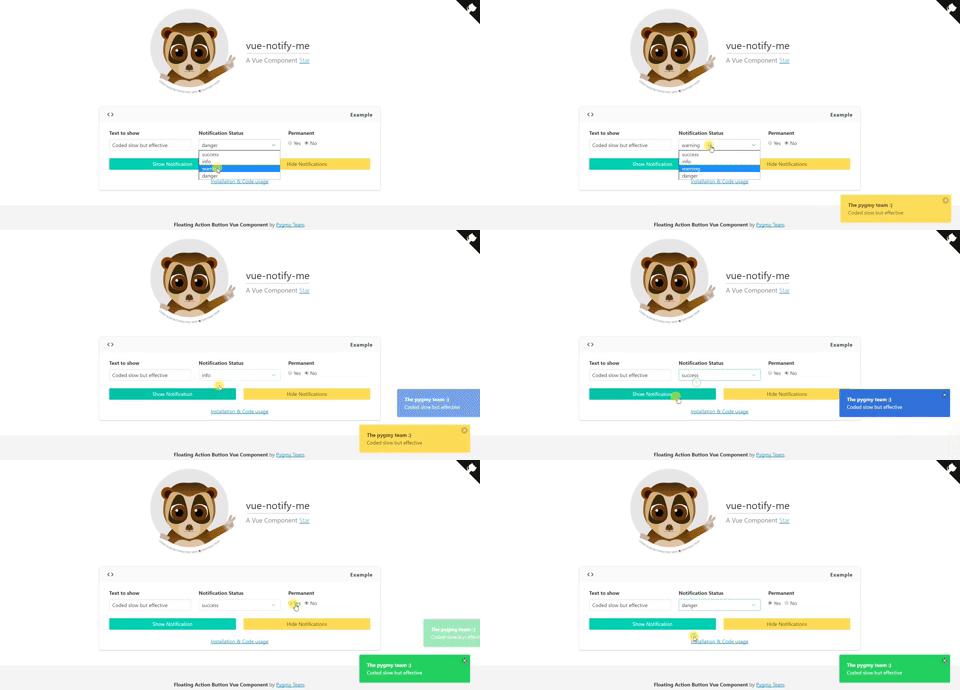
Notification Alert for Vue.
Features
- Customizable template
- Stackable notifications
Installation
npm install vue-notify-me --save
Properties
| Properties | Type | Values |
|---|---|---|
event-bus |
Object | Central event Bus |
event-show (not required) |
String | Default notify-me |
event-hide (not required) |
String | Default hide-notify-me |
close (not required) |
String | Default bulma, options: bootstrap or any other class for the closing icon |
permanent (not required) |
Bool | Default false |
container (not required) |
String | Default notification, (Class for the notification container) |
status (not required) |
String | Default is-success, (Class for the notification status) |
width (not required) |
String | Default 350px. It's mandatory to set the unit for the width. For example: rem, em, px |
timeout (not required) |
Number | Default 4000. If notification is not permanent you can set the timeout for it |
Examples
Include the component in your .vue file.
<template>
  <notify-me
        :event-bus="bus">
      <template slot="content" scope="{data}">
          <div style="width: 100%; word-break: break-all; text-align: left">
              <h4><b>{{data.title}}</b></h4>
              <p style="margin: 0">{{data.text}}</p>
          </div>
      </template>
  </notify-me>
</template>
If you'd like to use the component in a SPA set a single template on your layout application and fire your notification through your central event bus. Set any available prop for the component like this:
<notify-me
    container="notification"
    status="alert-success"
    :width="300"
    close="bulma"
    :event-bus="bus"
>
      <template slot="content" scope="{data}">
          <div style="width: 100%; word-break: break-all; text-align: left">
              <h4><b>{{data.title}}</b></h4>
              <p style="margin: 0">{{data.text}}</p>
          </div>
      </template>
  </notify-me>
To show a notification just fire an event like this:
<script>
import Notify from 'vue-notify-me'

const bus = new Vue();

export default {
  components: {
    'notify-me': Notify
  },
  data(){
      return {
          bus
      }
  },
  mounted(){
      this.bus.$emit('notify-me', {
        data: {
            title: 'The pygmy team :)',
            text: 'this is my notification'
        }

      });
  }

}
</script>
You may also add any available prop through the event emitter:
this.bus.$emit('notify-me', {
    permanent: true,
    status: this.status,
    data: {
        title: 'The pygmy team :)',
        text: this.text
    }

});
Enjoy :)
Related Packages
@codedungeon/vue-messenger
Vue Messenger provides an expressive suite of features and customization
1,031
0
Version History
| Version | Released | Vue | License |
|---|---|---|---|
| 1.1.0 | ^2.2.1 | MIT | |
| 1.0.6 | ^2.2.1 | MIT | |
| 1.0.5 | ^2.2.1 | MIT | |
| 1.0.4 | ^2.2.1 | MIT | |
| 1.0.3 | ^2.2.1 | MIT | |
| 1.0.2 | ^2.2.1 | MIT | |
| 1.0.1 | ^2.2.1 | MIT | |
| 1.0.0 | ^2.2.1 | MIT |