vue-mermaid
vue-mermaid
flowchart of mermaid with vue componet
Requirements
Install Setup
# install dependencies
npm install --save vue-mermaid
Usage
Register component
import VueMermaid from "vue-mermaid";
Vue.use(VueMermaid);
Use component
export default {
  data: function() {
    return {
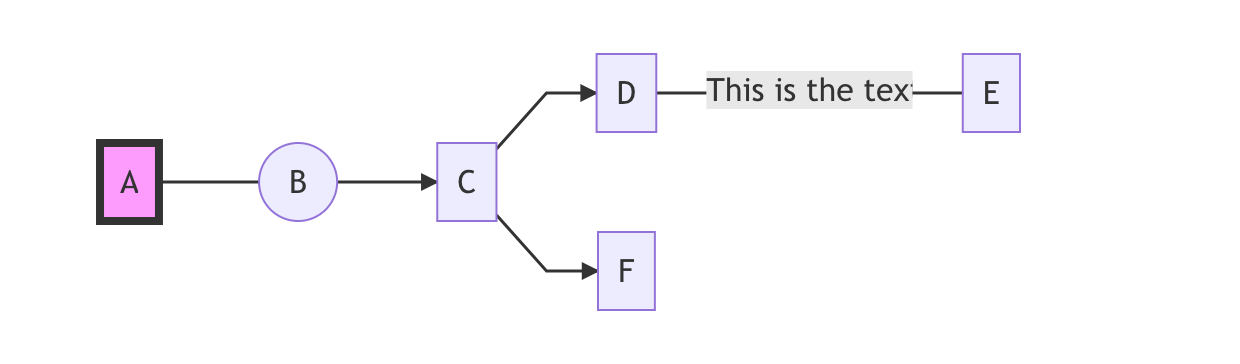
      data: [
        {
          id: "1",
          text: "A",
          link: "---",
          next: ["2"],
          editable: true,
          style: "fill:#f9f,stroke:#333,stroke-width:4px",
        },
        { id: "2", text: "B", edgeType: "circle", next: ["3"] },
        { id: "3", text: "C", next: ["4", "6"] },
        { id: "4", text: "D", link: "-- This is the text ---", next: ["5"] },
        { id: "5", text: "E" },
        { id: "6", text: "F" }
      ]
    };
  },
  methods: {
    editNode(nodeId) {
      alert(nodeId);
    }
  }
};
Different link values of next:
nodes: [
        {
          id: "1",
          text: "A",
          link: ["-- yes -->", "-- no -->"],
          linkNumber: 1,
          linkStyle: "fill:none,stroke:red,stroke-width:1px;",
          next: ["2", "3"],
          editable: true
        },
        { id: "2", text: "B" },
        { id: "3", text: "C"}
      ],
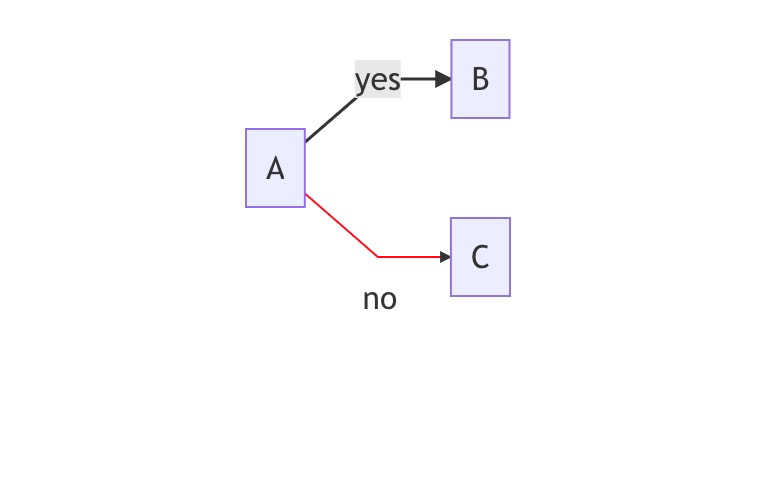
Possible edgeType values:

Template
<template>
  <vue-mermaid
    :nodes="data"
    type="graph LR"
    @nodeClick="editNode"
  ></vue-mermaid>
</template>
Result
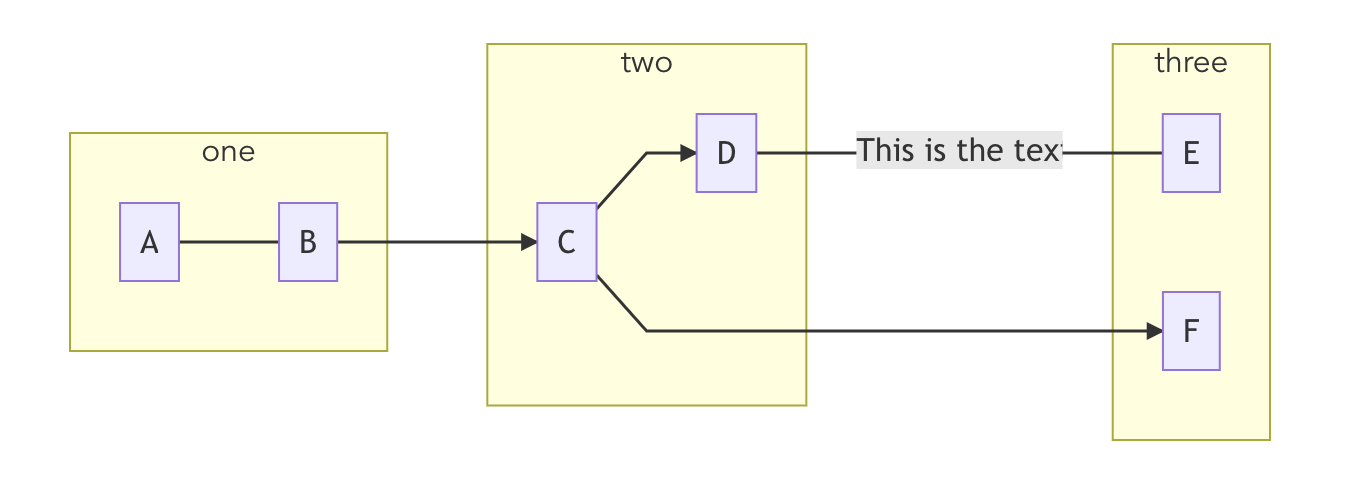
Group Type
export default {
  data: function() {
    return {
      data: [
        {
          id: "1",
          text: "A",
          link: "---",
          next: ["2"],
          group: "one"
        },
        { id: "2", text: "B", edgeType: "circle", next: ["3"], group: "one" },
        { id: "3", text: "C", next: ["4", "6"], group: "two" },
        {
          id: "4",
          text: "D",
          link: "-- This is the text ---",
          next: ["5"],
          group: "two"
        },
        { id: "5", text: "E", group: "three" },
        { id: "6", text: "F", group: "three", , url: "http://www.github.com" }
      ]
    };
  }
};
Theme
- To change theme, you can pass in a config object, for available themes, you can refer to mermaidjs themes
<template>
  <vue-mermaid
    type="graph LR"
    :config="config"
  ></vue-mermaid>
</template>
export default {
  data: function() {
    return {
      config: {
        theme: 'neutral'
      }
    };
  }
};
Build Setup
# install dependencies
npm install

# build for production with minification
npm run build
Related Packages
vue-super-flow
Vue-super-flow is a quick and convenient Vue plug-in to realize flow chart. Demo...
11,882
@composy/flowchart-vue
Vue 3 adapter for OA approval flowcharts: components, composables, and plugins.
0
Version History
| Version | Released | License |
|---|---|---|
| 0.0.15 | MIT | |
| 0.0.14 | MIT | |
| 0.0.13 | MIT | |
| 0.0.12 | MIT | |
| 0.0.11 | MIT | |
| 0.0.10 | MIT | |
| 0.0.9 | MIT | |
| 0.0.8 | MIT | |
| 0.0.7 | MIT | |
| 0.0.6 | MIT | |
| 0.0.5 | MIT | |
| 0.0.4 | MIT | |
| 0.0.3 | MIT | |
| 0.0.2 | MIT | |
| 0.0.1 | MIT |