vue-markdown-stream
vue-markdown-stream
🌐 English | 简体中文
一个基于 markdown-it 的 Vue 3 组件,专为在流式场景(例如大型语言模型 (LLM) 的流式响应)中高效渲染代码块而优化。
🔍 功能特点
🚀 支持流式响应的渲染机制
专为大语言模型(LLM)流式输出等实时内容更新场景设计。相比传统 Markdown 渲染方案,本组件能做到增量渲染,避免整段 HTML 的反复重绘。
🔧 基于 markdown-it 插件生态
完全兼容markdown-it插件生态,在此基础上通过Vue Component自定义您的代码块渲染插件
前往👉markdown-it了解插件生态
🧩 支持自定义组件注入
对于像 ```echarts 这样的代码块,可以渲染为真正的 Vue 组件,比如您自定义的Echarts.vue
🔄 基于 VNode 的渲染方式
不再依赖 v-html,而是将 Markdown token 直接转换为 Vue 的 虚拟 DOM (VNode),具备:
更细粒度的响应式更新
更好的性能和可控性
更高的安全性(无 HTML 注入风险)
🎯 最小化 DOM 更新 适配流式文本更新,基于 Vue 的 VNode diff 策略,只更新必要部分,性能表现优秀。
安装
pnpm install vue-markdown-stream
使用示例
简单使用
<template>
  <div>
    <VueMarkdown :content="markdownContent" :plugin="pluginsMap"/>
  </div>
</template>

<script setup lang="ts">
import { ref } from 'vue'
import VueMarkdown from 'vue-markdown-stream'
import 'vue-markdown-stream-test/dist/index.css'//引入css

const markdownContent = ref(`
# 这是一段Markdown示例
`)

</script>

<style scoped>
</style>
流式场景下
<template>
  <div>
    <VueMarkdownStream :content="markdownContent"/>
  </div>
</template>

<script setup lang="ts">
import { ref } from 'vue'
import VueMarkdownStream,{useTypewriter} from 'vue-markdown-stream'
import 'vue-markdown-stream-test/dist/index.css'//引入css

const markdownContent = ref('')

// 模拟流式内容更新
const streamContent = `
以下是一段自定义的代码块
`
const { startTyping } = useTypewriter()
const stop = startTyping(streamContent,100,[3,5],(text)=>{
  markdownContent+=text
})
</script>

<style scoped>
</style>
自定义组件式代码块插件
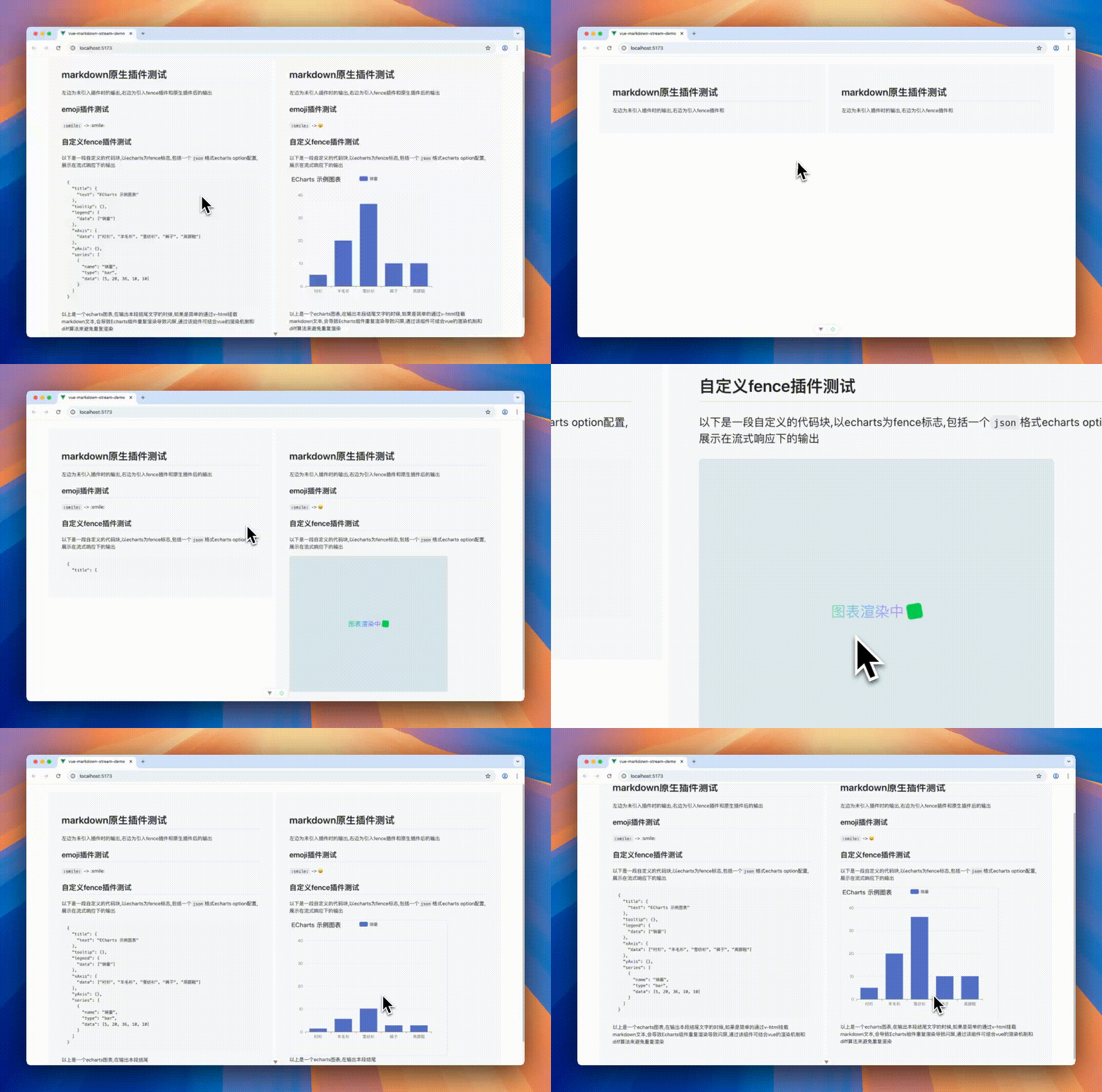
假如我通过一些手段要求大模型或者后端固定返回特定格式代码块,比如这样:
  ```echarts
    {
        "title": {
        "text": "ECharts 示例图表"
      },
        "tooltip": {},
        "legend": {
        "data": ["销量"]
      },
        "xAxis": {
        "data": ["衬衫", "羊毛衫", "雪纺衫", "裤子", "高跟鞋"]
      },
        "yAxis": {},
        "series": [{
        "name": "销量",
        "type": "bar",
        "data": [5, 20, 36, 10, 10]
      }]
    }
  ```
然后定义echarts这个fence标志对应的组件,就可以将markdown中这一段代码块渲染为Vue组件,通过fencePlugin props注入,接着看:
父组件
<template>
  <div>
    <VueMarkdownStream :content="markdownContent" :fencePlugin="pluginsMap"/>
  </div>
</template>

<script setup lang="ts">
import { ref } from 'vue'
import VueMarkdownStream from 'vue-markdown-stream'
import 'vue-markdown-stream-test/dist/index.css'//引入css
import Echarts from '/path/to/Echarts.vue'
import Mermaid from '/path/to/Mermaid.vue'

const pluginsMap = ref({
  //key就是自定义的代码块标志,value是引入的自定义组件
  echarts:Echarts,
  mermaid:Mermaid
})
const markdownContent = ref('')
</script>

<style scoped>
</style>
一个自定义Echarts组件如下:
Echarts.vue
pnpm install echarts
<!-- use tailwindcss -->
<template>
  <div
    class="echarts-block animate-in fade-in-95 zoom-in-95 relative my-4 w-[80%] rounded-md border border-gray-200 duration-500"
  >
    <div
      v-show="loading"
      class="animate-skeleton-loading absolute z-10 flex min-h-[400px] w-full items-center justify-center gap-1"
    >
      <span
        class="loading-text flex animate-pulse bg-gradient-to-r from-green-500 via-blue-500 to-violet-500 bg-clip-text text-[1.2rem] font-bold text-transparent"
        >图表渲染中</span
      >
      <div class="animate-wiggle h-5 w-5 rounded-sm bg-green-500"></div>
    </div>
    <div class="min-h-[400px] w-full" ref="echartsContainer"></div>
  </div>
</template>

<script setup lang="ts">
import { onBeforeUnmount, onMounted, ref, watch } from 'vue'
import * as echarts from 'echarts'

const props = defineProps({
  config: {
    type: String,
    default: '{}',
  },
})
const loading = ref<boolean>(true)
const option = ref()
const echartsContainer = ref<HTMLDivElement>()
let chart: echarts.ECharts | null = null
let observer: ResizeObserver

const renderCharts = () => {
  if (!echartsContainer.value) return

  if (!chart) {
    chart = echarts.init(echartsContainer.value)

    observer = new ResizeObserver(() => {
      chart?.resize()
    })
    observer.observe(echartsContainer.value)
  }

  if (option.value) {
    loading.value = false
    chart?.setOption(option.value)
  }
}

watch(
  () => props.config,
  (val) => {
    try {
      option.value = JSON.parse(val)
      renderCharts()
    } catch (err) {
      loading.value = true
    }
  },
  { immediate: true },
)

onMounted(() => {
  renderCharts()
})
onBeforeUnmount(() => {
  observer?.disconnect()
  chart?.dispose()
})
</script>
使用markdown-it插件
VueMarkdownStream同样保留了原生markdown-it插件集成能力,可以通过组件的plugin props注入
pnpm install markdown-it-emoji
<template>
  <div>
    <VueMarkdown :v-model="markdownContent" :plugin="plugins"/>
  </div>
</template>

<script setup lang="ts">
import { ref } from 'vue'
import VueMarkdown from 'vue-markdown-stream'
import 'vue-markdown-stream-test/dist/index.css'//引入css
import { full as emoji } from 'markdown-it-emoji'

const plugins = ref([emoji])

const markdownContent = ref('')

</script>

<style scoped>
</style>
使用自己的markdown-it对象
为了支持完全自定义,你也可以传入自定义markdown-it对象,相当于本组件只是做了一个fence代码块的插件增强
<template>
  <div>
    <VueMarkdown :v-model="markdownContent" :md="myMarkdownIt"/>
  </div>
</template>

<script setup lang="ts">
import { ref } from 'vue'
import VueMarkdown from 'vue-markdown-stream'
import 'vue-markdown-stream-test/dist/index.css'//引入css

const markdownContent = ref('')

const myMarkdownIt = new MarkdownIt({...})//你的自定义MarkdownIt

</script>

<style scoped>
</style>
Related Packages
A simple, lightweight markdown-it wrapper for Vue written in pure typescript.
Version History
| Version | Released | Vue | License |
|---|---|---|---|
| 0.5.9 | ^3.0.0 | MIT | |
| 0.5.8 | ^3.0.0 | MIT |