vue-jalali-datepicker
| Install | |
|---|---|
npm install vue-jalali-datepicker |
|
| Latest Version: | 0.2.0 |
| Vue: | 3 |
| License: | MIT |
| Last Updated: | Oct 12, 2026 |
| Links: | GitHub · npm |
📅 vue-jalali-datepicker
A lightweight, zero-dependency Persian (Jalali / Shamsi) date & range picker for Vue 3.
RTL-first · Fully typed · Themeable with CSS variables · ~6 kB gzipped


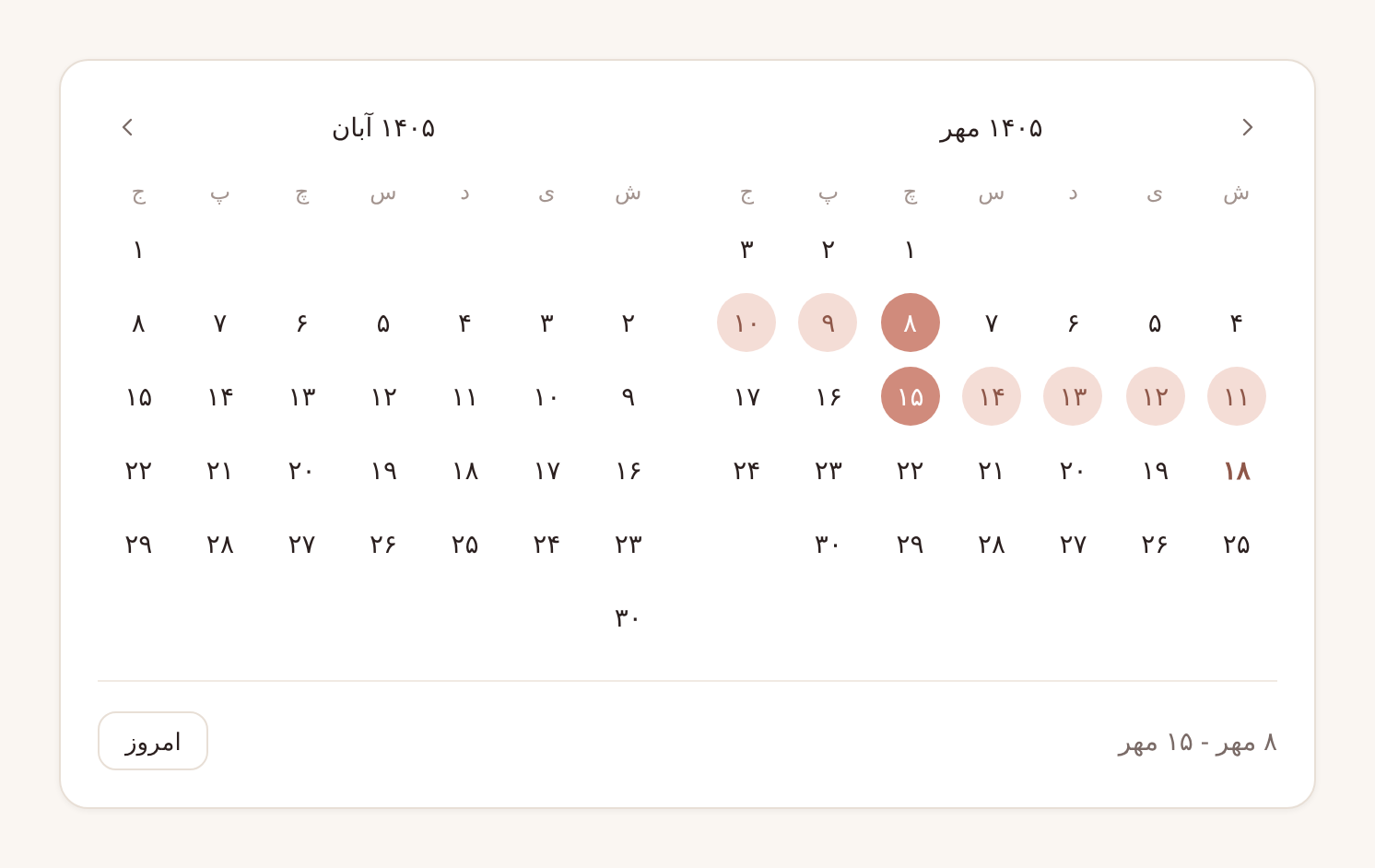
Table of contents
- Why this picker?
- Gallery
- Installation
- Quick start
- Examples
- API reference
- Localization
- Theming
- Jalali utilities
- Working with dates
- Accessibility
- Browser support
- FAQ
- Contributing
- License
Why this picker?
| 🪶 Zero dependencies | Only vue as a peer dependency. No moment, no dayjs, no UI framework. |
| 📅 Single & range | Pick one date or a start/end range with a live hover preview. |
| 🪟 Popover or inline | Ships with a ready-made input + popover, or drop the calendar straight into your layout. |
| 📱 Responsive by container | The two-month view collapses to one month based on the space it's given (CSS container queries), not the screen size. |
| 🚫 Flexible disabling | minDate, maxDate, a list of disabledDates, or any isDateDisabled(date) predicate. |
| 🌐 Localizable | Persian and English labels included, every string overridable, Persian or Latin digits. |
| ↔️ RTL first, LTR ready | Built for Persian interfaces, works just as well in LTR apps. |
| 🎨 Themeable | One color prop to brand it, or every color, radius and shadow as a CSS custom property. A dark theme is built in. |
| 🧮 Exact conversion | Closed-form Jalali ↔ Gregorian arithmetic, verified day by day against Intl. Doesn't depend on the browser's Persian calendar support. |
| 🟦 TypeScript | Written in TypeScript, with full types for props, events and utilities. |
| ⚡ SSR friendly | No DOM access during render. Works in Nuxt and other SSR setups. |
Gallery
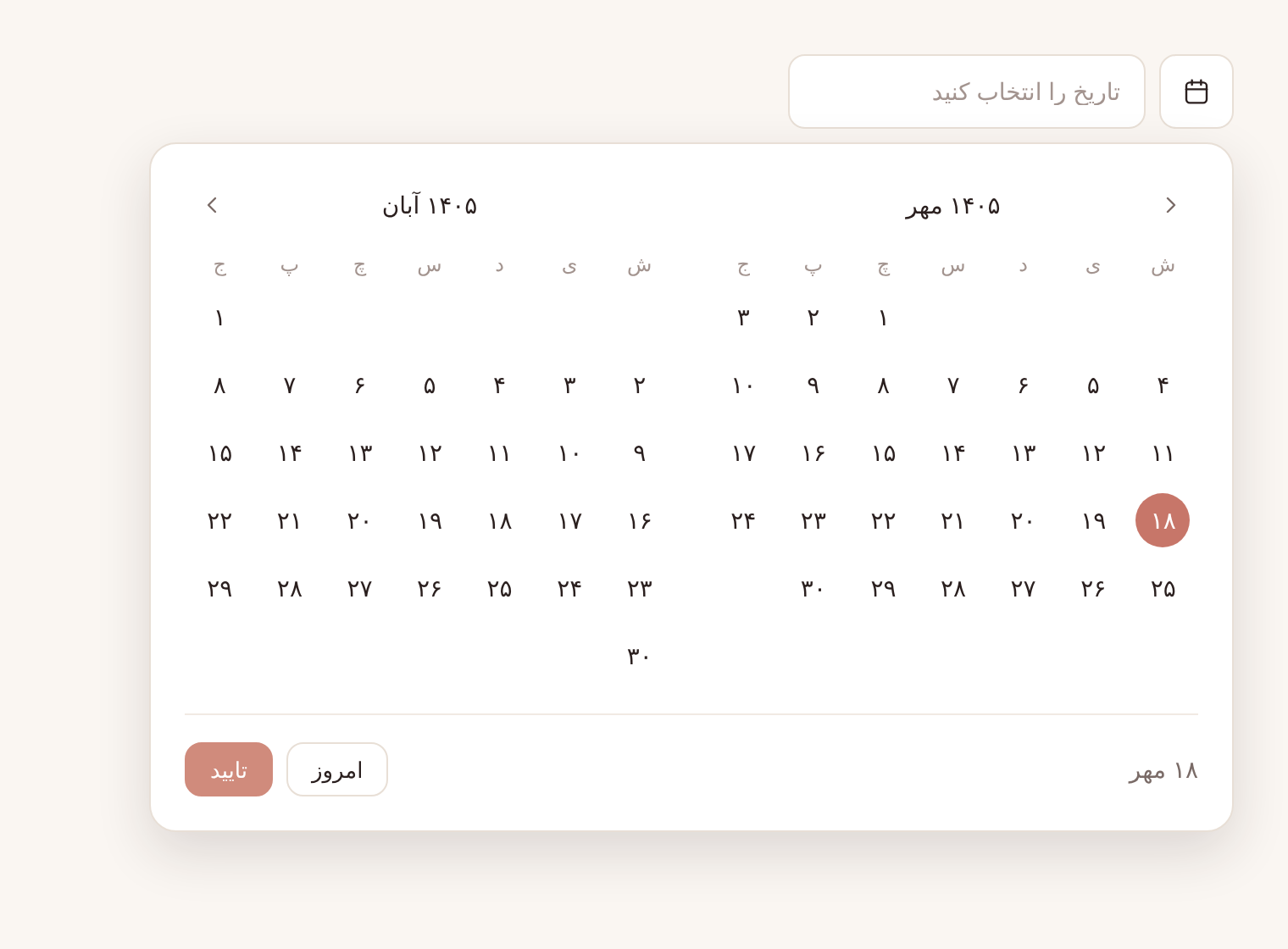 Popover · input + floating calendar with confirm |
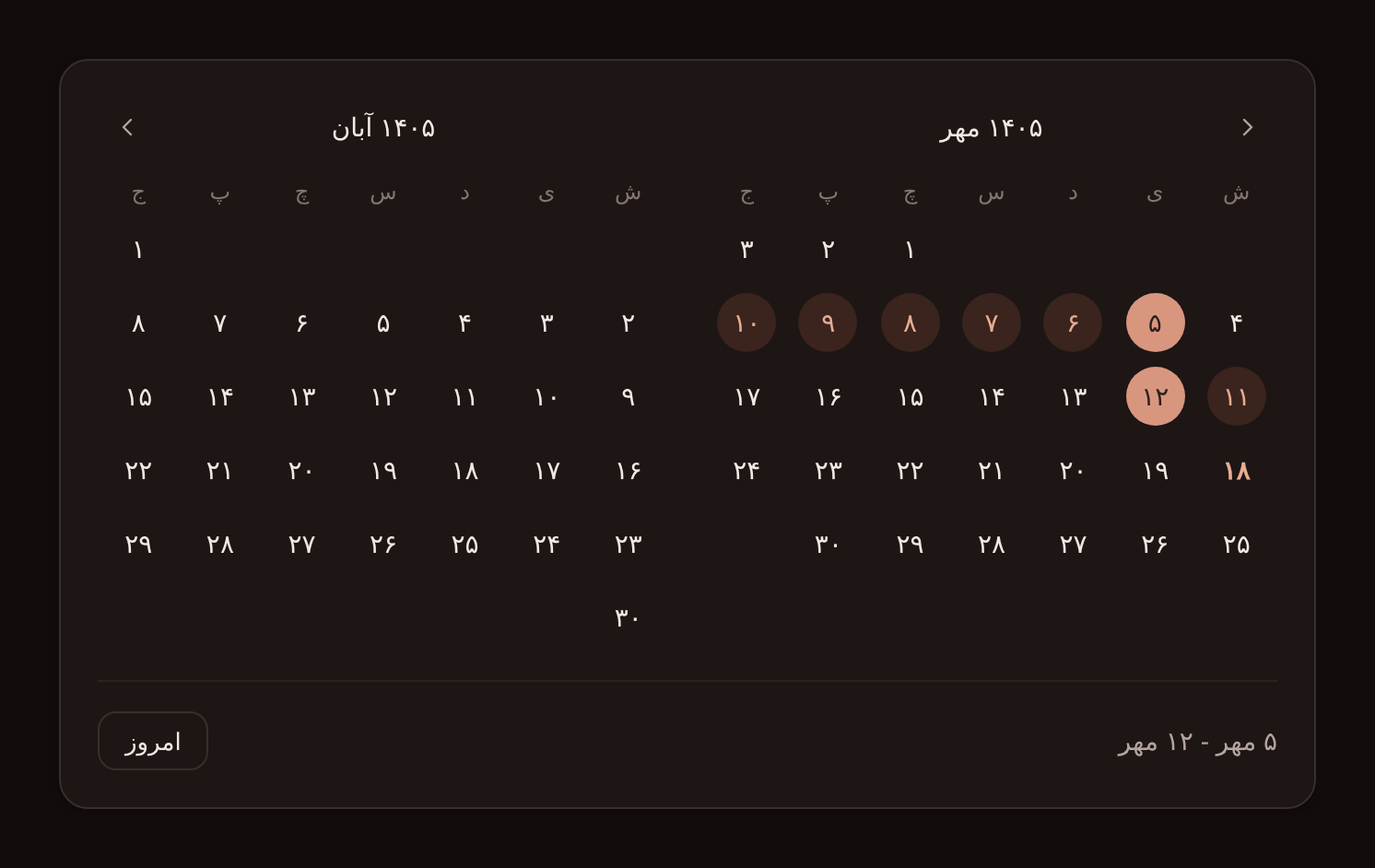 Dark theme · range selection |
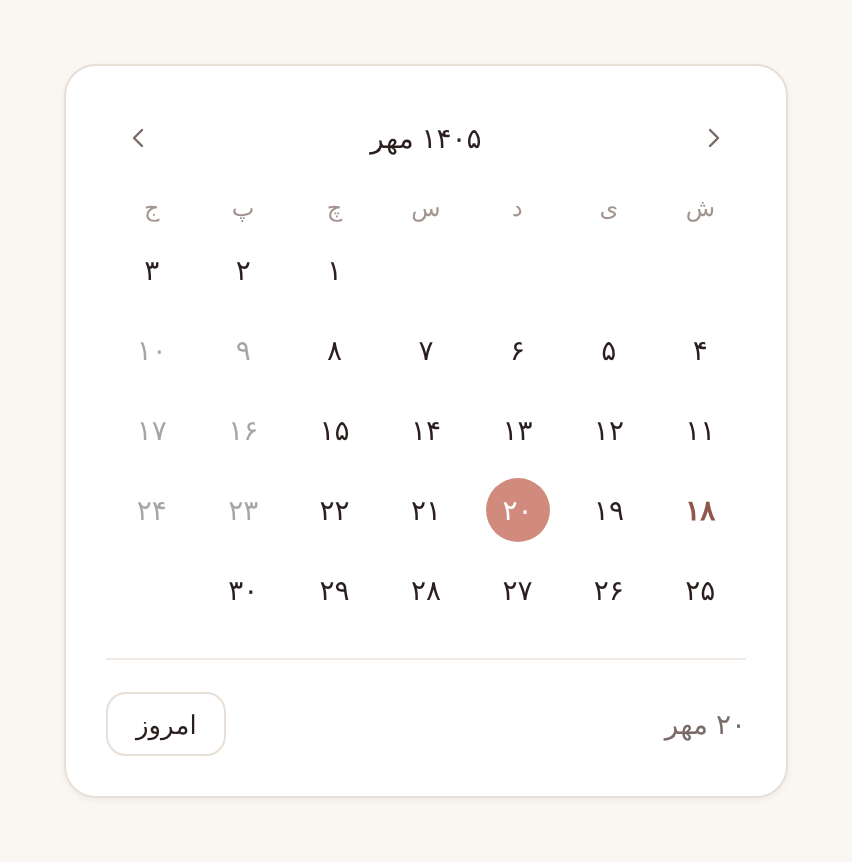 Single month · disabled dates |
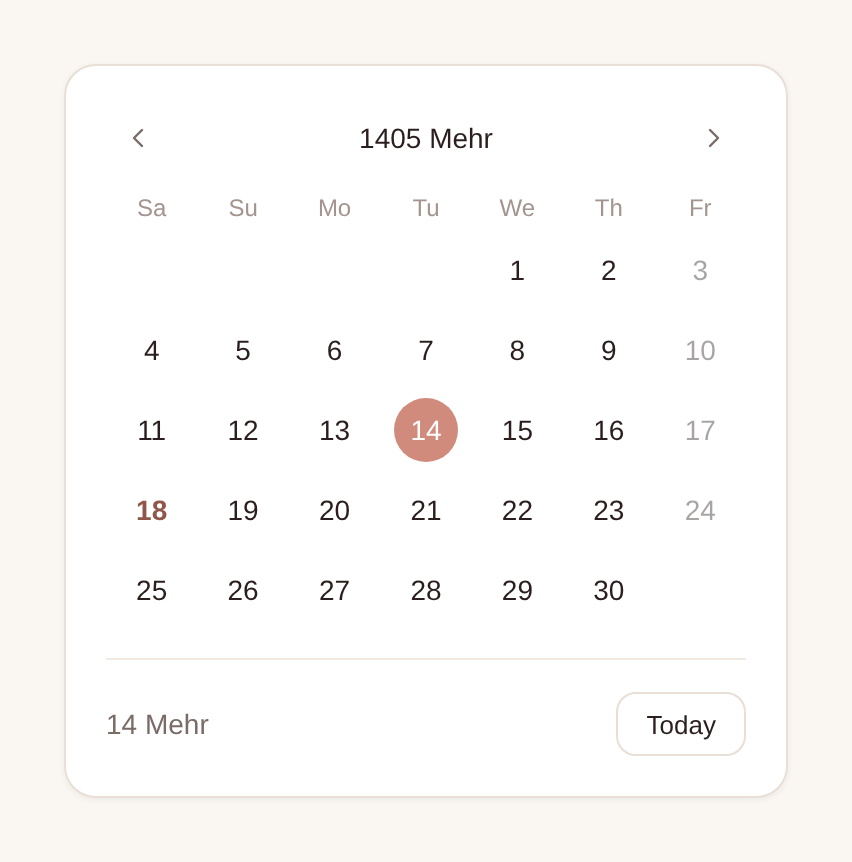 LTR + English labels · Latin digits, Fridays disabled |
Installation
# npm
npm install vue-jalali-datepicker

# pnpm
pnpm add vue-jalali-datepicker

# yarn
yarn add vue-jalali-datepicker

# bun
bun add vue-jalali-datepicker
Requirements: Vue
3.3or newer.
Don't forget the stylesheet. It's shipped separately so you decide where it goes in your CSS cascade:
import 'vue-jalali-datepicker/style.css'
Quick start
Local registration
<script setup lang="ts">
import { ref } from 'vue'
import { JalaliDatePicker } from 'vue-jalali-datepicker'
import 'vue-jalali-datepicker/style.css'

const date = ref<Date | null>(null)
</script>

<template>
  <JalaliDatePicker v-model="date" />
</template>
Global registration
// main.ts
import { createApp } from 'vue'
import { JalaliDatePickerPlugin } from 'vue-jalali-datepicker'
import 'vue-jalali-datepicker/style.css'
import App from './App.vue'

createApp(App)
  .use(JalaliDatePickerPlugin)          // registers <JalaliDatePicker />
  // .use(JalaliDatePickerPlugin, { name: 'DatePicker' })  // or under a custom name
  .mount('#app')
Nuxt 3 / 4
// plugins/jalali-datepicker.ts
import { JalaliDatePickerPlugin } from 'vue-jalali-datepicker'
import 'vue-jalali-datepicker/style.css'

export default defineNuxtPlugin((nuxtApp) => {
  nuxtApp.vueApp.use(JalaliDatePickerPlugin)
})
Examples
Date range
In range mode v-model is an object with start and end.
<script setup lang="ts">
import { ref } from 'vue'
import { JalaliDatePicker, type DateRange } from 'vue-jalali-datepicker'

const stay = ref<DateRange>({ start: null, end: null })
</script>

<template>
  <JalaliDatePicker v-model="stay" range />
</template>
Clicking a date earlier than the start flips the range for you, and hovering shows a preview of the range before the second click.
Inline calendar
<JalaliDatePicker v-model="date" variant="inline" />
Inline pickers update v-model on every click. There is no confirm step.
Apply without a confirm button
By default the popover keeps a draft until the user presses تایید (confirm). With auto-apply the value is committed, and the popover closes, as soon as the selection is complete:
<JalaliDatePicker v-model="stay" range auto-apply />
Limiting selectable dates
<script setup lang="ts">
const today = new Date()
const inThreeMonths = new Date(today.getFullYear(), today.getMonth() + 3, today.getDate())

const holidays = [new Date(2026, 2, 20), new Date(2026, 2, 21)]

// Disable every Friday
const isFriday = (date: Date) => date.getDay() === 5
</script>

<template>
  <JalaliDatePicker
    v-model="date"
    :min-date="today"
    :max-date="inThreeMonths"
    :disabled-dates="holidays"
    :is-date-disabled="isFriday"
  />
</template>
All four options can be combined. A day is disabled if any of them says so.
One month only
<JalaliDatePicker v-model="date" :months="1" />
English labels, Latin digits, LTR layout
<script setup lang="ts">
import { JalaliDatePicker, enLocale } from 'vue-jalali-datepicker'
</script>

<template>
  <JalaliDatePicker v-model="date" :locale="enLocale" digits="latin" :rtl="false" />
</template>
Brand color
<JalaliDatePicker v-model="date" color="#2563eb" />
Any CSS color works. See The color prop for details.
Custom label format
<script setup lang="ts">
import { toFaDigits, faLocale, type JalaliDate } from 'vue-jalali-datepicker'

// e.g. "۱۴۰۵/۰۷/۱۸"
const formatDate = (_date: Date, j: JalaliDate) =>
  toFaDigits(`${j.jy}/${String(j.jm).padStart(2, '0')}/${String(j.jd).padStart(2, '0')}`)
</script>

<template>
  <JalaliDatePicker v-model="date" :format-date="formatDate" />
</template>
Custom trigger
Replace the built-in input and button with any element through the trigger slot:
<JalaliDatePicker v-model="date">
  <template #trigger="{ toggle, open, label, placeholder }">
    <button type="button" class="my-button" :aria-expanded="open" @click="toggle">
      📅 {{ label ?? placeholder }}
    </button>
  </template>
</JalaliDatePicker>
Controlling the popover from code
<script setup lang="ts">
import { ref } from 'vue'
import { JalaliDatePicker } from 'vue-jalali-datepicker'

const picker = ref<InstanceType<typeof JalaliDatePicker>>()
</script>

<template>
  <JalaliDatePicker ref="picker" v-model="date" />
  <button @click="picker?.open()">Pick a date</button>
</template>
Inside a form
The built-in input is readonly and accepts a name. Send whatever format your backend expects through a hidden field:
<form @submit.prevent="submit">
  <JalaliDatePicker v-model="birthday" name="birthday-label" />
  <input type="hidden" name="birthday" :value="birthday?.toISOString() ?? ''" />
</form>
Reacting to every click
select-date fires on every day click, even while a popover selection is still a draft. This is useful for analytics or for loading availability:
<JalaliDatePicker v-model="date" @select-date="(d) => loadSlots(d)" />
API reference
Props
| Prop | Type | Default | Description |
|---|---|---|---|
modelValue |
Date | null | DateRange |
null |
Selected value. Date | null in single mode, { start, end } in range mode. |
range |
boolean |
false |
Enables start/end range selection. |
variant |
'popover' | 'inline' |
'popover' |
popover renders an input with a floating calendar. inline renders only the calendar. |
months |
1 | 2 |
2 |
Months displayed side by side. With 2, the second month hides automatically when the calendar has less than ~560px. |
placeholder |
string |
from locale | Placeholder of the built-in input. |
minDate |
Date | null |
null |
Earliest selectable day (inclusive). |
maxDate |
Date | null |
null |
Latest selectable day (inclusive). |
disabledDates |
Date[] |
[] |
Specific days that can't be selected. Only the calendar day matters, not the time. |
isDateDisabled |
(date: Date) => boolean |
— | Predicate for custom rules (weekends, fully-booked days, …). |
locale |
Partial<DatePickerLocale> |
faLocale |
Override any label. Missing keys fall back to Persian. |
digits |
'fa' | 'latin' |
'fa' |
Render numbers as ۱۲۳ or 123. |
rtl |
boolean |
true |
Layout direction of the calendar. |
autoApply |
boolean |
false |
Popover only. Commit and close as soon as the selection is complete. Hides the confirm button. |
showToday |
boolean |
true |
Show the "Today" button in the footer. |
showFooter |
boolean |
true |
Inline only. Show the footer with the selection summary and the "Today" button. |
align |
'start' | 'end' |
'start' |
Popover alignment relative to the trigger (logical, so it follows dir). |
disabled |
boolean |
false |
Disables the built-in trigger. |
name |
string |
— | name attribute for the built-in input. |
color |
string | Partial<DatePickerColors> |
— | Accent color. A CSS color string derives every shade automatically; an object sets individual shades. See The color prop. |
formatDate |
(date: Date, jalali: JalaliDate) => string |
— | Custom label for selected dates. Defaults to <day> <month>, e.g. ۱۸ مهر. |
Events
| Event | Payload | Fired when |
|---|---|---|
update:modelValue |
DatePickerValue |
The value is committed: on every click for inline, on confirm (or auto-apply) for popover. |
confirm |
DatePickerValue |
The user confirms a popover selection. |
select-date |
Date |
Any day is clicked, or "Today" is pressed, whether or not the value is committed yet. |
open |
— | The popover opens. |
close |
— | The popover closes (confirm, outside click, Esc, or close()). |
Slots
| Slot | Props | Description |
|---|---|---|
trigger |
{ open: boolean, toggle: () => void, label: string | null, placeholder: string } |
Replaces the built-in input and button of the popover variant. label is the formatted committed value, or null when nothing is selected. |
Exposed methods
Available through a template ref:
| Method | Description |
|---|---|
open() |
Opens the popover. The draft resets to the current modelValue. |
close() |
Closes the popover and discards the draft. |
toggle() |
Toggles the popover (no-op when disabled). |
Types
import type {
  DateRange,        // { start: Date | null; end: Date | null }
  DatePickerValue,  // Date | null | DateRange
  DatePickerLocale, // all translatable strings (see below)
  DatePickerColor,  // string | Partial<DatePickerColors>
  DatePickerColors, // { accent, accentHover, accentSoft, accentFg, onAccent }
  JalaliDate,       // { jy: number; jm: number; jd: number }
  JalaliMonth,      // { jy: number; jm: number }
} from 'vue-jalali-datepicker'
Localization
Two locales are included:
import { faLocale, enLocale } from 'vue-jalali-datepicker'
Pass a full locale or override only what you need. Missing keys fall back to faLocale:
<JalaliDatePicker
  v-model="date"
  :locale="{ confirm: 'ثبت', today: 'برو به امروز', placeholder: 'تاریخ نوبت' }"
/>
All locale keys
| Key | Persian default | English (enLocale) |
|---|---|---|
months |
['فروردین', …, 'اسفند'] |
['Farvardin', …, 'Esfand'] |
weekdays |
['ش', 'ی', 'د', 'س', 'چ', 'پ', 'ج'] |
['Sa', 'Su', 'Mo', 'Tu', 'We', 'Th', 'Fr'] |
toggleLabel |
باز کردن تقویم | Open calendar |
placeholder |
تاریخ را انتخاب کنید | Select a date |
rangePlaceholder |
بازه تاریخ را انتخاب کنید | Select a date range |
emptySummary |
تاریخ را انتخاب کنید | Select a date |
emptyRangeSummary |
تاریخ شروع و پایان را انتخاب کنید | Select start and end dates |
today |
امروز | Today |
confirm |
تایید | Confirm |
prevMonth |
ماه قبل | Previous month |
nextMonth |
ماه بعد | Next month |
rangeSeparator |
' - ' |
' – ' |
weekdays always starts on Saturday, following the Persian week.
With vue-i18n, build the locale from your messages:
<script setup lang="ts">
import { computed } from 'vue'
import { useI18n } from 'vue-i18n'

const { t } = useI18n()
const pickerLocale = computed(() => ({ today: t('picker.today'), confirm: t('picker.confirm') }))
</script>

<template>
  <JalaliDatePicker v-model="date" :locale="pickerLocale" />
</template>
Theming
The default look is a soft "rose" palette. There are two ways to change it:
- The
colorprop, the quickest way to match your brand. - CSS custom properties, for full control over every color, radius and shadow.
The color prop
Pass any CSS color and the picker works out the rest:
<JalaliDatePicker v-model="date" color="#2563eb" />
<JalaliDatePicker v-model="range" range color="rgb(22 163 74)" />
<JalaliDatePicker v-model="date" color="var(--brand-primary)" />
From that one color it derives:
| Shade | How it's derived |
|---|---|
| Selected day, confirm button | the color itself |
| Hover on the selected day | mixed 15% toward the text color |
| Days inside a range | 18% of the color over the surface |
| Today's number, text inside a range | mixed 45% toward the text color, for contrast |
| Hover on regular days | 8% tint of the surface |
| Text on selected days | white or near-black, whichever has the higher WCAG contrast |
Because the shades are mixed against the surface and text colors, they adapt automatically to dark mode.
Note: text on selected days is picked automatically for hex (
#2563eb,#25e,#2563ebcc) andrgb()/rgba()colors. For other formats (named colors,hsl(),var()…) it stays at the theme default (white). Use the object form to set it.
To control each shade yourself, pass an object instead. Any key you leave out keeps the theme value:
<JalaliDatePicker
  v-model="date"
  :color="{
    accent: '#0f766e',
    accentHover: '#115e59',
    accentSoft: '#ccfbf1',
    accentFg: '#115e59',
    onAccent: '#ffffff',
  }"
/>
The prop is reactive, so you can switch colors at runtime (for example, a per-user theme). It sets the variables inline on the component, so it takes precedence over the CSS variables below for the shades it covers.
CSS variables
Everything is driven by CSS custom properties defined on .vjdp-calendar and .vjdp-popover, so you can retheme it from any ancestor without fighting specificity.
/* Brand it once, app-wide */
.vjdp-calendar,
.vjdp-popover {
  --vjdp-accent: #2563eb;
  --vjdp-accent-hover: #1d4ed8;
  --vjdp-accent-soft: #dbeafe;
  --vjdp-accent-fg: #1e40af;
  --vjdp-radius: 12px;
  --vjdp-font-family: 'Vazirmatn', sans-serif;
}

/* …or scope a variant to one part of your app */
.checkout .vjdp-calendar,
.checkout .vjdp-popover {
  --vjdp-accent: #16a34a;
}
CSS variables
| Variable | Default (light) | Purpose |
|---|---|---|
--vjdp-font-family |
inherit |
Font of the whole component |
--vjdp-bg |
#ffffff |
Surface background |
--vjdp-bg-hover |
#f5efe8 |
Hover background of days and buttons |
--vjdp-fg |
#2a1f1e |
Primary text |
--vjdp-fg-muted |
#7a6b67 |
Secondary text (summary, nav icons) |
--vjdp-fg-subtle |
#a3948f |
Weekday names, placeholder |
--vjdp-border |
#e8dfd6 |
Surface, input and button borders |
--vjdp-border-faint |
#f1eae3 |
Footer divider |
--vjdp-accent |
#d08b7c |
Selected day, primary button |
--vjdp-accent-hover |
#c77669 |
Hover state of the accent |
--vjdp-accent-soft |
#f4ddd6 |
Days inside a range |
--vjdp-accent-fg |
#8e5749 |
Today's number, text inside a range |
--vjdp-on-accent |
#ffffff |
Text on the accent color |
--vjdp-radius |
16px |
Calendar corner radius |
--vjdp-radius-control |
10px |
Input and button radius |
--vjdp-shadow |
subtle | Inline calendar shadow |
--vjdp-shadow-elevated |
soft drop | Popover shadow |
--vjdp-width |
640px / 320px |
Calendar width with two / one month(s) |
--vjdp-z-index |
50 |
Popover stacking order |
--vjdp-transition |
150ms ease |
Hover transitions (0s under prefers-reduced-motion) |
Dark mode
Dark colors switch on when an ancestor has the dark class (the convention used by Tailwind, Nuxt Color Mode, VueUse useDark, …) or the vjdp-dark class:
<html class="dark"> … </html>

<!-- or just one picker -->
<div class="vjdp-dark">
  <JalaliDatePicker v-model="date" />
</div>
Following the OS setting instead:
@media (prefers-color-scheme: dark) {
  .vjdp-calendar,
  .vjdp-popover {
    --vjdp-bg: #1d1615;
    --vjdp-fg: #f3e9e4;
    /* …override the other variables as needed */
  }
}
Class hooks
For anything the variables don't cover, every part has a stable, BEM-style class:
.vjdp-popover · .vjdp-trigger · .vjdp-input · .vjdp-popover__panel · .vjdp-calendar · .vjdp-month · .vjdp-month__title · .vjdp-nav · .vjdp-weekdays · .vjdp-day · .vjdp-day--selected · .vjdp-day--in-range · .vjdp-day--today · .vjdp-footer · .vjdp-btn · .vjdp-btn--primary
Jalali utilities
The conversion helpers the picker uses are exported too, so you don't need a separate date library for simple Jalali work:
import {
  toJalali,
  toGregorian,
  isJalaliLeapYear,
  jalaliMonthLength,
  jalaliFirstWeekday,
  shiftJalaliMonth,
  toFaDigits,
} from 'vue-jalali-datepicker'

toJalali(new Date(2025, 2, 21))              // { jy: 1404, jm: 1, jd: 1 }
toGregorian({ jy: 1404, jm: 1, jd: 1 })      // Date → Fri Mar 21 2025 00:00 (local)
isJalaliLeapYear(1403)                       // true
jalaliMonthLength(1404, 12)                  // 29
jalaliFirstWeekday(1404, 1)                  // 6  (0 = Saturday … 6 = Friday)
shiftJalaliMonth({ jy: 1404, jm: 12 }, 1)    // { jy: 1405, jm: 1 }
toFaDigits('1404/01/01')                     // '۱۴۰۴/۰۱/۰۱'
| Function | Signature | Notes |
|---|---|---|
toJalali |
(date: Date) => JalaliDate |
Reads the date in local time. |
toGregorian |
(date: JalaliDate) => Date |
Returns local midnight. |
isJalaliLeapYear |
(jy: number) => boolean |
33-year cycle based arithmetic. |
jalaliMonthLength |
(jy: number, jm: number) => number |
31 / 30 / 29–30 (Esfand). |
jalaliFirstWeekday |
(jy: number, jm: number) => number |
Saturday-first index of day 1. |
jalaliKey |
(date: JalaliDate) => number |
Comparable integer, handy for sorting and equality. |
shiftJalaliMonth |
(month: JalaliMonth, delta: number) => JalaliMonth |
Moves across year boundaries correctly. |
toFaDigits |
(value: number | string) => string |
Converts 0-9 to ۰-۹. |
The conversion is a closed-form implementation of the Borkowski algorithm, valid for Jalali years -61 to 3177. It's tested against Intl's Persian calendar for every single day between 1991 and 2051.
Working with dates
-
Values are plain
Dateobjects at local midnight. The picker works with calendar days, so the time part of anyDateyou pass in is ignored. -
Sending to an API? Serialize the way your backend expects. For a pure date, avoid
toISOString()(it converts to UTC and can shift the day in positive-offset time zones such as Asia/Tehran). Prefer something like:const toYmd = (d: Date) => `${d.getFullYear()}-${String(d.getMonth() + 1).padStart(2, '0')}-${String(d.getDate()).padStart(2, '0')}` -
Range values are always ordered.
start <= endonce both are set, whichever order the user clicked in. -
Popover drafts. While the popover is open the selection is a draft.
modelValueonly changes on confirm (orauto-apply). Closing without confirming discards the draft.
Accessibility
- Every control is a native
<button>, so you get keyboard focus and activation for free, with visible:focus-visiblerings. - The navigation buttons and calendar toggle have localized
aria-labels. - Today's date has
aria-current="date", and selected days havearia-selected="true". - The trigger button reports its state through
aria-expanded, and Esc closes the popover. - Disabled days use the native
disabledattribute. - Transitions are switched off under
prefers-reduced-motion: reduce.
Browser support
All evergreen browsers. The responsive two-month layout uses CSS container queries (Chrome/Edge 105+, Safari 16+, Firefox 110+). Older browsers still get a fully working single-month layout. The derived shades of the color prop use color-mix() (Chrome/Edge 111+, Safari 16.2+, Firefox 113+).
FAQ
The popover is clipped inside a scrolling container or modal.
The popover is positioned absolutely relative to the picker, so an ancestor with overflow: hidden can clip it. Give that container enough room, set overflow: visible, or use variant="inline" inside your own popover/dialog component.
Can I use it with Nuxt UI, Vuetify, PrimeVue, Tailwind…?
Yes. The component has no styling dependencies. Use the trigger slot to render your design system's input or button, and map your design tokens onto the --vjdp-* variables.
Does it support time selection?
Not yet. The picker works with calendar days. Pair it with your own time input and combine the values.
Can the week start on a different day?
The Persian week starts on Saturday, and the grid always follows that. Feel free to open an issue if you need a configurable first weekday.
Why not just use Intl for the Jalali conversion?
Intl can format dates in the Persian calendar but can't construct them, so converting back requires a search, and support varies between runtimes. The closed-form arithmetic used here is exact, fast, and behaves the same everywhere.
Contributing
Issues and pull requests are welcome! 🙌
git clone https://github.com/Ariaaghakhani/vue-jalali-datepicker.git
cd vue-jalali-datepicker
npm install

npm run dev        # interactive playground (playground/App.vue)
npm test           # unit tests (Vitest)
npm run typecheck  # vue-tsc
npm run build      # library build → dist/
Project layout
src/
├── components/
│   ├── JalaliDatePicker.vue    # public component: state, popover, v-model
│   ├── DatePickerCalendar.vue  # month grid(s) + footer
│   └── DatePickerMonth.vue     # a single month
├── jalali.ts                   # conversion & calendar utilities
├── locale.ts                   # faLocale / enLocale
├── color.ts                    # `color` prop → CSS variables
├── types.ts
├── style.css                   # all styles & CSS variables
└── index.ts                    # public exports + plugin
Before opening a PR, please make sure npm run typecheck, npm test and npm run build all pass. CI runs the same checks.
Releasing (maintainers): bump version in package.json (and add a CHANGELOG.md entry) in your pull request. When it's merged into main, the publish workflow type-checks, tests and builds the package, then publishes it to npm with provenance using the NPM_TOKEN repository secret. Merges that don't change the version skip publishing. The workflow can also be run by hand from the Actions tab.
License
Related Packages
Vue bindings for jalali-js: useCalendar composable, headless Calendar grid, a de...
An accessible Vue 3 Persian (Jalali) calendar, date picker, and time picker with...
Idiomatic Vue 3 bindings for Khorshid — composables + styled components for the...
Version History
| Version | Released | Vue | License |
|---|---|---|---|
| 0.2.0 | ^3.3.0 | MIT | |
| 0.1.0 | ^3.3.0 | MIT |
Pre-releases (1)
| Version | Released | License |
|---|---|---|
| 0.0.0-stage |