vue-iconfont
Vue Iconfont




更优雅地使用 Iconfont.cn,同时支持 font-class 引入 和 symbol 引入。
安装
# Yarn
yarn add vue-iconfont

# npm
npm i vue-iconfont
CDN:jsDelivr | UNPKG (可通过 window.VueIconfont 使用)
使用
首先用 Vue.use 安装 VueIconfont:
import Vue from 'vue'
import VueIconfont from 'vue-iconfont'

Vue.use(VueIconfont/*, options*/)

// ......
然后就可以在组件中这样使用:
<icon name="right" />
options
| 选项 | 类型 | 默认值 | 说明 |
|---|---|---|---|
| tag | String |
icon |
图标组件的标签。 |
| type | font | svg |
font |
font:表示用 font-class 引入的字体图标。svg:表示用 symbol 引入的 SVG 图标。 |
| prefix | String |
- | 表示类名前缀或 SVG 图标名称前缀。 |
| family | String |
= prefix |
仅当 type 为 font 时有效,表示设置了 font-family 样式的类。 |
| sprite | String |
- | 仅当 type 为 svg 时有效,表示 SVG Sprite,其会被自动加载,形如:<svg><symbol id="ok">......</symbol></svg> |
| component | { name: String, 'props': Object, beforeRender: context => void } |
{ name: 'Icon', 'props': {}, beforeRender: () => {} } | name 表示组件的 name 选项,props 表示组件的 props 选项,beforeRender 是一个函数,它接收 Vue 函数组件中 render 的 context,你可以对 context 施加改变。 |
完整实例
项目配置
-
打开 iconfont.cn 的
图标管理 > 我的项目,选择一个项目。 -
点击
更多操作 > 编辑项目:
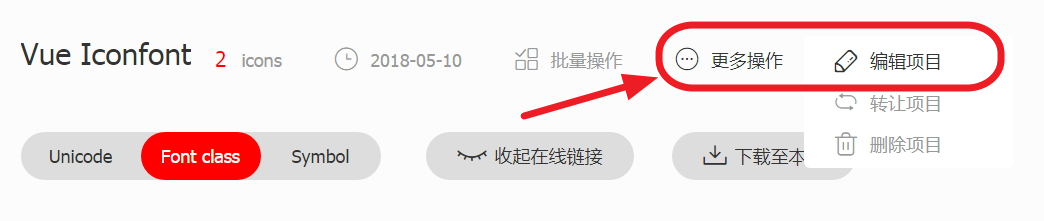
- 将
FontClass/Symbol 前缀和Font Family表单项设为同一个值,这个值就是上面options中的prefix:
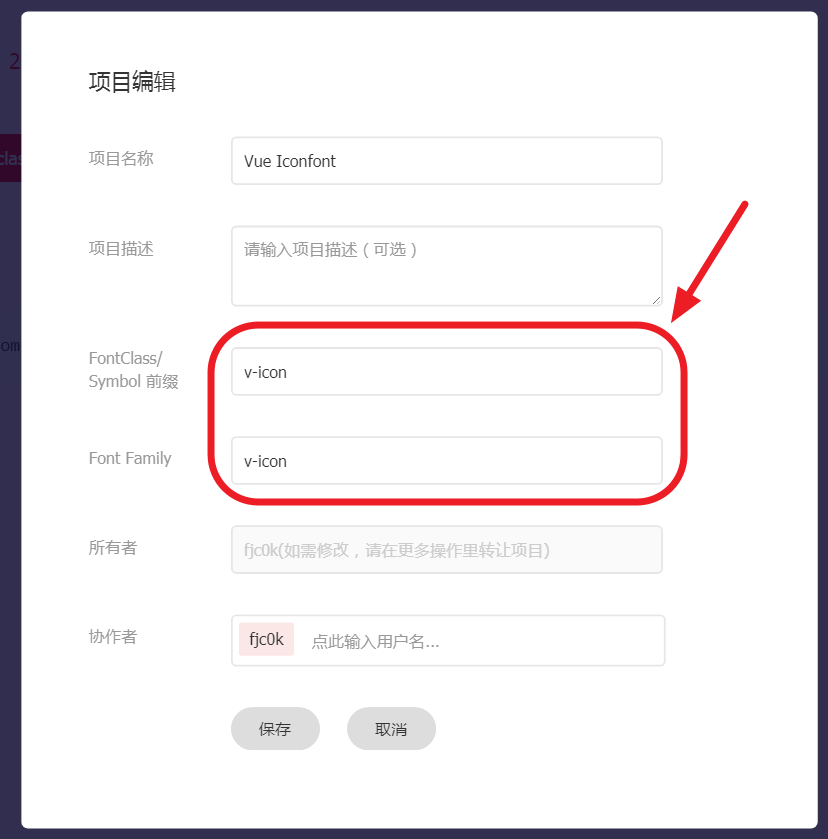
- 点击
下载至本地将图标文件下载解压到项目文件夹中。
安装
你可以使用 Vue.use(VueIconfont, [options1, options2, ..., optionsN]) 按需定义不同的图标组件。
// index.js
import Vue from 'vue'
import VueIconfont from 'vue-iconfont'
import App from './app.vue'

// 引入上面下载得到的使用 font-class 图标必须的 css 文件
import './iconfont/iconfont.css'

// 引入上面下载得到的使用 SVG 图标必须的 js 文件
import './iconfont/iconfont.js'

Vue.use(VueIconfont, [
  // 定义 v-icon 组件以使用 font-class 图标
  {
    tag: 'v-icon',
    prefix: 'v-icon',
    type: 'font'
  },

  // 定义 v-svg-icon 组件以使用 SVG 图标
  {
    tag: 'v-svg-icon',
    prefix: 'v-icon',
    type: 'svg'
  }
])

new Vue({
  el: '#app',
  render: h => h(App)
})
使用
<!-- app.vue -->
<template>
  <div>
    <v-icon name="right" />
    <v-svg-icon name="right" />
  </div>
</template>
如何设置图标颜色、大小等?
直接设置其 CSS 即可:
<v-icon name="right" style="color: red; font-size: 2em;" />
<v-svg-icon name="right" style="color: blue; font-size: 14px;" />
Related Packages
Version History
| Version | Released | Vue | License |
|---|---|---|---|
| 2.5.1 | ^2.5.16 | MIT | |
| 2.5.0 | ^2.5.16 | MIT | |
| 2.4.1 | ^2.5.16 | MIT | |
| 2.4.0 | ^2.5.16 | MIT | |
| 2.3.1 | ^2.5.16 | MIT | |
| 2.3.0 | ^2.5.16 | MIT | |
| 2.2.0 | ^2.5.16 | MIT | |
| 2.1.1 | ^2.5.16 | MIT | |
| 2.1.0 | ^2.5.16 | MIT | |
| 2.0.1 | ^2.5.16 | MIT | |
| 2.0.0 | ^2.5.16 | MIT | |
| 1.1.0 | ^2.4.2 | MIT | |
| 1.0.7 | MIT | ||
| 1.0.6 | MIT | ||
| 1.0.5 | MIT | ||
| 1.0.4 | MIT | ||
| 1.0.3 | MIT | ||
| 1.0.2 | MIT |