vue-float-menu
smart floating menu for Vue 3
18,009
577
| Install | |
|---|---|
npm install vue-float-menu |
|
| Latest Version: | 2.0.1 |
| Vue: | 3 |
| License: | MIT |
| Last Updated: | Dec 8, 2025 |
| Links: | GitHub · npm |
Maintainer: prabhuignoto
Vue Float Menu 🎯




✨ Features
- 🎯 Drag & Drop - Freely position your menu anywhere on screen
- 🧠 Smart Positioning - Automatic edge detection and menu flipping
- 🌳 Nested Menus - Support for complex menu hierarchies
- ⌨️ Keyboard Accessible - Full keyboard navigation support
- 📱 Touch Optimized - Enhanced mobile experience (Touch Guide)
- ⚡ Performance - Optimized bundle size (Bundle Guide)
- 🎨 Customizable - Extensive theming options
- 🛠 TypeScript - Built with type safety
- 🎭 Vue 3 - Leverages the latest Vue.js features
- 📦 Tree-shakeable - Only import what you need
📚 Table of Contents
⚡ Installation
# Using npm
npm install vue-float-menu

# Using yarn
yarn add vue-float-menu

# Using pnpm
pnpm add vue-float-menu
🚀 Quick Start
<template>
  <float-menu position="top left" :dimension="50" :menu-data="items" @select="handleSelection">
    <template #icon>
      <BoxIcon />
    </template>
  </float-menu>
</template>

<script setup>
import { FloatMenu } from 'vue-float-menu';
import 'vue-float-menu/dist/vue-float-menu.css';

const items = [
  { name: 'New' },
  {
    name: 'Edit',
    subMenu: {
      name: 'edit-items',
      items: [{ name: 'Copy' }, { name: 'Paste' }],
    },
  },
  { name: 'Open Recent' },
  { name: 'Save' },
];

const handleSelection = (selectedItem) => {
  console.log('Selected:', selectedItem);
};
</script>
📖 Documentation
Props
| Prop | Type | Default | Description |
|---|---|---|---|
dimension |
number |
50 |
Size of menu head in pixels |
position |
string |
'top left' |
Initial position (top left, top right, bottom left, bottom right) |
fixed |
boolean |
false |
Disable dragging and fix position |
menu-dimension |
object |
{ width: 200, height: 300 } |
Menu dimensions |
menu-data |
array |
[] |
Menu structure data |
menu-style |
string |
'slide-out' |
Menu style (slide-out' or accordion`) |
flip-on-edges |
boolean |
false |
Auto-flip menu on screen edges |
theme |
object |
{} |
Custom theme configuration |
Positioning
The menu can be positioned in four corners of the screen:
<float-menu position="bottom right">
  <template #icon>
    <BoxIcon />
  </template>
</float-menu>
Menu Configuration
Configure menu dimensions and style:
<float-menu :dimension="50" :menu-dimension="{ width: 300, height: 400 }" menu-style="accordion">
  <template #icon>
    <BoxIcon />
  </template>
</float-menu>
Styling
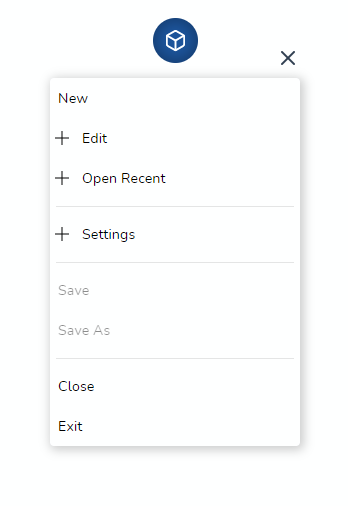
Two menu styles are available:
- Slide-out (default)
- Accordion (mobile-friendly)
Theming
Customize the appearance with the theme prop:
<float-menu
  :theme="{
    primary: '#00539C',
    textColor: '#000',
    menuBgColor: '#fff',
    textSelectedColor: '#fff',
  }"
>
  Click
</float-menu>
🛠 Development
# Install dependencies
pnpm install

# Start development server
pnpm run dev

# Run linting
pnpm run lint:all

# Build package
pnpm run rollup
🤝 Contributing
- Fork the repository
- Create your feature branch (
git checkout -b feature/amazing-feature) - Commit your changes (
git commit -m 'Add amazing feature') - Push to the branch (
git push origin feature/amazing-feature) - Open a Pull Request
📝 License
Distributed under the MIT License. See LICENSE for more information.
👨💻 Author
Prabhu Murthy
- Twitter: @prabhumurthy2
- Email: prabhu.m.murthy@gmail.com
- Website: prabhumurthy.com
- GitHub: @prabhuignoto
Related Packages
Version History
| Version | Released | License |
|---|---|---|
| 2.0.1 | MIT | |
| 2.0.0 | MIT | |
| 1.9.1 | MIT | |
| 1.9.0 | MIT | |
| 1.8.2 | MIT | |
| 1.8.1 | MIT | |
| 1.8.0 | MIT | |
| 1.7.6 | MIT | |
| 1.7.5 | MIT | |
| 1.7.4 | MIT | |
| 1.7.3 | MIT | |
| 1.7.2 | MIT | |
| 1.7.1 | MIT | |
| 1.7.0 | MIT | |
| 1.6.1 | MIT | |
| 1.6.0 | MIT | |
| 1.5.0 | MIT | |
| 1.4.3 | MIT | |
| 1.4.2 | MIT | |
| 1.4.1 | MIT | |
| 1.4.0 | MIT | |
| 1.3.0 | MIT | |
| 1.2.0 | MIT | |
| 1.1.11 | MIT | |
| 1.1.10 | MIT | |
| 1.1.9 | MIT | |
| 1.1.8 | MIT | |
| 1.1.7 | MIT | |
| 1.1.6 | MIT | |
| 1.1.5 | MIT |
Showing the latest 30 of 65. See every release on npm