vue-el-datatables
Vue2.0 Datatables
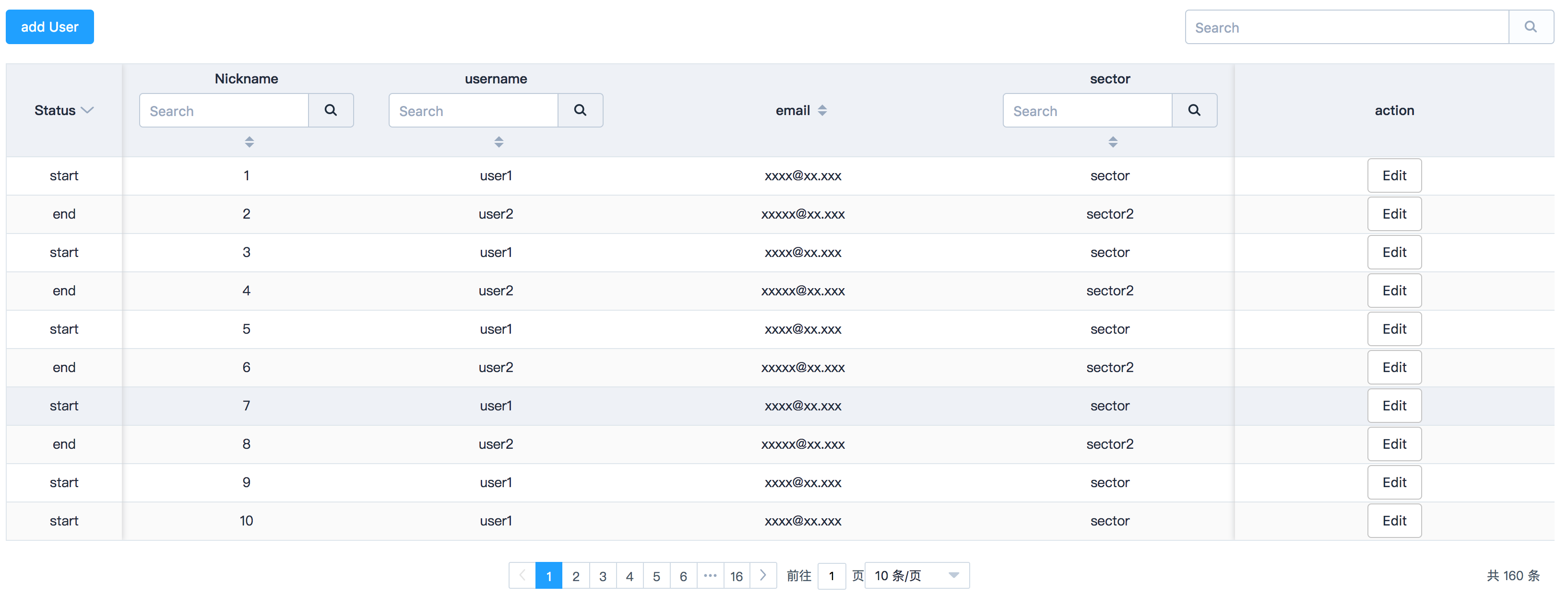
Based on elemnet-ui, ES6
Install
npm install element-ui vue-el-datatables -save
Get Started
import ElementUI from 'element-ui'
import DataTables from 'vue-el-datatables'

Vue.use(ElementUI)
Vue.component(DataTables.name, DataTables)
or
import { Row, Col, Card, Table, TableColumn, Input } from 'element-ui'
import DataTables from 'vue-el-datatables'

Vue.use(Row)
Vue.use(Col)
Vue.use(Table)
Vue.use(TableColumn)
Vue.use(Input)
Vue.component(DataTables.name, DataTables)
Usage
对于服务器接口返回数据形式,数据会建立本地缓存,已获取的分页数据将不会进行重新请求,但为了保证搜索功能数据的完整性,使用搜索时将进行接口请求,而清除搜索条件后表格会自动回到分页缓存数据
<template>
  <DataTables :columnHead="columnHead" :tableData="tableData" :serverApi="serverApi" :searchBar="true" @apiError="apiError">
    <el-button type="primary" slot="toolBar">add User</el-button>
    <template scope="props">
      <el-button v-if="props.columnID === 'action'" @click.stop="apiError(props.ev.row.id)">Edit</el-button>
      <div v-if="props.columnID === 'status'" :class="formatStatus(props.ev.row.status)[0]">{{formatStatus(props.ev.row.status)[1]}}</div>
    </template>
  </DataTables>
</template>
slot
DataTables 内容可使用分发内容 toolBar 分发至表格顶部工具区域 template 内部分发至表格数据行内容,可通过scope="props",获取当前行的数据,并进行格式化数据
Attributes
| Property | Type | Desc | Default values | ||||||||||||||||||||||||||||||||||||
|---|---|---|---|---|---|---|---|---|---|---|---|---|---|---|---|---|---|---|---|---|---|---|---|---|---|---|---|---|---|---|---|---|---|---|---|---|---|---|---|
| columnHead | Array |
表格头设置:
|
|||||||||||||||||||||||||||||||||||||
| tableData | Array | 数据表值,使用serverApi参数时该项无用,结构:[{prop1: value, prop2: value}] | |||||||||||||||||||||||||||||||||||||
| serverApi | Function | 服务器数据获取接口方法,当使用该选项时,组件会调用该方法,传递参数:
|
|||||||||||||||||||||||||||||||||||||
| useStore | Boolean | 是否使用缓存模式 | false | ||||||||||||||||||||||||||||||||||||
| searchBar | Boolean | 是否显示模糊搜索框 | false | ||||||||||||||||||||||||||||||||||||
| rowClick | Function | 行点击事件,见element-ui文档 | () => {} | ||||||||||||||||||||||||||||||||||||
| rowContextmenu | Function | 行右键点击事件,见element-ui文档 | () => {} | ||||||||||||||||||||||||||||||||||||
| rowDblclick | Function | 行双击事件,见element-ui文档 | () => {} | ||||||||||||||||||||||||||||||||||||
| apiError | String | 监控数据表调用接口返回错误结果,msg => {console.log(msg)} | |||||||||||||||||||||||||||||||||||||
| reload | Functon | 通过this.$refs['ref'].reload调用,如果是接口模式该方法将重新获取当前页面数据并请求返回数据总数,如果是非接口模式将重载页面并回到第一页 |
Contact
The project's website is located at https://github.com/Dess-Li/vue-el-datatables
Related Packages
vue-data-tables-kxtreme
A simple, customizable and pageable table, based on vue2 and element-ui.
973
@dullar/mercury
Advanced and highly reusable Mobile UI Components built on Vue2 & You can define...
8,553
6
Version History
| Version | Released | Vue | License |
|---|---|---|---|
| 0.5.7 | ^2.5.9 | ||
| 0.5.6 | ^2.5.9 | ||
| 0.5.5 | ^2.5.9 | ||
| 0.5.4 | ^2.5.9 | ||
| 0.5.3 | ^2.5.9 | ||
| 0.5.2 | ^2.5.9 | ||
| 0.5.1 | ^2.5.9 | ||
| 0.5.0 | ^2.5.9 | ||
| 0.4.9 | ^2.5.9 | ||
| 0.4.8 | ^2.5.9 | ||
| 0.4.7 | ^2.5.9 | ||
| 0.4.6 | ^2.5.2 | ||
| 0.4.5 | ^2.5.2 | ||
| 0.4.4 | ^2.4.4 | ||
| 0.4.3 | ^2.4.4 | ||
| 0.4.2 | ^2.4.4 | ||
| 0.4.1 | ^2.4.4 | ||
| 0.4.0 | ^2.4.4 | ||
| 0.3.9 | ^2.4.4 | ||
| 0.3.8 | ^2.4.4 | ||
| 0.3.7 | ^2.4.4 | ||
| 0.3.6 | ^2.3.4 | ||
| 0.3.5 | ^2.3.4 | ||
| 0.3.4 | ^2.3.4 | ||
| 0.3.3 | ^2.3.4 | ||
| 0.3.2 | ^2.3.4 | ||
| 0.3.1 | ^2.3.4 | ||
| 0.3.0 | ^2.3.4 | ||
| 0.2.8 | ^2.3.4 | ||
| 0.2.7 | ^2.3.4 |
Showing the latest 30 of 37. See every release on npm