vue-easy-print
vue-easy-print
A print component that supports both Vue 2 and Vue 3.
Core
Render the print template through a Vue slot. Copy the print area into an iframe and trigger the browser print flow.
Online demo
Updates
2026-03-13 ver 1.0.0
- adds support for both Vue 2 and Vue 3
- adds styleHTML props, thanks to mrliuc
- removed unused props; print styles are now fully managed by the template.
2021 ver 0.0.7
- fixes compatibility issues, thanks to Wizard67
Quick Start
Step 1
npm install vue-easy-print --save
Step 2: register the component in your Vue page
import vueEasyPrint from "vue-easy-print";
import demo from "./your path/demo";

export default {
    components: {
        vueEasyPrint,
        demo
    }
};
Step 3: provide the print template
<vue-easy-print tableShow>
    <template slot-scope="func">
        <demo :getChineseNumber="func.getChineseNumber"></demo>
    </template>
</vue-easy-print>
slot-scope
The default slot exposes the getChineseNumber helper, which converts a numeric amount into uppercase Chinese currency text.
Props
| Prop | Type | Default | Description |
|---|---|---|---|
| tableShow | Boolean | false | Controls whether the print area is displayed. |
| buttonShow | Boolean | false | Controls whether the built-in print button is shown. |
| buttonClass | String | el-button el-button--default | Class name applied to the built-in print button. |
| beforeCopy | Function | - | Hook called before copying the print DOM, useful for preparing content. |
| beforePrint | Function | - | Hook called before triggering browser print, useful for regenerating QR codes or similar content. |
| styleHTML | String | - | No need to copy the project styles; just pass in a fixed style string. |
Methods
| Method | Parameters | Returns | Description |
|---|---|---|---|
| init | - | void | Initializes the print iframe and syncs styles into the print context. It runs automatically after mount. |
| - | void | Starts the print flow. You can call it manually through a component ref, for example this.$refs.easyPrint.print(). | |
| getStyle | - | void | Collects page-level style and link tags and injects them into the print iframe. Usually no manual call is needed. |
| getChineseNumber | currencyDigits | String | Converts a numeric amount into uppercase Chinese currency text for display in the template. |
Full Demo
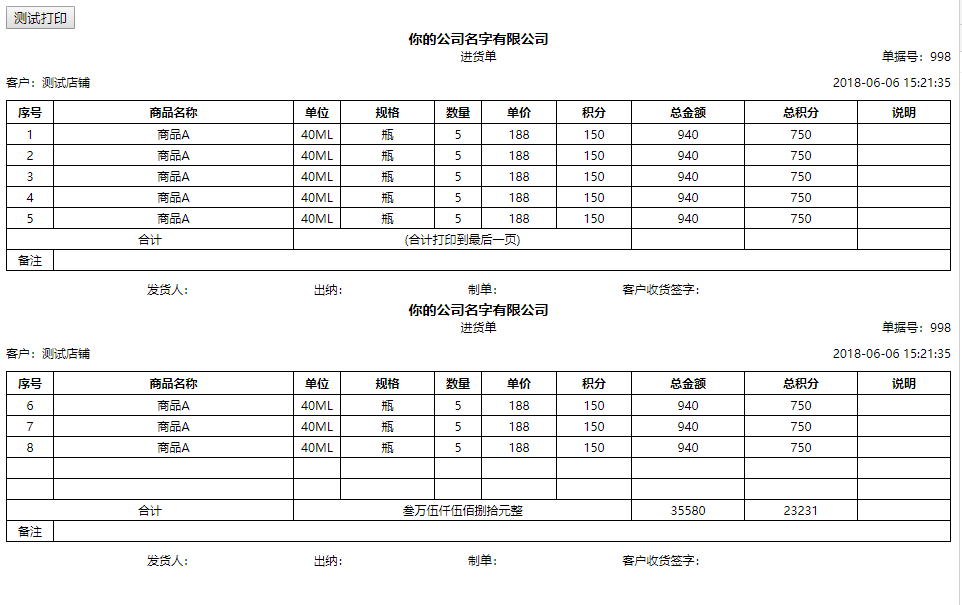
Code
<template>
    <div id="app">
        <button @click="printDemo">Test Print</button>
        <vue-easy-print tableShow ref="easyPrint">
            <!-- Write your own print template -->
            <!-- <template slot-scope="func">
                <demo :getChineseNumber="func.getChineseNumber"></demo>
            </template> -->
        </vue-easy-print>
    </div>
</template>

<script>
import vueEasyPrint from "vue-easy-print";
import demo from "./components/demo";

export default {
  name: "App",
  data() {
    return {
      tableData: {
        id: 998,
        store_name: "Test Store",
        created_at: "2018-06-06 15:21:35",

        detail: [
          {
            name: "Product A",
            item_unit: "40ML",
            item_size: "Bottle",
            item_quantity: 5,
            item_price: 188,
            pv: 150,
            item_total: 5 * 188,
            item_total_pv: 5 * 150
          },
          {
            name: "Product A",
            item_unit: "40ML",
            item_size: "Bottle",
            item_quantity: 5,
            item_price: 188,
            pv: 150,
            item_total: 5 * 188,
            item_total_pv: 5 * 150
          },
          {
            name: "Product A",
            item_unit: "40ML",
            item_size: "Bottle",
            item_quantity: 5,
            item_price: 188,
            pv: 150,
            item_total: 5 * 188,
            item_total_pv: 5 * 150
          },
          {
            name: "Product A",
            item_unit: "40ML",
            item_size: "Bottle",
            item_quantity: 5,
            item_price: 188,
            pv: 150,
            item_total: 5 * 188,
            item_total_pv: 5 * 150
          },
          {
            name: "Product A",
            item_unit: "40ML",
            item_size: "Bottle",
            item_quantity: 5,
            item_price: 188,
            pv: 150,
            item_total: 5 * 188,
            item_total_pv: 5 * 150
          },
          {
            name: "Product A",
            item_unit: "40ML",
            item_size: "Bottle",
            item_quantity: 5,
            item_price: 188,
            pv: 150,
            item_total: 5 * 188,
            item_total_pv: 5 * 150
          },
          {
            name: "Product A",
            item_unit: "40ML",
            item_size: "Bottle",
            item_quantity: 5,
            item_price: 188,
            pv: 150,
            item_total: 5 * 188,
            item_total_pv: 5 * 150
          },
          {
            name: "Product A",
            item_unit: "40ML",
            item_size: "Bottle",
            item_quantity: 5,
            item_price: 188,
            pv: 150,
            item_total: 5 * 188,
            item_total_pv: 5 * 150
          }
        ]
      }
    };
  },
  methods: {
    printDemo() {
      this.$refs.easyPrint.print();
    }
  },
  components: {
    vueEasyPrint,
    demo
  }
};
</script>
License
Related Packages
@afwenming123/vue-plugin-hiprint
hiprint for Vue2.x / Vue3.x 支持拖拽(分页(不分页)、表头表脚、样式设置、复制粘贴...
6,197
1,739
Version History
| Version | Released | License |
|---|---|---|
| 1.0.0 | MIT | |
| 0.0.8 | MIT | |
| 0.0.7 | MIT | |
| 0.0.6 | MIT | |
| 0.0.5 | MIT | |
| 0.0.4 | MIT | |
| 0.0.3 | MIT | |
| 0.0.1 | MIT |