vue-double-range-input
vue-double-range-input
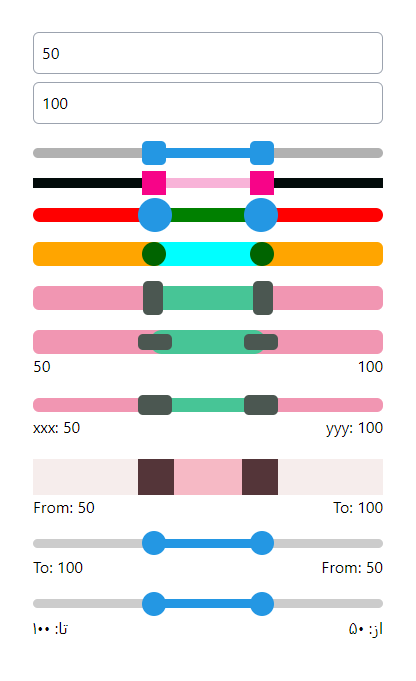
Double range input for vue 3 with min and max value that help you select two value with one input.
One of important usage is in shops for filtering between min and max price.
How to use
Install package
Run this code to install this package:
npm i vue-double-range-input
Then You should Import component's style:
import 'vue-double-range-input/dist/style.css';
Now you can import package:
import VueDoubleRangeInput from 'vue-double-range-input';
This is a simple version of component with minimum props that needed:
<VueDoubleRangeInput :min="min"
                     :max="max"
                     v-model:minValue="minValue"
                     v-model:maxValue="maxValue" />
Default number slot
If you want to change the text of numbers, you can do it like below:
<VueDoubleRangeInput :min="min"
                     :max="max"
                     v-model:minValue="minValue"
                     v-model:maxValue="maxValue">
  <!-- Do not change minValueRef and maxValueRef spelling -->
  <template #from="{ minValueRef }">
    از: {{ (Number(minValueRef)).toLocaleString('fa-IR') }}
  </template>
  <template #to="{ maxValueRef }">
    تا: {{ (Number(maxValueRef)).toLocaleString('fa-IR') }}
  </template>
</VueDoubleRangeInput>
Get only numbers
If you only want to get min and max value and show it where you want, you can do it like below:
const min = ref(0);
const max = ref(100);
const minValue = ref(25);
const maxValue = ref(75);

const outMinValueRef = ref(0);
const outMaxValueRef = ref(0);

function outMinValue(val) {
  outMinValueRef.value = val;
}
function outMaxValue(val) {
  outMaxValueRef.value = val;
}
<div>
  {{ outMinValueRef }}
  <br />
  {{ outMaxValueRef }}
</div>
<VueDoubleRangeInput :min="min"
                     :max="max"
                     v-model:minValue="minValue"
                     v-model:maxValue="maxValue">
  <template #from="{ minValueRef }">
    {{ outMinValue(minValueRef) }}
  </template>
  <template #to="{ maxValueRef }">
    {{ outMaxValue(maxValueRef) }}
  </template>
</VueDoubleRangeInput>
Change minValue and maxValue by input
Use :value and @change if you want to change values in an input.
Note: If you want to change component values from outside, its better to use :value and @change like below. Otherwise you may see some weird issues.
<div>
  <input type="text" name="min_value" id="min_value"
         :value="minValue"
         @change="minValue = $event.target.value">
  <input type="text" name="max_value" id="max_value"
         :value="maxValue"
         @change="maxValue = $event.target.value">
</div>
Complete example
This one has everything that you can do on this component:
<div>
  <input type="text" name="min_value" id="min_value"
         :value="minValue"
         @change="minValue = $event.target.value">
  <input type="text" name="max_value" id="max_value"
         :value="maxValue"
         @change="maxValue = $event.target.value">
</div>
<VueDoubleRangeInput dir="rtl"
                     step="5"
                     color="#2497E3"
                     track-color="rgba(100,100,100,0.5)"
                     track-radius="5px"
                     track-height="10px"
                     handler-color="#2497E3"
                     handler-radius="5px"
                     handler-width="24px"
                     handler-height="24px"
                     :push-on-touch="false"
                     :show-numbers="true"
                     :min="min"
                     :max="max"
                     v-model:minValue="minValue"
                     v-model:maxValue="maxValue">
  <template #from="{ minValueRef }">
    از: {{ (Number(minValueRef)).toLocaleString('fa-IR') }}
  </template>
  <template #to="{ maxValueRef }">
    تا: {{ (Number(maxValueRef)).toLocaleString('fa-IR') }}
  </template>
</VueDoubleRangeInput>
List of props and default values
| prop | default | description |
|---|---|---|
| dir | ltr | don't use it if your want to be ltr or just put ltr in it. |
| step | null | just like step in normal range input. |
| color | #2497E3 | color of line between two value (accept all css color selector). |
| track-color | #cccccc | set color of full track in behind (accept all css color selector). |
| track-height | 9px | set height for track. |
| track-radius | 9999px | set border-radius for track. |
| handler-color | #2497E3 | set color of circle handlers of input range (accept all css color selector). |
| handler-radius | 9999px | set border-radius for handlers. |
| handler-width | 24px | set width for handlers. |
| handler-height | 24px | set height for handlers. |
| show-numbers | true | set it to false if you want to hide "from" and "to" numbers. |
| push-on-touch | true | false: min value cannot go above max value and max value cannot go below min value. true: if min value become greater than max value, max value automatically set to min value and vise versa. |
| min | 0 | same as min in normal range input. |
| max | 100 | same as max in normal range input. |
| v-model:minValue | 25 | same as value in normal range input but for min. |
| v-model:maxValue | 75 | same as value in normal range input but for max. |
| --------------------------- | ---------- | -------- |
Related Packages
A component create range slider that have two values minValue and maxValue that...
Version History
| Version | Released | Vue | License |
|---|---|---|---|
| 0.1.6 | ^3.3.4 | MIT | |
| 0.1.5 | ^3.3.4 | MIT | |
| 0.1.4 | ^3.3.4 | MIT | |
| 0.1.3 | ^3.3.4 |