vue-diagram-editor
Vue diagram editor


Please read the documentation https://vue-diagram-editor.js.org (includes demo)
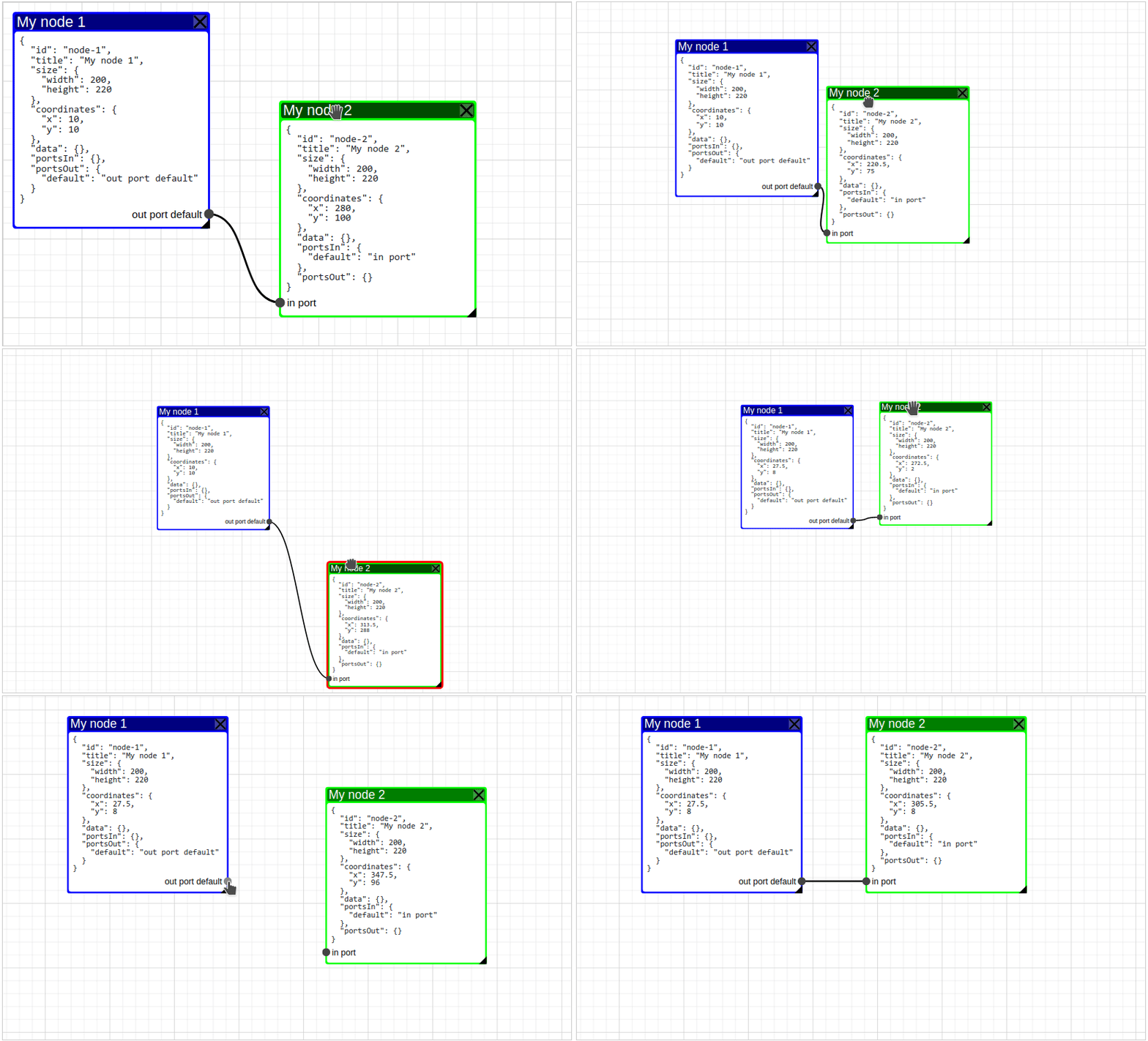
Introduction
The main purpose of this component is to make it possible to use any component within each node of the diagram.
Vue Diagram Editor features:
- scoped-slot for node
- ripple (pulsable) node
- any number of instances per page
- customizable node color
- customizable node pulse color
Getting Started with Vue Diagram Editor
It's recommended to install vue-diagram-editor via npm, and build your app using a bundler like webpack:
npm install vue-diagram-editor
Requires Vue 2.6+
Simple example
<template>
  <VueDiagramEditor
    ref="diagram"
    :node-color="nodeColor"
    :node-pulsable="nodePulsable"
  >
    <pre slot="node" slot-scope="{node}">{{ format(node) }}</pre>
  </VueDiagramEditor>
</template>

<script>
import VueDiagramEditor from 'vue-diagram-editor';
import 'vue-diagram-editor/dist/vue-diagram-editor.css';

export default {
  name: 'simple-example',
  components: {
    VueDiagramEditor
  },
  data: () => ({
    nodes: {
      'node-1': {
        id: 'node-1',
        title: 'My node 1',
        size: {
          width: 200,
          height: 220
        },
        portsOut: {
          default: 'out port default'
        }
      },
      'node-2': {
        id: 'node-2',
        title: 'My node 2',
        size: {
          width: 200,
          height: 220
        },
        coordinates: {
          x: 280,
          y: 100
        },
        portsIn: {
          default: 'in port'
        }
      },
    },
    links: {
      'link-1': {
        id: 'link-1',
        start_id: 'node-1',
        start_port: 'default',
        end_id: 'node-2',
        end_port: 'default'
      }
    }
  }),
  mounted() {
    this.init();
  },
  methods: {
    init() {
      this.$refs.diagram.setModel({
        nodes: this.nodes,
        links: this.links
      });
    },
    format(node) {
      return JSON.stringify(node, null, 2);
    },
    nodeColor(node) {
      if (node.coordinates.x > 200) {
        return '#0f0';
      }
      if (node.coordinates.y > 200) {
        return '#f00';
      }

      return '#00f';
    },

    nodePulsable(node) {
      return node.coordinates.y > 200;
    }
  }
};
</script>
If you just don't want to use webpack or any other bundlers, you can simply include the standalone UMD build in your page. In this way, make sure Vue as a dependency is included before vue-diagram-editor.
<!DOCTYPE html>
<html lang="en">
<head>
  <meta charset="UTF-8">
  <title>Title</title>
  <script src="https://cdn.jsdelivr.net/npm/vue@2.6"></script>
  <script src="https://cdn.jsdelivr.net/npm/vue-diagram-editor@^1/dist/vue-diagram-editor.umd.min.js"></script>
  <link rel="stylesheet" href="https://cdn.jsdelivr.net/npm/vue-diagram-editor@^1/dist/vue-diagram-editor.min.css">
</head>
<body>
  <div id="app">
    <diagram-editor ref="diagram"></diagram-editor>
  </div>
  <script>
    // register the component
    Vue.component('diagram-editor', VueDiagramEditor.Diagram);
    new Vue({
      el: '#app',
      data: {
        nodes: {
          'node-1': {
            id: 'node-1',
            title: 'My node 1',
            size: {
              width: 200,
              height: 220
            },
            portsOut: {
              default: ''
            }
          },
          'node-2': {
            id: 'node-2',
            title: 'My node 2',
            size: {
              width: 200,
              height: 220
            },
            coordinates: {
              x: 280,
              y: 100
            },
            portsIn: {
              default: 'in port'
            }
          },
        },
        links: {
          'link-1': {
            id: 'link-1',
            start_id: 'node-1',
            start_port: 'default',
            end_id: 'node-2',
            end_port: 'default'
          }
        }
      },
      mounted() {
        this.init();
      },
      methods: {
        init() {
          this.$refs.diagram.setModel({
            nodes: this.nodes,
            links: this.links
          });
        }
      }
    });
  </script>
</body>
</html>
API
Node
| Prop | Required | Default | Description |
|---|---|---|---|
id |
no | generated ulid identifier | Unique identifier of node |
title |
yes | - | Title of node |
coordinates |
no | {x:10,y:10} |
Node coordinates object. Must contain this two numerical properties: x and y |
size |
no | {width:150, height:150} |
Node size object. Must contain this two numerical properties: width and height |
portsIn |
no | {} |
The node's incoming ports object. Object keys are port names and values are port headers |
portsOut |
no | {} |
The node's outgoing ports object. Object keys are port names and values are port headers |
data |
no | {} |
Custom data object. May be useful when handling events |
Link
| Prop | Required | Type/Default | Description |
|---|---|---|---|
id |
no | String / generated ulid identifier | Unique identifier of link |
start_id |
yes | String / - | ID of the node from which this link starts |
start_port |
no | String / "default" |
The name of the outgoing port of the node from which this link begins |
end_id |
yes | String / - | ID of the node where this link ends |
end_port |
no | String / "default" |
The name of the incoming port of the node where this link ends |
Props
| Name | Type / Default | Description |
|---|---|---|
height |
Type: NumberDefault: 500 |
Block height with Vue-Diagram-Editor |
zoomEnabled |
Type: BooleanDefault: true |
Allows to scale the diagram |
nodeColor |
Type: Function: StringDefault: node => "#66cc00" |
The function takes object of Node as parameter and must return a string with a hexadecimal color representation. Avoid heavy computation in this function |
nodeDeletable |
Type: Function: BooleanDefault: node => true |
Shows or hides the delete node button |
nodePulsable |
Type: Function: BooleanDefault: node => false |
Enables or disables the ripple of a specific node. Avoid heavy computation in this function |
nodePulseColor |
Type: Function: StringDefault: node => "#f00" |
Determines the color of the node's ripple (in the case when nodePulsable returns true). Avoid heavy computation in this function |
beforeDeleteNode |
Type: Function: BooleanDefault: node => true |
In the case when the node is deletable, it is executed immediately before deleting. If the function returns false, the node is not deleted. Avoid heavy computation in this function |
beforeDeleteLink |
Type: Function: BooleanDefault: link => true |
Executed immediately before the link is removed. If the function returns false, the link is not removed. Avoid heavy computation in this function |
portDisabled |
Type: Function: BooleanDefault: ({id,type,port}) => false |
Determines if the port is blocked for communication. If the port is disabled, you will not be able to create a new link or click on it. Accepts an object with properties:id - node identifier,type - port type (in or out),port - port name |
portAvailable |
Type: Function: BooleanDefault: ({id,type,port,activePort}) => true |
This function is executed at the moment of hovering to the port when a new link is creating. Accepts an object with properties:id - node identifier,type - port type (in or out),port - port nameactivePort - Object with the data of the starting port of the link being created |
preventMouseEventsDefault |
Type: BooleanDefault: true |
Stops handling native events see |
Methods
| Name | Params | Return | Description |
|---|---|---|---|
setModel(model) |
model.nodes - Array or collection of node structure objectsmodel.links - Array or collection of link structure objects |
void |
The method completely re-initializes the diagram model |
serialize() |
- |
{nodes:[{...},{...}], links:[{...}]} |
Method returns an object with arrays of nodes and links |
addNode(node) |
node - node structure object |
void |
Method new node to the diagram model |
addLink(link) |
link - link structure object |
void |
Method new link to the diagram model |
updateNode(params) |
params.id node IDparams.name node property nameparams.value node property value |
void |
Update root property of node |
deleteNode(id) |
id - node ID |
void |
the method simulates a click on the button to delete a node |
deleteLink(id) |
id - link ID |
void |
the method lowers the deletion of the link. |
enableDblClickZoom() |
- |
void | see |
disableDblClickZoom() |
- |
void | see |
isDblClickZoomEnabled() |
- |
Boolean | see |
enableMouseWheelZoom() |
- |
void | see |
disableMouseWheelZoom() |
- |
void | see |
isMouseWheelZoomEnabled() |
- |
Boolean | see |
resetZoom() |
- |
void | see |
updateBBox() |
- |
void | see |
fit() |
- |
void | see |
contain() |
- |
void | see |
center() |
- |
void | see |
Events
| Name | Data | Description |
|---|---|---|
select-node |
nodeId |
When a node is selected, an event with the node identifier is emitted |
deleted-node |
nodeId |
When deleting a node, an event with the node identifier is emitted |
deleted-link |
linkId |
When deleting a link, an event with the identifier of the deleted link is emitted |
updated-node |
Node |
Updated node object |
click-port |
{ "id": "node-id", "type": "in", "port": "port_name" } |
The event is emitted when a port is clicked. The event sends an object with a node identifier (id), port type (in or out) and port name |
created-link |
Link |
The event is emitted after creating a new link |
CONTRIBUTING
Best way to contribute is to create a pull request. In order to create a pull request:
- Fork this repository
- Clone repository fork (created in previous step) locally (on your machine)
- Ensure that you have nodejs and npm installed locally
- In console:
cdinto project foldernpm install && npm run dev
- After change is done lint project
npm run lint - Commit only meaningful changes. Do not commit distribution files (dist folder). Distribution files are built only before a release
- Push your changes into your fork
- Create a pull request
Related Packages
@billtaofbj/diagram
Process/execution diagram editor component with input/output params and script a...
5,601
Version History
| Version | Released | License |
|---|---|---|
| 1.2.1 | Apache-2.0 | |
| 1.2.0 | Apache-2.0 | |
| 1.1.2 | Apache-2.0 | |
| 1.1.1 | Apache-2.0 | |
| 1.0.0 | Apache-2.0 |