vue-cropgram
Vue-Cropgram: Upload Images like in Instagram 🖼



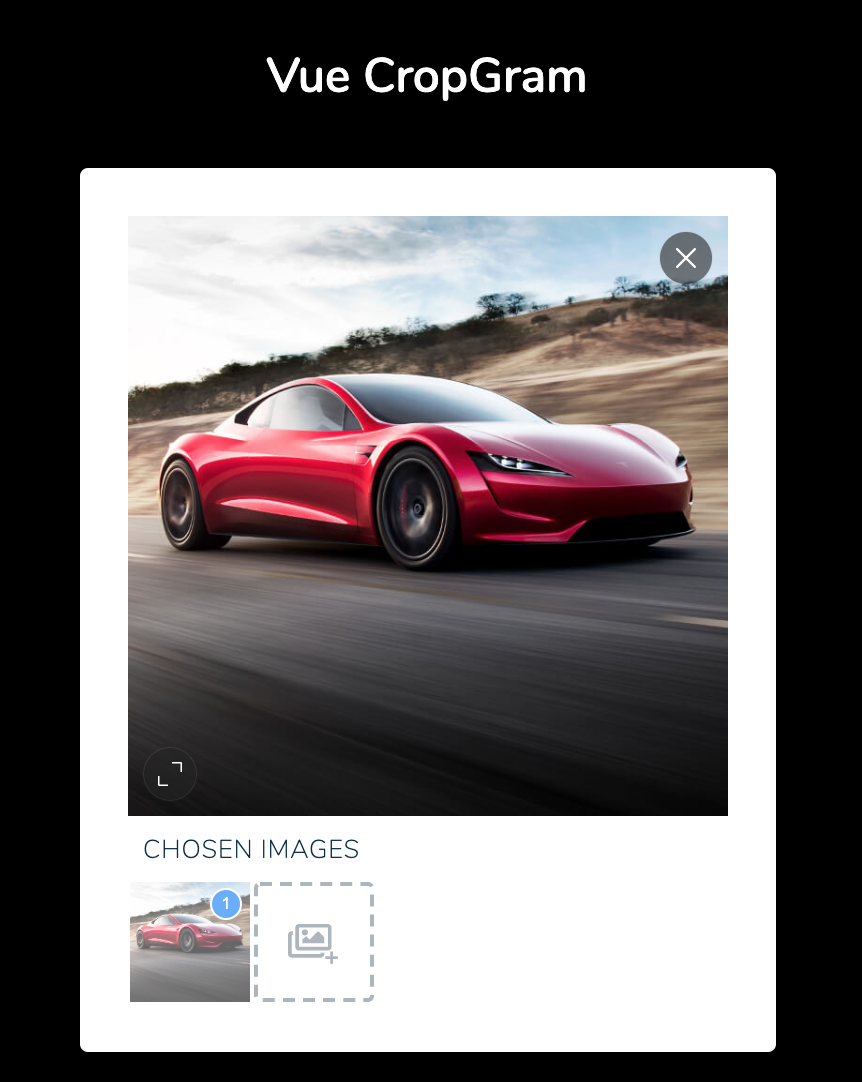
If you are only looking to crop images like in Instagram, please visit https://github.com/avidofood/vue-instagram-cropper 😜
Prerequisites: Vue 3.2 or newer for version 2.x of this package. For Vue 2, use version 1.x. Version 1.x is on the
1xbranch and gets no new features.
Installation in 2 Steps
1: Add with npm 💻
# For Vue 3.x.x
npm install vue-cropgram

# For Vue 2.x.x
npm install vue-cropgram@1x
npm also installs vue-instagram-cropper 2.x, the cropper inside this package.
2a: Import the component
<script setup>
import CropGram from 'vue-cropgram';
</script>
Or register it globally:
import { createApp } from 'vue';
import CropGram from 'vue-cropgram';

const app = createApp(App);
app.component('CropGram', CropGram);
2b: Install as a plugin
import { createApp } from 'vue';
import { Plugin } from 'vue-cropgram';

const app = createApp(App);
app.use(Plugin);
The plugin registers the component as CropGram. You can use it as <CropGram> or <crop-gram>.
TypeScript
The package contains type declarations for the props, the events, the methods, the result of save() and the plugin. The types of the cropper props and of the crop data come from vue-instagram-cropper.
import type { CropGramCropperProps, CropGramResult } from 'vue-cropgram';
Usage - (or to make it runnable 🏃♂️)
Easiest version 🔍
<crop-gram ref="cropgram"></crop-gram>
Advanced version 🌐
Just an example:
 <crop-gram
   ref="cropgram"
   canvas-color="#F7F7F7"
   placeholder-color="#67ACFD"
   selection-text-class="px-2 mb-1 text-left small-9 text-uppercase text-primary2 spacing-05"
   force-cache-break
   selection-text="Chosen images"
   placeholder="Choose an image"
   :items="pictures"
   :show-cropper="currentTab == 'pictures'"
   :placeholder-font-size="16"
   :file-size-limit="20000 * 1024"
   @init="$emit('init')"
   @set-view="currentTab = 'pictures'"
>
   <shows-instagram-feed-as-an-example
      v-show="currentTab == 'instagram'"
      :has-token="hasToken"
   />
</crop-gram>
Size of the cropper 📐
The cropper takes the size of its container, the element with the class cp-view. Give this element a width and a height with CSS. The CSS must not be scoped, because cp-view is inside the component.
.cp-view {
    width: 300px;
    height: 300px;
}
.cp-view .cropper-container {
    width: 100%;
}
When the component mounts and when the window resizes, the cropper reads the size. The thumbnails below the cropper are 60 × 60 pixels.
Demo ⚡️
https://avidofood.github.io/vue-cropgram
Props
IMPORTANT: This package contains the props of https://avidofood.github.io/vue-instagram-cropper as well. Please have a check!
CropGram gives every attribute that it does not know to the cropper, for example placeholder or file-size-limit. It also gives listeners for events that it does not emit itself to the cropper. Only class and style stay on the root element of CropGram.
Props values
showCropper(default:true, type: Boolean)
Perfect to hide the cropper, but still shows the selected images. If you want to show something else, this is useful.
items(default:[], type: Array)
Contains all your pictures you want to contain. Important, they must be valid URLs. Visit the demo page to have a look. When CropGram mounts, it reads the URLs once. To add an image later, call addNewUrl(url).
CropGram gives the cropper an absolute URL with a fragment, for example https://example.com/a.jpg#cropgram-1. The browser does not send the fragment to the server. With it, the same URL twice in items gives two separate images. A URL that already has a fragment stays as it is. The update event shows this URL in img.src.
-
mimeType(default:image/jpeg, type: String) -
compression(default:0.8, type: Number) -
selectionText(default:Chosen Images, type: String) -
selectionTextClass(default:'', type: String) -
itemsLimit(default:4, type: Number)
Limits how many images can be choosen.
multiple(default:false, type: Boolean)
The add button and chooseFile() let the user choose several files at once (#5). CropGram places each new image like the cropper places a chosen file: the image fills the cropper and is centered. If more files come than itemsLimit allows, CropGram adds the first ones and emits limit-reached. A click on the empty cropper or a drop on it still chooses one file.
<crop-gram multiple :items-limit="10" />
labels(default:{}, type: Object)
Texts for screen readers, for example in your language. {index} is the number of the image, starting at 1. {order} is the place of a chosen image in the result of save(). A text that you leave out keeps its default. CropGram gives canvas, remove and fullscreen to the cropper.
<crop-gram :labels="{ add: 'Bilder hinzufügen', image: 'Bild {index}', choose: 'Bild {index} auswählen' }" />
| Key | Default | Where |
|---|---|---|
add |
Add images |
name of the add button |
image |
Image {index} |
alt text of a thumbnail |
choose |
Choose image {index} |
name of the button with the order number |
position |
Number {order} |
description of that button for a chosen image |
canvas |
default of the cropper | name of the cropper canvas, with the keys |
remove |
Remove image |
name of the remove button of the cropper |
fullscreen |
Fit or fill the image |
name of the fit or fill button of the cropper |
Accessibility
The thumbnails, the order numbers and the add button are buttons. Keyboard users reach them with Tab and use them with Enter or Space. The current thumbnail has aria-current="true". The button with the order number has aria-pressed, which is true for a chosen image. For a chosen image, its description tells the place in the result of save(). The add button keeps its focus ring for the keyboard.
Events
IMPORTANT: Same as for props, this package contains the events of https://avidofood.github.io/vue-instagram-cropper as well. Please have a check!
CropGram emits these events of the cropper with the same arguments:
update,init,drawfile-choose,file-size-exceed,file-type-mismatch,file-loadednew-image-drawn,initial-image-loaded,loading-start,loading-endimage-error,image-remove,move,zoom
For example, file-size-exceed carries the file that is too big.
Events of CropGram itself:
choose-file-button: The add button orchooseFile()opened the file dialog.set-view(index): The cropper shows another image.limit-reached: An image did not fit, because the number of images is atitemsLimit.has-changed: Images were added, moved, zoomed in or out, removed, or the order changed.new-image: An image was added, from a file or withaddNewUrl().thumbnail-error(index): A thumbnail did not load. CropGram shows a placeholder instead.
move and zoom fire only for changes by the user. While the cropper loads the image of a new view, CropGram does not emit them.
Methods
You need to set ref="cropgram" to the HTML tag <crop-gram>. After that you can call all methods like this this.$refs.cropgram.save(). With <script setup>, use a template ref:
<script setup>
import { ref } from 'vue';
import CropGram from 'vue-cropgram';

const cropgram = ref(null);

async function upload() {
    const result = await cropgram.value.save();
    // ...
}
</script>

<template>
    <CropGram ref="cropgram" />
</template>
save(): Returns a promise with an array of objects, one for each chosen image in its order. An unchanged image fromitemsgives{ url }. A chosen file, or an image that you moved or zoomed, gives{ blob, name }.nameis the name of the chosen file or the last part of the URL. Its extension follows the blob type, for exampleholiday.jpg. A data URL gives noname. If the browser cannot create an image, for example because the cropper has no size, the promise rejects with an error. Here is an example how you can send this to your backend:
async createFormData() {
   const result = await this.$refs.cropgram.save()

   const data = new FormData();
   //list of your pics
   result.forEach((picture, index) => {
         if (picture.url) {
            data.append(`media[${index}]`, picture.url);
         } else {
            // Without a name, FormData calls the file "blob"
            data.append(`media[${index}]`, picture.blob, picture.name);
         }
   });
   return data;
},
getCurrentCropperThumbnail(): Get's thumbnail of the current viewchooseFile(): Opens the file dialog. AtitemsLimit, it emitslimit-reachedand opens no dialog.setView(id): Sets a view with indexaddNewUrl(url): Sets an image via URLaddFiles(files): Adds image files, for example from your own drop zone, and shows the first new one.filesis aFileListor an array ofFile. It works also withoutmultiple. The promise resolves with the number of added images. For a file that does not fit, CropGram emits the event of the cropper with the file:file-type-mismatch,file-size-exceed(withfile-size-limit) orimage-error. The other files are added.
async onDrop(event) {
   await this.$refs.cropgram.addFiles(event.dataTransfer.files);
},
Migration from 1.x to 2.x
Version 2.0 works with Vue 3. These are the changes for your code:
- Vue 3.2 or newer is required. For Vue 2, stay on 1.x:
npm install vue-cropgram@1x. - Register the component on the app:
app.component('CropGram', CropGram)instead ofVue.component('crop-gram', CropGram), andapp.use(Plugin)instead ofVue.use(Plugin). The plugin registers the nameCropGram. The tag<crop-gram>still works. - The cropper is vue-instagram-cropper 2.x. CropGram passes its props and events on as before. Read the upgrade notes of the cropper for changes of the cropper itself.
- Attributes:
classandstylestay on the root element, as in 1.x. All other attributes and listeners go only to the cropper. In 1.x, other attributes were also on the root element and on the<form>around the cropper. - Listeners for events that CropGram does not emit, for example
@image-remove-onload, now reach the cropper. In 1.x, these listeners never ran. - Events of the cropper now carry their arguments, for example the file of
file-size-exceedand the cropper ofinit. In 1.x, onlyupdatehad an argument. Listeners without parameters work as before. save()returns what you see. It uses the latest crop of the current image.blobis always aBlob. Before, it was sometimes a pending promise ornull. If the browser cannot create an image,save()now rejects with an error. An unchanged image fromitemsstays a{ url }after you looked at it. If you calledupdateCurrentSortedItem()beforesave()as a workaround (#6), you can remove that call.chooseFile()atitemsLimitemitslimit-reachedand opens no file dialog. In 1.x, it opened the dialog, and the chosen file replaced the current image in the cropper.- The package files changed.
dist/index.common.js,dist/index.umd.jsanddist/index.umd.min.jsare nowdist/vue-cropgram.mjs(ES module) anddist/vue-cropgram.umd.js(UMD and CommonJS). The package no longer containssrc/. Import fromvue-cropgramonly. - The thumbnails and the order numbers are buttons now. A thumbnail is
button.roll-element-viewwith theimginside. The order number isbutton.roll-element-order. The classes and the look did not change. If your CSS selects.roll-element > img, change it to.roll-element img. - The UMD build does not contain the cropper anymore. In a
<script>tag setup, load Vue, then the UMD build of vue-instagram-cropper 2.x, thenvue-cropgram.umd.js. The global name isVueCropgram. In 1.x, it wasindex.
TODO
I have only limited time to develop this package further. If you help me to improve it step by step, it means a lot to me. This package contains my cropper package that also has a todo list. Have a look: vue-instagram-cropper and here is a small list, what is still missing for this package:
- If you want to use the slot in vue-instagram-cropper, we need to develiver the content there.
- If you have multiple images and you remove one, you will see in a tiny fraction the placeholder text.
- We need to lock the image aspect ratio. For that we need to add a the prop
forceAspectbut for vue-instagram-cropper. - Do we need private methods like in vue-instagram-cropper?
Development
You need Node.js 22.22.2 or newer in the 22 line, or 24.15 or newer (see .nvmrc). jsdom 30 needs these versions for the tests.
npm install
npm test          # unit tests and type checks
npm run lint
npm run build     # builds dist/ and the demo
npm pack and npm publish build dist/ first.
Releases
- Set the new version in
package.jsonand add it toCHANGELOG.md. - Merge the change into
master. - Push a tag with the version number, for example
git tag 2.0.1 && git push origin 2.0.1.
The Release workflow then runs the lint and the tests, and publishes the package to npm. It uses npm trusted publishing, so it needs no npm token and no 2FA prompt. The tag must match the version in package.json and must be on master. Run the workflow by hand to check the setup. That run publishes nothing.
On npmjs.com, the trusted publisher of the package points to this repository, the workflow release.yml and the environment npm-publish. Under "Allowed actions", it must allow npm publish. If a new trusted publisher does not publish within 2 days, it expires. Create it right before a release.
Security
If you discover any security related issues, please do not email me. I am afraid 😱. avidofood@protonmail.com
Credits
Now comes the best part! 😍 This package is based on
- https://github.com/zhanziyang/vue-croppa (but simplefied)
Oh come on. You read everything?? If you liked it so far, hit the ⭐️ button to give me a 🤩 face.
Changelog
See CHANGELOG.md.
Related Packages
Easy to use image cropper and uploader component for Vue.js. Beta version.
A Vue 3 component to crop images and videos with easy interactions. Drag, zoom,...
Version History
| Version | Released | Vue | License |
|---|---|---|---|
| 2.0.0 | ^3.2.0 | MIT | |
| 1.0.6 | ^2.6.12 | MIT | |
| 1.0.5 | ^2.6.10 | MIT | |
| 1.0.4 | ^2.6.10 | MIT | |
| 1.0.3 | ^2.6.10 | MIT | |
| 1.0.2 | ^2.6.10 | MIT | |
| 1.0.1 | ^2.6.10 | MIT | |
| 1.0.0 | ^2.6.10 | MIT |