vue-cookie-toggler
| Install | |
|---|---|
npm install vue-cookie-toggler |
|
| Latest Version: | 0.2.2 |
| Vue: | 2 |
| License: | MIT |
| Last Updated: | Apr 3, 2021 |
| Links: | GitHub · npm |
# vue-cookie-toggler
Vue 2 component for GDPR cookies consent.
- Categorize the cookies in your application
- Block all categorized cookies until the visitor agrees with the cookie policy
- Allow the visitor to update his/her privacy options through a modal
Currently iframe and script tags are supported.
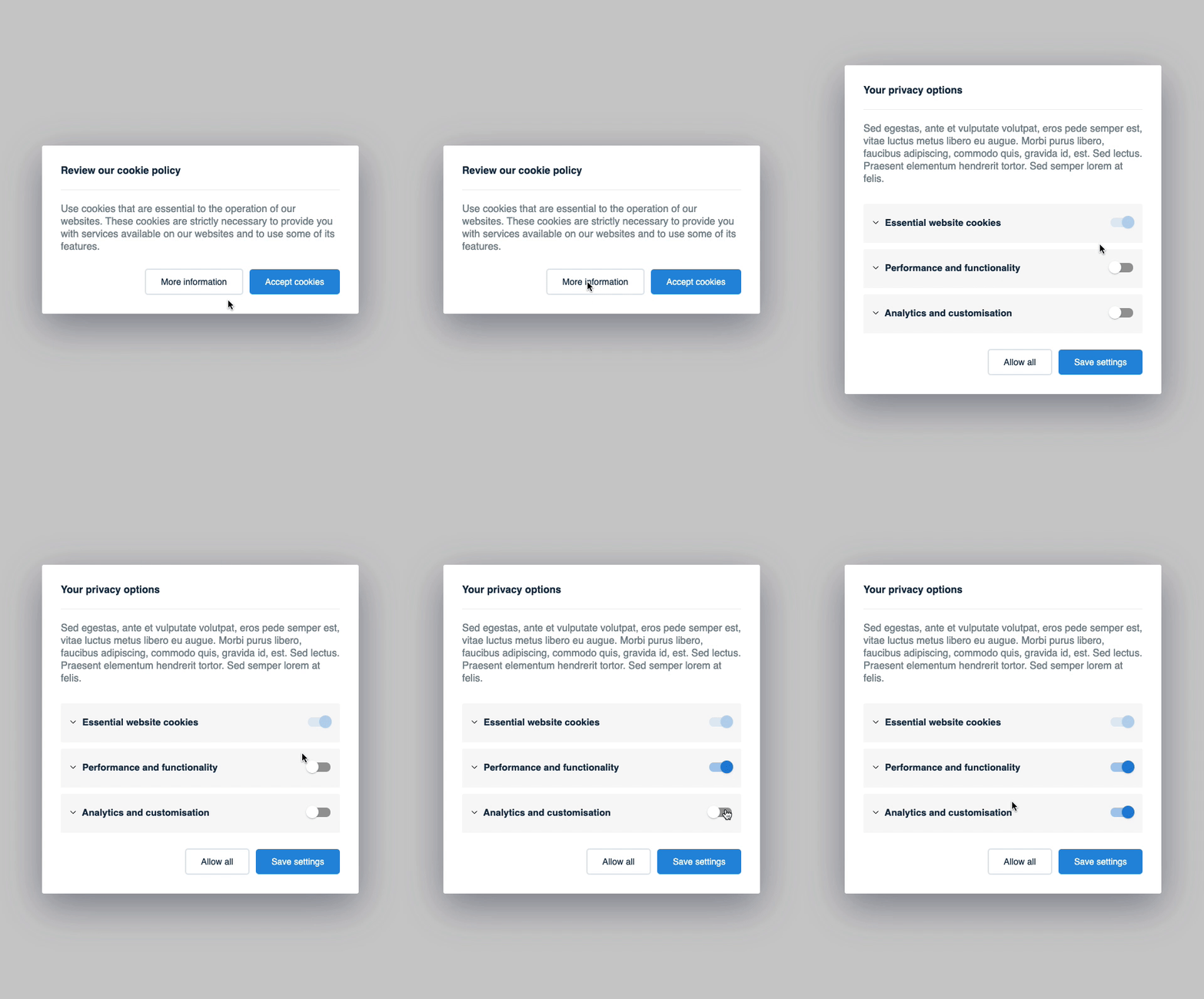
# npm
npm i vue-cookie-toggler

#yarn
yarn add vue-cookie-toggler
Usage
Import the component like this:
import VueCookieToggler from 'vue-cookie-toggler';
Then you can use it in your app like this (see a complete example below):
<vue-cookie-toggler :cookies-groups="cookiesGroups" title="Cookie policy title">
    Cookie policy message
</vue-cookie-toggler>
cookiesGroups example:
[
  {
    category: 'essential',
    name: 'Essential website cookies',
    description:'Lorem ipsum dolor sit amet <a href="#">cookie policy</a>.',
    active: true,
    required: true,
  },
  {
    category: 'analytics',
    name: 'Analytics and customization',
    description:'Lorem ipsum dolor sit amet.',
    active: false,
  },
  {
    category: 'social_networking',
    name: 'Social networking',
    description:'Lorem ipsum dolor sit amet.',
    active: false,
  },
]
Then in your HTML the iframes and scripts tags should be written like this:
script tag examples:
Example 1:
<script type="text/plain" data-cookie data-category="analytics" src="/path/to/file"></script>

Example 2:
<script type="text/plain" data-cookie data-category="essential">
    // .. your awesome code here
</script>
iframe tag example:
<iframe
  data-cookie
  data-category="analytics"
  data-placeholder="true"
  alt="Please accept the cookie policy to see the content"
  data-src="/path/to/file"
></iframe>
Later, if you want to modify the cookie settings, you can add a link to trigger the cookie settings modal like this:
<a href="#" data-cookie-toggler"settings">Update cookie settings</a>
cookiesGroups options:
| Name | Type | Default value | Description | |
|---|---|---|---|---|
| category | string | This will be used in data-category |
required |
|
| name | string | The cookie title used in Cookie Settings | required |
|
| description | string | The cookie description used in Cookie Settings | required |
|
| active | boolean | Whether to set the cookie ON or OFF by default | required |
|
| required | boolean | false | Disable the option to toggle cookie ON/OFF from the Cookie Settings | optional |
Example with all the options:
<vue-cookie-toggler
    :cookies-groups="cookiesGroups"
    title="Cookie policy title"
    settings-title="Cookie settings title"
    settings-label="Settings button label"
    accept-label="Accept button label"
    save-label="Save button label"
    cancel-label="Cancel button label"
>
    <!-- This content will show up the main view (1st view) -->
    Cookie policy message

    <!-- (optional) use '#settingsContent' slot if you what to add content in Cookie Settings view (2nd view) -->
    <template #settingsContent> Cookie settings message </template>

    <!-- (optional) use '#mainButtons' slot if you what to change the buttons in the main view (1st view) -->
    <template #mainButtons="{ accept, settings, save, cancel }">
      <button class="vct__btn vct__btn--default" @click="settings">
        Customize settings
      </button>
      <button class="vct__btn vct__btn--primary" @click="accept">
        Accept all cookies
      </button>
    </template>

    <!-- (optional) use '#settingsButtons' slot if you what to change the buttons in Cookie Settings view (2nd view) -->
    <template #settingsButtons="{ accept, save, save, cancel }">
      <button class="vct__btn vct__btn--default" @click="accept">
        Accept all cookies
      </button>
      <button class="vct__btn vct__btn--primary" @click="save">
        Save settings
      </button>
    </template>
</vue-cookie-toggler>
How it works
Becase we have defined the script tags with type="text/plain" and the iframes with data-src, the browser will not load them.
At first load the parsers will scan the DOM for data-cookie tagged elements and categorize them.
After the visitor accepts the cookie policy, the parsers will enable all script tags and iframes categorized in the previous step.
TODO:
- make the component more flexible (props & slots)
- improve variables names
- move CSS to an
assetsfolder - create a parser for links
- remove
lodashdependency -
vue-js-modalissue on mobile for when the modal is to heigh - add some examples
- write proper documentation
Related Packages
Show a banner with text, a decline button, and an accept button on your page.
A Vue 3 compatible component to handle cookie consent styled with Tailwind CSS 3...
Version History
| Version | Released | Vue | License |
|---|---|---|---|
| 0.2.2 | ^2.6.12 | MIT | |
| 0.2.1 | ^2.6.12 | MIT | |
| 0.2.0 | ^2.6.12 | MIT | |
| 0.1.2 | ^2.6.12 | MIT | |
| 0.1.1 | ^2.6.12 | MIT | |
| 0.1.0 | ^2.6.12 |