vue-cookie-law-with-type
🍪 👮 EU Cookie Law Plugin for Vue.js
526
| Install | |
|---|---|
npm install vue-cookie-law-with-type |
|
| Latest Version: | 2.1.1 |
| Vue: | 2 |
| License: | MIT |
| Last Updated: | Feb 27, 2019 |
| Links: | GitHub · npm |
Maintainer: shamatienko.yaroslav
🍪 👮 Vue Cookie Law


EU Cookie Law Plugin for Vue.js
📺 Demo
🔧 Install
npm i vue-cookie-law-with-type
👈 Usage
<template>
  <footer>
    <cookie-law theme="dark-lime"></cookie-law>
  </footer>
</template>

<script>
  import CookieLaw from 'vue-cookie-law'
  export default {
    components: { CookieLaw }
  }
</script>
Slots
You can also pass in the message into a named slot. This way you can for example add <router-link> and other dynamic content.
<cookie-law>
  <div slot="message">
    Here is my message for more info <router-link to="legal-notes">Click here</router-link>
  </div>
</cookie-law>
Scoped Slot
For a more complex layout use the scoped slot
<cookie-law>
  <div slot-scope="props">
    <button class="skew" @click="props.accept"><span>I accept</span></button>
    <p>
      This site uses 🍪
    </p>
    <button class="skew" @click="props.close"><span>Ignore me</span></button>
  </div>

</cookie-law>
| methods | description |
|---|---|
| accept | Closes the cookie disclaimer and saves to localStorage |
| close | Only closes the cookie disclaimer. The disclaimer will reappear on the next page load. |
| open | Show disclaimer if user ignored him |
Props
| prop | default | type | description |
|---|---|---|---|
| buttonText | 'Got It!' | String | 🔘 Well, its the button text |
| buttonLink | String|Object | Link to more infos. Simple href or a vue-router Location object | |
| buttonLinkText | 'More info' | String | Label of link button |
| buttonLinkNewTab | false | Boolean | If true, it opens the link in a new tab/window (href) |
| buttonClass | 'Cookie__button' | String | Custom class name for buttons |
| message | 'This website uses cookies to ensure you get the best experience on our website.' | String | Your message in the content area |
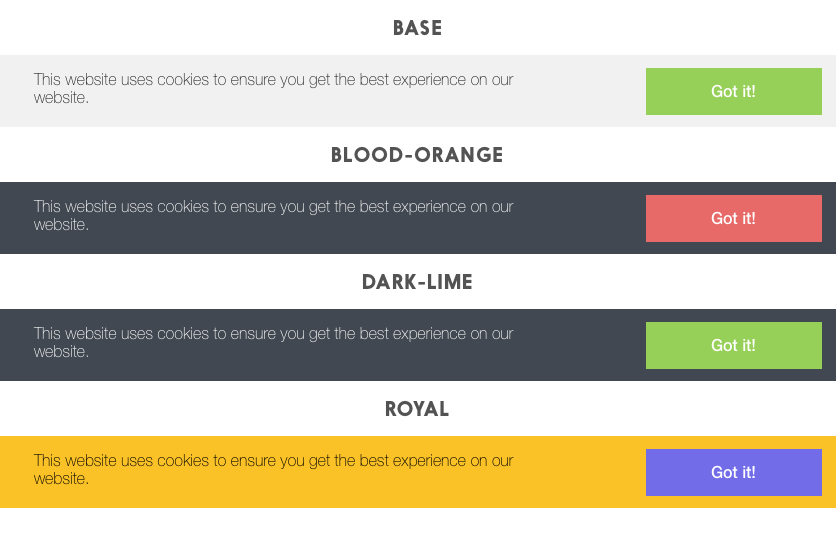
| theme | 'base' | String | Selected theme. You can also create a custom one |
| position | 'bottom' | String | Possible positions are bottom or top |
| transitionName | 'slideFromBottom' | String | Enter and leave transitions. Currently supported slideFromBottom, slideFromTop, fade |
| storageName | cookies:accept | String | Key for cookies or local storage |
| storageType | 'localStorage' | String | Type of storage, where to store 'cookies:accept': true. Can be localStorage (default), cookies or both. If LocalStorage is unsupported, then used Cookies. |
Events
The default button will emit an accept event you can listen on if the user clicks the button.
<cookie-law v-on:accept="ThankYouMethod()"/>
💅 Themes
Custom Themes
You can easy create your own themes. The classes that need to be styled are:
.Cookiefor the container.Cookie__contentfor the content with message.Cookie__buttonfor the button
If you create your own theme, postfix the class.
.Cookie--mytheme {....}
.Cookie--mytheme .Cookie__button {....}
.Cookie--mytheme div.Cookie__button:hover {....}
And then pass your theme name to the component.
Related Packages
Version History
| Version | Released | Vue | License |
|---|---|---|---|
| 2.1.1 | ^2.5.17 | MIT | |
| 2.1.0 | ^2.5.17 | MIT | |
| 2.0.0 | ^2.5.17 | MIT | |
| 1.9.0 | ^2.5.17 | MIT |