vue-column-explorer
Vue Column Explorer
A powerful, flexible, and easy-to-use multi-column explorer component for Vue 3.
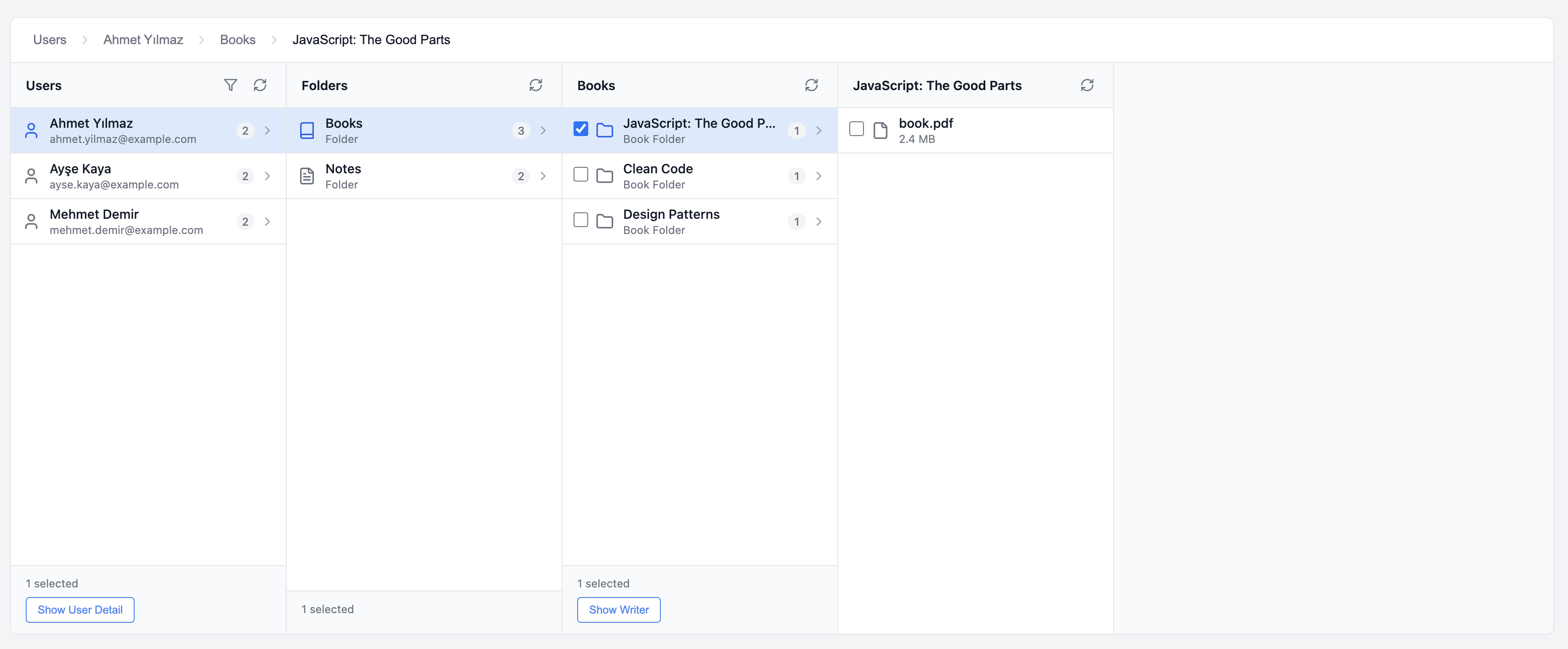
✨ Features
- 🎯 Easy to Use: Create columns in seconds with
createColumnhelper - 🔄 Multi-Column Navigation: macOS Finder-style navigation
- 🎨 Lucide Icons: 1000+ built-in icons support
- ✅ Multiple Selection: Single or multiple item selection
- 🔍 Filtering: Search, number, and select filters
- 📱 Responsive: Mobile-friendly design
- 🎭 Actions: Actions for selected items (Send Mail, Download, etc.)
- 🍞 Breadcrumb: Breadcrumb navigation for going back
- ⚡ TypeScript: Full type support
- 📦 Zero Dependencies: Only Vue 3 and Pinia
🚀 Quick Start
Installation
npm install vue-column-explorer
Basic Usage
1. Create a column:
// columns/users.js
import { createColumn } from 'vue-column-explorer'

export const usersColumn = createColumn({
  id: 'users',
  name: 'Users',

  fetchData: () => {
    return [
      {
        id: '1',
        name: 'John Doe',
        type: 'user',
        icon: 'lucide:user',
        count: 5  // Count displayed on the right
      }
    ]
  },

  onItemClick: (item) => {
    return createNextColumn(item.id)
  }
})
2. Add to your app:
<template>
  <ExplorerContainer :root-column="usersColumn" />
</template>

<script setup>
import { ExplorerContainer } from 'vue-column-explorer'
import { usersColumn } from './columns/users'
import 'vue-column-explorer/dist/style.css'
</script>
That's it! 🎉
📖 Detailed Usage
For a detailed usage guide, see: USAGE.md
🎬 Demo
npm install
npm run dev
Demo Features
✅ User search and age filtering ✅ Multi-level navigation (Users → Folders → Books → Files) ✅ Folder and file counts ✅ Multiple selection and bulk operations ✅ Send Mail and Download actions ✅ Breadcrumb navigation
📁 Example Project Structure
example/
├── columns/
│   ├── users.ts       # Users column
│   ├── folders.ts     # Folders column
│   ├── books.ts       # Books column
│   ├── notes.ts       # Notes column
│   └── bookFiles.ts   # Files column
├── mockData.ts        # Sample data
└── App.vue            # Main component
Each column file is independent and easy to understand!
🎯 createColumn API
createColumn({
  id: string                    // Unique ID
  name: string                  // Column title
  fetchData: (params) => Item[] // Data fetching function
  onItemClick?: (item) => Column | null  // Click handler
  allowMultipleSelection?: boolean       // Multiple selection
  singleActions?: Action[]               // Actions for single selection
  multipleActions?: Action[]             // Actions for multiple selection
  filters?: Filter[]                     // Filters
})
🎨 Item Structure
{
  id: 'unique-id',        // Required
  name: 'Name',           // Required
  type: 'user|folder|file', // Required
  icon: 'lucide:user',    // Optional
  metadata: { ... },      // Optional (subtitle)
  count: 5,               // Optional (count on right)
  hasChildren: true       // Optional (show chevron)
}
💡 Examples
Simple Column
export const usersColumn = createColumn({
  id: 'users',
  name: 'Users',
  fetchData: () => getUsers(),
  onItemClick: (item) => createFoldersColumn(item.id)
})
Column with Filters
export const usersColumn = createColumn({
  id: 'users',
  name: 'Users',

  fetchData: ({ filters }) => {
    let users = getUsers()
    if (filters.search) {
      users = users.filter(u => u.name.includes(filters.search))
    }
    return users
  },

  filters: [
    { key: 'search', label: 'Search', type: 'search' },
    { key: 'age', label: 'Age >', type: 'number' }
  ]
})
Column with Actions
export const filesColumn = createColumn({
  id: 'files',
  name: 'Files',
  fetchData: () => getFiles(),

  allowMultipleSelection: true,

  singleActions: [
    {
      key: 'view',
      label: 'View Details',
      icon: 'lucide:eye',
      handler: (ids) => viewDetails(ids[0])
    }
  ],

  multipleActions: [
    {
      key: 'mail',
      label: 'Send Mail',
      icon: 'lucide:mail',
      handler: (ids) => sendMail(ids)
    },
    {
      key: 'download',
      label: 'Download',
      icon: 'lucide:download',
      handler: (ids) => download(ids)
    }
  ]
})
📚 Documentation
- USAGE.md - Detailed usage guide
- SIMPLE_USAGE.md - Simple usage guide (Turkish)
- CLAUDE.md - 🤖 Technical architecture for Claude (code development)
- PROJECT_SUMMARY.md - Project summary
- CHANGELOG.md - Change log
🛠️ Development
# Install dependencies
npm install

# Dev server
npm run dev

# Type check
npm run type-check

# Build
npm run build
📦 Technologies
- Vue 3 (Composition API)
- TypeScript
- Pinia (State management)
- Vite
- Lucide Icons
📄 License
MIT
Easy integration, powerful features! 🚀
Related Packages
vuefinder
A sleek, developer-friendly file manager for Vue — organize, preview, and manage...
134,690
607
Version History
| Version | Released | Vue | License |
|---|---|---|---|
| 1.3.4 | ^3.4.0 | MIT | |
| 1.3.3 | ^3.4.0 | MIT | |
| 1.3.2 | ^3.4.0 | MIT | |
| 1.3.1 | ^3.4.0 | MIT | |
| 1.3.0 | ^3.4.0 | MIT | |
| 1.2.6 | ^3.4.0 | MIT | |
| 1.2.5 | ^3.4.0 | MIT | |
| 1.2.4 | ^3.4.0 | MIT | |
| 1.2.3 | ^3.4.0 | MIT | |
| 1.2.2 | ^3.4.0 | MIT | |
| 1.2.1 | ^3.4.0 | MIT | |
| 1.2.0 | ^3.4.0 | MIT | |
| 1.1.0 | ^3.4.0 | MIT | |
| 1.0.2 | ^3.4.0 | MIT | |
| 1.0.1 | ^3.4.0 | MIT | |
| 1.0.0 | ^3.4.0 | MIT |