vue-cmdk-palette
| Install | |
|---|---|
npm install vue-cmdk-palette |
|
| Latest Version: | 1.2.2 |
| Vue: | 3 |
| License: | MIT |
| Last Updated: | Oct 24, 2026 |
| Links: | GitHub · npm |

vue-cmdk




Docs · Demo · Changelog · GitHub
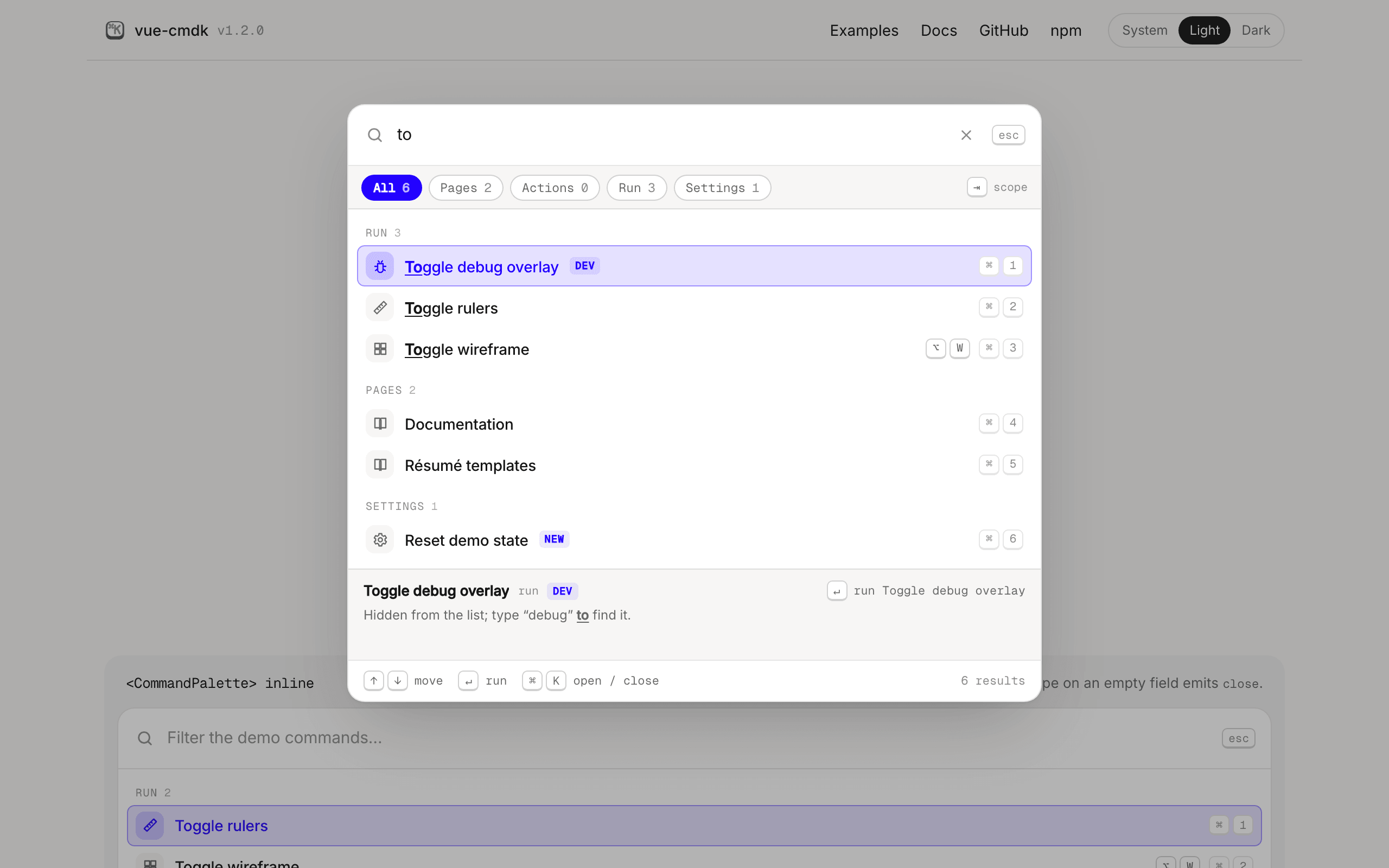
A small command palette for Vue 3 that works well from the keyboard and with screen readers.
The npm package is vue-cmdk-palette. Other projects on npm and GitHub also use the name vue-cmdk; they are not this library.
There are two ways to use it. <CommandPaletteDialog> is a ready-made modal. If you'd rather write your own markup, the headless useCommandPalette() composable gives you the state and the ARIA wiring and leaves the rendering to you.
Arrow keys wrap, Enter runs the selected command, and ⌘/Ctrl+Enter runs its alternate action (opening a link in a new tab, for example). ⌘/Ctrl+1-9 picks a row directly, Tab switches scopes, Escape backs out one layer at a time, and Backspace on an empty field leaves a nested list.
The markup follows the WAI-ARIA combobox and listbox pattern. Focus stays inside the dialog while it's open and goes back where it was when it closes, and a live region announces the result count.
There are no runtime dependencies (Vue is a peer dependency), and the bundle is about 11 kB minified and gzipped. Nothing is styled unless you ask for it: every part has a data-cmdk-* hook, and there's an optional theme built on CSS variables with light and dark modes.
Install
bun add vue-cmdk-palette
# or: npm install vue-cmdk-palette, pnpm add vue-cmdk-palette, yarn add vue-cmdk-palette
vue-cmdk requires Vue ^3.5.
Quick start
<script setup lang="ts">
import { ref } from 'vue'
import { CommandPaletteDialog, type Command } from 'vue-cmdk-palette'
import 'vue-cmdk-palette/style.css'

const open = ref(false)

// With vue-router: const navigate = (href: string) => router.push(href)
const navigate = (href: string) => {
  location.hash = href
}

const commands: Command[] = [
  { kind: 'link', id: 'home', label: 'Home', href: '/', group: 'Pages', alternateLabel: 'Open in new tab' },
  {
    kind: 'action',
    id: 'copy-url',
    label: 'Copy current URL',
    group: 'Actions',
    keywords: ['clipboard', 'share'],
    perform: () => navigator.clipboard.writeText(location.href),
  },
]
</script>

<template>
  <button @click="open = true">Search…</button>
  <CommandPaletteDialog v-model:open="open" :commands="commands" :navigate="navigate" />
</template>
Press ⌘K (or Ctrl+K on Windows and Linux) anywhere on the page to toggle the palette.
Commands
Every command has an id (unique within its list), a label, and a kind:
| kind | required | on activation |
|---|---|---|
action |
perform(ctx) |
Closes the palette, then calls perform({ command, mode, close }). The function can be async. |
link |
href |
Calls navigate(href), or assigns location.href when no navigate is given. The alternate mode opens a new tab. |
page |
children |
Opens a nested list. children is an array or a function that returns one, sync or async. |
Optional fields:
| field | meaning |
|---|---|
group |
The heading the row is filed under. |
scope |
The id of a scope chip (see Scopes). |
hint |
A one-line description. It is searched and shown in the detail panel. |
keywords |
Words someone might type that aren't in the label. |
icon |
A component or a string, such as an emoji. |
shortcut |
Key caps printed on the row: 'mod+shift+c' or ['⌥', 'W']. |
badge |
A short tag next to the label. |
disabled |
true, or a reason string that is shown on the row. Disabled rows can't be selected. |
hidden |
The row isn't listed for an empty query, but search still finds it. |
keepOpen |
The palette stays open after activation. |
trackRecent |
Set to false to keep the command out of recents. |
alternateLabel |
The footer hint for ⌘/Ctrl+Enter, such as Open in new tab. |
verb |
The word for what Enter does. The default is run for actions and open otherwise. |
placeholder |
page commands only: the field placeholder while the page is open. |
meta |
Free-form data for your own slots. The palette never reads it. |
Errors thrown or rejected by perform or by children are caught and emitted as error.
Search
The query matches as a plain substring anywhere in the label, keywords, or hint, ignoring case and accents. A query with several words matches when every word appears somewhere, in any order, so file new finds New file. There's no fuzzy matching, on purpose: fuzzy search returns something for every query, so a typo gets you a confident list of wrong answers. Ranking, best first:
- the label starts with the query
- the label contains it (earlier positions rank higher)
- the label contains every word, but not as one run
- a keyword contains the query, or the label and keywords contain every word between them
- the hint is needed for the query or one of its words (earlier positions rank higher)
Accented letters match their plain forms, so resume finds Résumé, and typographic quotes and dashes match their keyboard equivalents, so typing what's finds What’s new. Matched text, every query word of it, is wrapped in <mark data-cmdk-highlight>. Groups are sorted by their best match, except for an empty query, where they follow the groupOrder prop.
If you want a different matcher, pass a filter. It returns null for no match, or a score where lower is better:
const filter: FilterFn = (command, needle) => (command.label.startsWith(needle) ? 0 : null)
Scopes
const scopes: Scope[] = [
  { id: 'pages', label: 'Pages' },
  { id: 'run', label: 'Run', prefix: '>' },
]
Each scope becomes a chip above the list, with a count of how many results the current query has in it. Tab and Shift+Tab cycle through the chips. Typing a scope's prefix at the start of the query switches to that scope.
Recents
Recents are on by default and live in localStorage. When the query is empty, commands you've picked before show up first in a "Recent" group, ranked by how often and how recently you used them.
<CommandPaletteDialog :commands="commands" :recents="{ namespace: user.id, display: 5 }" />
<CommandPaletteDialog :commands="commands" :recents="false" />
To store recents somewhere else, pass your own adapter:
const storage: RecentsAdapter = {
  load: () => api.get('/recents'),
  save: (entries) => api.put('/recents', entries),
}
Shift+Delete (Shift+Backspace on a Mac) removes the selected row from the Recent group. To clear history from a settings page, call clearRecents() or forgetRecent(id) on a template ref. Both also work while the dialog is closed.
Slots
| slot | props |
|---|---|
item |
row, command, label, selected, disabled, reason, digit |
group-heading |
group, heading, count |
empty |
query, labels |
loading |
|
detail |
row, verb (rendered only with show-detail) |
footer |
list, selected, verb |
breadcrumb |
trail |
input-prefix |
The row wrapper still owns selection, ARIA attributes, and clicks, so a custom item can't break keyboard use:
<CommandPaletteDialog :commands="people">
  <template #item="{ command, label, selected }">
    <span class="avatar" :data-on="selected">{{ command.meta?.initials }}</span>
    <CommandHighlight :segments="label" />
  </template>
</CommandPaletteDialog>
Headless
<script setup lang="ts">
import { useCommandPalette } from 'vue-cmdk-palette'

const palette = useCommandPalette({ commands, recents: false })
</script>

<template>
  <div @keydown="palette.onContainerKeydown">
    <input v-model="palette.query.value" v-bind="palette.fieldAttrs.value" @keydown="palette.onFieldKeydown" />
    <ul v-bind="palette.listAttrs.value">
      <li
        v-for="row in palette.list.value.rows"
        :key="row.command.id"
        v-bind="palette.rowAttrs(row)"
        @pointermove="palette.hover(row)"
        @click="palette.activate(row)"
      >
        {{ row.command.label }}
      </li>
    </ul>
  </div>
</template>
The attribute getters (fieldAttrs, listAttrs, rowAttrs, groupAttrs, chipAttrs) fill in the ids, roles, and aria-* attributes, so your markup only has to bind them.
Props
<CommandPalette> renders the palette inline. <CommandPaletteDialog> accepts the same props and adds modal behavior.
| prop | default | |
|---|---|---|
commands |
required | |
scopes |
[] |
|
group-order |
declaration order | Heading order for an empty query. |
max-results |
40 |
The total number of rows drawn for a non-empty query. |
filter |
built-in | |
recents |
true |
false, true, or RecentsOptions. |
quick-select |
true |
⌘/Ctrl+1-9. |
show-detail |
false |
The band below the list that describes the selected row. |
labels |
English | Every built-in string. Pass any subset of PaletteLabels. |
navigate |
location.href |
A router hook for link commands. |
chord |
dialog: hotkey |
The chord printed in the footer. |
autofocus |
true |
|
v-model:query |
'' |
|
| dialog only | ||
v-model:open |
false |
|
hotkey |
'mod+k' |
false disables the global chord. |
open-on-slash |
false |
/ opens the palette when focus is not in a field. |
dismissible |
true |
A backdrop click closes the palette. |
to |
'body' |
The Teleport target. |
trap-focus |
true |
Events: select(command, mode), error(error, command), close() (inline only), no-results(query, scope), update:open, update:query. no-results fires once for a query that matched nothing and stayed unchanged for 500 ms, so you can send it straight to analytics.
Keyboard
| key | action |
|---|---|
| ⌘K / Ctrl+K | Open or close the palette (dialog). |
| ↑ ↓, Home End | Move the selection. It wraps and skips disabled rows. |
| ↵ | Activate the selected row. |
| ⌘↵ / Ctrl+↵ | Alternate activation, for example opening a link in a new tab. |
| ⌘1-9 / Ctrl+1-9 | Activate the row at that position. Add ⇧ for alternate activation. |
| ⇥ / ⇧⇥ | Next or previous scope. |
| ⌫ on an empty field | Go back one page. |
| ⇧⌦ / ⇧⌫ on a Mac | Remove the selected row from recents, in the Recent group only. |
| Esc | Clear the query, then go back one page, then close. |
Change the dialog's shortcut with hotkey, for example hotkey="mod+shift+p" or hotkey="alt+space". Modifiers are mod (⌘ on a Mac, Ctrl elsewhere), ctrl, meta, alt and shift, and they must match exactly. Shortcuts with ⌥ work on a Mac too, even though ⌥ changes the character a key types there. For several shortcuts at once, set :hotkey="false" and call useHotkey with parseChord and matchesChord. To open the palette from code, set v-model:open, or call show(), hide() or toggle() on a template ref.
Theming
import 'vue-cmdk-palette/style.css'
The theme uses --cmdk-* custom properties. Override any of them on :root or on an ancestor of the palette:
:root {
  --cmdk-accent: #7c3aed;
  --cmdk-width: 720px;
  --cmdk-radius: 10px;
}
You get the dark theme under prefers-color-scheme: dark (unless an ancestor has [data-theme='light']) and under any [data-theme='dark'] ancestor. Animations switch off under prefers-reduced-motion.
Skip the stylesheet and nothing is styled. You can write your own CSS against the data-cmdk-* attributes and the state attributes data-selected, data-disabled, and data-active.
Browser support
| browser | components and composable | default theme |
|---|---|---|
| Chrome, Edge | 93+ | 111+ |
| Firefox | 92+ | 113+ |
| Safari, iOS Safari | 15.4+ | 16.2+ |
The theme's higher floor comes from color-mix(), which tints the selected row and its icon. Older browsers still get a working, readable theme, with a plain highlight in place of the tint. Every change is tested in current Chromium, Firefox and WebKit.
License
MIT
Related Packages
Fast, composable, unstyled command menu for Vue 3. A faithful port of cmdk by Pa...
Idiomatic Vue headless WAI-ARIA cmdk-style command palette (portal overlay, sear...
Lightweight command palette for Vue 3: a framework-free ranking core with fuzzy...
Headless Command+K palette for Vue 3 with fuzzy search, grouped and nested comma...
Version History
| Version | Released | Vue | License |
|---|---|---|---|
| 1.2.2 | ^3.5.0 | MIT | |
| 1.2.1 | ^3.5.0 | MIT | |
| 1.2.0 | ^3.5.0 | MIT | |
| 1.1.0 | ^3.5.0 | MIT | |
| 1.0.1 | ^3.5.0 | MIT | |
| 1.0.0 | ^3.5.0 | MIT |
Pre-releases (1)
| Version | Released | License |
|---|---|---|
| 0.0.0-stage |