vue-cloneya
A vue component to clone DOM elements
1,654
16
| Install | |
|---|---|
npm install vue-cloneya |
|
| Latest Version: | 1.0.14 |
| Vue: | 2 |
| License: | MIT |
| Last Updated: | Dec 3, 2022 |
| Links: | GitHub · npm |
Maintainer: ridaamirini
vue-cloneya



A vue component to clone DOM elements
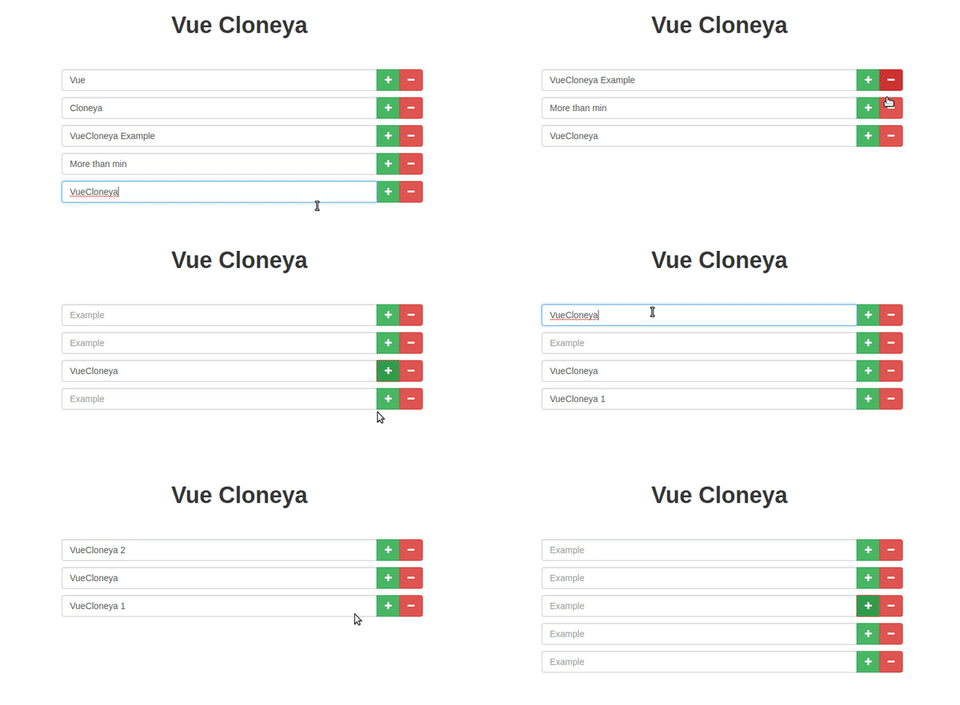
Install
yarn add vue-cloneya
# or
npm i vue-cloneya
Import
import Vue      from 'vue'
import VueCloneya from 'vue-cloneya'

Vue.use(VueCloneya)
Example
<vue-cloneya :maximum="5" :value="exampleData">
  <div class="input-group">
      <!-- Add the "v-cloneya-input" directive to elements you wish to set v-bind:value -->
      <!-- Only input, select, radio, checkbox etc. -->
      <input type="text" name="example[]" class="form-control" placeholder="Example" v-cloneya-input>
      <span class="input-group-btn">
        <!-- Add the "v-cloneya-add" directive to elements you wish to add the click listener
        that will clone the root element -->
        <button type="button" class="btn btn-success" tabindex="-1" v-cloneya-add>
            <i class="fa fa-plus"></i>
        </button>
        <!-- Add the "v-cloneya-remove" directive to elements you wish to add the click listener
        that will remove the element -->
        <button type="button" class="btn btn-danger" tabindex="-1"  v-cloneya-remove>
          <i class="fa fa-minus"></i>
        </button>
      </span>
  </div>
</vue-cloneya>
Output:
[
  "Some value",
  // ...
]
With multiple elements:
<vue-cloneya :maximum="5" :value="exampleData">
  <div class="input-group">
      <!-- Add the "v-cloneya-input" directive to elements you wish to set v-bind:value -->
      <!-- Only input, select, radio, checkbox etc. -->
      <input type="text" class="form-control" placeholder="Firstname" v-cloneya-input="'Firstname'">
      <input type="text" class="form-control" placeholder="Lastname" v-cloneya-input="'Lastname'">
      <span class="input-group-btn">
        <!-- Add the "v-cloneya-add" directive to elements you wish to add the click listener
        that will clone the root element -->
        <button type="button" class="btn btn-success" tabindex="-1" v-cloneya-add>
            <i class="fa fa-plus"></i>
        </button>
        <!-- Add the "v-cloneya-remove" directive to elements you wish to add the click listener
        that will remove the element -->
        <button type="button" class="btn btn-danger" tabindex="-1"  v-cloneya-remove>
          <i class="fa fa-minus"></i>
        </button>
      </span>
  </div>
</vue-cloneya>
Output:
[
  {
    Firstname: "VALUE",
    Lastname: "VALUE"
   }
   // ...
]
API
Props
minimum
- Type:
number - Default:
1
The minimum number of clones allowed.
maximum
- Type:
number - Default:
1
The maximum number of clones allowed.
value
- Type:
array - Default:
null
The values for the v-cloneya-input. For Two-way Data Binding use v-model
multiple
- Type:
boolean - Default:
false
Enables multiple v-model on multiple v-cloneya-input elements. Sinice 1.0.6
Events
When minimum limit is reached:
minimum:cloneya
When maximum limit is reached:
maximum:cloneya
Directives
cloneyaInput
v-cloneya-input
- Type:
stringoptional
If :multiple="true" is enabled, you must supply the key where you wanted to retrieve the data on v-model
cloneyaAdd
v-cloneya-add
cloneyaRemove
v-cloneya-remove
Development
# for dev
yarn dev
#or
npm run dev

# build with parcel-bundler
yarn build
#or
npm run build
License
MIT © ridaamirini
Related Packages
@formkit/observer
Utility to wrap a FormKitNode in a dependency tracking observer proxy
5,049,667
4,779
Version History
| Version | Released | Vue | License |
|---|---|---|---|
| 1.0.14 | ^2.5.16 | MIT | |
| 1.0.13 | ^2.5.16 | MIT | |
| 1.0.12 | ^2.5.16 | MIT | |
| 1.0.11 | ^2.5.16 | MIT | |
| 1.0.10 | ^2.5.16 | MIT | |
| 1.0.9 | ^2.5.16 | MIT | |
| 1.0.8 | ^2.5.16 | MIT | |
| 1.0.7 | ^2.5.16 | MIT | |
| 1.0.6 | ^2.5.16 | MIT | |
| 1.0.5 | ^2.5.16 | MIT | |
| 1.0.4 | ^2.5.16 | MIT | |
| 1.0.3 | ^2.5.16 | MIT | |
| 1.0.2 | ^2.5.16 | MIT | |
| 1.0.1 | ^2.5.16 | MIT |