vue-cert-poster
Vue 生成证书海报组件




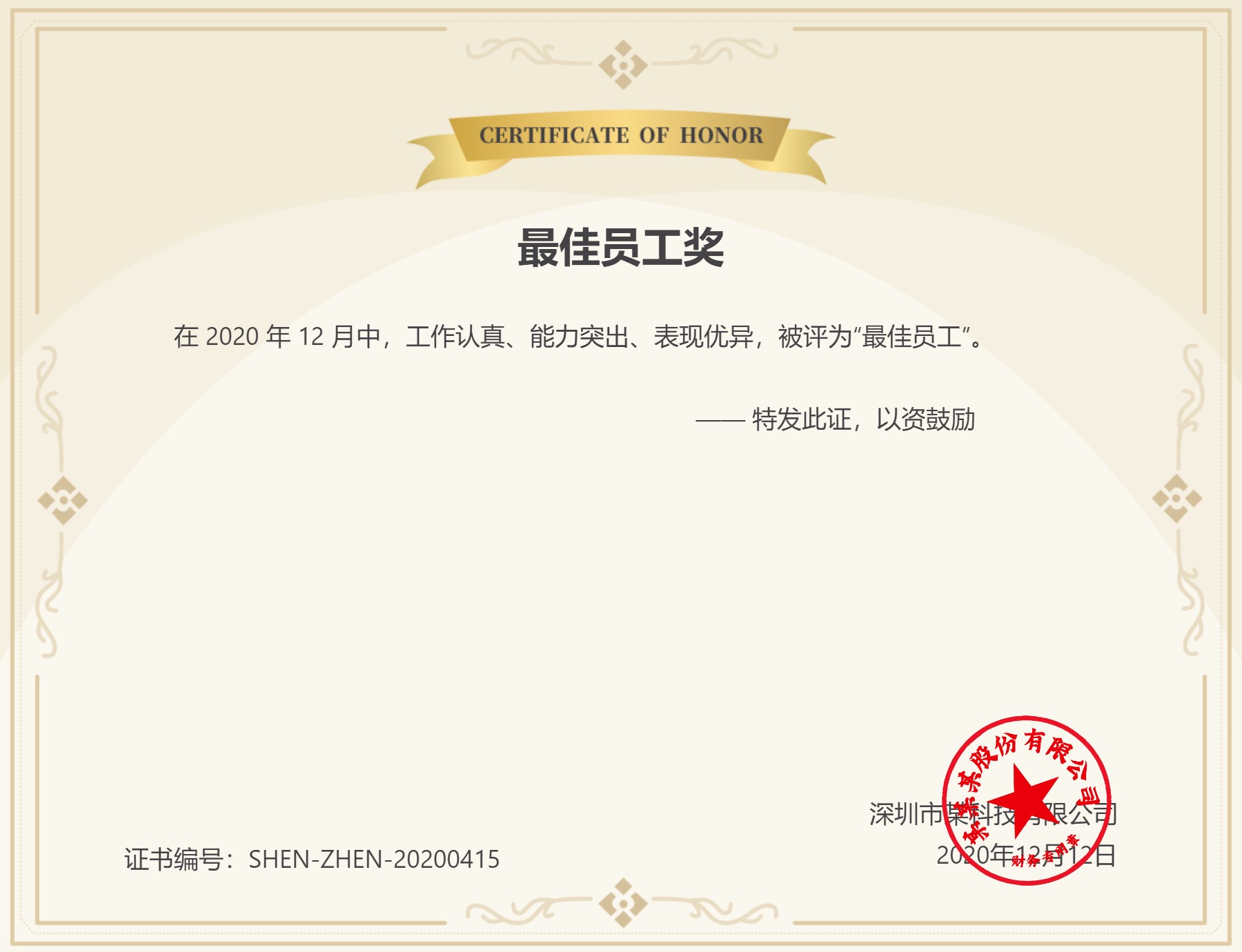
最终效果
特性
PC端和移动端效果一致
使用
- 安装
npm i -S vue-cert-poster
- 引入组件
import CertPoster from 'vue-cert-poster'

Vue.use(CertPoster)
- 调用示例
<template>
  <div id="app">
    <button @click="onCreate">
      生成证书海报
    </button>

    <img
      :src="https://raw.githubusercontent.com/1014156094/vue-cert-poster/HEAD/posterUrl"
      width="100%"
    >
  </div>
</template>

<script>
export default {
  data() {
    return {
      posterUrl: '',
      certDetail: {
          title: '最佳员工奖', // 证书标题
          background:
            'http://cdn.towinos.com/committee/cert/style/2/edit/20200407103146-2142379266903-cert-default-background.png?imageView2/2/w/1920', // 证书背景
          stamp:
            'http://cdn.towinos.com/committee/cert/style/2/edit/20200407023952-367736050162-c4cd5f047be86d3f1545fcf2defe5b09.png?imageView2/2/w/1920', // 证书盖章
          greet: '亲爱的小七哥同志', // 称呼
          content:
            '在 2020 年 12 月中,工作认真、能力突出、表现优异,被评为“最佳员工”,特发此证,以资鼓励。', // 证书内容
          signature: '深圳市某科技有限公司↵2020年12月12日', // 证书署名
          number: 'SHEN-ZHEN-20200415' // 证书编号
      }
    }
  },

  methods: {
    onCreate() {
      this.$certPoster({
        certTitle: this.certDetail.title,
        certBackground: this.certDetail.background,
        certStamp: this.certDetail.stamp,
        certContent: this.certDetail.content,
        certSignature: this.certDetail.signature,
        certNumber: this.certDetail.number,
        width: '600px',
        height: '460px'
      }).then(posterUrl => {
        // 生成成功
        this.posterUrl = posterUrl // 海报 base64 地址
      }).catch(()=>{
        // 生成失败
      })
    }
  }
}
</script>
或者
<template>
  <div id="app">
    <button @click="onCreate">
      生成证书海报
    </button>

    <img
      :src="https://raw.githubusercontent.com/1014156094/vue-cert-poster/HEAD/posterUrl"
    >

    <cert-poster
      ref="certPoster"
      width="600px"
      height="460px"
      :cert-title="certDetail.title"
      :cert-background="certDetail.background"
      :cert-stamp="certDetail.stamp"
      :cert-content="certDetail.content"
      :cert-signature="certDetail.signature"
      :cert-number="certDetail.number"
      @success="onSuccess"
    />
  </div>
</template>

<script>
export default {
  name: 'App',

  data() {
    return {
      posterUrl: '',
      certDetail: {
          title: '最佳员工奖', // 证书标题
          background:
            'http://cdn.towinos.com/committee/cert/style/2/edit/20200407103146-2142379266903-cert-default-background.png?imageView2/2/w/1920', // 证书背景
          stamp:
            'http://cdn.towinos.com/committee/cert/style/2/edit/20200407023952-367736050162-c4cd5f047be86d3f1545fcf2defe5b09.png?imageView2/2/w/1920', // 证书盖章
          greet: '亲爱的小七哥同志', // 称呼
          content:
            '在 2020 年 12 月中,工作认真、能力突出、表现优异,被评为“最佳员工”。↵↵                                                                                    —— 特发此证,以资鼓励', // 证书内容
          signature: '深圳市某科技有限公司↵2020年12月12日', // 证书署名
          number: 'SHEN-ZHEN-20200415' // 证书编号
      }
    }
  },

  methods: {
    onSuccess(posterUrl){
      this.posterUrl = posterUrl // 海报 base64 地址
    },

    onCreate() {
      this.$refs.certPoster.create()
    }
  }
}
</script>
Prop
| 参数 | 说明 | 类型 | 默认值 |
|---|---|---|---|
| width | 证书宽,为保证清晰度,生成成功后会放大三倍 | String |
600px |
| height | 证书高,为保证清晰度,生成成功后会放大三倍 | String |
460px |
| certTitle | 证书标题 | String |
'' |
| certBackground | 证书背景 | String |
'' |
| certStamp | 证书盖章 | String |
'' |
| certGreet | 证书问候语 | String |
'' |
| certContent | 证书内容,回车符(\n 或 ↵)自动转为 <br>,空格符自动转为 |
HTML |
'' |
| certSignature | 证书署名,回车符(\n 或 ↵)自动转为 <br>,空格符自动转为 |
HTML |
'' |
| certNumber | 证书编号 | String |
'' |
| showCertGreet | 是否显示证书问候语 | Boolean |
false |
Event
| 事件 | 说明 | 回调 |
|---|---|---|
| success | 生成成功后触发 | imageUrl |
| fail | 生成失败后触发 | - |
Slot
| 插槽名 | 说明 |
|---|---|
| main-content | 证书主要内容,除了证书背景外的所有内容 |
许可证
MIT
最后
使用过程中发现任何问题都可以提 Issue,也非常欢迎提 PR
Related Packages
yn-components
Advanced and highly reusable Mobile UI Components built on Vue2 & You can define...
3,128
6
Version History
| Version | Released | Vue | License |
|---|---|---|---|
| 1.2.6 | ^2.6.11 | MIT | |
| 1.2.5 | ^2.6.11 | MIT | |
| 1.2.4 | ^2.6.11 | MIT | |
| 1.2.3 | ^2.6.11 | MIT | |
| 1.2.2 | ^2.6.11 | MIT | |
| 1.2.1 | ^2.6.11 | MIT | |
| 1.1.1 | ^2.6.11 | MIT | |
| 1.1.0 | ^2.6.11 | MIT | |
| 1.0.20 | ^2.6.11 | MIT | |
| 1.0.19 | ^2.6.11 | MIT | |
| 1.0.18 | ^2.6.11 | MIT | |
| 1.0.17 | ^2.6.11 | MIT | |
| 1.0.16 | ^2.6.11 | MIT | |
| 1.0.15 | ^2.6.11 | MIT | |
| 1.0.14 | ^2.6.11 | MIT | |
| 1.0.13 | ^2.6.11 | MIT | |
| 1.0.12 | ^2.6.11 | MIT | |
| 1.0.11 | ^2.6.11 | MIT | |
| 1.0.10 | ^2.6.11 | MIT | |
| 1.0.9 | ^2.6.11 | MIT | |
| 1.0.8 | ^2.6.11 | MIT | |
| 1.0.7 | ^2.6.11 | MIT | |
| 1.0.6 | ^2.6.11 | MIT | |
| 1.0.5 | ^2.6.11 | MIT | |
| 1.0.4 | ^2.6.11 | MIT | |
| 1.0.3 | ^2.6.11 | MIT | |
| 1.0.2 | ^2.6.11 | MIT | |
| 1.0.1 | ^2.6.11 | MIT | |
| 1.0.0 | ^2.6.11 | MIT |