vue-audio-visual
| Install | |
|---|---|
npm install vue-audio-visual |
|
| Latest Version: | 3.1.1 |
| Vue: | 3 |
| Older releases: | 2 |
| License: | MIT |
| Last Updated: | Jun 14, 2026 |
| Links: | npm |
vue-audio-visual




Vue HTML5 audio visualization components
UPDATE NOTES
[!WARNING] The current plugin version is compatible only with Vue v3. For Vue 2, use plugin version 2.5.1. See the install section for details.
Overview
An audio spectrum visualizer plugin for VueJS framework.
It is built with HTML5
Web Audio API
and compatible with all browsers that support the HTML5 audio API. It provides
several Vue components that let you draw lightweight, attractive visualizations
for audio HTML elements.
[!NOTE] Visit DEMO page for working examples.
Usage examples:
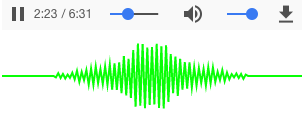
Component AvLine. Vue template name <av-line>
<av-line :line-width="2" line-color="lime" src="/static/music.mp3"></av-line>
This will create the following element:
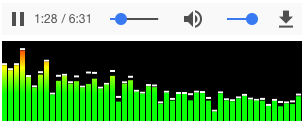
Component AvBars. Vue template name <av-bars>
<av-bars
  caps-color="#FFF"
  :bar-color="['#f00', '#ff0', '#0f0']"
  canv-fill-color="#000"
  :caps-height="2"
  src="/static/bach.mp3"
></av-bars>
This will create the following element:
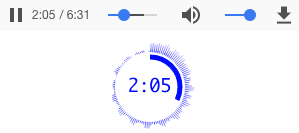
Component AvCircle. Vue template name <av-circle>
<av-circle
  :outline-width="0"
  :progress-width="5"
  :outline-meter-space="5"
  :playtime="true"
  playtime-font="18px Monaco"
  src="/static/bach.mp3"
></av-circle>
This will create the following element:
Component AvWaveform. Vue template name <av-waveform>
<av-waveform src="/static/bar.mp3"></av-waveform>
This will create the following waveform element:
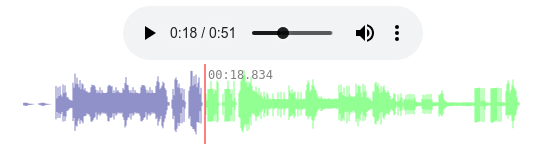
The component will pre-load audio content and generate a clickable waveform.
Component AvMedia. Vue component <AvMedia>
<AvMedia :media="mediaObject" type="vbar"></AvMedia>
This will create the following media element:

There are more media types. See details below.
:gear: Get started
Install
Install using npm
npm install --save vue-audio-visual
For Vue 2, install version 2.5.1
npm i -S vue-audio-visual@2.5.1
Use plugin
Install the plugin in main.js:
import { createApp } from "vue";
import App from "./App.vue";
import { AVPlugin } from "vue-audio-visual";

const app = createApp(App);
app.use(AVPlugin);

app.mount("#app");
Then anywhere in your app you can use it like this:
<av-bars src="/static/bach.mp3" bar-color="#CCC"> </av-bars>
Use component
A single component can be imported and used:
<script setup lang="ts">
import { AVWaveform } from 'vue-audio-visual'
</script>

<template>
  <AVWaveform src="http://foo.com/music.ogg" />
</template>
Composable functions
The plugin provides composable "use" functions for each component. Each component uses a composable function internally. See, for example, line component.
Composable functions use audio and canvas element refs. They are handy when you need full access to audio or canvas elements. At the same time they are easy to use:
<script setup lang="ts">
import { ref } from 'vue'
import { useAVBars } from 'vue-audio-visual'

const player = ref(null)
const canvas = ref(null)
const mySource = "./symphony.mp3"

// composable function useAVBars
useAVBars(player, canvas, { src: mySource, canvHeight: 40, canvWidth: 200, barColor: 'lime' })
</script>

<template>
  <div>
    <audio ref="player" :src="mySource" controls />
    <canvas ref="canvas" />
  </div>
</template>
:gear: API
There are several components that come with the plugin. Here is the list of available components:
| Name | Component name | Composable function |
|---|---|---|
| av-bars | AVBars | useAVBars |
| av-circle | AvCircle | useAVCircle |
| av-line | AVLine | useAVLine |
| av-media | AVMedia | useAVMedia |
| av-waveform | AVWaveform | useAVWaveform |
There are props that are common to all components and special props for each component. Component prop names follow Vue conventions when used with composable functions: when a prop's name is "foo-bar", the corresponding composable function parameter is expected to be "fooBar".
Common props
AVLine props
Composable function:
function useAVLine<T extends object>(
  player: Ref<HTMLAudioElement | null>,
  canvas: Ref<HTMLCanvasElement | null>,
  props: T,
);
AVBars props
Composable function
function useAVBars<T extends object>(
  player: Ref<HTMLAudioElement | null>,
  canvas: Ref<HTMLCanvasElement | null>,
  props: T,
);
AVCircle props
Composable function
function useAVCircle<T extends object>(
  player: Ref<HTMLAudioElement | null>,
  canvas: Ref<HTMLCanvasElement | null>,
  props: T,
);
AVWaveform props
The composable function uses useFetch from
@vueuse/core package. The last argument of useAVWaveform is
options for the "createFetch" function from the "useFetch" module.
export function useAVWaveform<T extends object>(
  player: Ref<HTMLAudioElement | null>,
  canvas: Ref<HTMLCanvasElement | null>,
  props: T,
  fetchOpts: CreateFetchOptions = {},
);
AVMedia props
The component expects a MediaStream object. You can get it directly from
navigator.mediaDevices or from the @vueuse/core library function
useUserMedia. A live example can be found
in
App.vue.
<script setup lang="ts">
import { AVMedia } from 'vue-audio-visual'
import { useUserMedia } from '@vueuse/core'
...
const { stream } = useUserMedia()
...
</script>

<template>
...
<AVMedia :media="stream" type="circle" />
...
</template>
Composable function:
function useAVMedia<T extends object>(
  canvas: Ref<HTMLCanvasElement | null>,
  props: T,
);
License
MIT Copyright (c) 2018-present, Stas Kobzar
Version History
| Version | Released | License |
|---|---|---|
| 3.1.1 | MIT | |
| 3.1.0 | MIT | |
| 3.0.11 | MIT | |
| 3.0.10 | MIT | |
| 3.0.9 | MIT | |
| 3.0.8 | MIT | |
| 3.0.7 | MIT | |
| 3.0.6 | ||
| 3.0.5 | ||
| 3.0.4 | ||
| 3.0.3 | ||
| 3.0.2 | ||
| 3.0.1 | ||
| 3.0.0 | ||
| 2.5.1 | MIT | |
| 2.5.0 | MIT | |
| 2.4.1 | MIT | |
| 2.4.0 | MIT | |
| 2.3.1 | MIT | |
| 2.3.0 | MIT | |
| 2.2.2 | MIT | |
| 2.2.1 | MIT | |
| 2.2.0 | MIT | |
| 2.1.1 | MIT | |
| 2.1.0 | MIT | |
| 2.0.3 | MIT | |
| 2.0.2 | MIT | |
| 2.0.1 | MIT | |
| 2.0.0 | MIT | |
| 1.4.1 | MIT |
Showing the latest 30 of 35. See every release on npm