vue-accessibility-widget
| Install | |
|---|---|
npm install vue-accessibility-widget |
|
| Latest Version: | 0.0.33 |
| Vue: | 2 |
| License: | MIT |
| Last Updated: | Dec 9, 2022 |
| Links: | GitHub · npm |
vue-accessibility-widget

Vue plugin for a11y which enables media accessibility (m16y) customized controls widget for visually impaired user support in your app.
Automatically.
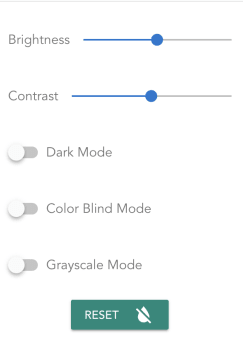
It will inject a small widget with basic settings to for helping visually impaired user, including:
- Low visions (contrast sensitivy, brightness sensitivity, etc)
- Color blindness (texture support)
Features
Brightness control
Allow user to change the brightness of the whole app.
Default: 100%
Contrast control
Allow user to change the contrsat of the whole app.
Default: 100%
Dark mode (Night mode)
Allow user to switch the app to dark theme, which is easier to read.
Default: false
Color blind mode
-
Allow user to enable color blind mode for images throughout the app. It will add texture to differentiate similar colors (red-green).
-
Currently only works when image is rendered using
image-wrappercomponent.
Default: false
Grayscale mode
Allow user to switch the app to grayscale color theme.
Installing 🚀
Direct install from npm vue-accessibility-widget
$ npm install --save vue-accessibility-widget
Or yarn
$ yarn add vue-accessibility-widget
Getting started 👩💻
- Add the plugin to Vue using
import M16yPlugin from 'vue-accessibility-widget';

Vue.use(M16yPlugin);
- Use Cloudinary plugins to get all other cool accessibility effect:
import M16yPlugin from 'vue-accessibility-widget';

Vue.use(M16yPlugin, {
  plugins: {
    Cloudinary: {
      cloudName: <yourCloudName>  //if you want to use Cloudinary
    }
  }
});
- In
App.vuesimple add attributev-m16y-ctrls
<div id="app" v-m16y-ctrls>
<!--code here--/>
</div>
Or you can customize the attribute name by
Vue.use(M16yPlugin, {
  directiveName: 'v-access-ctrls',
});
And in App.vue
<div id="app" v-access-ctrls>
<!--code here--/>
</div>
And it will just work! 👍
Docs ✍️
Coming soon
Issues 😱
Any bug 🐛 or issue ❓, just drop me a line at Issues
License
MIT
Related Packages
✨ Automagically manage the visibility of :focus states in your app, showing the...
Vue 3 Wrapper für das BAUER GROUP Accessibility Widget.
Nuxt Plugin für das BAUER GROUP Accessibility Widget.
Version History
| Version | Released | Vue | License |
|---|---|---|---|
| 0.0.33 | ^2.5.2 | MIT | |
| 0.0.32 | ^2.5.2 | MIT | |
| 0.0.31 | ^2.5.2 | MIT | |
| 0.0.30 | ^2.5.2 | MIT | |
| 0.0.29 | ^2.5.2 | MIT | |
| 0.0.28 | ^2.5.2 | MIT | |
| 0.0.27 | ^2.5.2 | MIT | |
| 0.0.26 | ^2.5.2 | MIT | |
| 0.0.25 | ^2.5.2 | MIT | |
| 0.0.24 | ^2.5.2 | MIT | |
| 0.0.23 | ^2.5.2 | MIT | |
| 0.0.22 | ^2.5.2 | MIT | |
| 0.0.21 | ^2.5.2 | MIT | |
| 0.0.20 | ^2.5.2 | MIT | |
| 0.0.19 | ^2.5.2 | MIT | |
| 0.0.18 | ^2.5.2 | MIT | |
| 0.0.17 | ^2.5.2 | MIT | |
| 0.0.16 | ^2.5.2 | MIT | |
| 0.0.15 | ^2.5.2 | MIT | |
| 0.0.14 | ^2.5.2 | MIT | |
| 0.0.13 | ^2.5.2 | MIT | |
| 0.0.12 | ^2.5.2 | MIT | |
| 0.0.11 | ^2.5.2 | MIT | |
| 0.0.10 | ^2.5.2 | MIT | |
| 0.0.8 | ^2.5.2 | MIT | |
| 0.0.7 | ^2.5.2 | MIT | |
| 0.0.6 | ^2.5.2 | MIT | |
| 0.0.5 | ^2.5.2 | MIT | |
| 0.0.4 | ^2.5.2 | MIT | |
| 0.0.3 | ^2.5.2 | MIT |
Showing the latest 30 of 31. See every release on npm