toolpop
💬 Toolpop
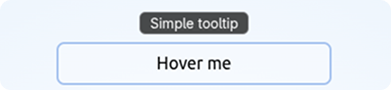
💬 Toolpop is a lightweight Vue 3 v-pop directive for reactive tooltips and simple HTML/image popovers.
Demo | Live Demo on StackBlitz
✨ Features
- 🎁 Tiny Vue 3 tooltip directive with only one runtime dependency: @floating-ui/dom
- 📐 Smart positioning, flipping, and shifting powered by Floating UI
- ⚡ Reactive tooltip values: strings, refs, computed values, and functions
- 🧩 Optional raw HTML/image mode via
.html - 🖱️ Desktop hover/focus behavior by default
- 📱 Touch-device behavior is explicit via
.touchor.click - 🎨 Fully customizable tooltip appearance
🚀 Installation
With pnpm:
pnpm add toolpop
With npm:
npm install toolpop
🔥 Quick Usage
<template>
   <p v-pop="'Simple tooltip'">
      Hover me
   </p>

   <button v-pop="`Count is ${count}`" @click="count++">
      Counter: {{ count }}
   </button>

   <button v-pop:bottom-start="'Aligned to start'">
      Bottom start
   </button>

   <button v-pop.click="'Opens on click or tap'">
      Click tooltip
   </button>

   <button v-pop.touch="'Desktop hover/focus, mobile tap'">
      Touch fallback
   </button>

   <p v-pop:right.html="image_tooltip">
      HTML image tooltip
   </p>
</template>

<script setup lang="ts">
import { ref } from 'vue'

const count = ref(0)

const image_tooltip = '<img src="https://raw.githubusercontent.com/jsonkody/toolpop/HEAD/images/example.avif" alt="Example image">'
</script>
🧩 Register as Plugin
// main.ts
import { createApp } from 'vue'
import Toolpop from 'toolpop'
import App from './App.vue'

const app = createApp(App)

app.use(Toolpop)

app.mount('#app')
With custom options:
app.use(Toolpop, {
   color: 'white',
   backgroundColor: 'rgba(0, 0, 0, 0.85)',
   fontSize: 16,
   borderRadius: 8,
})
✒️ Register as Directive
// main.ts
import { createApp } from 'vue'
import { createPop } from 'toolpop'
import App from './App.vue'

const app = createApp(App)

app.directive('pop', createPop())

app.mount('#app')
With custom options:
import { createPop, type PopOptions } from 'toolpop'

const options: Partial<PopOptions> = {
   fontSize: 16,
   paddingX: 10,
   paddingY: 4,
   blur: 0,
   backgroundColor: 'rgba(0, 0, 0, 0.85)',
}

app.directive('pop', createPop(options))
You can rename the directive if you want:
app.directive('tooltip', createPop())
Then use it as:
<p v-tooltip="'Tooltip text'">
   Hover me
</p>
📍 Placements
You can control placement using directive arguments.
<p v-pop="'Top by default'">
   Top
</p>

<p v-pop:bottom="'Bottom tooltip'">
   Bottom
</p>

<p v-pop:right="'Right tooltip'">
   Right
</p>

<p v-pop:left="'Left tooltip'">
   Left
</p>
Supported base placements:
| Placement | Example |
|---|---|
top |
v-pop:top="'Text'" |
bottom |
v-pop:bottom="'Text'" |
left |
v-pop:left="'Text'" |
right |
v-pop:right="'Text'" |
You can also use start and end alignment:
| Placement | Example |
|---|---|
top-start |
v-pop:top-start="'Text'" |
top-end |
v-pop:top-end="'Text'" |
bottom-start |
v-pop:bottom-start="'Text'" |
bottom-end |
v-pop:bottom-end="'Text'" |
right-start |
v-pop:right-start="'Text'" |
right-end |
v-pop:right-end="'Text'" |
left-start |
v-pop:left-start="'Text'" |
left-end |
v-pop:left-end="'Text'" |
⚙️ Behavior Modifiers
Default behavior
<p v-pop="'Simple tooltip'">
   Hover me
</p>
Default tooltips open on:
- hover on devices with real hover support
- keyboard focus via
:focus-visible
On touch/no-hover devices, default tooltips do not open on tap. This avoids accidental mobile tooltip behavior.
.touch
Use .touch when you want normal desktop hover/focus behavior, but tap behavior on touch devices.
<button v-pop.touch="'Desktop hover/focus, mobile tap'">
   .touch
</button>
Behavior:
| Device | Behavior |
|---|---|
| Desktop / real hover | hover + keyboard focus |
| Touch / no-hover | tap |
.click
Use .click when you want click/tap behavior everywhere.
<button v-pop.click="'Opens on click or tap'">
   .click
</button>
Behavior:
| Device | Behavior |
|---|---|
| Desktop / real hover | opens on click, closes on mouseleave |
| Touch / no-hover | opens on tap, closes on outside tap or Escape |
.outside
Use .outside with .click when the tooltip should stay open until the user clicks outside or presses Escape.
<button v-pop.click.outside="'Stays open until outside click or Escape'">
   .click.outside
</button>
This is useful for more persistent popover-like behavior.
.html
Use .html when you want to render raw HTML.
<p v-pop:right.html="image_tooltip">
   Image tooltip
</p>
const image_tooltip = '<img src="https://raw.githubusercontent.com/jsonkody/toolpop/HEAD/images/example.avif" alt="Example image">'
.html popovers are created on component mount and kept in the DOM hidden via CSS. This helps image and rich-content popovers appear instantly when shown.
⚠️
.htmlusesinnerHTML. Only pass trusted or sanitized HTML.
🧪 Reactive Values
Toolpop supports plain strings, refs, computed values, and functions.
<button v-pop="`Count is ${count}`" @click="count++">
   Counter: {{ count }}
</button>
const count = ref(0)
The tooltip content updates when the bound value changes.
✏️ Options
interface PopOptions {
   fontSize: number
   paddingX: number
   paddingY: number
   duration: number
   fontFamily: string
   color: string
   backgroundColor: string
   borderColor: string
   borderRadius: number
   scaleStart: number
   blur: number
}
Default options:
const default_options = {
   fontSize: 14,
   paddingX: 8,
   paddingY: 0,
   duration: 0.15,
   fontFamily: 'system-ui, sans-serif',
   color: 'white',
   backgroundColor: 'rgba(0, 0, 0, 0.7)',
   borderColor: 'rgba(255, 255, 255, 0.28)',
   borderRadius: 6,
   scaleStart: 0.75,
   blur: 14,
}
Custom options:
import { createPop, type PopOptions } from 'toolpop'

const options: Partial<PopOptions> = {
   fontSize: 18,
   paddingX: 12,
   paddingY: 4,
   blur: 0,
   backgroundColor: 'rgba(0, 0, 0, 0.9)',
}

app.directive('pop', createPop(options))
📁 Local Use
You can also copy src/pop.ts into your project and register it manually:
import { createPop } from '@/directives/pop'

app.directive('pop', createPop())
🌍 Live Projects
- jsonkody.cz
- num.jsonkody.cz
- snejk.bekinka.cz (need Twitch account)
🪪 License
Related Packages
Version History
| Version | Released | Vue | License |
|---|---|---|---|
| 2.0.0 | ^3.0.0 | MIT | |
| 0.4.9 | ^3.0.0 | MIT | |
| 0.4.8 | ^3.0.0 | MIT | |
| 0.4.7 | ^3.0.0 | MIT | |
| 0.4.6 | ^3.0.0 | MIT | |
| 0.4.5 | ^3.0.0 | MIT | |
| 0.4.4 | ^3.0.0 | MIT | |
| 0.4.3 | ^3.0.0 | MIT | |
| 0.4.2 | ^3.0.0 | MIT | |
| 0.4.1 | ^3.0.0 | MIT | |
| 0.4.0 | ^3.0.0 | MIT | |
| 0.3.6 | ^3.0.0 | MIT | |
| 0.3.5 | ^3.0.0 | MIT | |
| 0.3.4 | ^3.0.0 | MIT | |
| 0.3.3 | ^3.0.0 | MIT | |
| 0.3.2 | ^3.0.0 | MIT | |
| 0.3.1 | ^3.0.0 | MIT | |
| 0.3.0 | ^3.0.0 | MIT | |
| 0.2.9 | ^3.0.0 | MIT | |
| 0.2.8 | ^3.0.0 | MIT | |
| 0.2.7 | ^3.0.0 | MIT | |
| 0.2.6 | ^3.0.0 | MIT | |
| 0.2.5 | ^3.0.0 | MIT | |
| 0.2.4 | ^3.0.0 | MIT | |
| 0.2.3 | ^3.0.0 | MIT | |
| 0.2.2 | ^3.0.0 | MIT | |
| 0.2.1 | ^3.0.0 | MIT | |
| 0.2.0 | ^3.0.0 | MIT | |
| 0.1.4 | ^3.0.0 | MIT | |
| 0.1.3 | ^3.0.0 | MIT |
Showing the latest 30 of 33. See every release on npm